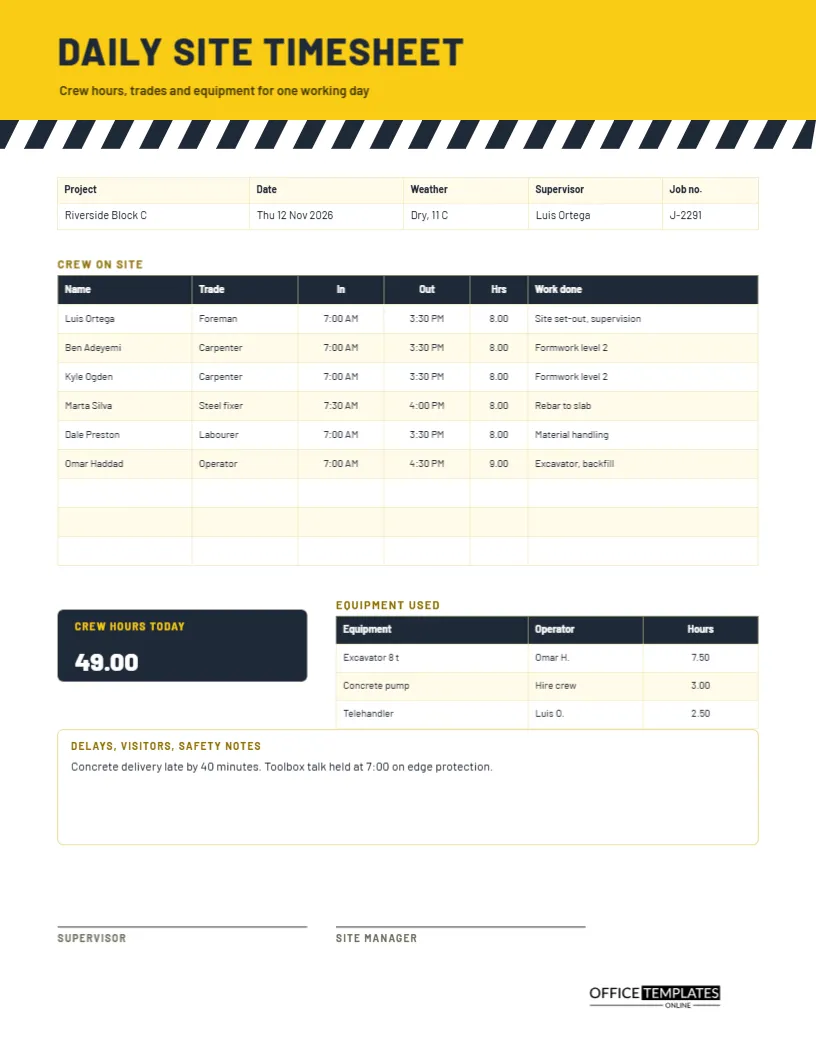
On a building site, the day is the unit of record. The foreman writes down who turned up, what trade they worked, how long and on which part of the job, what machines ran, and what held things up. Those few lines settle pay, feed the job cost report, and decide who is believed when a delay is argued over months later. This daily site timesheet is designed to be filled in quickly with a pen in a site cabin.
A Hazard Stripe Band in Yellow and Charcoal
The top of the page is a band of safety yellow with a row of charcoal diagonal stripes beneath it, the same pattern used on barriers and tape. The title DAILY SITE TIMESHEET is set in bold, spaced capitals in Barlow, a typeface drawn from road signage. The look says site, helmet and boots at a glance, and the high contrast reproduces well even on a poor photocopier.
Project, Date, Weather, Supervisor and Job Number
A five-column strip carries the facts that identify the day. The sample is Riverside Block C on Thursday, 12 November 2026, dry and 11 degrees, supervised by Luis Ortega under job number J-2291. Weather sits next to the date because it explains many delays, and the job number lets the office file the sheet against the right cost code.
The Crew Table
| Column | Meaning | Sample Monday |
|---|---|---|
| Day | Date of the visit | Mon 2 |
| Arrive | Start of the visit | 8:00 AM |
| Leave | End of the visit | 10:30 AM |
| Hours | Length of the visit | 2.50 |
| Care given | What was done | Washing and dressing, breakfast |
A work done column lists the task for each person, and three blank rows remain for extra labour.
Hours After a Thirty-Minute Break
The sample subtracts a half hour for the meal break from every shift, so a day from 7:00 to 3:30 shows 8.00 hours. Check your own site rules, because some contracts pay breaks or set different lengths. If breaks are paid on your site, simply write the full time. The important thing is that every entry follows the same rule.
Crew Hours Today
A charcoal tile reports crew hours today in yellow and white: 49.00. This one figure is what the site manager reads first, and it is the number that flows into the weekly labour report. Add the hours column carefully before writing the table, and recheck if anyone arrives late or leaves early after you have written their row.
Equipment Hours Beside the Crew
A smaller table lists the equipment used, the operator, and the hours. The sample shows an 8 tonne excavator for 7.50 hours, a concrete pump for 3.00 hours, and a telehandler for 2.50 hours. Hired equipment is billed by the hour or the day, so a daily record is the check that stops you paying for a machine that sat idle or never arrived.
Delays, Visitors and Safety Notes
The notes box has a gold heading and room for a few lines. The sample records that a concrete delivery was forty minutes late and that a toolbox talk on edge protection was held at 7:00. Delays, visitors, inspections, accidents, and near misses all belong here. If a dispute arises, a note written on the day carries far more weight than a memory.
Steps for a Foreman Closing the Day
- Fill in the project, date, weather, and job number.
- Write each person on site with trade, in and out times.
- Describe the work done in a few plain words.
- List the equipment and the hours it ran.
- Add delays and safety notes, then total the crew hours.
- Sign and pass the sheet to the site manager.
Using the Sheet for Subcontractors
If a subcontractor crew works on site, add their names and company in the crew table. Their hours may be billed differently, but the daily record shows who was present and for how long. Ask their foreman to initial the page so there is no argument when the invoice arrives.
Daily Sheets and the Weekly Payroll
At the end of the week, the office adds the daily sheets for each person to produce the weekly hours. Neat daily records make that a ten-minute job instead of an afternoon of phone calls. If you track overtime, mark it on the daily sheet in the work done column so that nobody has to guess later.
Keeping Records for Claims and Inspections
Daily site records are some of the most valuable documents in a construction dispute. They show who was working, what was delayed, and why. File the sheets in date order for each project, keep scans in a safe place, and retain them for the period your contract and local law require. Do not rewrite a sheet after the fact.
Editing Names, Trades and Table Rows
Every label is editable. Replace the crew and trades, change the project, and add or remove rows through Edit Table Data. The tables are real Table objects, so column widths, fonts, and fills can be changed. For a bigger crew, reduce the row height slightly or print a second sheet.
Signing Off the Day
The supervisor and the site manager sign at the foot. A supervisor signature confirms the facts, and the manager signature approves the sheet for payroll and cost control. Many sites also add the date and time of signing in small writing, which helps if sheets are collected late.
Printing for a Site Cabin
US Letter portrait. Print on heavier paper if the sheet will be carried on a clipboard, and consider laminating a blank master that you copy from. The yellow band prints well in colour and as a mid-grey in black and white.
Construction Timesheet Questions
Can I use it for a small renovation?
Yes. Delete the unused crew rows and use the notes box for client instructions.
Does it cover health and safety reports?
No. It records hours and brief safety notes. Use your site safety forms for formal reports.
What if the crew changes during the day?
Add a second row for the person with the actual times worked on each task.