The most common question at any shop during Black Friday weekend is simple: what time are you open? Hours change every day from Thanksgiving to Cyber Monday, and customers need to know before they set their alarm. This Store Hours Sign answers the question clearly, with a real editable table of the five days, the event on each, and the opening hours, Black Friday highlighted in yellow.
Store Hours Sign Overview
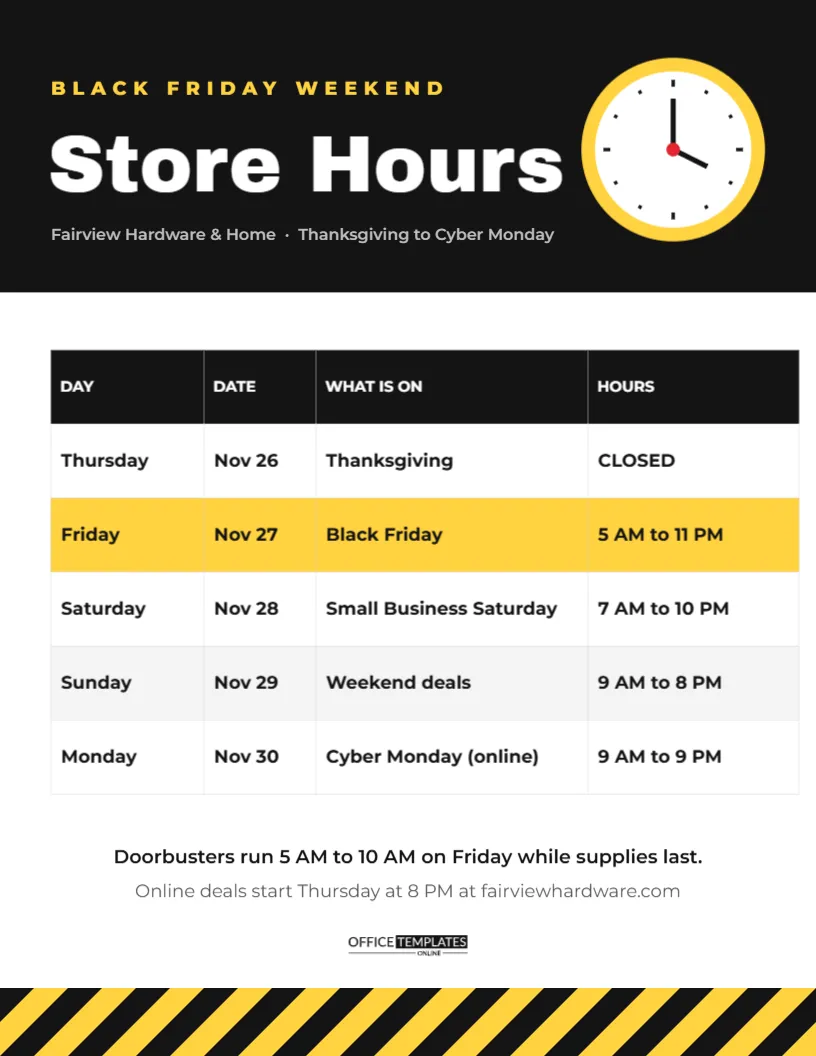
The sign is US Letter, 8.5 x 11 inches, portrait, a size that fits any door, window, or counter stand. The top is a black header. On the left, a yellow kicker reads BLACK FRIDAY WEEKEND, followed by Store Hours in big white Archivo Black and a grey line with the store name and the dates covered. On the right, a drawn clock with a yellow rim, a white face, black hour marks and hands, and a small red centre pin adds a friendly visual cue.
Below the header is a table with four columns: DAY, DATE, WHAT IS ON, and HOURS. The five rows run from Thursday to Monday. The Black Friday row is shaded bright yellow so it stands out. Below the table, two short lines explain when doorbusters run and when online deals start. The brand mark sits above a band of black and yellow hazard stripes at the foot.
Sample Weekend Hours
| Day | Date | What is on | Hours |
|---|---|---|---|
| Thursday | Nov 26 | Thanksgiving | Closed |
| Friday | Nov 27 | Black Friday | 5 AM to 11 PM |
| Saturday | Nov 28 | Small Business Saturday | 7 AM to 10 PM |
| Sunday | Nov 29 | Weekend deals | 9 AM to 8 PM |
| Monday | Nov 30 | Cyber Monday (online) | 9 AM to 9 PM |
These are only examples. Replace them with your real hours.
Editing the Store Hours Table
The schedule is a real table object. Double-click it, or choose Edit Table Data, to change any cell. You can add a row for Wednesday if you open late before Thanksgiving, or for Tuesday if you join Giving Tuesday. To move the yellow highlight, change the background colour of the cells in the row you want to stand out. Keep hours in a consistent format, such as 9 AM to 8 PM, so they are quick to compare.
Deciding Your Black Friday Weekend Hours
Many shops extend their hours over Black Friday weekend, but longer is not always better. Consider these questions:
- When do your customers actually shop? Check last year’s sales by hour if you have them.
- Can your team cover the hours without exhausting staff?
- Will neighbouring stores open early, bringing foot traffic to your street?
- Do you want to close on Thanksgiving so staff can be with family? Many retailers now do.
Clear Wording for Holiday Hours
Use full words for days and short dates. Write CLOSED in capitals so it cannot be missed. For overnight openings, avoid 12 AM, which confuses people; write midnight instead. If your hours differ by location, make one sign per store rather than one complicated table.
The Notes Lines
The two lines under the table hold extra information: when doorbusters run and when online deals begin. Other useful notes include Curbside pickup available all weekend,Returns desk opens at 9 AM, or Gift wrapping free on Saturday. Keep it to two lines so the table stays the main element.
Where to Post Your Hours
- the front door, at eye level;
- beside the till, for customers who ask;
- in the staff room, so everyone knows the schedule;
- on social media as a PNG image;
- on your map listings, which customers check before visiting.
Updating your online business listings is easy to forget but very important. Many people check map apps for opening times, and wrong hours there can send customers home disappointed.
Printing the Store Hours Sign
Download the PDF and print in colour on regular paper or card. For a door, slip it into a clear sign holder or laminate it, so you can wipe off fingerprints. A copy printed on card stock stands up well in an acrylic stand on the counter.
Changing the Sign’s Colours
Black and yellow is high-visibility and easy to read. To match your brand, change the header and the table header to your main colour, and the highlight and stripes to a lighter accent. Keep the text in the table dark on light backgrounds for the best readability.
Thanksgiving Day Closures
Closing on Thanksgiving Day is a decision many shops make for their staff. If you close, say so proudly on the sign: CLOSED in the hours column, and perhaps a short note such as Closed so our team can spend the day with family. Customers often respond warmly to that message.
Using the Hours Sign All Year
Save your edited version and reuse it for other holiday periods: Christmas week, New Year, Easter weekend, or a stocktaking closure. Change the header kicker and the table rows, and the layout fits any short period with special hours.
Black Friday Hours for Online Shops
Online shops do not have opening hours, but they do have important times: when the sale starts, when shipping cut-offs fall, and when customer service is available. Use the table to list those, for example, Sale starts at midnight Thursday,Last day for standard shipping, and Live chat 8 AM to 10 PM.
Telling Customers About Hours Online
Post a photo of the printed sign on social media the week before, and pin it to the top of your page for the weekend. Add the same hours to your website footer or contact page. Customers who plan an early start will check online first, and seeing the same sign in the window when they arrive reassures them they got it right.
Store Hours Sign Questions
Can I show two weeks?
Add rows to the table and reduce the row height a little; the sign holds up to about ten rows comfortably.
Can I remove the clock?
Yes. Delete it and widen the header text, or replace it with your logo.
Is the table editable after printing?
The printed sign is fixed, but the template stays editable, so you can print an updated version at any time.
Clear hours prevent wasted trips and frustrated customers. Fill in your weekend schedule, print the sign, and let everyone know when to find you open.