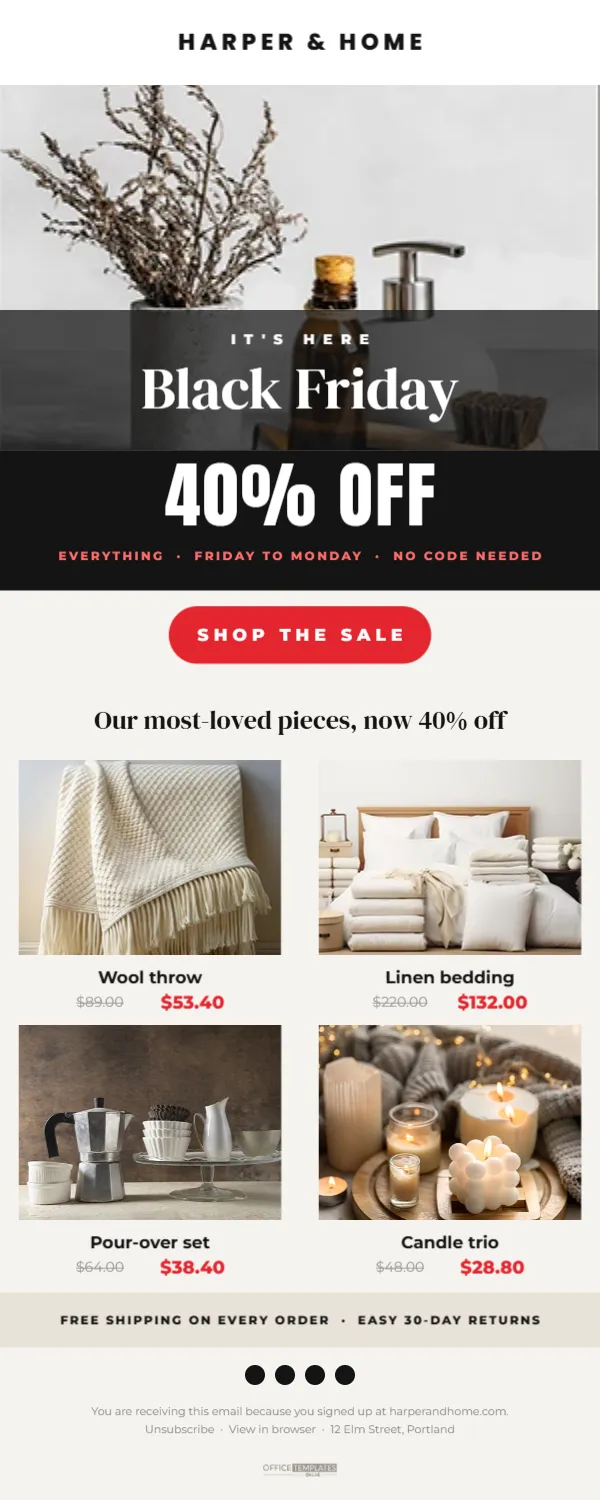
The Black Friday announcement email is often the single most important email a small business sends all year. It needs to be clear, attractive, and quick to act on, because subscribers are receiving dozens of similar emails the same morning. This template gives you a complete email layout, 600 pixels wide, from header to footer, so you can plan and build your announcement with confidence.
Sections of the Sale Announcement Email
The design is a full email, 600 pixels wide and 1500 pixels tall, on a warm off-white background. It is made up of clear sections from top to bottom:
- Logo bar: a white strip with the store name, HARPER & HOME, in spaced capitals.
- Hero: a wide photo with a dark translucent band across its lower part, reading IT’S HERE and Black Friday in elegant white serif letters.
- Offer band: a black block with 40% OFF in huge white Anton letters and EVERYTHING · FRIDAY TO MONDAY · NO CODE NEEDED in red.
- Button: a red SHOP THE SALE pill.
- Products:Our most-loved pieces, now 40% off, followed by four product cards in a two-by-two grid, each with a photo, a name, a struck-through original price, and the sale price in red.
- Benefits strip: FREE SHIPPING ON EVERY ORDER · EASY 30-DAY RETURNS.
- Footer: four social icon dots, a line explaining why the reader receives the email, links to unsubscribe and view in browser, and the business address.
Using the Template With an Email Builder
Email builders work in blocks: images, text, buttons, and product grids. The best way to use this template is as a blueprint. Export the hero section and the offer band as images, then build the rest with your builder’s own text, button and product blocks, following the layout and colours. Real text and buttons are important in emails because they remain readable when images are blocked, and they work better with screen readers.
The Hero and Offer Band
Replace the hero photo with your best lifestyle image. Keep important details out of the lower part of the photo, where the dark band and headline sit. The 40% OFF band carries the main message, so update it carefully: the percentage, the dates, and whether a code is needed. If you have different discounts for different products, change it to UP TO 40% OFF.
Sample Products and Prices
| Product | Original | Sale (40% off) |
|---|---|---|
| Wool throw | $89.00 | $53.40 |
| Linen bedding | $220.00 | $132.00 |
| Pour-over set | $64.00 | $38.40 |
| Candle trio | $48.00 | $28.80 |
Choose products that represent your range and appeal to gift buyers. Link each product card to its product page, not just the homepage.
Writing the Email Copy
Black Friday emails should be short. Most readers scan, so let the layout do the work. If you add a paragraph, keep it to two or three sentences: what the offer is, how long it lasts, and any important detail such as shipping deadlines. A friendly sign-off from the owner can add a personal touch for small businesses.
Subject Line and Preview Text
The subject line decides whether the email is opened. Try clear and specific lines such as Black Friday: 40% off everything,It’s here: our biggest sale of the year, or 40% off starts now, no code needed. The preview text, the short line shown after the subject in many inboxes, should add detail, such as Free shipping and easy returns all weekend.
Footer Essentials
Marketing emails generally need an unsubscribe link and, in many places, a physical address for the business. The footer in this template includes both. Replace the sample address and make sure the unsubscribe link is the real one from your email platform. A clear footer builds trust and keeps you on the right side of email rules.
Mobile Email Layout
Most emails are opened on phones. On a small screen, the two-by -two product grid may stack into a single column, depending on your builder. Check the mobile preview and make sure buttons are large enough to tap and text is at least about 14 pixels. The template’s layout is simple enough to adapt cleanly to one column.
When to Send the Announcement
Many stores send the announcement early on Black Friday morning, or the evening before if the sale starts at midnight. Consider your audience’s habits: early risers, commuters, or evening browsers. Schedule the email in advance and check that sale prices are live on your website before it sends.
Following Up the Announcement
Plan follow-up emails using the same layout: a Saturday reminder featuring different products, a Sunday last chance email, and a Cyber Monday email. Exclude people who have already purchased from some reminders, if your platform allows, so customers do not feel overwhelmed.
Email Accessibility Checklist
- Alt text on every image, especially the hero and offer band.
- Real text for the main offer, not only inside images.
- High contrast between text and background.
- Descriptive link text, such as Shop the sale rather than Click here.
- A logical reading order from top to bottom.
Measuring Black Friday Email Results
After sending, check opens, clicks, and sales from the email. Compare which products got the most clicks; that tells you what to feature in the next email. If clicks are low, try a stronger subject line or a bigger, clearer button next time.
Segmenting Your Black Friday Audience
If your email platform allows it, send slightly different versions to different groups. Recent customers might see accessories that go with what they bought, while subscribers who have never purchased might see your best sellers and a welcome note. Even a small change, such as different featured products, can lift clicks.
Sale Announcement Email Questions
Can I use the whole design as one image?
It is possible, but not recommended. Image-only emails can be hard to read with images blocked and may be more likely to land in spam.
Can I change the number of products?
Yes. Two, four, or six products all work in a grid.
Can I add a discount code?
Replace NO CODE NEEDED with your code, and repeat it in real text near the button.
A clear, well-built email can be your best salesperson this Black Friday. Plan your sections, add your products, and send an announcement that gets opened and clicked.