The Okafor family booked their first big trip abroad in January: a week in Lisbon in July. For six months, the children asked the same question every morning: How many days now? So their dad printed a vacation countdown that looked like a boarding pass, stuck it on the fridge, and let the children update the number each week. By the time the suitcases came out, the whole family knew the plan by heart. This is that planner.

A Boarding Pass on the Fridge
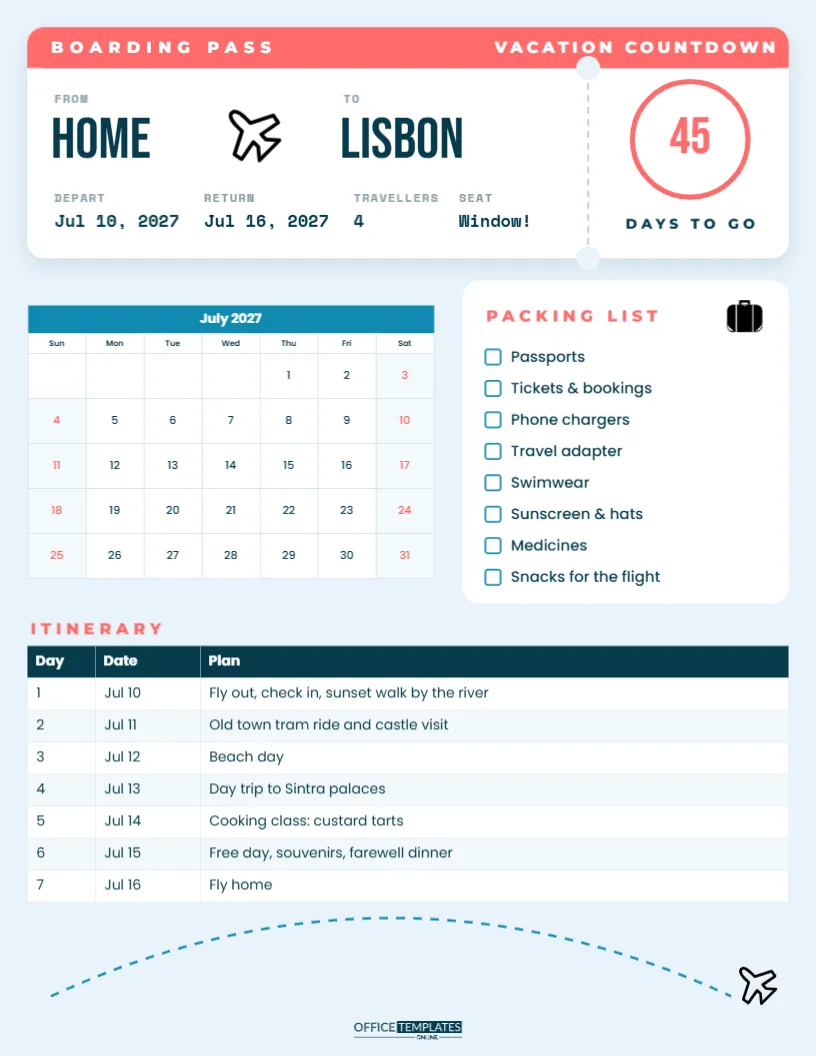
The page is US Letter portrait on a pale sky-blue background. The top third is a white boarding pass card with rounded corners and a soft shadow. A coral strip across the top reads BOARDING PASS on the left and VACATION COUNTDOWN on the right. Below it, in tall Bebas Neue letters, the route reads FROM HOME, a small airplane, then TO LISBON. Underneath, typewriter-style Space Mono details list DEPART Jul 10, 2027, RETURN Jul 16, 2027, TRAVELLERS 4, and SEAT Window!
On the right, a dashed perforation line with two little notches separates a tear-off stub. The stub holds a large coral ring with the number 45 inside and DAYS TO GO underneath. That number is the heart of the countdown.
Counting Down the Days
The Okafor children updated the number every Sunday at first, then every day in the last two weeks, when excitement was at its peak. In the editor, click the number and type a new one before you print; at home, you can cover it with a sticky note and write the number by hand. Counting down helps younger children understand time, and it turns waiting into part of the fun.
The Trip Month at a Glance
Below the boarding pass, a calendar shows July 2027 with a sky-blue title row and coral weekend dates. Mrs Okafor circled the travel days, marked the day the dog went to the sitter and added the date the passports needed to be checked. The calendar is the editor’s Calendar object, so open Calendar Options to change the month and year to your own trip. You can also start the week on Monday or recolour it.
A Packing List That Gets Ticked
Beside the calendar, a white card titled PACKING LIST, with a small suitcase icon, holds eight tick boxes: passports, tickets and bookings, phone chargers, travel adapter, swimwear, sunscreen and hats, medicines and snacks for the flight. The Okafor children each had a job: the eldest checked chargers and adapters, the youngest was in charge of snacks. Every item is editable text, so swap in what your trip needs, such as ski gloves, a camera, or the car seat.
The Itinerary, Day by Day
The lower part of the page is an itinerary table with columns for Day, Date, and Plan:
| Day | Date | Plan |
|---|---|---|
| 1 | Jul 10 | Fly out, check in, sunset walk by the river |
| 2 | Jul 11 | Old town tram ride and castle visit |
| 3 | Jul 12 | Beach day |
| 4 | Jul 13 | Day trip to Sintra palaces |
| 5 | Jul 14 | Cooking class: custard tarts |
| 6 | Jul 15 | Free day, souvenirs, farewell dinner |
| 7 | Jul 16 | Fly home |
The family left the beach day and the free day deliberately open. With children, a trip packed with activities every day ends in tired tears; one slow day in the middle keeps everyone happy. The table is the editor’s Table object, so add rows for a longer trip or a column for booking references and times.
The Flight Path Footer
At the bottom of the page, a dashed sky-blue flight path arcs across from left to right and ends at a small airplane, echoing the plane in the boarding pass. The OTO logo sits beneath the arc. It is a small detail, but it ties the page together and gives the children something to draw over: the Okafor youngest added clouds and a sun.
Making It Your Own Trip
Retype the destination, dates, number of travellers, and seat to match your booking; TO GRANDMA’S works just as well as TO LISBON. For a road trip, swap the airplane for a car using the editor’s own elements, and rename BOARDING PASS to ROAD TRIP. Recolour the coral strip and the countdown ring to suit your destination: turquoise for a beach, deep green for a forest cabin, red for a city break. Fonts are Bebas Neue, Space Mono and Poppins, all Google Fonts.
The Weeks Before Departure
As the countdown dropped, the planner became the family’s to-do list. At 60 days, Mr Okafor checked that every passport was valid for long enough after the return date. At 30 days, the family booked airport parking and ordered a few euros for the first day. At 14 days, the dog sitter was confirmed, and the children started trying on swimwear that still fitted. At 7 days, the packing list came out, and items began to pile up in the spare room. The night before, the number on the stub finally read 1, and nobody slept very much. Writing these milestones on the July calendar, or on the months before it, keeps the practical side of travel from sneaking up on you.
What the Okafors Would Do Again
- Print the planner as soon as the trip is booked, so the countdown starts early.
- Give every child one item on the packing list to be responsible for.
- Write the itinerary together, letting each person choose one activity.
- Keep the page after the trip and stick a favourite photo on the back.
Printing the Trip Planner
Download the PDF and print on letter paper or light card. Put it on the fridge, the back of the front door or a child’s bedroom wall. Print a second copy to take with you; the itinerary and packing list are just as useful in the hotel room as at home, especially on the morning you pack to come back. Tick the packing list again before checking out so nothing stays behind.
The Okafors are already planning next year. Pick your destination, set the countdown, and let the excitement build.