Content Calendar Spec Sheet
| Item | Detail |
|---|---|
| Format | US Letter landscape, 11 x 8.5 in, one page per month |
| Calendar | Editor Calendar in Task Calendar style, notes per date |
| Sample month | January 2027 with 12 planned posts |
| Side panel | Platform plan table and monthly goal box |
| Palette | Magenta to indigo header, dark navy title row, lilac accents |
| Fonts | Bebas Neue header, Inter calendar and body |
A Strategist’s Note on Planning Content

The brands and creators who post consistently are rarely more creative than everyone else. They simply decide what to post before the week starts. A monthly content calendar takes the daily what should I post? panic away. You make the creative decisions once, in a focused planning session, and then spend the month producing and publishing. This template is built for exactly that session.
The Page, Panel by Panel
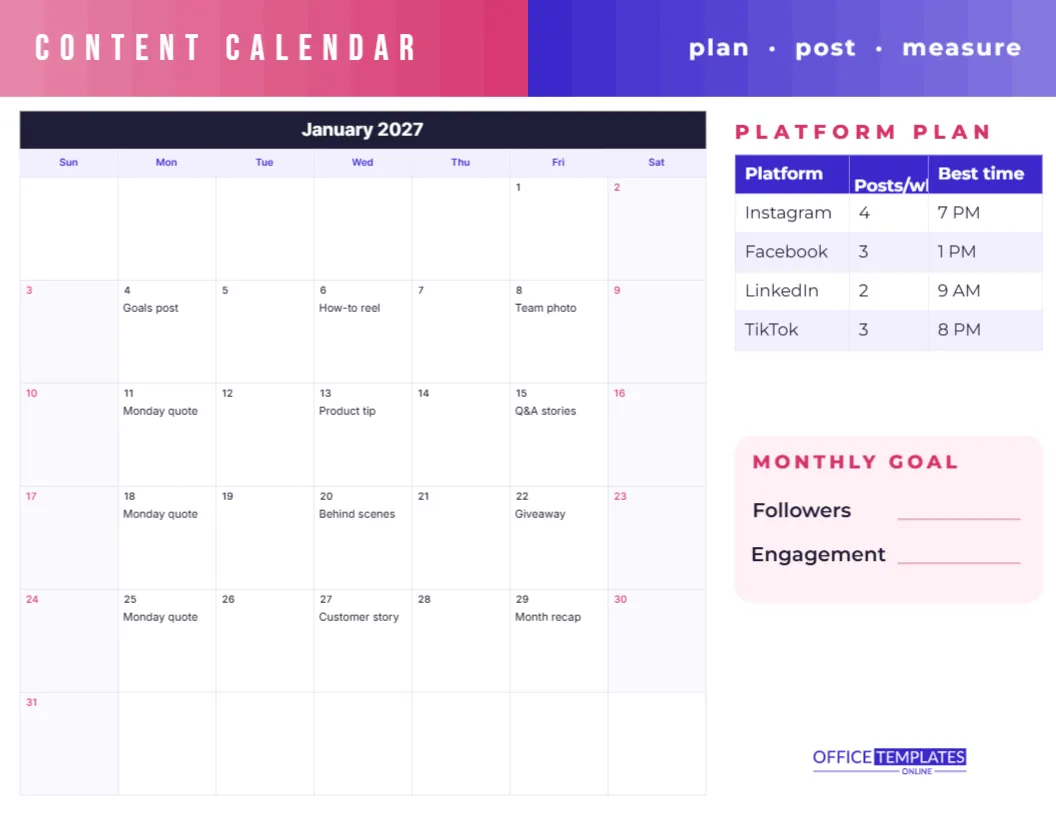
A bold header band blends from magenta on the left to deep indigo on the right, with CONTENT CALENDAR in white Bebas Neue capitals and the motto plan · post · measure on the right. The left two-thirds of the page hold the month in the editor’s Task Calendar style, with a dark navy title row, lilac weekday names, and magenta weekend numbers.
The sample month already contains a realistic posting plan: a goals post on January 4, a how-to reel on the 6th, a team photo on the 8th, a Monday quote every Monday, a product tip, a Q&A in stories, a behind-the-scenes post, a giveaway, a customer story, and a month recap on the 29th. On the right, a PLATFORM PLAN table lists Instagram (four posts a week, best at 7 PM), Facebook (three, 1 PM), LinkedIn (two, 9 AM), and TikTok (three, 8 PM). Under it, a soft pink MONTHLY GOAL box has lines for a followers target and an engagement target.
A Strategist’s Note on Content Pillars
Look closely at the sample posts, and you will see four content pillars: education (how-to reels, product tips), connection (team photos, behind-the-scenes), proof (customer stories), and engagement (Q&As, giveaways, Monday quotes). Rotating pillars keeps a feed varied and stops followers from feeling sold to. When you plan your own month, decide your pillars first, then spread them across the calendar so no single type dominates a week.
Planning a Month in One Hour
- Open Calendar Options and set the month you are planning.
- Delete the sample notes, or keep the ones that suit you.
- Add fixed dates: launches, sales, holidays, and events.
- Add recurring series, such as a weekly tip or a Friday Q&A.
- Fill the gaps with your content pillars in rotation.
- Update the platform plan and set this month’s goals.
- Download or print and share it with anyone who helps create content.
Editing the Platform Plan
The platform table is the editor’s Table object. Click a cell to change platforms, frequencies, or times, or add rows for Pinterest, YouTube, X, Threads, or an email newsletter. Best time should come from your own analytics, because audiences differ. Some teams add a column for the person responsible for each platform, which makes the page double as a simple workflow chart.
A Strategist’s Note on Measuring
The third word in the header, measure, matters most. At the end of the month, look back at the calendar and mark the three posts that performed best. Over a few months, you will see patterns: which pillars, formats, and days your audience responds to. Use those insights in next month’s plan. The MONTHLY GOAL box keeps you honest; two simple numbers, such as followers and engagement rate, are enough for most small businesses.
A Strategist’s Note on Batching
Once the month is planned, batch the work. Spend one afternoon writing all the captions, another photographing or filming, and schedule posts in advance with your platform’s scheduling tool. Batching uses your creative energy efficiently and leaves the rest of the month free for replying to comments and messages, which is where real community building happens. Use a highlighter on the calendar to mark posts that are written, created, and scheduled, so you can see progress at a glance.
A Strategist’s Note on Holidays and Trends
Holidays, awareness days, and seasonal moments are easy wins for content. Before you fill the month, list the relevant dates for your industry, such as Valentine’s Day for a florist or back-to-school for a stationer, and plan posts a few days ahead of each. Leave one or two flexible slots each week for trending topics, so you can join timely conversations without abandoning your plan.
Who Uses a Content Calendar
- Small business owners managing their own social media.
- Freelance social media managers presenting plans to clients.
- Bloggers and podcasters planning episode promotion.
- Schools, churches and charities sharing news and events.
- Marketing teams aligning posts with campaigns.
A Strategist’s Note on Captions
Write captions in the same session you plan the calendar, even if only as rough first lines. A strong first sentence matters most, because it is all most people read before deciding to stop scrolling.
Customising the Look
The magenta and indigo palette suits a modern brand, but you can match your own. Recolour the header band segments, then change the calendar colours in Calendar Options and the table colours in the Table Options. Swap the motto for your brand tagline. The Inter font keeps the notes readable at small sizes; any Google font can be used instead.
Sharing with a Team or Client
Download the finished month as a PDF to send to a client for approval, or as a PNG to pin in a team chat. Many freelancers present the calendar at a monthly planning call, then use it as the agreed schedule. Print a copy for the wall if your team works in the same room.
Content Calendar Questions
Can I plan more than one post per day?
Yes. Type two short ideas in one note, separated by a slash, such as Reel/Story Q&A.
Can the week start on Monday?
Yes. Many marketers prefer this; change it in Calendar Options.
Pick your pillars, fill the month, and post with confidence. Consistency is easier when the plan is already on paper.