Banking apps send reminders. Calendar apps send notifications. So why do so many people still miss bill payments? Usually because the reminders are scattered across six apps and none of them shows the whole month. A one-page paper bill calendar does something apps rarely do: it puts every bill, every due date, and every payment status in one place you can see at a glance.
Paper Bill Calendar or Banking App?
| Need | Paper bill calendar | Banking or budget app |
|---|---|---|
| See every bill for the month at once | Yes, on one page | Often split across accounts |
| Share with a partner or housemate | Pin it on the fridge | Needs shared logins |
| Track bills paid by cash or transfer | Easy to tick off | Often missed |
| Automatic reminders | Only if you look at it | Yes |
| Spot an expensive week ahead | Clear on the calendar | Hard to see |
The answer for most households is both: use autopay and reminders where you can, and the paper calendar as the single overview that ties it all together.
The Layout in Plain Terms
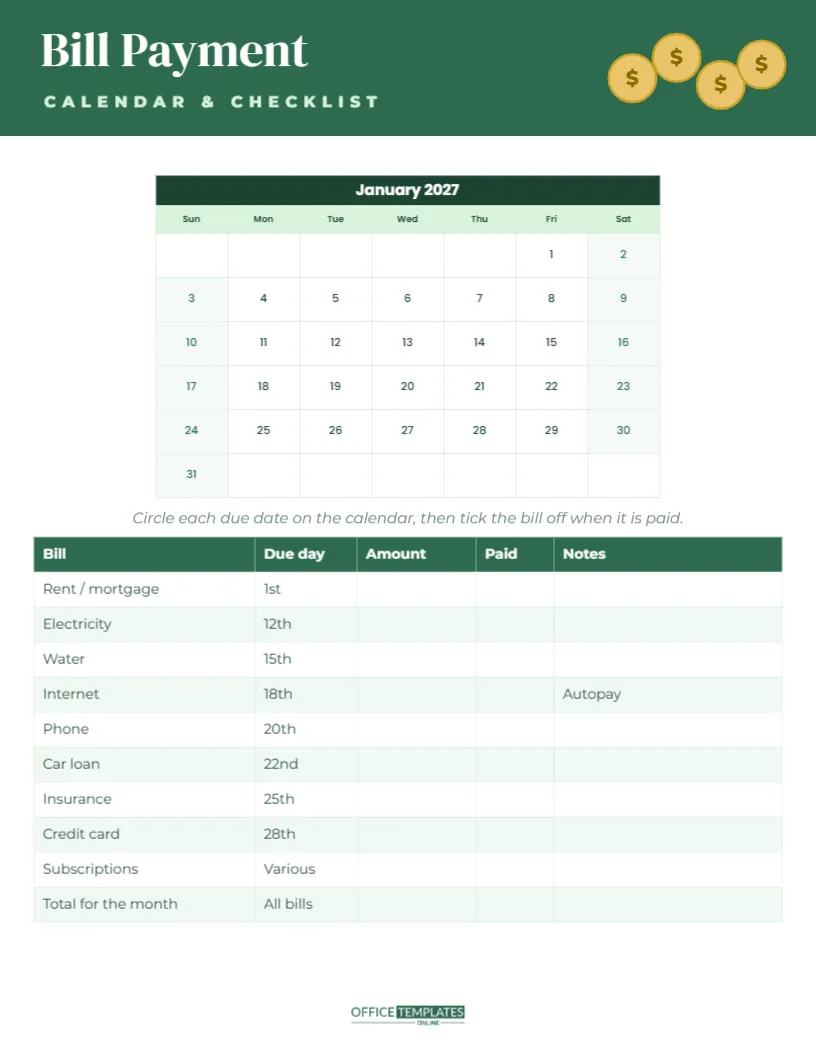
The calendar is US Letter, 8.5 x 11 inches, portrait. A deep money-green header carries Bill Payment in white DM Serif Display, with CALENDAR & CHECKLIST in pale green spaced capitals underneath. A small stack of gold coins with dollar signs sits on the right of the header.
Below the header, a compact month calendar shows the dates with a dark green title row, a pale mint weekday row, and centred dates. An italic line suggests circling each due date and ticking the bill off when it is paid. The bottom half of the page is a bill checklist table with columns for Bill, Due day, Amount, Paid, and Notes. It lists rent or mortgage (1st), electricity (12th), water (15th), internet (18th, with a note saying autopay), phone (20th), car loan (22nd), insurance (25th), credit card (28th), subscriptions (various), and a final row for the total for the month. The OTO logo sits at the foot.
Setting It Up in Fifteen Minutes
- Gather your last month’s bank statement and bills.
- Open Calendar Options and set the month and year.
- Edit the table: type each bill, its due day, and the usual amount. Use the Table options to add or remove rows.
- Circle each due date on the calendar, or print first and circle by hand.
- Add the total of all bills in the final row.
- Print and put it where you will see it often.
Spotting Expensive Weeks
Once due dates are circled, look at the calendar for clusters. Rent on the 1st and a car loan on the 3rd may make the start of the month tight, especially if payday is the 25th. Seeing the clusters lets you plan: move a due date by asking the provider (many will change it), set aside money in advance, or split a large payment. This is the single most useful thing the calendar shows that apps rarely do.
Using the Paid and Notes Columns
Tick the Paid column as soon as a bill is paid, and note the date or reference number if you pay manually. Use Notes for useful details: autopay from savings, price rises in March, call to renegotiate, or cancel after trial. These notes turn the calendar into a record that helps at tax time or when disputing a charge.
Bills People Often Forget
- Annual subscriptions that renew automatically.
- Insurance paid yearly rather than monthly.
- Vehicle registration and road tax.
- Professional memberships and licences.
- School fees, activity fees and childcare.
- Domain names and website hosting for small businesses.
Add a row for each, and circle the month they are due on that month’s page.
Changing the Month, Colours and Bills
The calendar is the editor’s Calendar object, so the month and year can be changed in Calendar Options and the dates update automatically. The week can start on Monday. The green palette can be recoloured: select the header and change the calendar and table colours to match your household binder. Fonts are DM Serif Display and Poppins, both Google Fonts.
Keeping a Year of Bill Calendars
Print a new page each month and keep them in a folder with your statements. After a few months, you will see how much your bills really cost, which makes budgeting and spotting price rises much easier. At the end of the year, the twelve pages give you a quick summary for taxes or financial planning.
For Small Businesses and Landlords
The same calendar works for small business expenses (rent, software, suppliers, payroll dates) or for landlords tracking property costs (mortgage, insurance, service charges). Rename the header, adjust the table, and keep one page per property or per month.
Where to Keep Your Bill Calendar
Download the PDF and print on plain letter paper. Keep it on the fridge, in a household binder, or next to the computer where you pay bills. If you share bills with a partner or housemates, a printed copy prevents the I thought you paid it conversation.
A Worked Example: The Okoro Household
Dana and Chris Okoro are paid on different days: Dana on the 1st and Chris on the 15th. Before using the bill calendar, almost every bill came out of Dana’s account in the first week, leaving the second half of the month tight. After circling every due date, they could see the problem at once. They asked the internet and phone providers to move their due dates to the 18th and 20th, so those bills now come out after Chris’s payday. The car loan stayed on the 22nd, and the rent stayed on the 1st. The result was two balanced halves of the month instead of one crowded week.
They also added two rows the template did not have: a yearly car insurance renewal in June and a gym membership that was still charging after they stopped going. That second row alone saved them money every month once they cancelled it. The example shows the real value of the page: it is not only a reminder, but it is also a monthly review that makes waste and bad timing visible.
Avoiding Late Fees for Good
Set autopay for fixed bills, keep a small buffer in the account the bills come from, and check the calendar every Sunday for the week ahead. If a payment is ever going to be late, call the provider before the due date; many will waive a first late fee or agree to a short extension.
List the bills, circle the dates, and tick them off one by one. No more surprise late fees.