Month calendars are too short for real planning, and a full-year calendar is too small to write on. A Quarterly Calendar sits in between: three months on one page, with space to set goals and track projects over a sensible stretch of time. If you are not sure whether this format suits you, the comparison below will help you decide.
Is a Quarterly Calendar Right for You?
| You need to | Monthly calendar | Quarterly calendar | Year calendar |
|---|---|---|---|
| Write daily appointments | Best | Short notes only | Not really |
| Plan projects over several weeks | Hard across months | Best | Too small |
| Set and review goals | Too short a span | Best | Too long a span |
| See the whole year at once | No | Four pages | Best |
| Align with business reporting | Partly | Matches Q1 to Q4 | Partly |
If most of your planning is about goals, projects, or business quarters, the quarterly calendar is the right tool. Many people use it together with a monthly calendar for daily detail.
Four Quarters, Four Colours
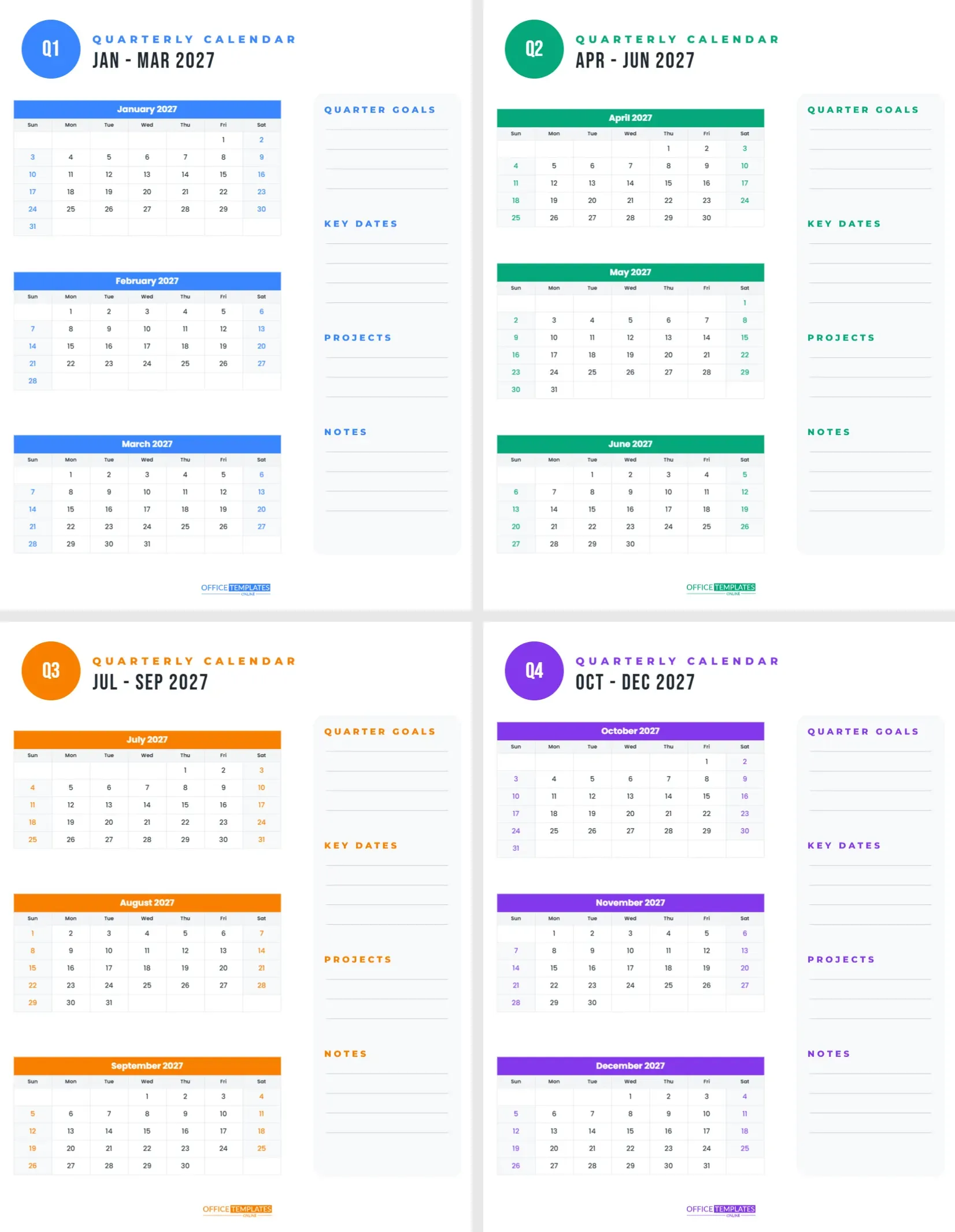
The set has four US Letter portrait pages, one per quarter of 2027. Each quarter has its own accent colour: bright blue for Q1 (January to March), fresh green for Q2 (April to June), warm orange for Q3 (July to September) and rich purple for Q4 (October to December). The colour runs through the round Q badge in the top-left corner, the QUARTERLY CALENDAR label, the month title bars, the weekend numbers, the section headings in the goals column, and the OTO logo at the foot.
Under the badge, the range and year, such as Jan – Mar 2027, are set in tall Bebas Neue. The left two-thirds of each page holds the three-month calendars stacked one above the other, with clean white cells, centred Poppins dates and light grey weekday names. The right third is a soft grey panel with four sections: QUARTER GOALS, KEY DATES, PROJECTS and NOTES, each with ruled lines for writing.
Using the Goals Column
The column on the right is what makes this calendar a planning tool rather than just a list of dates.
- Quarter goals: three or four outcomes you want by the end of the quarter, such as launching the new website or running a 10K.
- Key dates: deadlines, holidays, trips, and events that shape the quarter.
- Projects: the larger pieces of work that will deliver your goals.
- Notes: lessons, ideas, and things to carry into the next quarter.
Write your goals at the start of each quarter, and review them at the end before turning the page.
Quarterly Planning for Businesses
Most businesses report and plan in quarters, so this calendar fits naturally into a company’s rhythm. Use the Key Dates section for board meetings, tax deadlines, product launches, and reporting days. Write quarterly targets in the goals section and track project milestones on the calendars. If your financial year starts in April or July, simply reorder the pages, or change the months on each calendar in Calendar Options so Q1 starts when your year does.
Quarterly Planning for Personal Goals
Twelve-week goals are long enough to make real progress and short enough to stay focused. Many people set one health goal, one learning goal, and one money goal per quarter. Mark weekly check-ins on the calendar (every Sunday, for example) and colour the days you worked toward each goal. At the end of the quarter, note what worked in the Notes section before starting the next page.
For Students and Teachers
A quarterly view suits school terms and university semesters. Students can mark exams, assignment deadlines and holidays across three months, and write study goals in the right-hand column. Teachers can plan units of work, parent evenings and reports. Since school years often start in August or September, change the months on each page to match your terms.
Editing the Quarterly Pages
Each month on every page is the editor’s built-in Calendar object. Open Calendar Options to change the month, year, week start, colours, and font, and the dates rebuild automatically. To use the calendar for 2028, change the year on each of the twelve calendars. The Q badge, labels, and goals column are ordinary shapes and text, so you can rename sections, for example Wins instead of Notes, or change the accent colours to match your brand.
A Quarterly Review Routine
- On the last Friday of each quarter, block an hour.
- Read the goals you wrote and mark each one done, partly done, or not done.
- Write what helped and what got in the way in the Notes section.
- Turn to the next page and write the new quarter’s goals.
- Fill in the key dates you already know for the next three months.
- Circle your weekly check-in days on the calendars.
Four reviews a year, each taking an hour, can transform how much you achieve. Keep the old pages rather than throwing them away: by December, the four goal columns tell the story of your year, showing which goals you met, which you dropped, and which carried over. That record is the best starting point for planning 2028.
Combining Quarterly and Monthly Calendars
Many planners keep the quarterly page at the front of a binder and a monthly calendar for each month behind it. The quarterly page holds the big picture; the monthly page holds the day-to-day. When you write a new appointment on a monthly page, check that it fits the quarterly goals. This two-level system is simple, flexible, and much easier to keep up than a complex planner.
Printing the Four Quarterly Pages
Download the PDF and print all four pages on letter paper. The colours print well on any home printer, and the white backgrounds keep ink use low. Hole-punch them for a binder, pin the current quarter above your desk, or print on card and stand it on a shelf. At the start of each new quarter, move the next page to the front. Teams can print a large copy of the current quarter for the office wall, and mark shared deadlines in the accent colour.
Pick your goals, mark your dates, and plan the year one quarter at a time.