When you take several medicines, or care for someone who does, the hardest question is often the simplest: did I already take this morning’s tablet? This Monthly Medication and Appointment Calendar gives you one clear page to record every dose and every doctor’s visit. Start with the setup checklist below, read the common questions in the middle, then use the second checklist to keep it working every day.
Before You Start: A Medication Setup Checklist
- Gather every medicine, vitamin, and supplement in one place, including creams and inhalers.
- Read each label for the dose and the times of day.
- Check with your pharmacist that the list is complete, and the timings make sense.
- Write your name on the NAME line in the header.
- Choose the current month in Calendar Options.
- Fill in the Daily Medicines table: one row per medicine.
- Add your upcoming appointments to the Appointments table.
- Print and place the page where you take your medicines.
How the Medication Calendar Is Laid Out
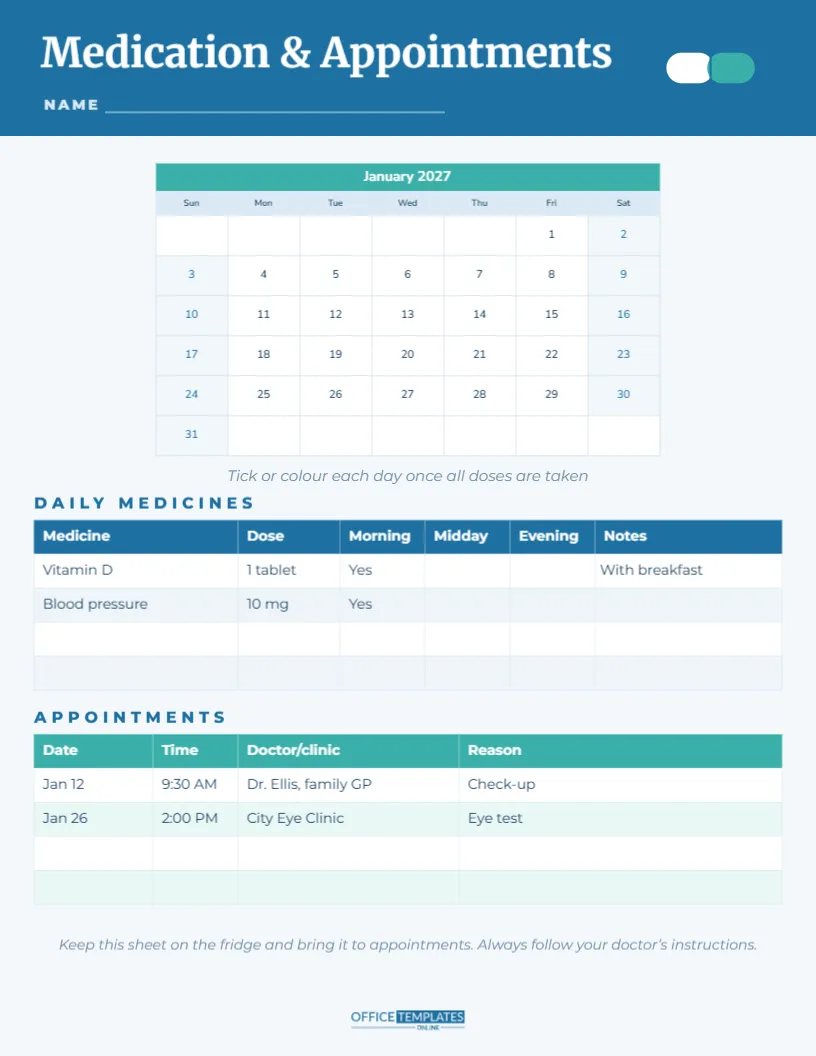
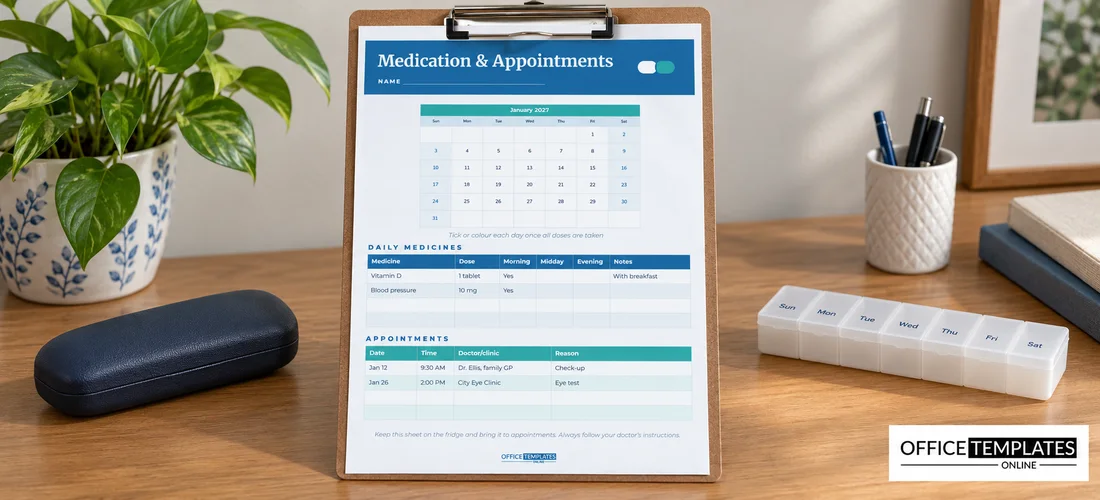
The page is US Letter, 8.5 x 11 inches, portrait, on a very pale blue background chosen to feel calm and clinical without being cold. A strong blue header carries Medication & Appointments in white Merriweather, a sturdy, highly readable serif. A NAME line sits beneath it, and on the right a small two-tone capsule, half white and half teal, gives the page its medical motif.
Below the header is a month calendar with a teal title row, pale blue weekday names and large, centred dates. An italic line asks you to tick or colour each day once all doses are taken. The lower half holds two tables: DAILY MEDICINES, with columns for Medicine, Dose, Morning, Midday, Evening and Notes, and APPOINTMENTS, with columns for Date, Time, Doctor or clinic, and Reason. A final italic line reminds you to keep the sheet on the fridge, bring it to appointments, and always follow your doctor’s instructions. The OTO logo sits in blue at the foot.
The Daily Medicines Table Explained
| Column | What to write | Example |
|---|---|---|
| Medicine | Name as printed on the box | Vitamin D |
| Dose | Amount per dose | 1 tablet |
| Morning | Yes if taken in the morning | Yes |
| Midday | Yes if taken at midday | No |
| Evening | Yes if taken in the evening | No |
| Notes | Food, water or timing instructions | With breakfast |
The sample rows show Vitamin D (one tablet in the morning with breakfast) and a blood pressure tablet (10 mg in the morning). Two empty rows are ready for more medicines, and you can add as many rows as you need in the editor’s Table options.
Questions People Ask About Tracking Medicines
Why not just use a pill organiser?
Pill organisers are excellent, and the calendar works alongside one. The organiser holds the tablets; the calendar records that they were taken and shows the whole month, including appointments and changes in dose. Together, they make missed or double doses much less likely.
Can I track more than one person on the page?
It is best to use one page per person, with their name on the NAME line. Mixing two people’s medicines on one sheet is a common cause of confusion. Print a separate copy for each family member who needs one.
What should I do if I miss a dose?
Every medicine is different. Check the leaflet or ask your pharmacist or doctor; never double up without advice. Make a note on the calendar for that day so you can mention it at your next appointment.
Is the calendar a medical record?
No. It is a personal tracking tool to help you remember. Your doctor and pharmacy hold your official records. The calendar is still useful to bring to appointments, because it shows how regularly you have been taking each medicine.
Recording Doctor and Clinic Appointments
The Appointments table keeps every visit in one place. The samples show a check-up with Dr. Ellis, the family GP, on January 12 at 9:30 AM, and an eye test at the City Eye Clinic on January 26 at 2:00 PM. Write each appointment in the table and circle the date on the calendar. In the Reason column, note anything you want to ask, so you do not forget in the consulting room. After the appointment, jot any changes to your medicines in the Notes column of the medicines table.
A Daily Checklist for Using the Medication Calendar
- Take your medicines at the same times each day.
- Tick or colour the day on the calendar when all doses are done.
- If a dose changes, update the medicines table straight away and date the change.
- Check the appointments table each Sunday for the week ahead.
- Reorder repeat prescriptions when about a week of tablets is left.
- At the end of the month, print a new page and copy over the table.
For Carers and Family Members
Carers looking after a parent, partner or child often juggle several medicines and appointments. A printed calendar means anyone who helps, such as siblings, visiting carers or neighbours, can see at a glance what has been taken and what is coming up. Leave a pen tied to the page and ask everyone to tick and initial each day. If the person you care for is in hospital or respite, the latest calendar is a helpful summary to hand to staff.
Changing Colours, Fonts and the Month
The month calendar is the editor’s Calendar object. Open Calendar Options to change the month and year, or start the week on Monday. Recolour the header, capsule and tables if you prefer green or purple. For people with low vision, increase the font sizes in the tables and calendar, and keep strong contrast between text and background. Fonts are Merriweather for the title and Nunito and Poppins for the rest, all Google Fonts.
Printing the Medication Tracker
Download the PDF and print on plain letter paper each month. Keep the page on the fridge, inside a kitchen cupboard door or next to the place where medicines are stored, out of reach of children. A copy in a clear plastic sleeve can travel with you to appointments. Keep past months in a folder for a simple history.
One page, one month, every dose and every appointment. Fill it in, tick it off, and always follow your doctor’s advice.