Real estate agents and brokerages have long used magazines to market themselves: a glossy booklet of featured homes left at coffee shops, mailed to neighbourhoods and handed out at open houses. The cover sells the whole booklet. This real estate magazine cover template puts a hero property front and centre with its price, then previews three more listings and the market stories inside. It helps an agent look like a publisher, not just a salesperson.
Cover Design Walkthrough
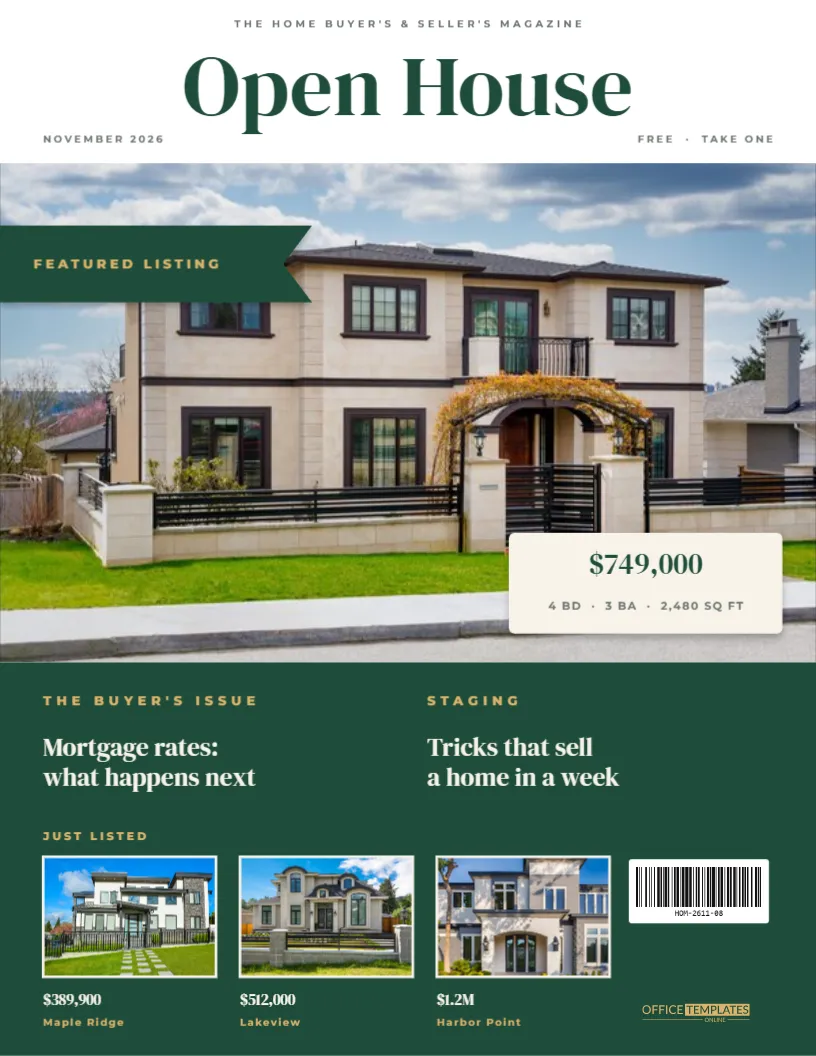
The template is US Letter, 8.5 x 11 inches, portrait, in a crisp white and forest-green scheme with gold accents:
- The masthead: Open House in large forest-green DM Serif Display, under “THE HOME BUYER’S & SELLER’S MAGAZINE”. “NOVEMBER 2026” and “FREE · TAKE ONE” sit on either side below it.
- The hero photo spans the full width of the cover’s upper half, sized for a front-of-house shot.
- A “FEATURED LISTING” flag in forest green with gold lettering points in from the left edge of the photo.
- A cream price card in the photo’s lower right shows “$749,000” and “4 BD · 3 BA · 2,480 SQ FT”.
- A forest-green lower panel holds two cover stories under gold kickers (“THE BUYER’S ISSUE: Mortgage rates: what happens next” and “STAGING: Tricks that sell a home in a week”).
- “JUST LISTED”: three thumbnail photos with cream borders, each with a price and neighbourhood name (Maple Ridge, Lakeview, Harbor Point).
- The barcode label and a small gold logo finish the lower right corner.
What Each Listing Needs
Buyers skim a cover in seconds. Every listing you feature, whether it’s the hero or a thumbnail, should give just enough to spark a call:
| Detail | Hero listing | Thumbnail listing |
|---|---|---|
| Photo | Best exterior, twilight or golden hour | Front exterior or standout room |
| Price | Large and clear | Yes, in bold |
| Beds / baths / sq ft | Yes, on one line | Optional |
| Location | In the feature inside | Neighbourhood name |
| Status | “Featured”, “New”, “Open Sunday” | “Just listed”, “Reduced” |
| Agent contact | Inside or on the back cover | Inside |
Check local advertising rules for real estate. Many areas require the brokerage name to appear in all property advertising, so add it to the masthead strap or the back cover.
Setting Up the Open House Cover
- Hero photo: click the large photo and choose Replace Image. Wide exterior shots fit the frame naturally. Keep the front door and roofline in the middle.
- Thumbnails: replace each small photo the same way. The frames keep their size and cream borders.
- Price card: update the price and the beds, baths and square footage.
- Stories: rewrite the two headlines in the green panel for your market: “Why spring is the time to sell”, “First-time buyer grants explained”.
- Masthead: keep “Open House” or change it to your brokerage’s magazine name, such as “The Hartley Homes Report”.
- Colours: recolour the green panel and flag to your brand colours. Navy and gold or charcoal and copper both look premium.
How Agents Use a Magazine Cover
- Monthly listings magazines left at cafés, gyms and local shops.
- Farming mailers: a cover postcard for your target neighbourhood.
- Open house handouts, with the featured listing on the cover and details inside.
- Listing presentations: show sellers exactly how their home would be marketed, with their house as the hero.
- Social media: a monthly “cover” post announcing new listings.
Printing a Listings Booklet
Download the PDF and send it to a print shop for gloss cover stock. Listings magazines are handled a lot, and gloss protects the forest green from scuffs. Use Add Page to build inside pages with more listings, a market report and your contact details, then have the whole booklet saddle-stitched (stapled on the fold). For email newsletters and social posts, download a PNG.
Photographing the Hero Listing
The featured photo does most of the selling, so it’s worth getting right. Professional real estate photographers often shoot exteriors at dusk, the “twilight shot”, when the sky is deep blue and every window glows warm, making any home look inviting. If that isn’t possible, shoot on a bright, slightly overcast day to avoid harsh shadows. Stand across the street at a slight angle so both the front and a side of the house are visible, and hold the camera level so walls look straight.
Before shooting, move cars and bins out of the driveway, open the curtains, turn on every light and add a pot of flowers by the door. For the thumbnails, a close-up of the best feature (a kitchen island, a garden, a view) can be more tempting than another front elevation.
A Simple Monthly Workflow
Agents who publish monthly keep the same design and only change the content. Each month: pick the listing with the best photo as the hero, choose three new or reduced properties for the thumbnails, update the two market stories and the date, then download and send to print. Because the layout, colours and fonts stay the same, readers start to recognise your magazine on the counter, and that consistency builds your brand.
Tracking Results From Your Magazine
To see whether your magazine brings in leads, add a unique phone extension, web address or QR code (made with the editor’s QR tool) to each month’s issue. When calls and visits come in, you’ll know which featured listings and which neighbourhoods got the most attention, and you can shape the next cover around them.
Real Estate Cover FAQs
Can I use it for a single-property brochure?
Yes. Put the property on the cover, replace the thumbnails with interior shots, and change the stories to the home’s features.
Where should my photo and contact details go?
Many agents put their headshot and phone number on the back cover. If you want them on the front, replace one thumbnail with your photo and your name as its caption.
Can I remove the barcode?
Yes. It’s there for a realistic magazine look. Free listing magazines often skip it.
Is the “FREE · TAKE ONE” line editable?
Yes. Double-click it to change it, for example to “COMPLIMENTARY COPY” or “SPRING EDITION”.
Make Every Listing a Cover Story
Feature your best property, preview your newest listings and share the market insight buyers are looking for. With a cover this polished, your magazine is as easy to pick up as it is to read.