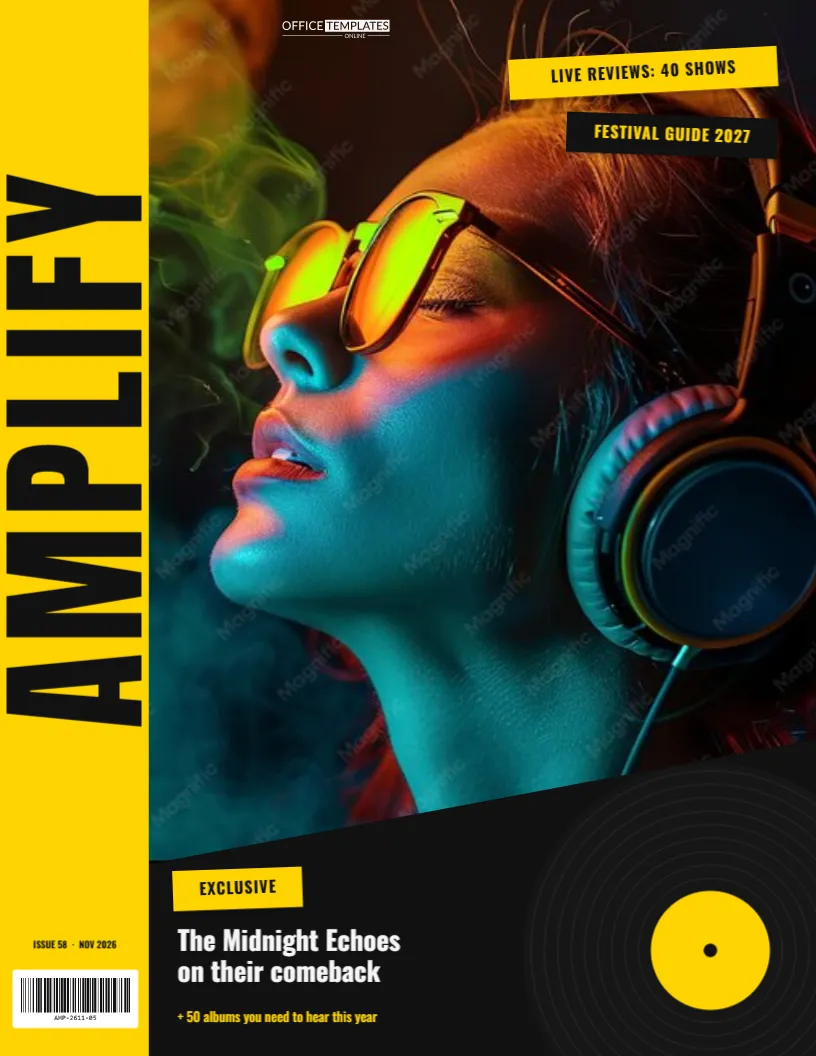
Music magazines have never played it safe. Their covers shout: huge type, attitude-filled photos, labels slapped on at angles. This music magazine cover template turns the volume up with a yellow strip carrying a giant vertical masthead, a band photo sliced on a diagonal, tape-style cover lines and a vinyl record spinning in from the corner. It’s made for bands and solo artists promoting a release, for music teachers and school bands, and for fans making a cover starring their favourite musician (or themselves).
Yellow, Black and a Spinning Record
The cover is US Letter, 8.5 x 11 inches, portrait, and plays yellow against black:
- The masthead strip: a bright yellow column runs down the full left edge. AMPLIFY is written up it in towering black Anton letters, reading from bottom to top like the spine of a record sleeve. The issue number and date sit at its foot, above a barcode on a white label.
- The photo: fills everything to the right of the strip, with its bottom edge cut on a sharp diagonal, rising from left to right, for a sense of motion.
- Taped labels near the top right look slapped on at angles: a yellow “LIVE REVIEWS: 40 SHOWS” and a black “FESTIVAL GUIDE 2027”.
- The feature sits in the black area under the diagonal: a yellow “EXCLUSIVE” tag, “The Midnight Echoes on their comeback” in bold white Oswald, and “+ 50 albums you need to hear this year” in yellow.
- A vinyl record with fine grooves and a yellow label spins in from the bottom-right corner.
- Our small logo in white at the top of the photo.
Using the Cover for a Release Campaign
If you’re an independent artist, a magazine-style cover makes a striking promo image. Here’s how it can support a single or album release week by week:
| When | Cover version | Where to post it |
|---|---|---|
| 4 weeks before | “COMING SOON” in the Exclusive tag, release date in the headline | Instagram, mailing list |
| 2 weeks before | Track list teaser in the taped labels | Stories, band website |
| Release day | “OUT NOW” with the streaming link as a QR code | Every channel, printed flyers at gigs |
| Tour | Tour dates in the black area, venue names on the labels | Venue posters, merch table |
| After | Best review quote as the headline | Press kit, electronic press kit (EPK) cover |
The editor’s QR tool can add a scannable link (to a streaming page or ticket site) next to the record, so printed covers become a way to find your music.
Customizing Your Cover
- Add the photo. Click the photo area and choose Replace Image. The photo fills the diagonal shape. A band shot with members in the upper two-thirds works best, since the bottom is cut away by the diagonal.
- Rename the magazine. Double-click “AMPLIFY” and type your own. Because it runs vertically, it can be a long word (up to about eight letters at this size): FEEDBACK, REVERB, BACKBEAT.
- Rewrite the labels. Each taped label is a coloured bar with text on top. Change the words and widen the bar if needed.
- Write the feature. Replace the band name and the cover lines in the black area.
- Recolour. Yellow and black is loud and classic. Hot pink and black suits pop, red and cream feels like vintage rock, and acid green reads as electronic.
- Edit the record. The vinyl is one group, so recolour its label to match your artwork or move it along the edge.
Who This Cover Is For
- Bands and solo artists promoting singles, albums and tours.
- Music schools and teachers making a “Student of the Month” cover or recital programme.
- School jazz bands, choirs and orchestras designing a concert programme front.
- Radio shows and podcasts about music, as a cover image.
- Fans making a gift for a friend who lives for concerts, with their own photo on the cover.
Photo Tips for a Music Cover
Great music covers feel candid and energetic. Shoot against a plain wall or in a rehearsal space with strong light from one side for drama. Get the band close together (overlapping shoulders look more like a band than a row of people), and try a slightly low camera angle for attitude. Black-and-white photos look fantastic against the yellow strip. Convert your photo before uploading if you want that look.
Gloss Covers and Gig Posters
Download the PDF and print on gloss cover stock for a real-magazine finish, or on matte poster paper for gig posters. The yellow strip and black area are strong colours, so a print shop gives the most even result. For posting online, download a PNG. Square crops for Instagram can focus on the masthead strip and photo.
Writing Cover Lines With Attitude
Music journalism has its own voice: confident, a little irreverent and full of energy. Keep cover lines short and punchy, and lean on strong verbs and specific details. “The Midnight Echoes on their comeback” works because it names the band and hints at a story. Add a promise of depth with words like EXCLUSIVE, INSIDE or THE FULL STORY. Numbers work too: “50 albums you need to hear”, “The 10 best live venues in town”. For school or community music covers, keep the same punch: “Jazz band takes the state title” reads like a headline, not a notice.
Music Cover FAQs
Can the masthead run horizontally instead?
Select it and set the rotation to 0, then move it to the top of the photo. For the most impact, keep the vertical version.
Can I add a QR code for my music?
Yes. Use the editor’s QR tool to add a code linking to your streaming page, video or tickets, and place it in the black area beside the record.
Can I use it as an album cover?
Album covers are square. You can adapt the design by changing the page size and rearranging the elements, or use it as a single’s promotional poster instead.
Does the record have to stay?
No. Select the record group and delete it, or swap it for a guitar or microphone icon from the editor’s elements.
Turn It Up
Put the band in the frame, name your magazine and slap on the labels. Print it for the merch table, post it for release day, and let the cover do some of the shouting for you.