Design magazines like to prove a point with their own covers. They’re bold, geometric and confidently simple. This art and design magazine cover template borrows from the Bauhaus and Swiss poster traditions: a grid of primary-colour blocks, one square photograph, a red circle and a huge issue number. It’s a strong choice for art schools, design studios, architecture firms, galleries, creative agencies and students presenting a portfolio.
The Grid, Block by Block
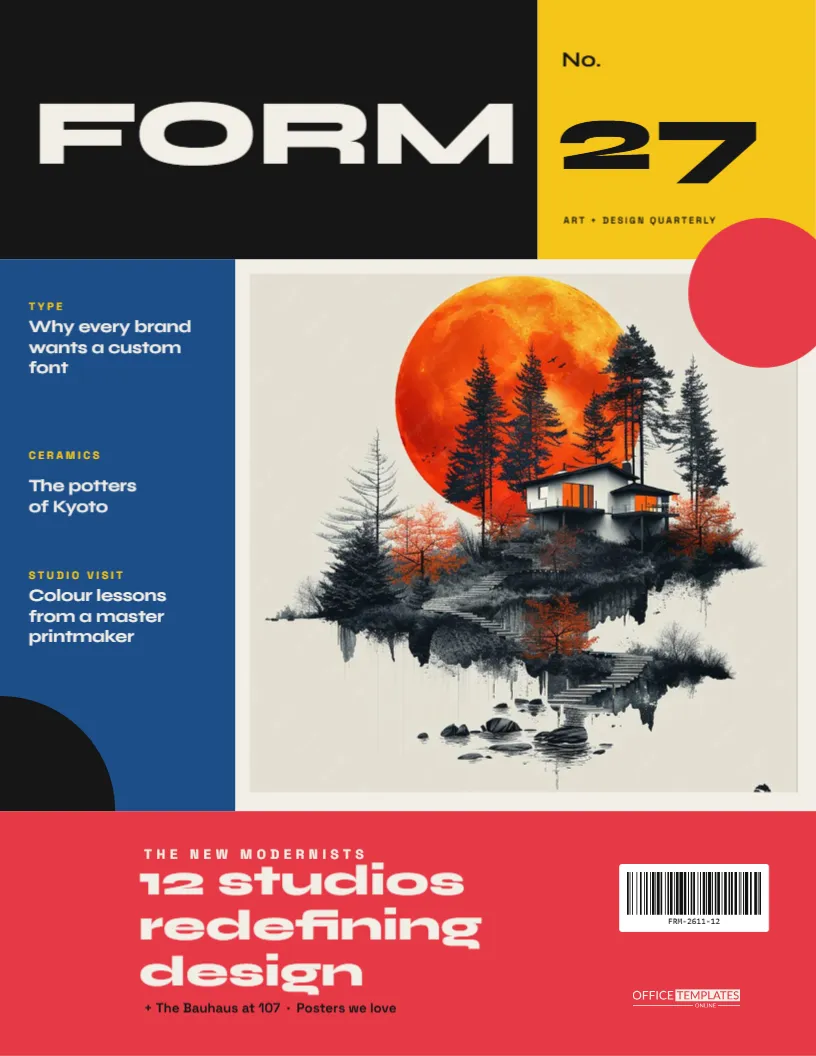
The cover is US Letter, 8.5 x 11 inches, portrait, divided into clear rectangles on an off-white paper background. The layout follows a simple grid:
| Block | Position | Colour | Contents |
|---|---|---|---|
| Masthead | Top left, about two-thirds wide | Black | “FORM” in huge off-white Syne capitals |
| Issue block | Top right | Yellow | “No. 27” and “ART + DESIGN QUARTERLY” |
| Cover-line column | Left, full middle height | Blue | Three stories with yellow kickers |
| Photo | Right of the column | Your image | A near-square photograph |
| Accent circle | Photo’s top-right corner | Red | A solid disc overlapping the edge |
| Quarter circle | Bottom-left corner of the column | Black | A quarter disc anchoring the corner |
| Feature band | Full width at the bottom | Red | “12 studios redefining design”, barcode, logo |
The cover-line column’s stories are TYPE (“Why every brand wants a custom font”), CERAMICS (“The potters of Kyoto”) and STUDIO VISIT (“Colour lessons from a master printmaker”). The red band’s kicker reads “THE NEW MODERNISTS”, with the extras line “+ The Bauhaus at 107 · Posters we love”.
Why Bauhaus Still Works
The Bauhaus school (1919–1933) taught that design should be clear, functional and built from basic forms: the circle, the square and the triangle, in primary colours. A century on, those rules still produce covers that stand out on any shelf or screen. They rely on contrast and structure, not decoration. In this template the grid does the organising, the colour blocks create rhythm, and the single red circle gives the eye a place to land. When you edit it, try to keep that restraint: one photo, a few words, strong shapes.
Adapting the FORM Grid
- Add your image. Select the square image and use Replace Image. Artwork, architecture, a product or a portrait all work. High-contrast or black-and-white images look especially striking against the colour blocks.
- Rename the magazine. Double-click “FORM”. Short words of four or five letters fill the black block best: GRID, SHAPE, CANVAS, or your studio’s name.
- Change the issue number. Double-click “27” in the yellow block. Numbers are part of the design, so feel free to make them even bigger.
- Write the cover lines. Edit the three stories in the blue column and the headline in the red band.
- Swap the palette. Every block is a plain rectangle, so recolour it with a click. Try the Mondrian set (red, yellow, blue and black) or a muted modern set (terracotta, mustard, teal and charcoal).
Who This Cover Suits
- Design and architecture students presenting a portfolio or thesis as a magazine.
- Creative studios and agencies producing a capabilities booklet or annual review.
- Galleries and museums for exhibition catalogues and event programmes.
- Art teachers teaching composition, colour theory or the history of design.
- Makers and illustrators releasing a zine of their work.
Matte and Uncoated Stocks for Flat Colour
Flat colour blocks print beautifully on uncoated or matte paper, which also suits the art-world aesthetic. Download the PDF and print on 100 lb matte or uncoated cover stock. A print shop can print full bleed so the blocks run to the page edges. For portfolios, print the cover and inside pages (use Add Page) and bind them with a simple saddle stitch or a black spiral. For online portfolios and Behance-style presentations, download a PNG.
Picking Images That Suit a Bauhaus Grid
Not every photo sits happily among bold colour blocks. The best images for this cover share a few qualities. They have a clear single subject, such as a vase, a chair, a building’s corner or a face in profile. They have strong shapes and edges that echo the geometry around them. And their palette doesn’t compete with the primaries: black-and-white photos, neutral backgrounds and images with one dominant colour all work well.
Architecture photographed straight-on, product shots on plain backgrounds and close-ups of textures (woven fabric, glazed ceramics, printed type) look especially good. If your image is busy, try converting it to black and white before uploading. The red circle and blue column then carry all the colour, the way many classic modernist posters do.
A Quick Colour Theory Note
Primary colours are powerful because they sit far apart on the colour wheel, so every block contrasts strongly with its neighbour. The template balances them unevenly on purpose: a large black block, a medium blue column, a small yellow block and red used twice (the circle and the band). That imbalance creates movement. If you change the palette, keep one colour dominant, one supporting and one as a small accent, and the grid will still feel lively rather than flat.
Using the Cover for a Student Portfolio
Design and architecture students often have to present work as a printed book. This cover gives that book an instant professional identity. Put your name as the masthead, your graduation year as the issue number, your strongest project in the photo square, and three project titles in the blue column. The same grid can then continue across the inside pages for a consistent, confident portfolio.
Design Cover FAQs
Can I rearrange the blocks?
Yes. Every block is a separate rectangle, so drag them into your own composition. Keep edges aligned so the grid still feels intentional.
What font is the masthead?
Syne, a wide, geometric display font, used here at extra-bold weight. The cover lines use Syne and Space Grotesk. All are Google Fonts in the editor.
Can I remove the red circle?
You can, but it’s the cover’s focal point. If you remove it, add another accent, such as a triangle or a thick stripe.
Does the cover work in black and white?
The blocks turn to greys and the grid still reads clearly, so it’s good for low-cost photocopied zines.
Design With Intent
Pick one strong image, name your issue and let the grid do the rest. This cover proves that a few confident shapes can say more than a crowded page.