Children’s magazines are pure joy to look at: bold colours, bouncy letters and badges that shout about puzzles, jokes and things to make. This kids magazine cover template captures all of that. It’s perfect for teachers running a class magazine project, parents making a birthday surprise, libraries and clubs producing a newsletter, and children who want to see themselves on the cover of their very own magazine.
What Kids Will See
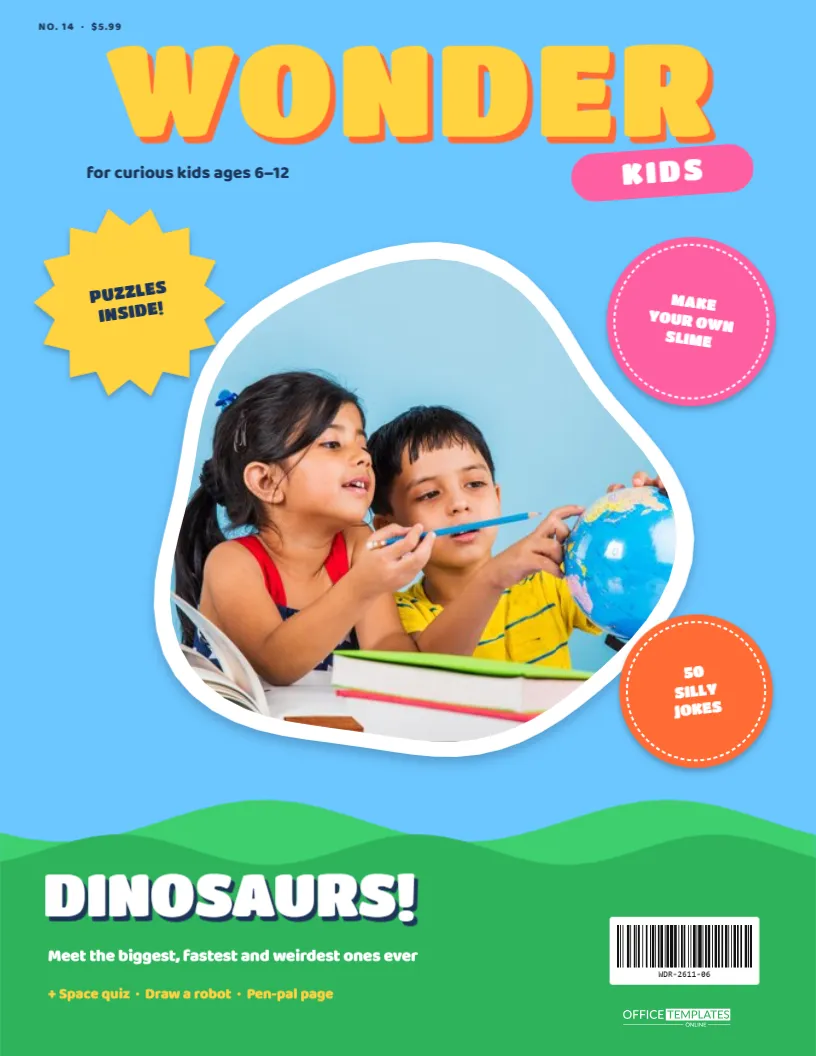
The cover is US Letter, 8.5 x 11 inches, portrait, on a cheerful sky-blue background:
- The masthead, WONDER, is set in big chunky yellow Titan One letters with an orange drop shadow that makes them pop off the page. A tilted pink pill underneath says KIDS, and “for curious kids ages 6–12” appears in navy beside it. The issue number and price sit in the top corner.
- The photo sits in a large wobbly blob shape with a thick white outline, like a sticker peeled from a sheet.
- Sticker badges hug the blob’s edges: a yellow starburst (“PUZZLES INSIDE!”), a pink circle (“MAKE YOUR OWN SLIME”) and an orange circle (“50 SILLY JOKES”), each with a dashed stitch line.
- Rolling green hills fill the bottom of the page in two shades of green. On them sits the main feature: “DINOSAURS!” in white with a navy shadow, the subline “Meet the biggest, fastest and weirdest ones ever”, and a yellow list of extras (“Space quiz · Draw a robot · Pen-pal page”).
- A barcode and our logo sit on the hills at the bottom right.
A Classroom Project: Make Your Own Magazine
This template makes a great foundation for a literacy or media lesson. Here’s a simple plan teachers can adapt for ages 7 to 11:
- Explore real covers (15 minutes). Look at two or three children’s magazines together. What do the masthead, photo, badges and cover lines each do?
- Choose a theme (10 minutes). Each child or group picks a topic they know well: dinosaurs, space, football, horses, cooking.
- Write cover lines (20 minutes). Practise short, exciting phrases with numbers and exclamation marks: “10 fastest animals!”, “How volcanoes work”.
- Take or choose a photo (15 minutes). Pupils photograph each other, a drawing or a model they made.
- Build the cover (30 minutes). In the editor, add the photo, rename the magazine and fill in the badges and cover lines.
- Print and present (15 minutes). Display the covers as a class newsstand and let each child pitch their magazine.
The activity practises persuasive writing, summarising and digital skills, and children love seeing their work look “real”.
Changing Wonder Kids for Your Readers
- Photo: click the blob and choose Replace Image. The photo fills the blob while keeping its shape. Photos with the face in the middle look best.
- Masthead: double-click “WONDER” to use the child’s name (“MAYA MONTHLY”) or a class name (“CLASS 3B NEWS”).
- Badges: each badge is a shape with text on top. Change the words to things inside your magazine: “RECIPES!”, “MAZE INSIDE”, “POSTER!”.
- Main feature: replace “DINOSAURS!” and its lines with your main topic.
- Colours: the hills are one group, so they recolour together (try orange for a desert or blue for the sea).
Birthday Surprise Idea
For a child’s birthday, put the birthday girl or boy’s photo in the blob, change the masthead to their name, and write cover lines all about them: “Turning 8: the full story!”, “Her top 5 favourite animals”, “EXCLUSIVE: best birthday ever”. Print it and put it in a frame next to the cake, or make one copy per guest as a party favour.
Printing Bright Colours for Kids
Download the PDF and print on bright white paper or card. The sky blue, yellow and green come out beautifully on a standard inkjet with the “vivid” colour setting. For classroom displays, laminate the covers so they survive lots of handling. For a newsletter, download a PNG and add it to your email or school website.
Writing for Young Readers
Children read covers differently from adults. They look at the picture first, then the biggest, brightest words, and they love exclamation marks, numbers and anything a little bit gross or silly. Keep headlines to two or three words where you can (“DINOSAURS!”, “SPACE QUIZ”), use words they can sound out, and promise something to do: make, draw, solve, find. Badges shaped like stickers and starbursts signal fun extras, which is why the template scatters them around the photo.
If the magazine is for early readers, pair each badge with a small picture or icon from the editor’s elements, such as a puzzle piece or a star, so pre-readers can still follow along. For older children, sneak in real facts: “The T. rex had teeth the size of bananas!” is as exciting as any joke and teaches something too.
A Printable Magazine for Rainy Days
Parents can turn the cover into a whole rainy-day project. Print the cover, then help the children make the inside pages by hand: a drawing of their favourite dinosaur, a joke page, a simple maze and a “fact of the day”. Staple the pages behind the cover and the result is a real magazine they made themselves, and something they’ll want to show everyone who visits.
Kids Cover FAQs
Is this suitable for younger children?
Yes. For ages 3 to 5, keep the words simple (“ANIMALS!”, “COLOURS”) and let the photo do the talking.
Can children edit it themselves?
Older children can, with a little help: click to replace the photo, double-click to change words. It’s a friendly way to learn simple design.
Can I add a second page with puzzles?
Use Add Page for an inside page with a word search, jokes or a drawing box, and download both pages together.
Can I change the blob to a circle?
The blob gives the cover its playful look, but you can delete it and add a circle photo frame from the editor’s shapes if you prefer.
Spark Some Wonder
Add a big smile to the blob, fill the badges with fun and print a cover that makes a child feel like a star reporter. Whether it’s a class project or a birthday surprise, it’s sure to be the most-read magazine in the house.