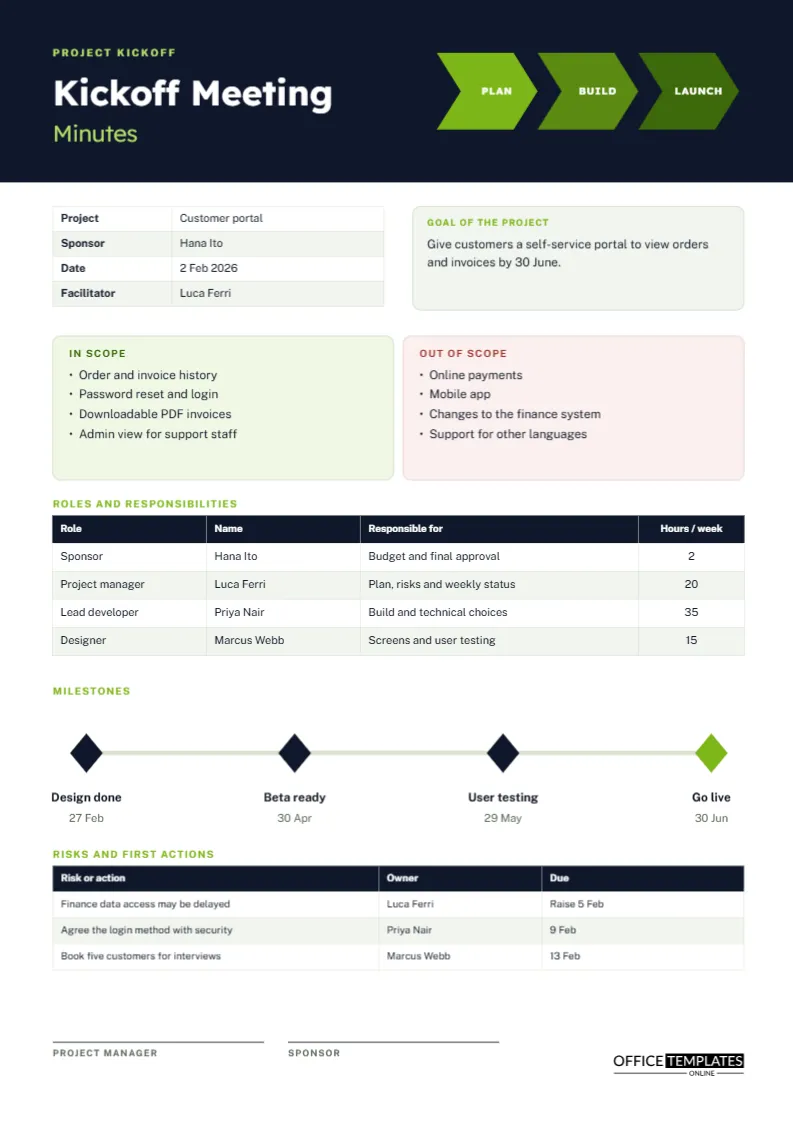
The kickoff is the one meeting in a project where everyone is in the same room, and nobody has yet disagreed. It is the moment to agree on what the project is, what it is not, who is responsible for what, and when the key dates fall. The minutes of that meeting become the reference point for every argument that follows. This page is built to record exactly those things on a single A4 sheet.
A Sixty Minute Kickoff Agenda to Follow
If you are the facilitator, this running order fits the sections of the page.
- Spend five minutes on goal and background.
- Spend fifteen minutes agreeing what is in scope and out of scope.
- Spend ten minutes confirming roles and time commitments.
- Spend fifteen minutes on milestones and dates.
- Spend ten minutes on risks and first actions.
- Spend five minutes confirming the next meeting.
Three Chevrons and a Dark Header
The top of the page is near-black navy with white and lime type. On the right, three arrow-shaped chevrons in lime green, olive and deep green spell out Plan, Build and Launch, which summarise the life of nearly every project. On the left, the heading Kickoff Meeting is set in bold Lexend, with the word Minutes beneath it in light lime. A restrained palette of dark, lime and soft grey keeps the page modern without feeling flashy.
Project Facts and the Goal Box
A small table on the left records the project name, sponsor, date, and facilitator. Beside it, a pale green panel states the goal in one sentence. The sample goal is to give customers a self-service portal to view orders and invoices by 30 June. A good goal passes two tests: it can be read aloud in one breath, and it says what success looks like.
In Scope and Out of Scope Side by Side
Two rounded cards stand next to each other, one tinted green for In scope and one tinted pink for Out of scope. The sample portal includes order history, login, PDF invoices, and an admin view for support staff, and it excludes online payments, a mobile app, finance system changes, and other languages. Writing the exclusions is as important as writing the inclusions, because scope creep usually begins with something that nobody explicitly ruled out.
A Mini RACI Chart for the Roles Table
The roles table lists role, name, responsibility, and weekly hours. Project managers often add a simple responsibility chart to avoid confusion about who does what. Here is a short example for one deliverable.
| Task | Responsible | Accountable | Consulted | Informed |
|---|---|---|---|---|
| Design the login screen | Designer | Project manager | Lead developer | Sponsor |
| Build the order history | Lead developer | Project manager | Designer | Sponsor |
| Approve the budget | Sponsor | Sponsor | Project manager | Team |
Weekly Hours as a Reality Check
The last column in the roles table shows hours per week, for example, two for the sponsor and thirty-five for the lead developer. Putting numbers on commitments exposes problems early. If a person is named on three projects and the hours add up to more than a working week, the kickoff is the time to say so.
The Milestone Line
A thin horizontal rule carries four dark diamonds, with the last one in lime to mark go live. Under each diamond sits a name and a date: design done 27 February, beta ready 30 April, user testing 29 May, and go live 30 June. The graphic makes the project feel like a journey, and it is easy to retype for your own dates.
Risks and First Actions
The final table mixes risks with the first actions. It lists a risk, an owner, and a due date; for example, finance data access may be delayed, owned by the project manager, to be raised by 5 February. At a kickoff, any risk you can name is a risk you can manage. Leave the table half empty rather than inventing risks to fill it.
Questions Worth Asking Before the Kickoff Ends
- What would make this project a failure in the sponsor’s eyes?
- Who must approve each deliverable, and how long will they take?
- Which dates are fixed and which are flexible?
- What happens if a key person is unavailable?
- How and how often will progress be reported?
Turning the Kickoff Into a Baseline
Project managers sometimes forget that a kickoff page is a baseline. Six weeks later, when someone asks for an extra feature or a new deadline, the page shows what was originally agreed and who agreed to it. That does not mean the plan cannot change, only that changes should be deliberate. Compare each request with the scope cards and the milestone line, decide together, and record the new decision in a fresh set of minutes.
Adapting the Kickoff Page for Non-Software Projects
The sample is a software project, but the layout fits an office move, an event, a marketing campaign, or a building renovation equally well. Change the chevron labels if your project has different phases, retype the scope bullets, and update the roles. Whatever the field, the same four questions apply: what are we doing, what are we not doing, who is doing it, and when is it due?
Editing the Kickoff Page
All text boxes are editable, and the chevrons and milestone diamonds are simple shapes that you can move or recolour. The roles and risks tables are real Table objects, so use Edit Table Data and the Add Row button. Table cells hold typed text, so hours will not total automatically.
Circulating the Kickoff Minutes
Send the page to everyone who attended, plus those who will be affected, within a day. Ask for corrections by a set date, and then treat the page as the baseline. When a later change request appears, compare it with the in-scope and out-of-scope cards before deciding.
Printing the Kickoff Page for the Project Board
A4 portrait. The dark header prints well in colour, and a grayscale copy remains readable. Many teams pin the printed page near the project board as a reminder of what was agreed.
Kickoff Questions Answered
Can this be used for small projects?
Yes. A two-person project still benefits from a page that states the goal and the scope.
Who should sign it?
The project manager and the sponsor, so both agree that the page is the starting point.