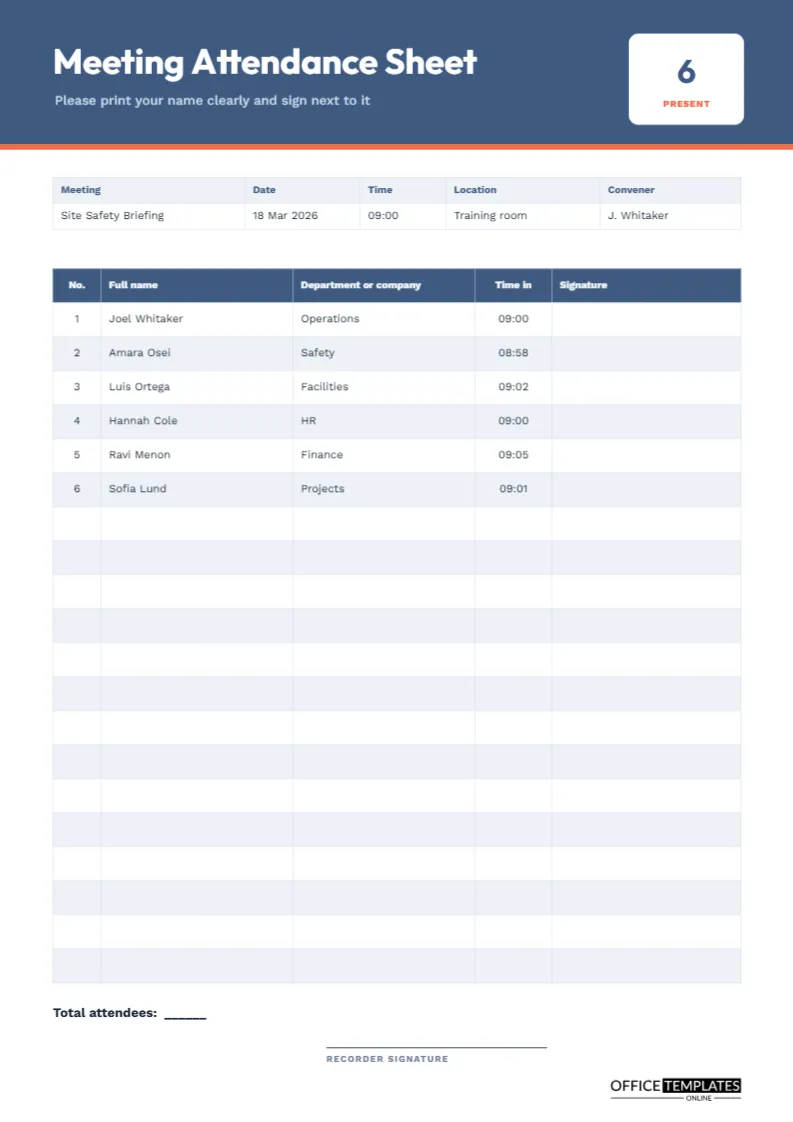
The humble attendance sheet does more work than it seems to. It proves who was at a meeting, it lets the chair check a quorum, and it forms a legal or safety record in many settings, from training sessions to board meetings. A good sheet is simple: big enough to write in, clear enough to fill in fast and neat enough to file. This page offers twenty rows of exactly that, with a header that tells people what to do and a count tile for the total.
A Blue Header That Gives the Instructions
The page begins with a steel blue band with a coral line beneath it. The title Meeting Attendance Sheet appears in Outfit, and a short line reads Please print your name clearly and sign next to it. A line of instruction placed on the sheet itself saves the organiser from repeating it at the door. A white tile on the right shows the number present; the sample says six, in large type with the word PRESENT below it.
Meeting Details Above the Table
A five-column strip records the meeting name, date, time, location and convener. The sample is a site safety briefing on 18 March, convened by an operations manager. Recording these details on every sheet means the page makes sense on its own if it is filed separately from the minutes.
Columns That Earn Their Place
| Column | Why it is included | Tip |
|---|---|---|
| No. | Makes totals easy to read | Counts the number of rows used |
| Full name | Identifies the person | Ask for print, not a scrawl |
| Department or company | Shows who they represent | Useful for visitors and contractors |
| Time in | Records arrival | Helps with late arrivals |
| Signature | Confirms presence | Leave the box wide enough |
Twenty Rows With Six Examples
The table has twenty rows. The first six show sample entries, and the rest are blank, so you can see how the page looks when used. Clear the sample text before printing. If you often have more than twenty people, print a second sheet or add rows with Edit Table Data and the Add Row button, checking that the table still fits the page.
Checking a Quorum From the Sheet
If the meeting needs a quorum, the chair can count signatures directly from the sheet. Note the time the quorum was reached next to the last signature needed, and record the same time in the minutes. This avoids the common dispute over whether a decision was taken with enough members present.
Using the Sheet for Training and Safety Sessions
Many organisations are required to prove that staff attended training, such as fire safety or data protection. A signed attendance sheet is the usual proof. Keep the page with the training material and the trainer’s name. If a worker later claims they were never briefed, the sheet is a ready answer.
Total Attendees and the Recorder
At the foot, a line reads Total attendees followed by a blank. The recorder counts the signatures, writes the number, and signs under it. The count on the sheet and the title at the top should match, so retype the title when you finish.
Keeping Personal Data Safe
An attendance sheet contains names and sometimes company details. Do not leave it on a table where others can copy it. Keep it with the meeting record, and follow your data protection rules about how long to keep it. For open events, consider a sheet that asks only for names and signatures.
Designing for Handwriting
The rows are about a centimetre high, which is comfortable for most handwriting. The signature column is wide, so a flowing signature fits. Print the page on plain paper that takes pen ink well, and provide a clipboard for people who stand.
Using the Sheet Online
For an online meeting, many platforms produce an attendance report. Paste the names into this sheet if you need a record in a familiar form, and leave the signature column blank or write present.
Editing the Sheet
Retype the meeting details in the strip and the heading if you want a different title, for example, Training Attendance Sheet. Table text is editable, and you can recolour the header cells to match your organisation.
Arriving Early and Setting Up the Sheet
Put the sheet on a table near the door with two or three pens and a clipboard. Fill in the meeting details before anyone arrives, and clear the sample names. A tidy sign-in point sets the tone and prevents a queue at the start. If you expect more than twenty people, put out two sheets and label them A and B.
What to Do When Someone Forgets to Sign
People forget. At the end of the meeting, check the sheet against the people you saw and ask anyone missing to sign before they leave. If someone has already gone, add their name with a note such as present, signature to follow, and ask them to initial the line the next day. A small habit saves arguments about who attended.
Checking Handwriting and Names
Illegible names are a common weakness. Ask people to print clearly in the name column, and read through the list after the meeting to correct anything that could be misread. Compare the names with the invitation list. A clean list is far more useful for follow-up, for example, when you send the minutes to those who attended.
Protecting Privacy on a Shared Sheet
When many people sign one page, each can see the others’ names. For most meetings this is fine, but for sensitive gatherings, consider an individual slip per person or a sign-in by a staff member at the door. Remember that the sheet may contain information about who was at a particular meeting, and store it accordingly.
Filing the Signed Attendance Sheet
A4 portrait. File the signed original with the minutes, and scan a copy for the shared drive.
Attendance Sheet Questions
Can I add a column for email addresses?
Yes. Add a column from the Table panel and narrow the others.
Why include a time column?
It records late arrivals, which can matter for training credit and for the minutes.