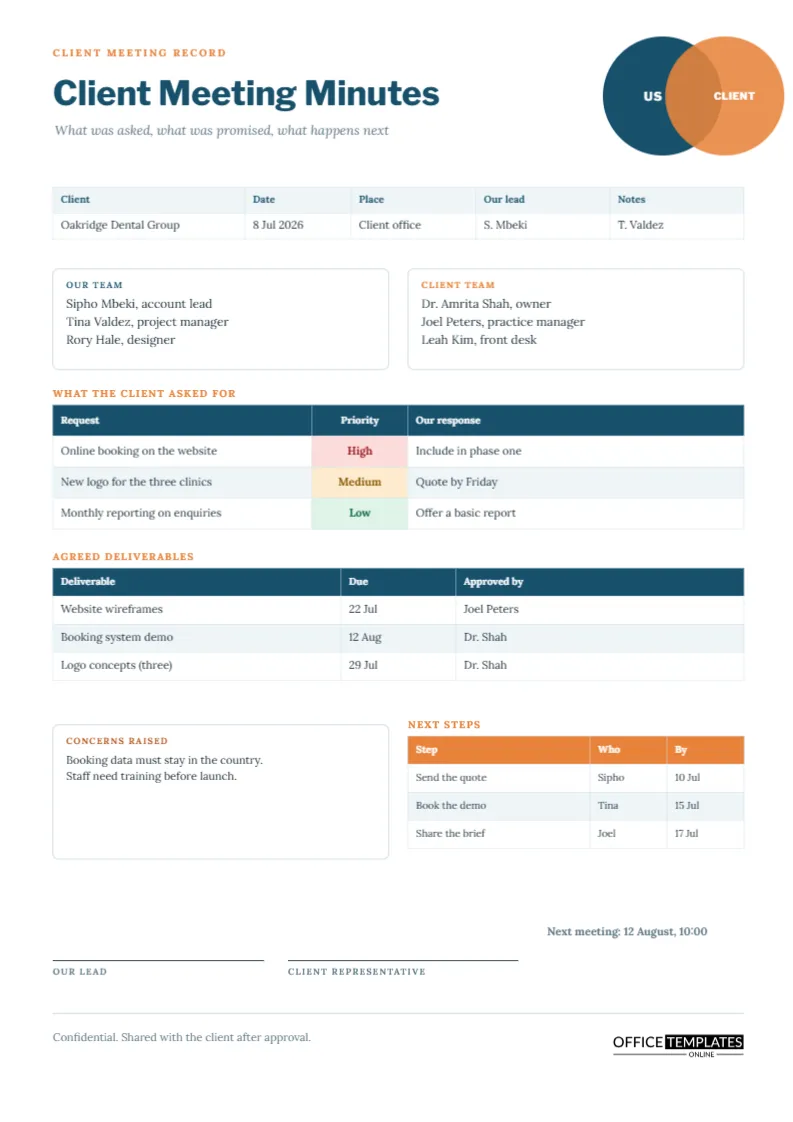
Client meetings go wrong in a predictable way. Everyone leaves feeling that something was agreed, and a fortnight later the two sides remember different things. A good client record prevents that by writing down, in plain words, what the client asked for, what you answered, and what each side will do next. This page is arranged around those three questions, with a simple picture of two overlapping circles to remind everyone that the project sits where the two parties meet.
Two Circles, One Overlap
In the top right corner, a deep teal circle labelled US overlaps an orange circle labelled CLIENT, and the overlap shows as a darker blend. It is a Venn diagram in its simplest form, and it frames the whole page: the minutes record the shared area, not either side’s wish list. The title Client Meeting Minutes is set in bold Libre Franklin beneath a small orange line reading Client meeting record, with the quieter italic subtitle What was asked, what was promised, what happens next.
Our Team and Client Team Cards
Two rounded cards sit side by side, one headed Our team in teal and one headed Client team in orange. Each lists three people with their roles. Writing both teams on the page matters because a client later may say that a particular person was not there. It also helps your own staff, who may join the project weeks later and need to know who the client contacts are.
The Request Table and the Honest Response
The first table lists each request, a priority, and your response. Priority cells are tinted red, amber, or green. The sample client asks for online booking, a new logo for three clinics, and monthly reporting, and the answers are included in phase one, quote by Friday, and offer a basic report. The discipline lies in the third column: every request deserves a response, even if the response is not yet. A blank cell invites the client to assume yes.
Phrases for Responding to a Request You Cannot Promise
| Situation | Wording for the response column | Why it works |
|---|---|---|
| Need more information | Quote by Friday | It sets a date without committing to a price |
| Outside the agreed scope | Price as a change request | It keeps the original agreement intact |
| Possible but costly | Offer a basic version | It gives the client a smaller yes |
| Not possible | Not in this phase | It is honest and leaves room for later |
Agreed Deliverables With an Approver
The second table lists each deliverable, the due date, and who on the client side approves it. The approver column prevents a common trap, where work is delivered and then held up because nobody on the client side knew they were responsible for approval. If approval takes longer than planned, the minutes show the delay did not come from your side.
Recording Concerns Without Escalating Them
A box at the lower left is headed Concerns raised, with an amber label. The sample records that booking data must stay in the country and that staff need training before launch. Concerns are not complaints. Writing them neutrally shows the client they were heard and gives you a list to address in the next meeting.
Next Steps for Both Sides
The orange-headed table lists steps, who and by when, and the sample splits actions between your team and the client. Include at least one action for the client. Projects stall most often because the client side owes something, such as a brief or a login, and nobody wrote it down.
Two Signatures, Not One
Signature lines for your lead and the client representative sit at the foot. Not every client will sign, but asking for a reply by email that says approved works almost as well. A footer notes that the minutes are confidential and shared with the client after approval.
Sending Client Minutes Within a Day
The page is most valuable when sent quickly. Within a day, email it as a PDF with a line asking the client to reply by a set date if anything is wrong. Silence after that date can reasonably be treated as agreement, and you can say so in the covering note.
Changing the Page for Your Own Business
Replace the sample dental group with your client, and retype the team cards. The circles are plain shapes you can recolour to match your brand and the client’s. The three tables are real Table objects, so use Edit Table Data to retype cells and Add Row to extend them. Cell colours for priority are stored as fills, so change them when a priority changes.
Preparing for a Client Meeting With the Page in Hand
You can use the page before the meeting as well as after it. Fill in the date, the team names, and the deliverables you already know about, and print it as a plan for the conversation. During the meeting, the empty rows become a prompt: if the client has not yet told you what they need, the request table is a visible gap to fill. Many account managers find that arriving with a half-completed page makes the meeting more focused and shows the client that you take their time seriously.
Handling a Client Who Changes Their Mind
Clients revise their requests, and that is normal. What matters is that each change is recorded as a change. When a request from last time is altered, add a new row, note the date, and mark the earlier one as replaced in the response column. This protects both sides. The client can see the history of their own decisions, and your team can show why a deadline or a price moved. Never overwrite an earlier minute; add to the record.
Printing the Client Page on A4
A4 portrait. The circles print in solid colour, and the overlap shows as a darker tone. A black and white copy remains clear because the labels sit inside the circles.
Client Meeting Questions
Should minutes include prices?
Only if they were agreed in the meeting. Otherwise, write quote to follow and send the figures in a separate document.
What if the client disagrees with the minutes?
Ask for their corrections in writing, update the page, and send the new version with the date of change.