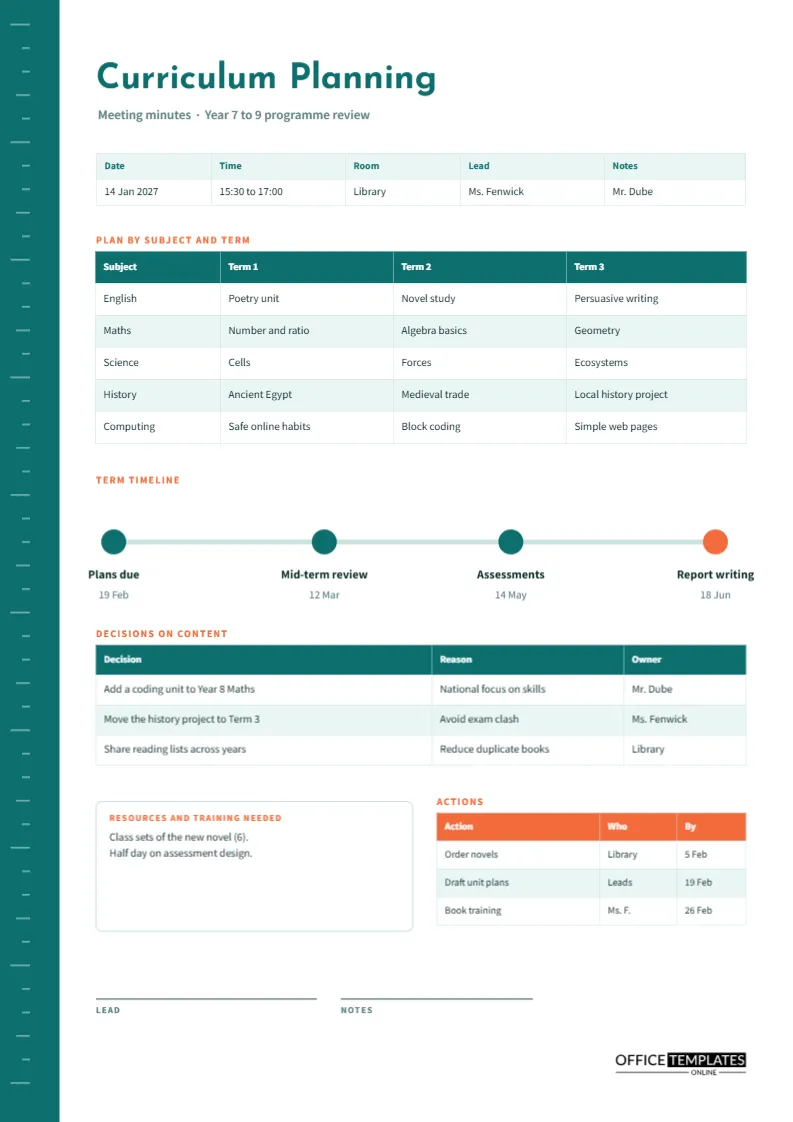
Planning what pupils will learn across a year involves a great many small agreements. Which unit comes first in term one, which project moves to term three, and how many novels the library must order. Teachers make these choices in a meeting, and they need to be able to look back later and see what was agreed and why. This page is a planning record built around a grid of subjects and terms, with a ruler running down its left edge to suggest measuring and planning.
A Teal Ruler Down the Left Side
The left edge is a tall teal strip marked with light tick marks of three different lengths, like a ruler. It is a small detail, but it frames the page and gives it a purposeful look. The title Curriculum Planning is set in Josefin Sans, a geometric face with a clean, modern feel, and a subtitle names the sample programme: a year seven to nine review. Source Sans Pro handles all the tables.
The Subject by Term Grid
The main table has subjects in the first column and three terms across. The sample lists English, maths, science, history and computing, with a unit in each cell: poetry, novel study and persuasive writing for English, number and ratio, algebra basics and geometry for maths. A grid like this shows the whole year at a glance and helps teachers see where units connect across subjects. It is also the part of the minutes most likely to be copied into a school handbook, so it deserves care.
Reading the Grid for Clashes and Gaps
| What to check | Where to look on the grid | Example in the sample |
|---|---|---|
| Heavy assessment weeks | Term 3 cells | History project and English writing in the same term |
| Cross-subject links | Same term, different rows | Computing web pages and history project |
| Empty cells | Any blank cell | A subject with no unit for a term |
| Resource needs | Units needing books or kit | The novel study in term two |
A Timeline of Term Milestones
A thin line carries four circles with labels and dates: plans due on 19 February, mid-term review on 12 March, assessments on 14 May and report writing on 18 June. The final circle is orange to mark the end. Putting dates on a timeline reminds the group that a curriculum has a calendar as well as a content list.
Decisions on Content, With Reasons
A table records three decisions, the reason for each, and the owner. The sample adds a coding unit to year eight maths because of a national focus on skills, moves the history project to term three to avoid an exam clash, and shares reading lists across years to reduce duplicate books. Recording the reason matters most. A new teacher reading the page in two years will understand why the project is in term three and will not move it back by accident.
Resources and Training Needed
A white box at the lower left lists what the plan requires: class sets of the new novel and half a day of training on assessment design. Resources are the hidden cost of any curriculum change, and the minutes should list them so that budgets can follow. Add quantities where you know them.
Planning Tasks for the Term Ahead
A small orange-headed table lists actions, who and by when: order novels, draft unit plans and book training. Curriculum work often runs over several months, so dates keep each piece moving.
Keeping Planning Minutes Consistent From Year to Year
If you use the same layout each year, the grids can be compared directly. Teachers can see which units were added, which were dropped, and how the balance has changed. Save each year’s page with the academic year first in the file name, and keep them in one folder.
Involving Teachers Who Are Not in the Meeting
A planning meeting usually includes subject leads, not every teacher. Send the page to everyone affected, and ask for comments by a given date. A short comment period reduces the number of surprises in the autumn, and it gives teachers a sense of ownership of the plan.
Linking Plans to Standards
If your school follows a national curriculum or a set of standards, mention the reference in the unit cells or in the notes. For example, add a code beside the unit name. A short code lets inspectors and colleagues check coverage quickly, and it avoids the need to copy long descriptions.
Editing the Grid
The grid is a real Table object. Use Edit Table Data to retype cells, and the Add Row button to include more subjects. Change the number of columns from the Table panel if your school has four terms or two semesters. The ruler strip and timeline are simple shapes you can recolour or move.
Printing the Planning Page
A4 portrait. The teal ruler strip prints dark, so a draft copy may use a lighter shade. In black and white, the grid and timeline remain clear.
Balancing Coverage and Depth in the Plan
Every curriculum tension begins with the same question: how much to cover and how deeply. A grid helps because it shows the number of units in each term. If term two has five dense units and term three has two, the imbalance is plain. Record the discussion in the reason column, and note which topics will be taught in depth and which will be introduced lightly.
Planning Across Year Groups
Pupils experience the curriculum over several years, so the plan for year seven must connect to years eight and nine. When you review one year, bring the grids for the others and look for repeated content and missing steps. A note in the reason column, such as builds on year seven fractions makes the progression visible to future readers.
Curriculum Planning Questions
Can I use it for a college programme?
Yes. Replace the subjects with modules and the terms with semesters.
How often should the plan be reviewed?
Once a term is common, with a larger review each year.