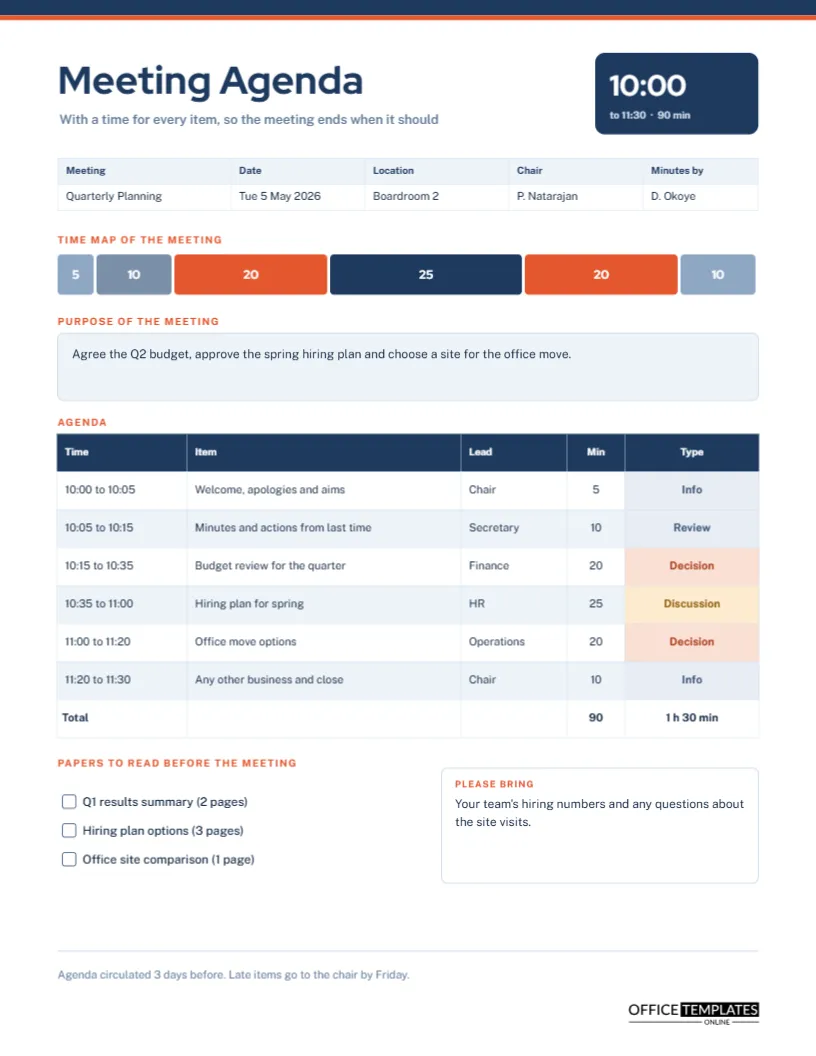
Most meetings overrun for a simple reason: nobody decided in advance how long each item deserved. An agenda that lists topics without times invites the first item to eat the whole hour. This template puts a number against every item and works out the clock times for you. A stacked bar at the top shows the shape of the meeting before it starts, and a column of item types tells each person whether they are there to decide, to discuss or simply to listen.
A Time Map Made of Six Blocks
Under the details strip, a row of coloured blocks runs the width of the page. Each block is as wide as its item is long, and the minutes are written in white inside it. The sample has blocks of five, ten, twenty, twenty-five, twenty, and ten minutes, and the two decision blocks are in orange so they stand out. A glance at the bar shows that a quarter of the meeting is one topic, which is exactly the sort of fact a chair needs to notice before the day.
Start Times That Add Up
The agenda table has a time column that shows each item as a range: 10:00 to 10:05, then 10:05 to 10:15, and so on to 11:30. The ranges are worked out from the minutes, so the last item ends exactly at 11:30, ninety minutes after the start. The total row sums the minutes and says one hour thirty. Because table cells hold typed text, recalculate the times when you change a duration.
Working Out Times in Five Steps
- Decide the start time and the total length you can afford.
- List the items and give each a realistic number of minutes.
- Add the minutes and compare the total with the time available.
- Trim or move items until the total fits.
- Write the start and end time of each item in the time column.
Item Types Set Expectations
| Type | What the person should do | Where it appears on the page |
|---|---|---|
| Info | Listen and ask short questions | Grey label |
| Review | Check progress against earlier decisions | Grey label |
| Discussion | Share views and options | Amber label |
| Decision | Come ready to vote or agree | Orange label |
A Navy and Orange Page in Red Hat Display
A thin navy bar and a thinner orange line cross the top edge of the US Letter page. The title Meeting Agenda is set in heavy Red Hat Display, and a navy panel at the right shows the start time in large digits with the end time and total below. The body text is Public Sans. The palette is calm and corporate, with orange reserved for the things that need attention.
The Purpose Box
A tinted box under the time bar states the purpose in a sentence: agree the Q2 budget, approve the spring hiring plan, and choose a site for the office move. A meeting without a stated purpose tends to wander. If you cannot write the purpose in one sentence, the meeting may be two meetings, or may not be needed at all.
Papers to Read Beforehand
Three empty check boxes list the papers attendees should read: a results summary, hiring options, and a site comparison, with page counts. Giving page counts helps people judge the effort, and the boxes encourage them to tick off each item. Meetings run much faster when everyone has read the papers in advance.
Please Bring
A box at the lower right asks people to bring specific things, such as hiring numbers and questions about site visits. It is a polite way to ask for preparation, and it turns the agenda from a notice into a short brief.
Sending the Agenda in Good Time
The footer says the agenda is circulated three days before, with late items going to the chair by Friday. A deadline for late items keeps the agenda stable. Three days gives attendees time to read the papers without making the agenda stale.
Leaving Room for Overruns
Experienced chairs plan slack. If a ninety-minute meeting has ninety minutes of content, the first overrun pushes everything past the end. Consider scheduling eighty minutes of content in a ninety-minute slot, or adding a ten-minute reserve line near the end. The sample does not show one, but you can add a row.
Editing Durations and Types
Change a duration by retyping the minute cell and the time ranges, and adjust the width of the matching block in the time map. The table is a real Table object, so you can use Edit Table Data and Add Row for more items. Type labels are coloured cells that you can recolour.
Using the Agenda as the Skeleton of the Minutes
After the meeting, the same table can become the minutes. Add a decision column, or paste the items into the minutes template of your choice. Keeping the same order means attendees can compare plan and outcome easily.
Putting Decisions Before Discussion Fatigue
Attention fades through a meeting, so place the items that need clear thinking in the first two-thirds. In the sample, the budget decision sits third and the office move fifth, both after the routine business but before the close. If a late item is a decision, give it extra time and a clear lead, or the group may rush it.
Handling Items That Run Over Their Time
When an item is about to run over, the chair has three choices: extend it by taking time from a later item, stop and set up a separate session, or agree on a decision by email. The time map on this page makes the trade visible, because you can see which block would shrink. Make the choice aloud, and note it in the minutes.
Agenda Habits That Save Time Across a Year
If a group meets monthly, a consistent agenda becomes a rhythm. Always open with the same two items, always close with next steps, and never skip the time column. Over twelve meetings, even five minutes saved each time returns an hour. Sending the page three days ahead also saves time, because people arrive prepared.
Printing the US Letter Agenda
The page is 8.5 by 11 inches. Print one copy per attendee, or share the PDF on screen if the meeting is online.
Agenda Questions
How many items fit in a ninety-minute meeting?
Four to six is usual, depending on how much discussion each needs.
Should the chair also be listed as a lead?
Yes, for items they present, such as the welcome and close.