What an Executive Card Needs to Say Without Saying It
Senior people rarely hand out many cards, so each one counts. The card should look calm, current and uncluttered, and it should make the key details easy to find: who you are, what you lead, how to reach you. This executive template uses plenty of white space and a single bright blue accent, which gives it the feel of a modern technology or services company. It works well for directors, managing partners and founders.
The Layout Piece by Piece
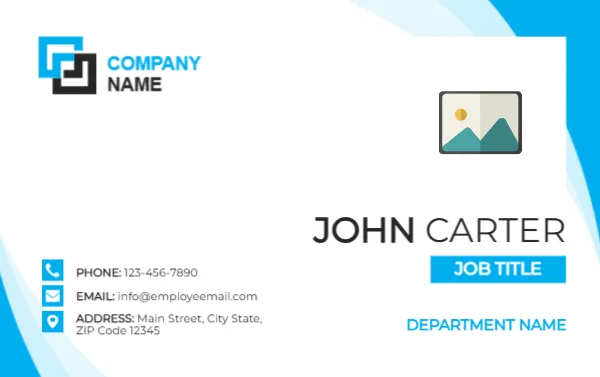
The card is 3.375 x 2.125 inches in landscape. The background is white with a sweeping blue wave in the right corners, light blue toward the edge and bright sky blue on the right side. At the top left, a square logo mark in blue and black sits beside the words COMPANY NAME. On the right, a photo placeholder sits above the name JOHN CARTER, set in large light capitals. Below the name, a bright blue tag reads JOB TITLE, and DEPARTMENT NAME follows in blue.
In the lower left, three small round icons in blue show a phone, an envelope and a map pin, each with a line of text: PHONE 123-456-7890, EMAIL [email protected], and ADDRESS Main Street, City State, Zip Code 12345. The type is a clean geometric sans serif.
Filling the Fields in Order
- Replace COMPANY NAME and the logo mark with your own logo.
- Retype the name, in the form your colleagues and clients use.
- Change JOB TITLE to your real title, such as Chief Executive Officer or Managing Director.
- Replace DEPARTMENT NAME with a division, or delete it if you lead the whole company.
- Enter a direct phone number, a work email and your business address.
- Click the photo placeholder and choose Replace Image, or delete it for a text only card.
Keep Titles Short on a Small Tag
The blue tag is sized for a few words. A long title such as Senior Vice President of Global Business Development will spill over. Shorten it to the most meaningful part, for example Senior Vice President, and put the detail on your email signature. If you must keep a long title, reduce the font size by a point or two and check that the tag still reads clearly.
Photo Etiquette for Leaders
Many executives leave the photo off their cards, and the template works well without it. If you do use a photo, choose a recent, professional portrait with a neutral background. If the card will be used by several leaders, use the same style of photograph for each one, so the set looks consistent when displayed together.
Matching the Brand
The bright blue is part of the artwork, so for a different colour palette you would change the logo and the text colours. If your brand is blue already, the card will fit naturally. If it is green or red, consider whether the blue wave will clash. The design works best when the logo itself includes blue.
Paper and Finish for a Senior Card
For a senior card, choose 350 gsm uncoated stock with a soft touch or a fine matte laminate. Ask a print shop for square corners for a modern look, or slightly rounded for a friendlier feel. At this size, eight cards fit on a letter sheet.
For other roles in the same family, see the intern name card and the office assistant name card. More are in ID cards.