Why freelancers need a credential
Freelance journalists face a special challenge: they do the same work as staff reporters but have no employer badge to show. When you arrive at a courthouse, a rally or a press conference, organizers want proof that you are who you say you are. A tidy freelance journalist press pass gives you a professional way to introduce yourself, and this template’s newspaper-inspired design makes you look established from the first glance.
How to look credible without an employer
Credibility comes from clarity. A good freelancer card shows a real photo, a full name, a clear role, the topics you cover and a way to verify you. It avoids pretending to be something it is not. This design lists “Freelance” prominently, names the beat and links to a verification page, so that anyone can see exactly what you do.
A walk through the card
The front: nameplate and stamp
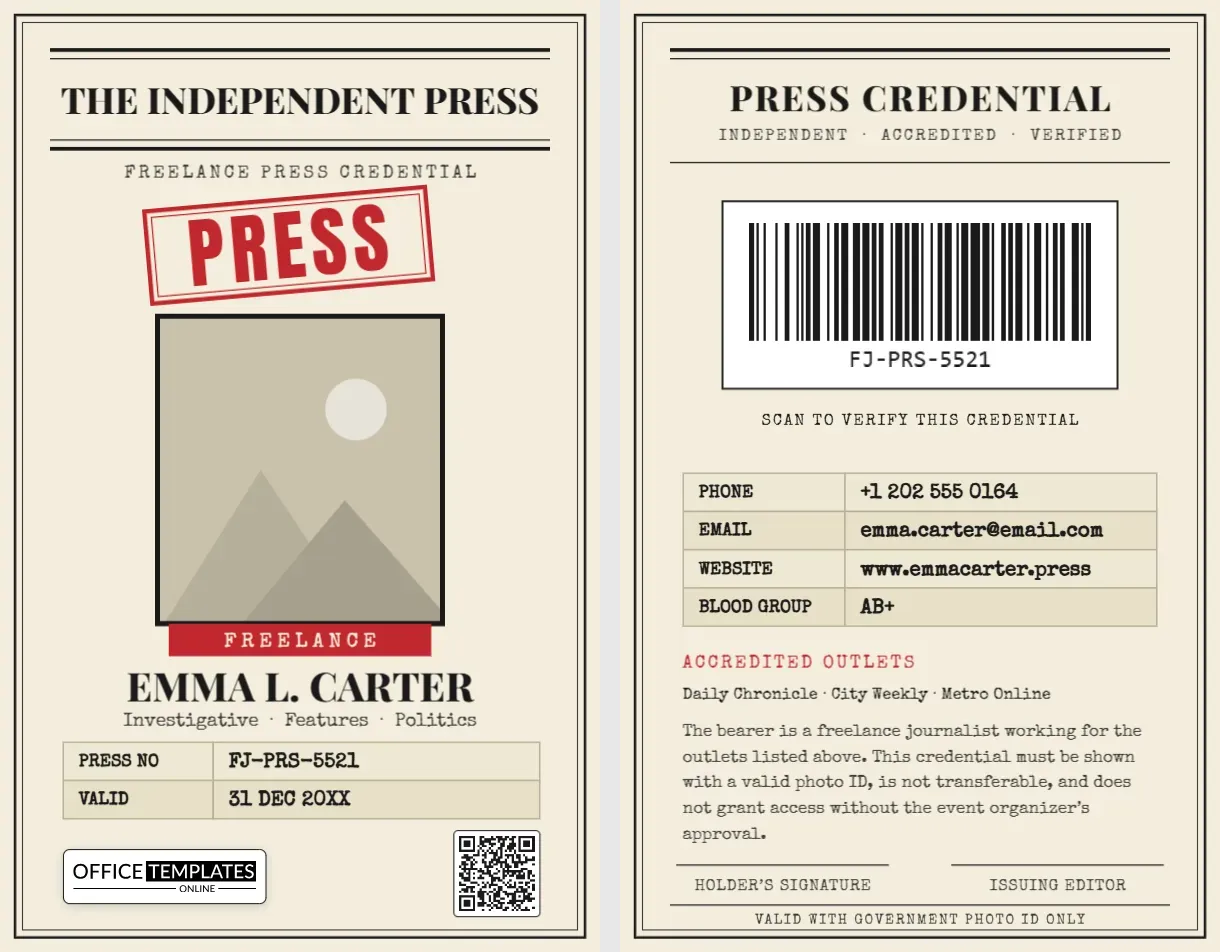
The top of the card is a newspaper nameplate: heavy rules, a bold serif masthead reading “The Independent Press” and a typewriter line, “Freelance Press Credential”. Beneath it sits a large red stamp reading “PRESS”, tilted like an ink stamp. You can rename the masthead to your own site, newsletter or collective.
The photo and name
A passport-style portrait sits inside a black frame, with a red “Freelance” ribbon beneath it. Your name appears in a strong serif, and your beat, such as “Investigative · Features · Politics”, appears in a typewriter font.
The details table
Two rows show the press number and the validity date. Add rows for your website, outlet or specialties, or remove one if you need more space.
The barcode
A barcode at the bottom right encodes your press number, and our logo appears at the bottom left as a template credit.
The back: verification and outlets
The back repeats the newspaper frame and displays a large QR code with the caption “Scan to verify this credential”. A contact table lists phone, email, website and blood group. A short list of accredited outlets follows, then a paragraph explaining the card’s purpose and a signature line for you and an issuing editor.
Getting the accredited outlets right
The “Accredited outlets” line is the most important part for a freelancer. List only publications, sites or broadcasters that have actually commissioned or published your work, and keep it up to date. If you work for several, list the three or four most recognizable. When an organizer asks who you are working for, this line answers immediately.
What a press card is, and is not
A card like this is a personal identification card that helps you introduce yourself. It is not a government license, and it does not by itself grant legal rights or access. Rules for press credentials differ by country, city and event. Always follow local laws and organizers’ accreditation rules, carry a government photo ID and apply for official accreditation where it is required. The card also states that it is valid with photo ID only, to keep expectations clear.
Turning the template into your own press pass
- Open the template and click the photo frame to Replace Image with your portrait.
- Type your name, beat, press number and validity date.
- Rename the masthead to your publication or personal brand.
- Edit the barcode and QR code with the editor’s built-in tools; link the QR to your portfolio or verification page.
- Update your outlets, contact details and signature labels on page 2.
- Download the card as a PDF, PNG or JPG.
Print at home or at a shop
The card is portrait CR80, 2.125 x 3.375 inches (54 x 85.6 mm). At home, print on thick matte photo paper, trim to size and laminate; a rounded-corner cutter gives a professional look. A print shop or online card service can produce PVC cards from your PDF, and many offer lanyard holders too. The cream color is designed for uncoated stock, so choose an ivory or natural finish if you order professionally.
Tips for freelancers on the move
- Carry your card in a hard holder together with a government ID.
- Keep a digital copy on your phone in case you lose the physical card.
- Update your outlets whenever you take on a new client.
- Refresh your photo every year or two so it stays accurate.
Short answers
Can I use it for a photojournalist or a blogger?
Yes. Change the words “Journalist” and the beat, and it works for photographers, bloggers, podcasters and citizen reporters.
Can I change the red stamp?
Yes. The stamp is text and shapes you can edit or recolor.
Does the QR code have to link to a website?
No. It can also hold text or contact details, using any option in the QR panel.
Building a simple page for your QR code
The QR code is only as good as the page it opens. Create a short, clean page or portfolio with your name, photo, beat, contact details and links to recent articles. Add a line stating that you are a freelance journalist and list the outlets you have worked with. When an organizer scans the code, they should see the same name and photo as on the card, which builds instant trust.
Renewing your card every year
A credential should not last forever. Choose a validity date one year ahead, and set a reminder to review it. At renewal, update your photo, outlets and contact details, and issue a new press number if you use one. A regularly refreshed card shows that you are active in the field and that your information is current, which organizers appreciate.
Keeping your details private
A press card travels with you, so think about what to print on it. Use a work email and a business phone number instead of personal ones if you prefer, and leave out your home address. The blood group row is optional; delete it if you would rather not print medical information. A well-chosen set of details keeps the card useful for organizers while protecting your privacy.
Show organizers you are serious about your work. Open the template, add your credentials and download a freelance press pass today.