Running media accreditation: the workflow
Every large event, from a sports final to a national conference, has to decide who is a genuine member of the press and where each person may go. A good accreditation pass turns that decision into a simple visual. This media event accreditation pass template was built for organizers who need to issue dozens or hundreds of passes and want every one to be clear, consistent and quick to check. Here is the workflow it supports.
- Applications open. Media outlets and freelancers apply with their credentials.
- Review and approval. The press office checks each application and assigns a category and access level.
- Pass creation. You fill in the template for each person, or duplicate it for a whole outlet.
- Issue and check-in. Staff scan the QR code or barcode when the holder arrives.
- Event day. Security and volunteers glance at the color, category and zones.
A design built for crowds
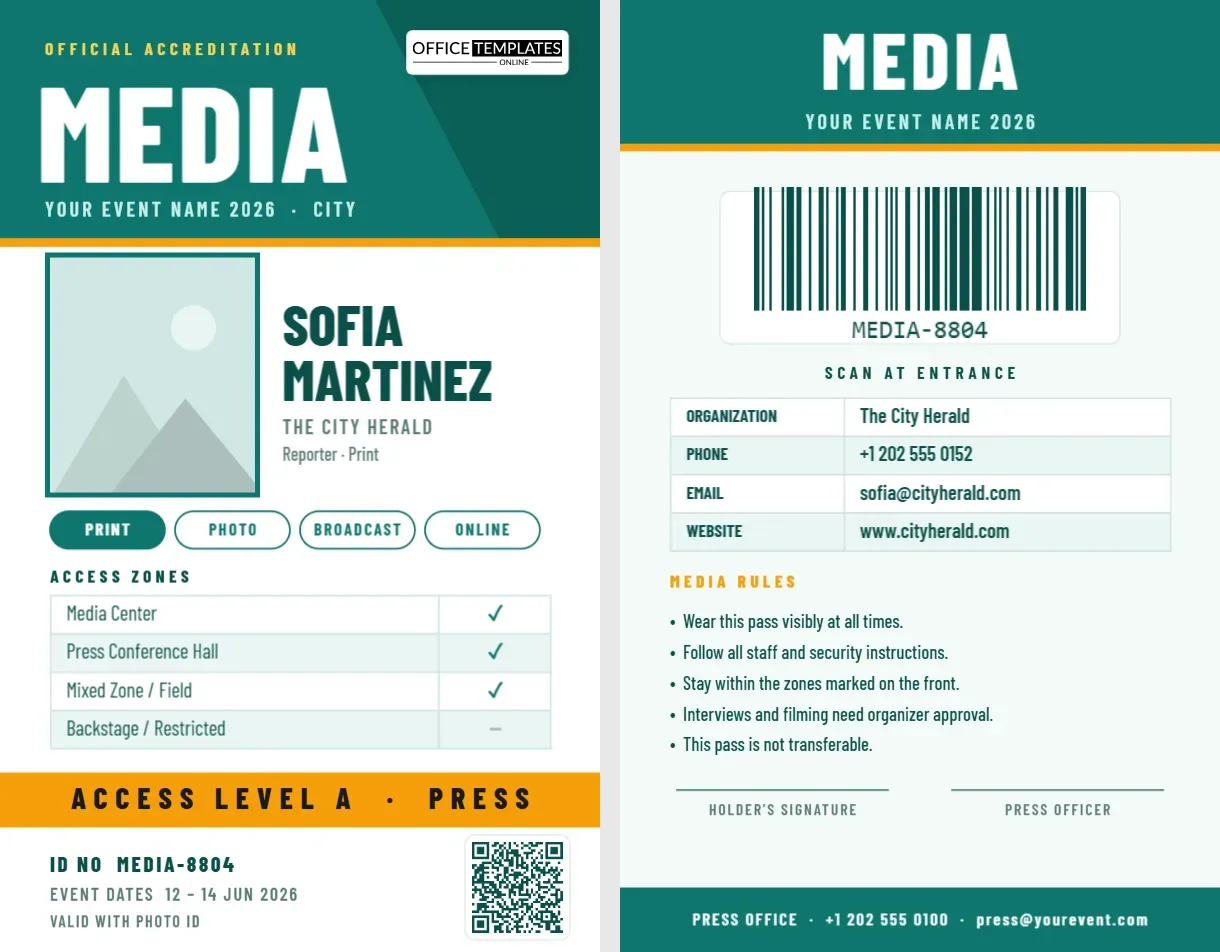
At a busy entrance, staff have a second or two per person. The front of this pass therefore uses a giant word, “MEDIA”, in white on a teal field, followed by an amber access-level band. Everything else is deliberately quiet: a photo, a name, the outlet and a set of tick marks. The result reads clearly from an arm’s length away.
The category chips explained
Under the photo and name are four rounded chips: Print, Photo, Broadcast and Online. The selected category is filled in teal, and the others are outlined. Different categories often have different rights, for example photographers may enter the field of play while print reporters remain in the press box. Rename the chips to your own categories, such as Wire, Radio, TV Crew or Freelance, and recolor the selected one.
Access zones with ticks
A table lists the areas of the venue and shows a tick or a dash for each: Media Center, Press Conference Hall, Mixed Zone or Field, and Backstage or Restricted. Because it is an editable table, you can rename the zones after your venue map, add rows for a press box or hospitality suite and change ticks for each person. The amber band below repeats the overall level, “Access Level A · Press”, so a guard can tell at a glance.
QR check-in and barcode backup
The front carries a QR code at the bottom right that can link to the holder’s registration record or a check-in page. The back carries a large barcode with the pass number, useful for handheld scanners at the door and for counting attendance by zone. Together they give you a fast primary method and a reliable backup if one fails.
Both codes are created with the editor’s built-in tools. Click the code, change its value and the image regenerates in place, so you can produce a whole batch by editing only the numbers.
The back of the pass
The reverse repeats the “MEDIA” header and lists the holder’s organization, phone, email and website. It includes a short set of media rules: wear the pass visibly, follow staff instructions, stay within marked zones, obtain approval for interviews and filming, and do not transfer the pass. Two signature lines, for the holder and the press officer, and a footer with the press office contact finish the design.
Design tips for busy entrances
- Use one strong color per category, so guards recognize passes from across a room.
- Keep names in large type and organization names smaller.
- Print the pass number in the same place on every card.
- Choose a lanyard color that matches the access level.
- Test the scanners with printed samples before the event.
Printing 200 passes without stress
The pass is portrait CR80, 2.125 x 3.375 inches. For large numbers, download the PDF and take it to a print shop that can print on PVC or thick card stock. For a small event, print on 200 gsm matte card at home, trim and laminate. Add lanyards with a clear holder so both sides show. Keep spares for late arrivals and replacements, and print a “Lost pass” procedure on the reverse of your press guide.
Customizing for your event
- Open the template and replace “Your Event Name 2026 · City” with your event.
- Click the photo frame and choose Replace Image for each holder.
- Change the name, outlet, role and select the right category chip.
- Update the access zone ticks and the access-level band.
- Edit the QR link and barcode number, then update the back’s contact details.
- Download the pass as a PDF, PNG or JPG.
Questions organizers ask
Can I make several categories from one template?
Yes. Duplicate the template and change the band color, category chip and zone ticks for each category.
Can I add a sponsor logo?
Yes. Upload an image from the editor and place it on the back or under the photo.
Is the pass suitable for conferences and trade shows?
Yes. Change “Media” to “Press”, “Speaker” or “Exhibitor” and edit the zones to match.
After the event: closing the loop
When the event ends, collect the passes or ask holders to destroy them, and deactivate the barcode numbers in your system. Use the scan data to see how many media attended, which zones were busiest and which outlets took part. Send a short thank-you message with a link to your press images and a survey, and keep the pass template so you can reuse it next year with new dates and colors.
Making the pass accessible and inclusive
Choose high-contrast colors, large type for names and a clear layout so that passes are easy to read for everyone, including people with low vision. Add a pass number in numerals as well as the barcode, and consider providing large-print or tactile alternatives for staff who need them. Small choices like these make your accreditation process friendlier and more professional.
Working with the press office team
Accreditation is a team effort. Agree a naming convention for pass numbers, decide who approves each category and keep one master file with all details. Volunteers who hand out passes should have a short checklist: check a government photo ID, confirm the name against the list, hand over the pass and lanyard, and explain the zones. A calm, organized desk makes a strong first impression on visiting journalists.
Make every entrance faster and every press area safer. Open the template, add your event details and download a media accreditation pass today.