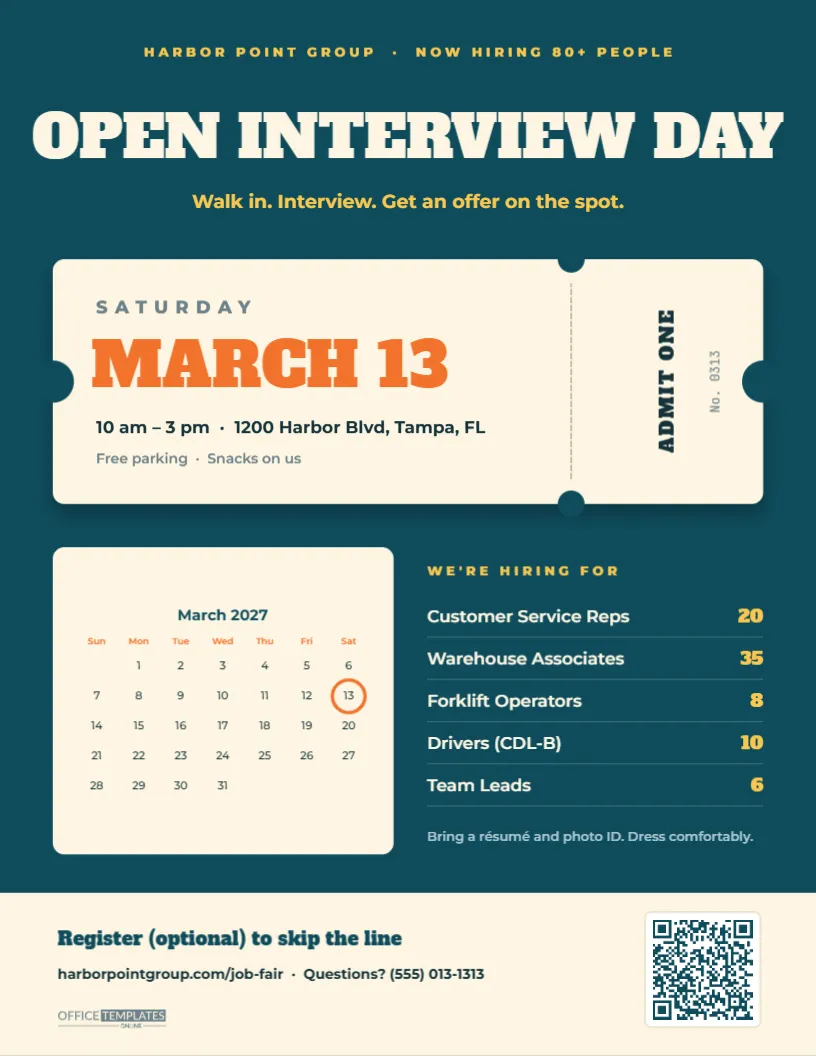
An open interview day can fill dozens of positions in a single afternoon, but only if people know about it and remember the date. This Job Fair Flyer is built around two things that help people remember: an admission ticket and a calendar. At the top, OPEN INTERVIEW DAY in bold slab capitals and Walk in. Interview. Get an offer on the spot. Beneath it, a cream admission ticket with notched edges, a perforated stub, and ADMIT ONE shows SATURDAY, MARCH 13, the time, and the address. Below the ticket, a month calendar with the date circled sits beside a list of how many people you are hiring for each role, and a cream footer invites people to register to skip the line. It suits employers running hiring events, staffing agencies, community job fairs, workforce centres, colleges and chambers of commerce.
A Ticket People Want to Keep
Admission tickets feel like invitations to something worth attending, which is exactly the feeling you want around a hiring event. The notches on both sides, the dashed perforation and the rotated ADMIT ONE stub make it recognisable at a glance. Together with the calendar, the flyer answers the three questions every attendee has: when, where, and what jobs.
Ticket, Calendar and Hiring List in Detail
- Top line: HARBOR POINT GROUP · NOW HIRING 80+ PEOPLE in spaced gold capitals on a deep teal page.
- Headline: OPEN INTERVIEW DAY in cream Alfa Slab One with the gold subline.
- Ticket: SATURDAY, MARCH 13 in large orange slab type, 10 am – 3 pm · 1200 Harbor Blvd, Tampa, FL, Free parking · Snacks on us, and a stub with ADMIT ONE and No. 0313.
- Calendar: the editor’s built-in Calendar object showing March 2027 on a cream card, with an orange circle around the 13th.
- WE’RE HIRING FOR: Customer Service Reps (20), Warehouse Associates (35), Forklift Operators (8), Drivers CDL-B (10), and Team Leads (6), with the numbers in gold.
- What to bring: a résumé and photo ID, with a note to dress comfortably.
- Footer:Register (optional) to skip the line, the event web address and a phone number, our small logo and a QR code.
The flyer fits US Letter paper, 8.5 x 11 inches, in portrait.
Changing the Month With Calendar Options
The calendar is not a picture of a calendar; it is the editor’s real Calendar object. To show your event month:
- Click the calendar to select it and open Calendar Options.
- Choose the month and year of your event. The grid rebuilds itself with the correct dates and the right number of weeks.
- Adjust the week start (Sunday or Monday), colours, and font in the same panel if you like.
- Drag the orange circle to your event date. The circle is a separate shape, so it stays where you put it; move it after changing the month.
Update the ticket date to match, and double-check the day of the week; it is the most common mistake on event flyers.
Event-Day Run Sheet for an Open Interview Day
A well-run hiring event turns walk-ins into offers quickly. Here is a simple plan you can adapt:
| Time | What happens | Who |
|---|---|---|
| 9:00 am | Set up check-in, interview tables, signage, and snacks | HR and volunteers |
| 10:00 am | Doors open; check-in and short application | Greeters |
| 10:15 am onward | 15-minute interviews by role | Hiring managers |
| Rolling | Conditional offers and background-check paperwork | Recruiters |
| 3:00 pm | Last check-in; follow-up list for no-shows | HR |
| Next day | Call candidates who registered but did not attend | Recruiters |
Editing the Ticket, Roles and Footer
- Company line and headline: type your company name and headcount; OPEN INTERVIEW DAY can become JOB FAIR or HIRING EVENT.
- Ticket: each line is separate text; change the day, date, time, address, and extras such as parking and childcare.
- Stub: keep ADMIT ONE and use the number for the date, or your event code.
- Hiring list: each role and number is its own text box; add or remove lines as needed.
- QR code: point it at your registration page from the QR code’s options panel.
- Colours: recolour the teal background, cream ticket and orange date to your brand palette.
Getting People Through the Door
Hiring events succeed when they are easy to attend. Hold them on Saturdays or early evenings so people with jobs can come, choose a location on a bus line with free parking, and promise a quick process, such as interviews on the spot and decisions the same day. Letting people pre-register with a QR code gives you a list to remind by text the day before. Share the flyer two to three weeks ahead through workforce centres, community organisations and social media, and print extra copies for the week of the event.
Making the Event Welcoming for Every Candidate
Job fairs draw a wide range of people: first-time job seekers, people returning to work after a break, older workers and candidates with disabilities. Small touches make a big difference. Mention on the flyer or registration page that the venue is accessible, that interpreters or large-print materials are available on request, and whether children are welcome if parents cannot find childcare. Keep the application short and offer help filling it in. Have water and seating, and tell people roughly how long the process takes. A welcoming, well-organised event reflects your company’s culture, and candidates who have a good experience are more likely to accept an offer and to tell friends about your next hiring day.
Printing and Distributing Event Flyers
Print from the PDF download on bright white paper. The teal background prints best on a laser printer. For community boards, laminate a few copies; for handouts, print on lighter paper to keep costs down. The calendar and ticket stay readable when printed at half size, so you can print two per sheet as small handbills.
Hiring Event Questions
Can I show a two-day event?
Change the ticket to MARCH 13 & 14 and duplicate the orange circle on the calendar for the second date.
What if my event is next month?
Open Calendar Options, pick the new month and year, and move the circle; the grid updates automatically.
Can I list pay for each role?
Replace the headcount numbers with pay ranges, or add pay in brackets after each role name.
Open the template, set your event date in Calendar Options, circle the day, list your openings, and fill the room on the day.