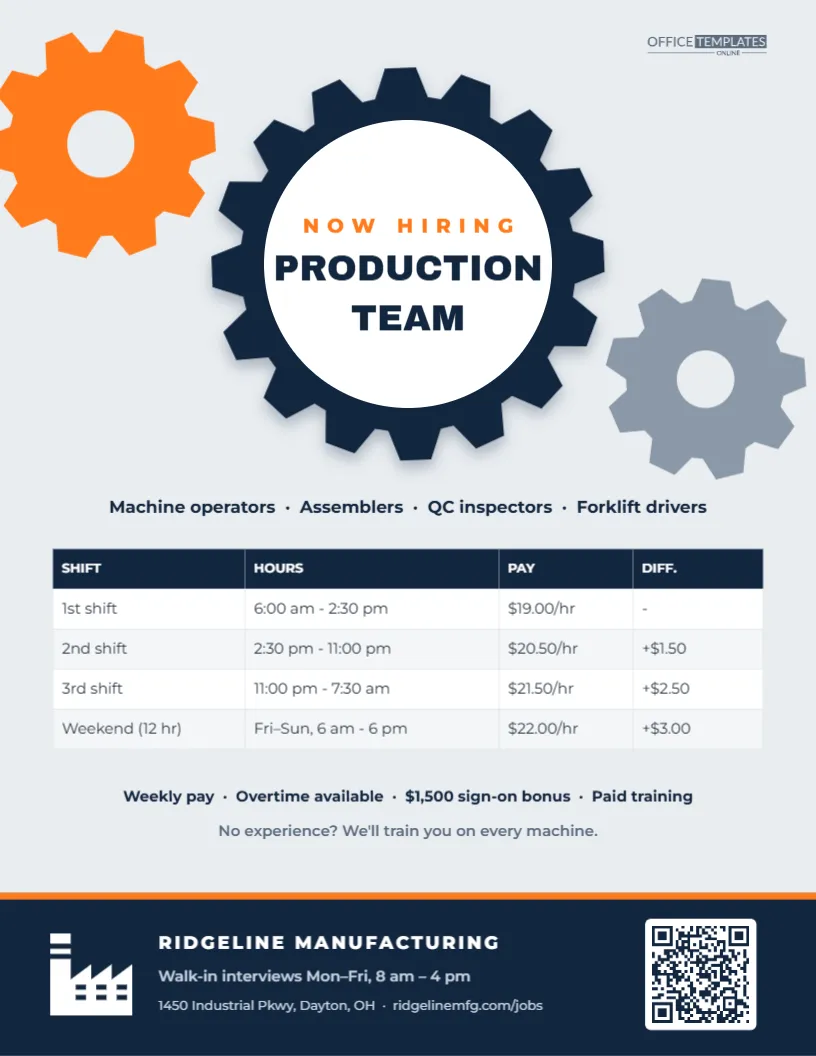
Manufacturers need people on every shift, and the best candidates compare plants by pay, schedule, and how they are treated on the floor. This Factory Hiring Flyer puts all of that on one clear page. Across the top, three interlocking machine gears (orange, navy, and grey) turn together, and the big navy centre gear holds a white disc with NOW HIRING and PRODUCTION TEAM. Below, the roles are listed in one line, followed by a real table of shifts with hours, pay, and shift differentials, and a line of perks. A navy footer with a factory icon, walk-in interview hours, and a QR code tells people how to apply. It suits manufacturing plants, food production facilities, packaging and assembly operations, fabrication shops, bottling plants, and industrial staffing agencies.
Gears as a Symbol of Teamwork on the Line
Interlocking gears are the classic symbol of manufacturing, but they also say something about teamwork: every gear depends on the others. The design uses that idea literally, with the headline sitting in the largest gear at the centre and the smaller gears cropped by the edges of the page so they look like part of a bigger machine. The rest of the flyer is clean and grid-based, like a well-organised plant floor.
Parts of the Production Flyer
- Top right: our small logo.
- Gears: an orange gear cropped by the top-left corner, a grey gear on the right edge, and a large navy centre gear with sixteen teeth and a soft shadow.
- Centre disc: NOW HIRING in spaced orange capitals and PRODUCTION TEAM in navy Archivo Black.
- Roles: machine operators, assemblers, QC inspectors, and forklift drivers in one line.
- Shift table: 1st shift (6:00 am – 2:30 pm, $19.00/hr), 2nd shift (2:30 pm – 11:00 pm, $20.50/hr, +$1.50), 3rd shift (11:00 pm – 7:30 am, $21.50/hr, +$2.50) and a weekend 12-hour shift (Friday to Sunday, $22.00/hr, +$3.00).
- Perks: weekly pay, overtime available, a $1,500 sign-on bonus, and paid training. No experience?We’ll train you on every machine.
- Footer: a navy band with an orange top line, a white factory icon, RIDGELINE MANUFACTURING, walk-in interview hours, the address and web address, and a QR code.
The layout fills a standard 8.5 x 11-inch US Letter sheet, portrait.
How Shift Differentials Add Up
The DIFF. column is one of the most useful things you can show a production candidate, because it explains why a night or weekend shift pays more. Here is how the numbers on the sample translate into weekly pay for a 40-hour week (before overtime and taxes):
| Shift | Hourly rate | 40-hour week | Difference vs. 1st shift |
|---|---|---|---|
| 1st shift | $19.00 | $760 | – |
| 2nd shift | $20.50 | $820 | +$60 |
| 3rd shift | $21.50 | $860 | +$100 |
| Weekend (3 x 12 hr) | $22.00 | $792 for 36 hours | More pay for fewer days |
Showing the math on your careers page, or explaining it at walk-in interviews, helps candidates choose the shift that fits their life and reduces early turnover from people who picked the wrong one.
Updating the Shift Table and Plant Details
- Shift table: double-click it or choose Edit Table Data to change shifts, hours, pay, and differentials. Use + Row for extra schedules, such as a 4 x 10 option.
- Import from a spreadsheet: if your HR team keeps shift pay in a spreadsheet, export a CSV and use Import CSV.
- Centre gear text: change PRODUCTION TEAM to ASSEMBLY TEAM, MACHINE OPERATORS, or WAREHOUSE CREW; the disc fits about 10 characters per line.
- Roles line and perks: retype them to match the jobs you are filling.
- Gear colours: recolour each gear to your company colours; they are simple shapes.
- Footer and QR code: update your plant name, address, walk-in hours, and the application link inside the QR code’s options panel.
Safety, Training and the First Week
Production candidates, especially those new to manufacturing, often worry about safety and whether they will be thrown onto a line without training. Address that directly. Mention the length of paid orientation, the safety training included (lockout/tagout awareness, PPE, forklift certification for eligible roles), and whether new hires shadow an experienced operator. If your plant has a strong safety record, such as several days without a lost-time injury, it is worth sharing. Clear, reassuring information about the first week helps you hire people who stay beyond the first month, which is when most production turnover happens.
Walk-In Interviews: Making Them Work
The footer invites candidates to walk in Monday to Friday, which suits production hiring, where many applicants prefer to talk to a person rather than fill in a long online form. To make walk-ins run smoothly, keep a short paper or tablet application at the front office, have someone available to do a quick first interview and plant tour, and be ready to make conditional offers on the spot, pending background checks and drug screens where required. Tell candidates what to bring, such as ID and work authorisation documents. Plants that can say Interview today, start next week fill shifts much faster than those relying on online applications alone.
Where Production Workers Look for Jobs
- Your plant gate, parking lot entrance and break rooms (for referrals).
- Workforce centres and unemployment offices.
- Community colleges with manufacturing or mechatronics programmes.
- Convenience stores, laundromats and diners near the plant.
- Local job groups and your company’s social media, using the PNG download.
Printing the Gear Flyer
Print from the PDF download on white paper. The light grey background and navy gears print evenly on most office printers. For outdoor noticeboards at the plant gate, laminate the flyer or print on weatherproof paper.
Plant HR Questions
Can I add a Spanish version?
Yes. Click Add Page, copy the elements onto it, and translate them; ESTAMOS CONTRATANDO and EQUIPO DE PRODUCCIÓN fit the centre gear at a slightly smaller size.
Can I use it for skilled trades like maintenance techs?
Change the headline to MAINTENANCE TECHS, list the skills required, and update the table with pay by skill level instead of by shift.
Are the gears editable?
Each gear is a single drawn shape with a separate centre hole, so you can resize, recolour, or move them freely.
Open the template, fill in your shifts and pay, set your walk-in hours, and start filling the line this week.