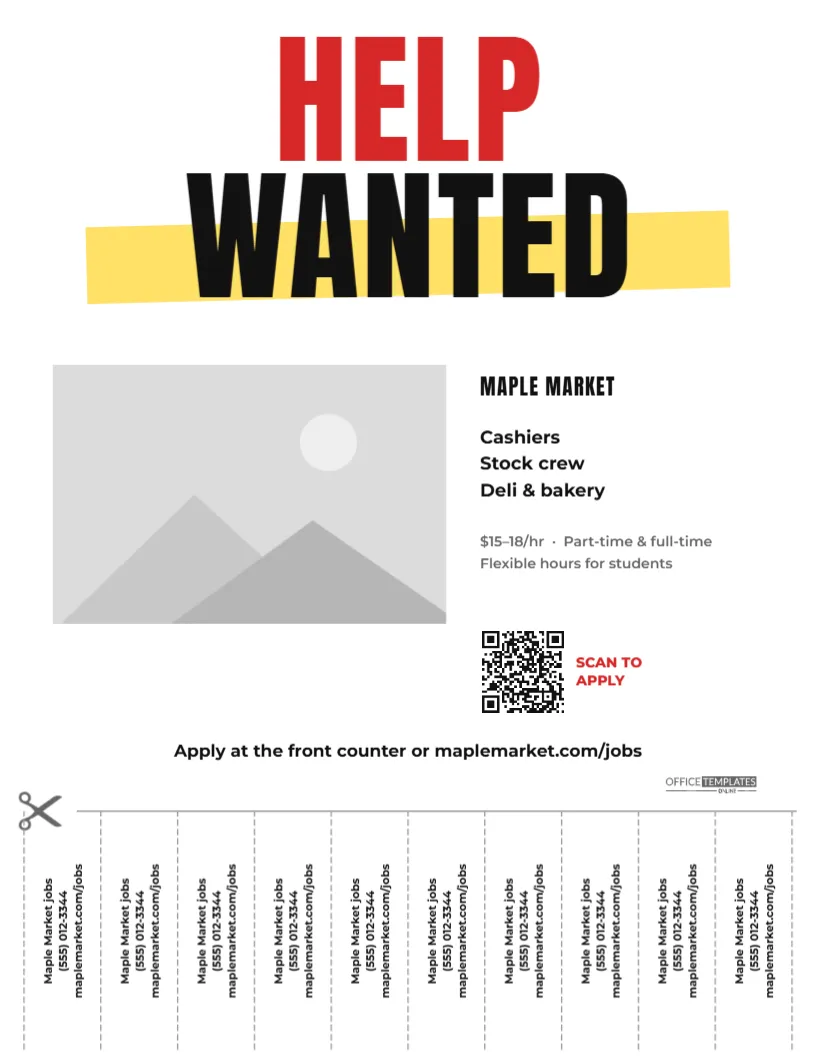
Some ideas never go out of style. The tear-off tab flyer has been pinned to community boards for decades because it works: someone sees the job, tears off a tab, and has your number in their pocket. This Help Wanted Flyer With Tear-Off Tabs updates the classic for today. A huge HELP in red and WANTED in black, with a yellow highlighter swipe behind it, grabs attention from across a laundromat. Below, a photo of your storefront sits beside the roles, pay, and a QR code for people who prefer to scan. A dashed cut line with a pair of scissors marks the bottom section, where ten vertical tabs carry your business name, phone number, and website. It suits small shops, cafés, markets, salons, family restaurants, cleaning services, trades and anyone who hires locally.
Why Tear-Off Tabs Still Work
People who notice a flyer on a noticeboard are often in the middle of something: doing laundry, buying groceries, waiting for a bus. They may not have time to scan a QR code or save a number. A tab takes two seconds to tear off and turns into a reminder later. Including both tabs and a QR code covers everyone, from teenagers looking for a first job to retirees who prefer paper.
The Classic Layout, Section by Section
- Headline: HELP in red and WANTED in black, both in tall Anton, with a slightly tilted yellow highlighter stripe behind WANTED.
- Photo: a large photo slot on the left for your shopfront, team, or counter.
- Details: MAPLE MARKET, the roles (cashiers, stock crew, deli and bakery), $15-18/hr, part-time and full-time, and flexible hours for students.
- QR code: a code with SCAN TO APPLY in red beside it.
- Apply line:Apply at the front counter or maplemarket.com/jobs, with our small logo on the right.
- Cut line: a dashed horizontal line with a scissors icon at the left edge.
- Tabs: ten tabs separated by dashed lines, each with Maple Market jobs, a phone number, and the website, printed vertically.
Sized for US Letter paper, 8.5 x 11 inches, portrait, the standard for community noticeboards.
How to Cut the Tabs Neatly
Well-cut tabs make the flyer look professional and easy to use. After printing:
- Lay the flyer on a cutting mat or thick cardboard.
- Use scissors or a craft knife and ruler to cut along each vertical dashed line, from the bottom edge up to the horizontal cut line. Do not cut across the horizontal line.
- Leave the tabs attached along the top so they hang together.
- Optionally, fold along the horizontal dashed line and unfold again; the crease makes tabs tear off cleanly.
- Tear off one tab yourself before pinning the flyer up. A missing tab signals that others are interested, which encourages people to take one.
Editing the Flyer and the Tabs
- Photo: click the photo area and choose Replace Image for your storefront or team photo.
- Business name, roles, and pay: double-click each text block to retype it.
- QR code: select it and put your application link in its options panel. You can switch it to a phone or SMS code in the same panel if you prefer calls or texts.
- Tab text: each tab is a separate rotated text box. Edit the first one, then copy its text into the others. Keep three short lines: who you are, the phone number, and the website.
- Headline colours: change the red and yellow if you prefer your brand colours, keeping strong contrast so it reads from a distance.
What to Put on a Tab
Tabs are tiny, so every character counts. Put the most important item first: the business name or Jobs at …, so people remember why they took it. Follow with a phone number that is actually answered, or a text number, and a short web address. Avoid long URLs; a simple path like /jobs is easy to type later. If you hire through walk-ins only, replace the website with your address or hours, such as Apply in store, 9-5.
Keeping Track of Where Applicants Came From
When you post flyers in several places, it helps to know which boards bring in applicants. A simple trick is to vary the tabs slightly for each location. For example, ask callers to mention code L on the laundromat flyer and code C on the coffee shop flyer, or use a different web address path such as /jobs-l and /jobs-c that both lead to the same form. You can also create a separate QR code for each location. After a couple of weeks, you will see which spots work best and can focus your next round of flyers there, saving printing time and money.
The Best Boards for Tear-Off Flyers
- Laundromats and grocery store community boards.
- Coffee shops, libraries, and community centres.
- College and high school job boards (ask the front office first).
- Churches, gyms and apartment building mail rooms.
- Your own shop window and counter.
Check back every week or two: replace flyers when most tabs are gone, and take them down once the job is filled.
Printing for Easy Tearing
Print from the PDF download on standard 20 lb or 24 lb white paper; heavier cardstock is harder to tear. The design is mostly white, so it prints cheaply in black and red on any office printer. If you print many copies, a print shop can pre-perforate the tabs for you, which saves cutting time.
Small Business Questions
Can I use it for other notices, like a room for rent?
Yes. Change HELP WANTED to ROOM FOR RENT or TUTOR AVAILABLE, swap the photo and details, and update the tabs.
Can I have fewer, wider tabs?
Delete some of the dashed dividers and tab texts, then widen the remaining tab text boxes. Eight tabs work well if your details are longer.
Will the vertical text print correctly?
Yes. The tab text is rotated in the design and prints exactly as you see it; readers tilt their head, just as with any tear-off flyer.
Open the template, add your storefront photo and contact details, print a few copies, cut the tabs, and pin them up around your neighbourhood today.