The card that follows one item around
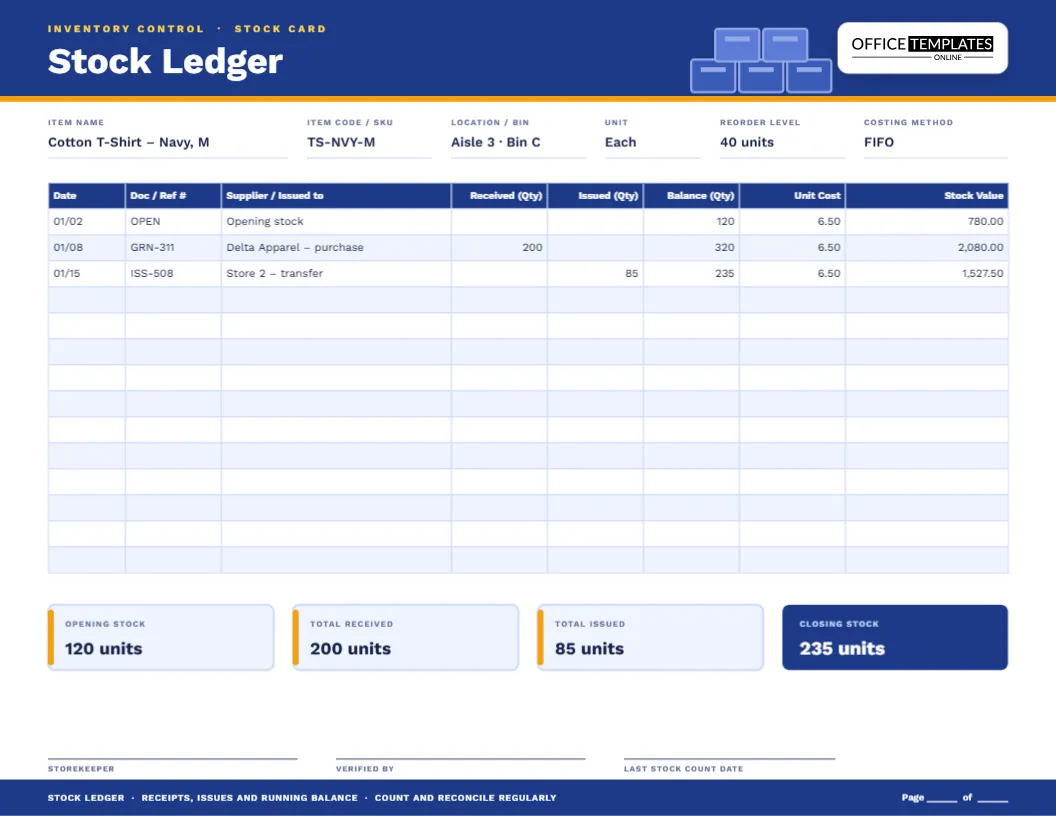
Warehouse people call it a stock card: a record kept for a single item that shows every unit that came in, every unit that went out and how many are left. It is one of the oldest inventory controls and still one of the best. When someone asks, “Do we have any navy medium shirts?”, the stock card answers without a walk to the shelf. When the count on the shelf and the count on the card disagree, the ledger shows exactly where to look. This inventory stock ledger template puts the whole card on a wide, cobalt-blue landscape page.
What goes in the header
Six fields describe the item and how you manage it.
- Item name, including size, colour or model.
- Item code / SKU, the code used on labels and orders.
- Location / bin, where the item lives in the store.
- Unit, such as each, box, kilogram or litre.
- Reorder level, the quantity at which you buy more.
- Costing method, such as FIFO or weighted average.
The eight columns of the ledger
Each line records one movement of stock.
- Date of the movement.
- Doc / Ref # ties the line to a goods received note, an issue slip or a transfer form.
- Supplier / Issued to names the source of receipts or the destination of issues.
- Received (Qty) is the number of units that came in.
- Issued (Qty) is the number that went out.
- Balance (Qty) is the quantity on hand after the movement.
- Unit Cost is the cost per unit for that movement or balance.
- Stock Value is quantity times unit cost.
Following the sample through
The three sample lines show the arithmetic. The item starts with 120 units at 6.50, a value of 780.00. A delivery of 200 units on 01/08 lifts the balance to 320 units and the value to 2,080.00. On 01/15, 85 units are issued to a second store, leaving 235 units worth 1,527.50. The four tiles at the bottom agree: opening stock 120, received 200, issued 85 and closing stock 235.
Choosing a costing method
When the price of an item changes from one delivery to the next, you need a rule for what an issued unit costs.
- FIFO (first in, first out) assumes the oldest units are issued first, so the remaining stock is valued at the most recent prices.
- Weighted average recalculates an average cost after each receipt and uses it for every issue.
- Specific identification tracks the actual cost of individual items, and suits high-value goods such as vehicles or jewellery.
Accounting rules differ between countries, and some methods are not permitted everywhere, so choose the one your accountant recommends and write it in the header so every page follows the same rule.
The reorder level and the four tiles
The reorder level is the line in the sand. Every time you write a new balance, glance at it. If it is at or below the level, a purchase order is due. The four tiles at the foot of the page, Opening stock, Total received, Total issued and Closing stock, let you confirm the arithmetic at the end of each period: opening plus received minus issued must equal closing.
Counting the shelf against the card
- Choose a date for the count, and stop movements of that item while you count.
- Count the physical units in the bin and any overflow location.
- Compare the number with the last balance on the stock card.
- If they differ, check the last few issue slips and delivery notes for a missing entry.
- Record any confirmed adjustment as a line with the reason in the description.
- Write the date of the count and sign the page.
Where stock ledgers earn their keep
- Small shops and boutiques with a back room
- Restaurants and cafes managing dry goods
- Workshops and maintenance stores with spare parts
- Schools and offices with stationery cupboards
- Clinics tracking consumables
- Online sellers who hold stock at home
Filling in a page
- Type the item name, SKU, bin, unit, reorder level and costing method.
- Write the opening quantity and cost on the first line.
- Record every receipt and issue with its document number.
- Update the balance quantity and value after each line.
- Complete the four tiles at the end of the period.
- Download as PDF, PNG or JPG.
Paper size and page layout
The ledger is US Letter in landscape, 11 by 8.5 inches, which gives the Supplier / Issued to column enough space for a real name. There are 14 lines below the header, and you can add more by extending the table. A footer strip reminds staff to count and reconcile regularly, and a page number line makes multi-page cards easy to follow.
Stock ledger puzzles, solved
Do I need one page for every item?
For fast movers and valuable items, yes. For low-value bulk goods, group similar items on one page or use a bin card.
How is a stock ledger different from an inventory list?
A list shows what you have now. A ledger shows how you got there, which is what you need when the numbers do not match.
What if the unit cost changes with every delivery?
Add a new line for each delivery with its own cost and follow your chosen costing method to value the issues.
Can I use it for raw materials in a workshop?
Yes. Change the description column to the job or work order number when materials are issued.
Spotting shrinkage and slow movers
Once a few months of movements are on the card, patterns appear. An item whose issues have stopped is a slow mover tying up cash. An item whose counts keep coming up short may be suffering from damage, theft or unrecorded use. A steady rise in unit cost tells you it is time to ask another supplier for a quote. None of this needs software, only a habit of glancing down the Issued and Unit Cost columns when you update the balance.
When every unit is accounted for, ordering gets easier and surprises get rarer. Open the template, name your first item and start a stock card you can trust.