Where every transaction first lands
Bookkeepers describe the general journal as the book of original entry. Before a transaction reaches the ledger, it is written here first, in date order, with the accounts to debit, the accounts to credit and a line explaining why. The ledger then sorts those entries by account. Without the journal, the ledger is a set of unexplained numbers; with it, every figure has a story. This general journal template is designed to look and feel like the ledger books used for generations, with cream paper, forest-green rules and red margin lines, yet it is fully editable on screen.
The ledger-paper look, and why it works
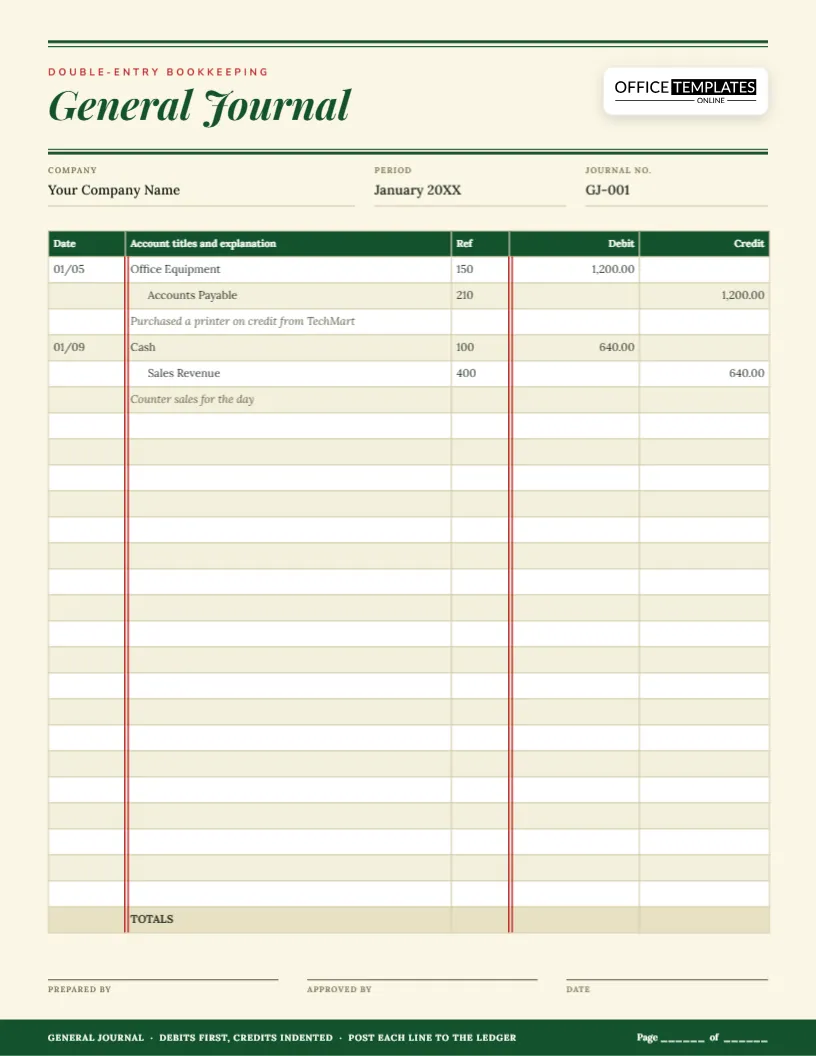
The page uses a double rule at the top and under the title, a serif italic heading and a cream background. Two pairs of thin red lines run down the table: one after the Date column and one before the Debit column. Those red rules are a traditional feature of accounting paper. They split the page into date, description and money areas so that the eye can follow a line across without straying.
Five columns, one purpose each
- Date of the transaction. Write the year once at the top and the month and day on each entry.
- Account titles and explanation holds the accounts and a short description.
- Ref is the ledger account number, filled in when the line is posted.
- Debit is the amount to be debited.
- Credit is the amount to be credited.
There are 25 entry lines plus a totals row, and the totals of the two money columns should always be equal.
The conventions that make a journal readable
- Write the debited account first, flush against the left edge of the account column.
- Write each credited account underneath, indented a few spaces.
- Put the explanation on the next line, in italics or brackets, describing the transaction in a phrase.
- Leave a blank line, or a change in shading, between entries.
- Only fill in the Ref column once the amount has been posted to the ledger.
The two sample entries, explained
On 01/05, a printer is bought on credit from a supplier for 1,200.00. Office Equipment is debited because the business now owns an asset, and Accounts Payable is credited because the business owes the supplier. The explanation line says exactly that. On 01/09, counter sales of 640.00 are recorded by debiting Cash and crediting Sales Revenue. Each entry balances on its own, and the Ref numbers, 150, 210, 100 and 400, show where each line will go in the ledger.
Everyday entries you will write again and again
- Owner invests cash: debit Cash, credit Owner’s Capital.
- Buy supplies for cash: debit Supplies (or Supplies Expense), credit Cash.
- Invoice a customer: debit Accounts Receivable, credit Sales Revenue.
- Customer pays: debit Cash, credit Accounts Receivable.
- Pay a supplier’s bill: debit Accounts Payable, credit Cash.
- Record wages: debit Wages Expense, credit Cash.
- Record depreciation: debit Depreciation Expense, credit Accumulated Depreciation.
Compound entries and adjusting entries
Some transactions touch more than two accounts. A payment of 1,000.00 might be split between 900.00 of rent and 100.00 of a late fee. Write one debit line for each expense and one credit line for cash, and make sure the debits and credits still total the same. At the end of a period you will also write adjusting entries, for things such as accrued wages, prepaid insurance and depreciation. They are ordinary journal entries with a clear explanation, dated on the last day of the period.
Fixing a mistake the professional way
If you find a wrong entry, do not erase it, and do not scribble it out. Write a correcting entry: reverse the wrong one with an entry that has the opposite debits and credits, then record the right one. Add an explanation such as “To correct entry of 01/05”. The journal then shows what happened and why, which is what an auditor wants to see.
From journal to ledger: posting
- Choose a journal line and find the account it debits in the ledger.
- Copy the date, the amount and a short description to the ledger page as a debit.
- Write the ledger account number in the journal’s Ref column.
- Do the same for the credited account.
- Tick the entry when both sides are posted, and move to the next.
Who uses a general journal
- Accounting and bookkeeping students
- Small businesses that keep manual books
- Accountants preparing adjusting and closing entries
- Clubs and charities with a volunteer treasurer
- Anyone converting records to accounting software who needs opening entries
Filling in a journal page
- Type the company name, period and journal number in the three fields under the title.
- Write your entries in date order, using the sample lines as a pattern.
- Rename the account examples to match your chart of accounts.
- Add the totals of the Debit and Credit columns in the last row.
- Sign the prepared by and approved by lines.
- Download as PDF, PNG or JPG.
Print notes for a journal you will keep
The page is US Letter portrait, 8.5 by 11 inches. Print on plain paper for practice or on a slightly heavier stock for a permanent record, and number the pages consecutively using the page line in the footer. A general journal is normally kept for years, so use a black pen for entries you write by hand and store the pages in date order in a binder.
Journal entry doubts, cleared up
Is a journal the same as a ledger?
No. The journal records transactions in date order. The ledger groups them by account.
Do I still need a journal if I use software?
Software keeps the journal behind the scenes. A printed one is helpful for manual entries, opening balances and teaching.
What should the explanation say?
Say what happened in a few plain words, and mention a reference such as an invoice or receipt number.
Why do debits and credits have to be equal?
Because every transaction affects at least two accounts by the same amount. If the totals differ, an entry is incomplete or wrong.
A good journal makes every later step easier. Open the template, write your first entry and build a set of books that explain themselves.