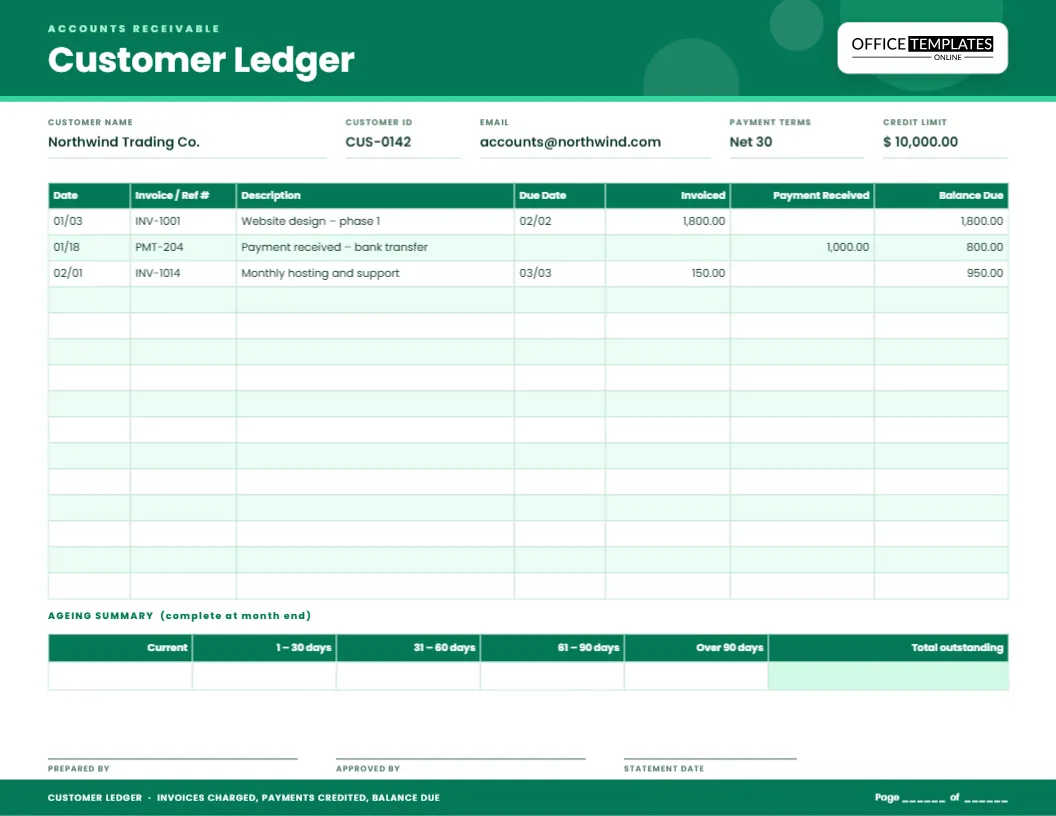
Money that customers owe you is an asset only until it turns into a memory. Every business owner knows the feeling of opening the mail and realising an invoice from three months ago was never paid. The cure is not complicated: a page for each customer that shows what you billed, what they paid and what is left. This customer ledger template is that page. It is a landscape sheet in emerald green, designed for accounts receivable, with an ageing summary underneath so you can see at a glance how old the debt is.
One page for each customer
A customer ledger, sometimes called a debtor’s account or a statement of account, records the whole history of one customer’s dealings with you. Keeping it separate from your general ledger has two advantages. You can answer a customer’s question in seconds (“Did you receive my payment from the 18th?”), and you can send them a clean statement when a reminder is needed.
What you fill in at the top
Five fields across the header identify the account.
- Customer name, exactly as it appears on your invoices.
- Customer ID, a short code that matches your accounting system or invoice book.
- Email of the person who handles payments, so you know whom to contact.
- Payment terms, such as Net 30, which means the invoice is due 30 days after the invoice date.
- Credit limit, the most you are willing to let the customer owe at any one time.
Reading the seven columns
The ledger table runs across the page and has room for the details that matter when you are chasing a payment.
- Date of the invoice or the payment.
- Invoice / Ref #, the invoice number or the payment reference.
- Description, a short note of what was sold or how the customer paid.
- Due Date, which is the date you expect payment. Leave it blank on payment lines.
- Invoiced is the amount you billed, and it increases what the customer owes.
- Payment Received is what they paid, and it reduces the debt.
- Balance Due is the running total after every line.
The sample lines show the pattern: an invoice for 1,800.00 raises the balance to 1,800.00, a payment of 1,000.00 brings it down to 800.00, and a new invoice for 150.00 takes it to 950.00.
The ageing summary, and why collectors love it
Under the ledger you will find a small table with six boxes: Current, 1 to 30 days, 31 to 60 days, 61 to 90 days, Over 90 days and Total outstanding. Once a month, sort the unpaid invoices by how overdue they are and write each bucket’s total in the matching box. The shape of that row tells a story. A balance sitting mostly in the first two boxes is healthy. A balance that creeps to the right is a warning that a customer is slipping, and it is time to phone before it turns into a write-off.
A simple collections routine
- On the first of the month, update each customer ledger with new invoices and payments.
- Fill in the ageing summary for any customer with a balance.
- Send a friendly reminder for anything in the 1 to 30 bucket.
- Call customers with balances in the 31 to 60 bucket and note the promised payment date.
- Stop new credit for accounts over 60 days until the oldest invoice is settled.
- Sign and date the page in the prepared by and approved by boxes.
What payment terms really mean
Terms are printed on invoices but often misunderstood, so it helps to write them on the ledger too.
- Due on receipt means payment is expected immediately.
- Net 15, Net 30 or Net 60 means the full amount is due that many days after the invoice date.
- 2/10 Net 30 means a 2 percent discount if paid within 10 days, otherwise the full amount in 30 days.
If you offer a discount, record it as a separate line so the balance still reaches zero when the customer pays.
Who benefits from a customer ledger
- Freelancers and consultants who invoice clients monthly
- Small wholesalers and distributors who sell on credit
- Contractors who bill by stage of a project
- Schools and clubs that collect fees in instalments
- Service businesses with retainer customers
- Accountants who keep books for several small clients
Setting up a customer page
- Type the customer’s name, ID, email, terms and credit limit in the header.
- Delete the sample lines or overwrite them with real invoices.
- Enter each invoice under Invoiced, and each receipt under Payment Received.
- Recalculate the Balance Due after each line.
- At month end, complete the ageing summary and sign the page.
- Download as PDF, PNG or JPG, or print and file it.
Printing and sending statements
The page is US Letter in landscape orientation, 11 by 8.5 inches, in emerald green with a white body that prints economically. Export a PDF and attach it to a reminder email, and the customer sees every invoice, every payment and the balance in one place. If you prefer a paper file, print at 100 percent scale on standard paper and punch it on the short edge for a binder.
Receivables questions, answered
Can I use one sheet for several customers?
It works best as one page per customer. If you have many small customers, duplicate the page and name each copy after the customer.
Where do credit notes go?
Record a credit note in the Payment Received column with a description such as Credit note CN-12, since it reduces the balance in the same way.
How is this different from the vendor ledger?
The customer ledger tracks money owed to you. The vendor ledger tracks money you owe to suppliers. Many businesses keep both.
What about late fees?
Add them as a new line in the Invoiced column, with the reason in the description, so the customer sees exactly what was added.
Clear records make polite reminders easy. Open the template, add a customer and turn unpaid invoices into a tidy, easy-to-follow account.