A one-on-one is the smallest and most personal meeting at work, and also one of the most easily wasted. Without a plan, it becomes a status update that could have been an email. With a shared page, it turns into a regular conversation about the person, not only the tasks: how they feel, what they want to learn, what is blocking them, and what each side will do before the next time. This page gives both people a place to put those things, and it keeps the record short.
Two Bubbles, Two Voices
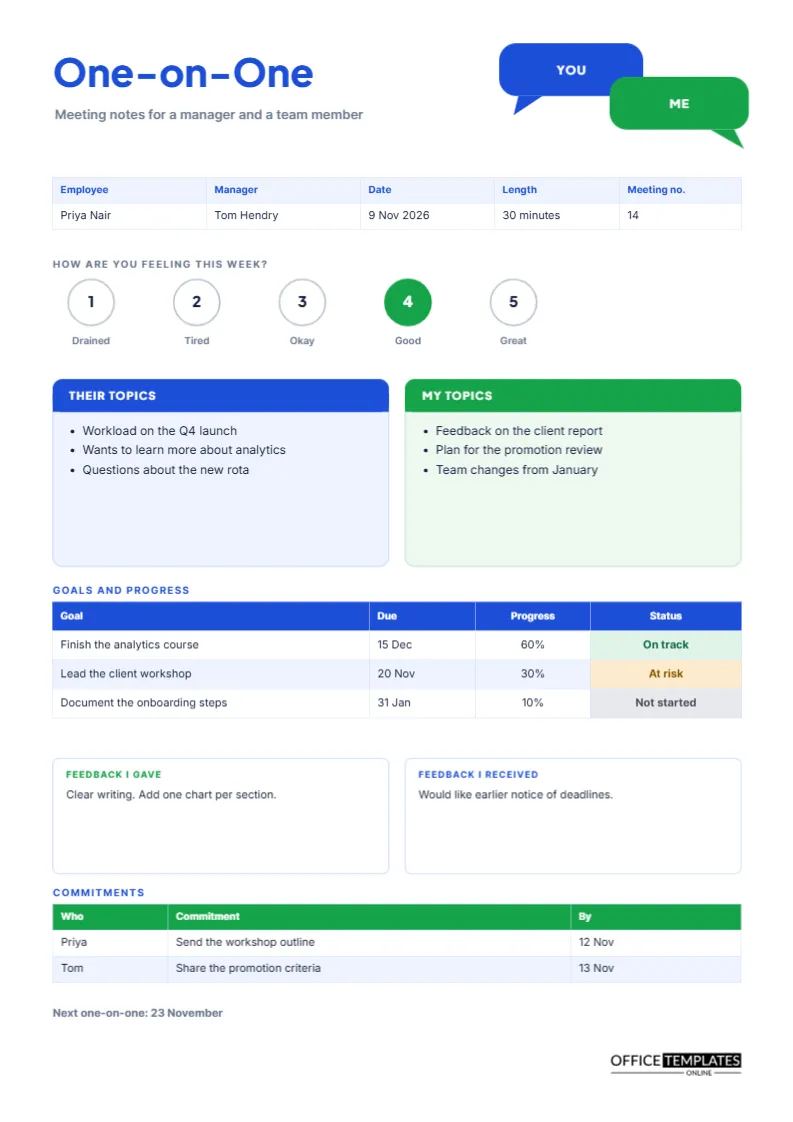
At the top right, two overlapping chat bubbles, one blue labelled YOU and one green labelled ME, remind both people that the meeting belongs to each of them. The title One-on-One is set in heavy Plus Jakarta Sans in blue, and the grey subtitle reads Meeting notes for a manager and a team member. The pairing of blue for the employee and green for the manager runs through the page: blue boxes belong to the employee’s side and green to the manager’s.
Starting With a Mood Check
A row of five numbered circles under the details strip asks how you are feeling this week, with labels from Drained to Great. In the sample, the fourth circle is filled green. This tiny ritual takes ten seconds and tells a manager more than a long report. A pattern of low numbers over several weeks is a prompt to ask what is wrong, and a rise after a change is useful evidence that the change helped.
What a Good Mood Question Looks Like
| Number | Label on the page | A useful follow-up question |
|---|---|---|
| 1 | Drained | What would make the next week easier? |
| 2 | Tired | Is it the workload or something else? |
| 3 | Okay | What would move you to a four? |
| 4 | Good | What has helped this week? |
| 5 | Great | Can we repeat what worked? |
Their Topics First, Then Mine
Two boxes sit side by side under the mood row. The left, THEIR TOPICS in blue, belongs to the employee. The right, MY TOPICS in green, belongs to the manager. The order matters. When the employee goes first, the meeting becomes theirs, which builds trust and brings up concerns that a manager might not think to ask about. In the sample, the employee raises workload, a wish to learn analytics, and questions about a rota.
Tracking Goals Between Meetings
A three-row table lists each goal, a due date, a progress figure, and a coloured status. The sample includes finishing an analytics course at 60 percent and on track, leading a client workshop at 30 percent and at risk, and documenting onboarding steps not yet started. Reviewing the same table every meeting stops goals from fading into the background.
Feedback in Both Directions
Two white boxes headed Feedback I gave, and Feedback I received sit near the bottom. The manager’s feedback is easy to expect, but the second box is more important than it looks. Asking for feedback on your own management, and writing down what you hear, signals that you take the relationship seriously. The sample shows a request for earlier notice of deadlines, which is a concrete and fixable point.
Commitments for Both People
The green table lists who, commitment, and date. One line each for the employee and the manager is a good rule. The manager promises to share promotion criteria, and the employee promises a workshop outline. A manager who also has commitments shows that the meeting is mutual.
Keeping Notes Private and Useful
One-on-one notes are sensitive. Agree who can see them. Many managers share the page with the employee and keep nothing hidden, which builds trust. Store the pages in a private folder, label them with the date, and never forward them without the employee’s knowledge. If a conversation touches on health, family, or disciplinary matters, follow your organisation’s policy about where those details are kept.
How Often to Meet and for How Long
Weekly or fortnightly meetings of thirty minutes suit most teams. The sample records a length of thirty minutes and a meeting number, which helps both people see the rhythm. Cancelled one-on-ones: send a message, so reschedule instead of skipping, and use the page even for shorter calls.
Using the Page for Remote Staff
Share the page on screen at the start and fill it in together. Remote staff benefit even more from a written record because they miss the casual conversations of an office. Send the finished page afterwards, with the commitments highlighted.
Customising the Bubbles and Colours
Change YOU and ME to the names or initials of the two people. Recolour the bubbles and boxes to your own palette from the editor panel. The goals and commitments tables are real Table objects, with Edit Table Data and the Add Row button, and the status cells hold typed words with a fill colour.
Printing the One-on-One Page
A4 portrait. Many managers print a fresh page for each meeting and file it in a folder for the employee. In black and white, the boxes keep their headers, and the mood scale still shows which circle was filled.
Spotting Patterns Across Many One-on-Ones
The real value of a stack of one-on-one pages appears over time. Lay six of them side by side and look at the mood row, the recurring topics, and the goals. If the same worry appears three times, it is no longer a passing comment but a theme that needs a plan. If a goal has shown the same progress figure for a month, it is stuck. Reading pages in a sequence turns small weekly conversations into a clear picture of how a person is doing, and it gives you facts to discuss at the annual review.
What to Do When a Meeting Gets Emotional
Sometimes a one-on-one becomes difficult, with tears, anger or news of a personal problem. Slow down, stop writing if that helps, and listen. Afterwards, record only what is necessary and appropriate, and follow your organisation’s guidance on support and confidentiality. The page can wait; the person comes first.
Questions About One-on-Ones
Should I take notes during the meeting?
Yes, briefly, and tell the employee that you are doing so. It shows you are listening.
Can I use it for a mentor?
Yes. Rename the labels to mentor and mentee.