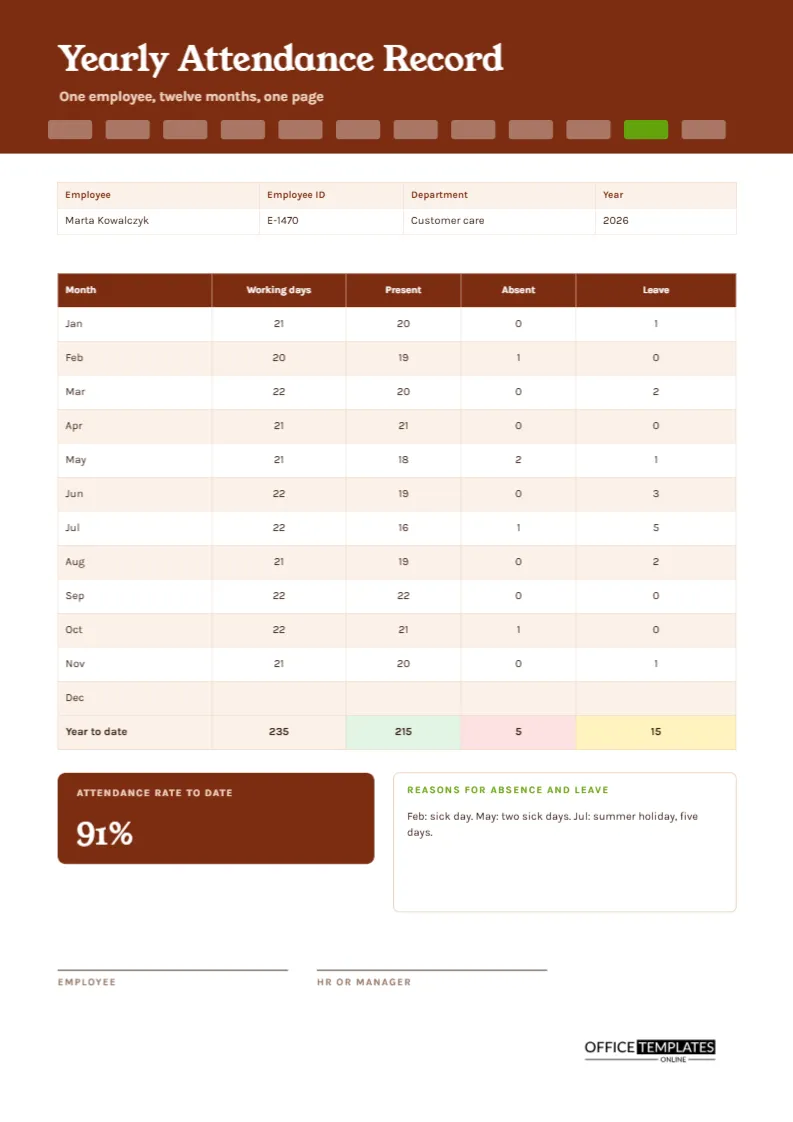
Once a year, almost every employer is asked the same questions about an employee. How many days did they work? How many days were they absent? How many were leave? Appraisals, reference requests, bonus decisions, and visa applications all need the answer. Digging it out of twelve monthly registers is slow. This A4 sheet keeps one person’s whole year on one page, month by month, so the answer is always ready.
A Brown Banner With Twelve Month Tabs
A rich brown header carries the title Yearly Attendance Record in Young Serif, a warm and friendly typeface. Below it, twelve small rounded tabs run along the lower edge of the banner, one for each month. In the sample, the tab for November is lime green to mark where the year has reached. Karla sets the table text. The design feels like a personnel file folder.
Employee, ID, Department, and Year
A four-column strip lists the employee, the ID number, the department, and the year. The sample is Marta Kowalczyk, E-1470, Customer Care, 2026. The ID matters in larger organisations where two people may share a name, and it lets you link the sheet to payroll and HR files.
The Month-by-Month Table
| Month | Working days | Present | Absent | Leave |
|---|---|---|---|---|
| January | 21 | 20 | 0 | 1 |
| February | 20 | 19 | 1 | 0 |
| March | 22 | 20 | 0 | 2 |
| April | 21 | 21 | 0 | 0 |
| May | 21 | 18 | 2 | 1 |
| June | 22 | 19 | 0 | 3 |
| July | 22 | 16 | 1 | 5 |
| August | 21 | 19 | 0 | 2 |
| September | 22 | 22 | 0 | 0 |
| October | 22 | 21 | 1 | 0 |
| November | 21 | 20 | 0 | 1 |
December is left blank in the sample because the year is not finished.
Year to Date Totals
The last row adds the columns: 235 working days, 215 present, 5 absent, and 15 leave days. Each cell is shaded, with green for present, red for absent, and yellow for leave. Present days are working days minus absent and leave days, so you can check any month by subtracting.
The Attendance Rate Tile
A brown tile at the lower left shows the attendance rate to date in large white numerals: 91%. This is present days divided by working days, rounded to the nearest whole number. Some employers count paid leave as attendance, and others do not. Decide your rule, state it in the notes, and apply it to every employee in the same way.
Reasons for Absence and Leave
A lime-headed box records reasons. The sample reads February: sick day. May: two sick days. July: summer holiday, five days. A short note beside the numbers transforms a dry table into a story. It also helps HR answer questions without searching other files, and it reminds the employee of the pattern of their year.
Filling in the Record
- Write the employee, ID, department, and year.
- At month-end, copy the working days from the calendar.
- Take absent and leave counts from the monthly register.
- Subtract to get present days and write them in.
- Update the year-to-date row and the attendance rate.
- Add reasons and have the employee and HR sign.
Using the Record in Appraisals
An annual attendance record is a clear, neutral fact sheet for a performance review. It shows reliability, helps put absences in context, and supports requests for flexibility. Bring it to the meeting and let the employee see it first, so there are no surprises and the conversation starts from shared facts.
References, Applications and Proof of Employment
Former employees often ask for a reference or confirmation of employment. A yearly record lets you answer accurately in minutes. Always check what your organisation is allowed to share, and get the person’s consent where needed. Attendance details are personal data, and should be handled with care.
Adjusting for Part-Time and Shift Patterns
Working days differ for part-time staff and shift workers. Change the working days column to the days that the person was scheduled to work, not the calendar days. Then the present, absent, and leave figures still add up, and the attendance rate is fair for each individual.
Keeping Records for the Required Period
Employers must keep certain employment records for some years, and the period depends on where you are. Check the rules that apply to you, store the signed yearly sheets in the personnel file, and take a scan. When the retention period ends, destroy the records safely.
Editing the Table and Tabs
All text is editable. For a different year, retype the year and the working days. Change the lime tab to mark the current month. The table is a real Table object, and cell fills and fonts can be changed. After editing, retype the totals and the rate tile.
Signing and Printing
Employee and HR or manager lines sit at the foot of the A4 page. Print one page per person at the end of the year, or at any time as a year-to-date snapshot.
Starting a New Year Record in January
Print a fresh sheet for each employee in the first week of January and file the previous year with the personnel record. Fill in the working days for all twelve months at once from the calendar, then you only need to add absent and leave counts at the end of each month, which takes a few minutes.
Explaining the Attendance Rate Fairly
A single percentage never tells the full story. Someone with a long illness and someone with many short absences may show similar numbers but very different situations. Use the rate as a starting point, read the notes beside it, and talk with the person before concluding their reliability.
Yearly Attendance Record Questions
Can I use it for a financial year?
Yes. Retype the month names to start in April or July, and adjust the year in the strip.
Where do public holidays go?
Exclude them from the working days, or count them as leave. Choose one rule and keep to it.
Does the rate calculate itself?
No. Divide present days by working days and retype the title.