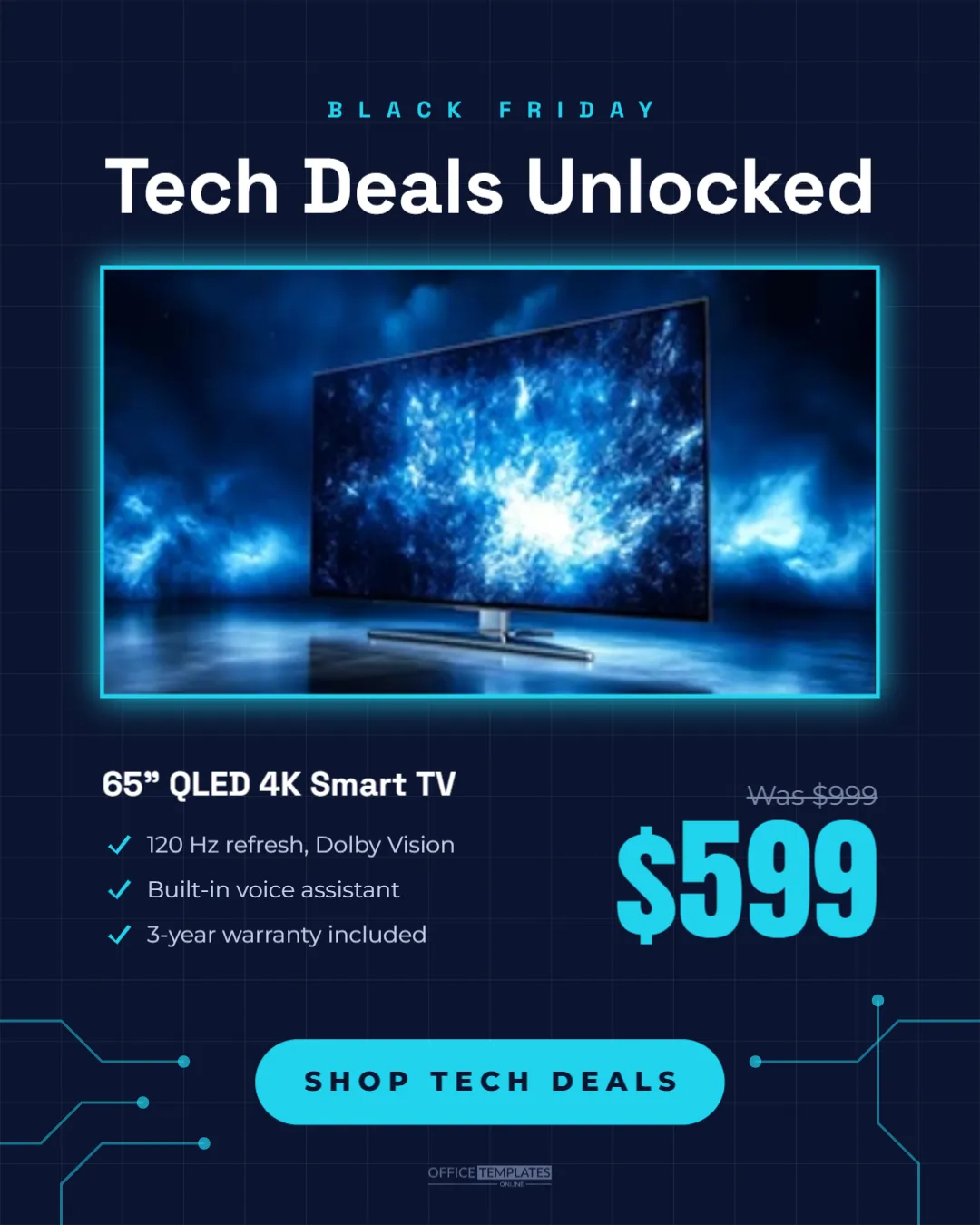
Electronics are among the most searched Black Friday categories. TVs, laptops, headphones, and smart home devices see some of the biggest discounts of the year, and shoppers compare deals carefully. A good electronics post shows the product, the key specs, and the price clearly. This 1080 x 1350 pixel template does that with a sleek dark tech look, cyan highlights, and circuit board details.
Electronics Post Design Walkthrough
The post has a deep navy background covered by a faint grid of thin lines, like graph paper or a blueprint. Cyan circuit traces, lines with right-angled bends ending in small dots, decorate the bottom corners.
At the top, BLACK FRIDAY appears in small, spaced cyan capitals, with the headline Tech Deals Unlocked in white Space Grotesk, a modern font with a technical feel. A large rounded photo card with a glowing cyan edge holds the product image.
Below the photo, the product name, 65 QLED 4K Smart TV, is in bold white, followed by three spec lines with cyan tick marks: 120 Hz refresh with Dolby Vision, built-in voice assistant, and a three-year warranty. On the right, the original price, Was $999, is struck through in grey, and the sale price, $599, is set large in cyan Anton. A cyan pill reads SHOP TECH DEALS, with a small logo mark below.
What Electronics Shoppers Look For
- The exact model: size, type, and key feature in the name.
- Specs that matter: two or three features that justify the price.
- The real saving: original and sale price side by side.
- Trust signals: warranty, returns, or price match policies.
The template has a place for each of these.
Adding the Product Photo
Click the photo card and choose Replace Image. Product images on dark or transparent backgrounds look best against the navy design. Manufacturers often provide official product images to retailers; check their terms of use. For a TV, a lifestyle image showing the screen in a living room can be more appealing than a plain product shot.
Editing Specs and Prices
Replace the product name and the three spec lines with your product’s most important features. Keep specs short and concrete, such as 16 GB RAM, 512 GB SSD for a laptop or 30-hour battery for headphones. Update the was and sale prices; the original price should be a genuine recent price.
Spec Ideas by Product Type
| Product | Specs to highlight |
|---|---|
| TV | Screen size, resolution, refresh rate, HDR |
| Laptop | Processor, memory, storage, battery life |
| Headphones | Noise-cancelling, battery, wireless range |
| Smartphone | Storage, camera, unlocked or carrier |
| Game console | Storage, bundle contents, included games |
| Smart speaker | Voice assistant, sound, smart home support |
Making a Series of Tech Deal Posts
Duplicate the template for each featured product and post them as a carousel or a series through the weekend. A carousel of five deals, one per slide, with a final slide saying More tech deals in store and online, works well. Keep the same layout so the series looks organised.
Changing the Tech Colours
Navy and cyan suggest technology and precision. Alternatives include black with lime for gaming, charcoal with orange for a bold store brand, or white with electric blue for a clean, modern look. The grid and circuit traces are grouped, so you can recolour or hide them quickly.
Price Matching and Policies
Electronics shoppers often compare prices across stores. If you offer price matching, extended warranties, or free installation, add it as one of the spec lines or in the caption. These policies can be the deciding factor between two similar deals.
Caption Tips for Electronics Deals
Lead with the product and the savings: Save $400 on our best-selling 65-inch QLED TV this Black Friday. Add availability, such as in-store and online while stock lasts, and the deadline. Mention whether the deal includes delivery or setup. Clear, factual captions build trust with careful tech buyers.
Stock Levels and Urgency
Popular electronics deals can sell out quickly. If stock is limited, say so honestly in the caption or add a line such as Limited stock under the price. Update followers when items sell out, and replace the post with the next deal.
Using the Design In Store
Print the post as a Letter-size sign for your electronics aisle. The dark design stands out among bright packaging, and the specs help customers compare products without searching for a staff member. Matching online and in-store graphics make your deals easy to recognise.
Electronics Post Accessibility
Add alt text with the product name and price, such as 65-inch QLED 4K Smart TV, was $999, now $599 for Black Friday. Screen reader users and anyone with images turned off still get the deal details.
Writing Clear Spec Lines
Specs only help if shoppers understand them. Put the most important number first, use common terms rather than internal model codes, and avoid stacking too many figures on one line. 120 Hz refresh, Dolby Vision is easy to scan; a list of six technical terms is not. If a feature needs explanation, translate it into a benefit, such as smooth motion for sports and gaming. Keep each spec line short enough to fit on a single line beside its tick.
Bundles and Accessories
Electronics deals are often more attractive as bundles: a console with an extra controller, a laptop with a case, or a TV with a soundbar discount. If you offer a bundle, list the extras as spec lines and show the bundle price. Bundles can increase order value while still feeling like a great Black Friday deal to the customer.
Electronics Deals Post Questions
Can I show two products?
Yes. Split the photo card into two smaller cards and give each its own price.
Can I use it for refurbished products?
Yes. Add Certified refurbished to the product name so buyers know exactly what they are getting.
Does it work as a square post?
Resize the canvas to 1080 x 1080 pixels and reduce the photo height slightly.
Tech buyers want facts and a fair price. Add your product, list the specs that matter, and post a Black Friday deal that makes comparison easy.