Early access emails are some of the most opened emails of the year. They make subscribers feel valued, and they reward the people who signed up for your list. This Email Template is designed to feel exclusive, like an invitation to a private event, with a gold key, a private code, and clear start and end times.
Early Access Email Layout
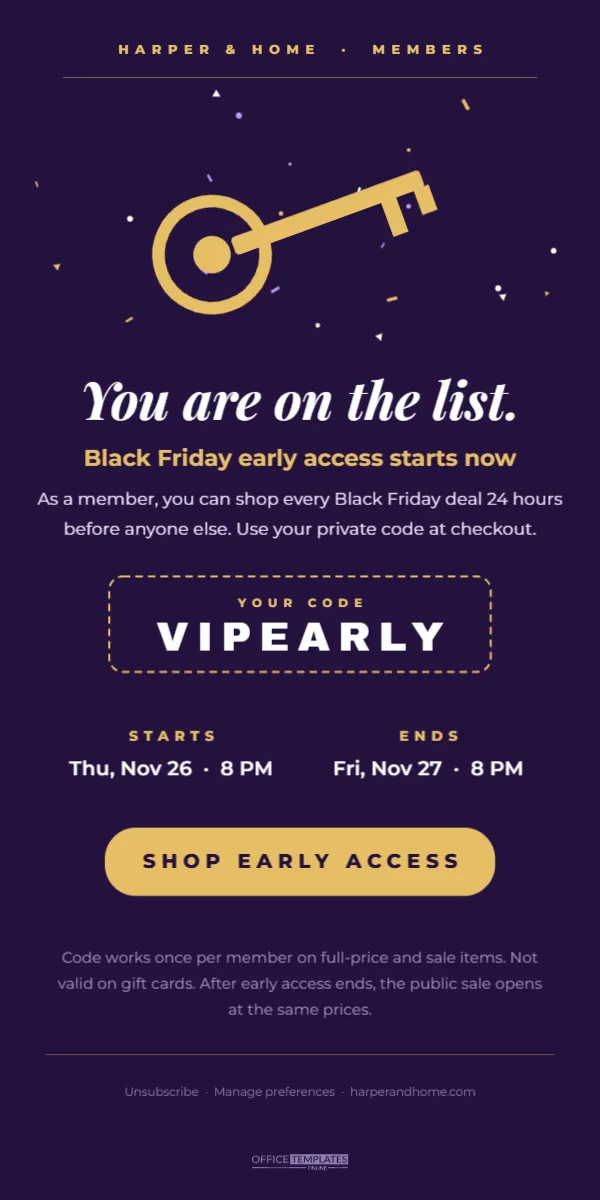
The email is 600 pixels wide and 1200 pixels tall, on a deep plum background. At the top, HARPER & HOME · MEMBERS appears in small spaced gold capitals above a fine gold rule. Gold, white, and lilac confetti pieces float around a large gold key drawn from simple shapes, tilted as if just turned in a lock.
Below the key, You are on the list. is written in white Playfair Display italic, followed by Black Friday early access starts now in gold. Two lines explain that members can shop every deal 24 hours early with a private code. A dashed gold box holds YOUR CODE and the code itself, VIPEARLY, in heavy white letters.
Two columns show when early access STARTS (Thursday, November 26 at 8 PM) and ENDS (Friday, November 27 at 8 PM). A gold pill button reads SHOP EARLY ACCESS. Fine print explains how the code works, and a footer line offers unsubscribe and preference links before the logo mark at the bottom.
Why Early Access Emails Work
- Exclusivity: people value being first.
- Reward: subscribers feel their sign-up was worthwhile.
- Spread demand: orders arrive over a longer period, easing pressure on your website and team.
- Best stock: loyal customers get first choice of sizes and colours.
Editing the Code and Times
Replace VIPEARLY with the code you set up in your store. Short codes in capitals are easiest to type. Update the start and end times; include the day, date, and time, and consider adding a time zone if your customers live in different regions, such as 8 PM Eastern. If early access needs no code, change the box to read No code needed: sale prices are live for you.
Building the Email in Your Platform
Use the template as a guide and build the email from blocks. Export the key and confetti area as an image for the top. Create the headline, code, times, and button as real text and button blocks in the same colours. Real text is important for the code, because subscribers need to copy it, and copying text from an image is impossible.
Early Access Fine Print
Clear rules prevent confusion. The template’s fine print says the code works once per member, applies to full-price and sale items, excludes gift cards, and that the public sale opens later at the same prices. Write your own rules honestly: whether members get an extra discount or simply earlier access, whether stock is limited and any exclusions.
Subject Lines for Early Access
| Subject line | Tone |
|---|---|
| Your early access starts now | Direct |
| You are on the list: Black Friday opens early for you | Personal |
| Members only: 24 hours before everyone else | Exclusive |
| The doors are open (just for you) | Playful |
Timing the Early Access Email
Send the email exactly when early access opens, so the message starts now is true. Schedule it in advance and double-check that the code and prices are active a few minutes before. Send a short reminder a few hours before early access ends, with the subject Early access ends tonight.
Plum and Gold for a VIP Feel
Purple and gold are traditional colours of luxury and royalty, which suit a members-only message. If your brand uses other colours, try black and gold, emerald and cream, or navy and silver. Keep the button the brightest element in the email, because it is the action you want readers to take.
Dark Background Emails
Dark backgrounds look dramatic, but some email apps change colours in dark mode or when backgrounds are not supported. Build the background colour into your email builder’s section settings rather than relying only on an image, and test in a few email apps. Make sure text remains readable if the background changes.
Turning Members Into Repeat Customers
Early access is a great start to a long relationship. After Black Friday, send members a thank-you email, invite them to review their purchase, and offer them first access to future sales. A loyal member list can become one of your most valuable assets.
Early Access for In-Store Events
The same email works for physical shops. Change the times to an early opening hour, such as Doors open at 6 AM for members, and replace the code with Show this email at the door. Members enjoy a quieter, more relaxed shopping experience before the crowds arrive.
Privacy and Member Lists
Only send early access emails to people who have agreed to receive marketing from you. Include a working unsubscribe link and a way to manage preferences, as the template’s footer does. Respecting your subscribers’ choices keeps your list healthy and your emails out of spam folders.
Preparing the Store for Early Access
Before the email goes out, set up the private code in your store and test it on a real order. Check that it applies to the right products, that it cannot be used more times than intended, and that it stops working when early access ends, if that is your plan. Make sure sale prices or the code display correctly on mobile checkout, because many members will open the email on their phones. A quick test the evening before saves a flood of my code does not work messages when the doors open.
Early Access Email Questions
Can I add products to the email?
Yes. Add a product grid below the button showing a few highlights members can shop first.
Can I personalise the headline?
Many email tools support merge tags, so the headline can read: You are on the list, Sarah.
Can I use it for a loyalty program launch?
Change the headline and fine print, and the design suits any members-only announcement.
Rewarding your subscribers first is good for them and good for you. Set your code, confirm your times, and open the doors early with an email that feels like a VIP invitation.