Every coach and team parent knows the questions: When is the next game? Is it home or away? What time is kick-off? A one-page season schedule answers all of them before they are asked. Here are nine things this team calendar does for coaches, players, and parents.
1. It Looks Like a Real Pitch
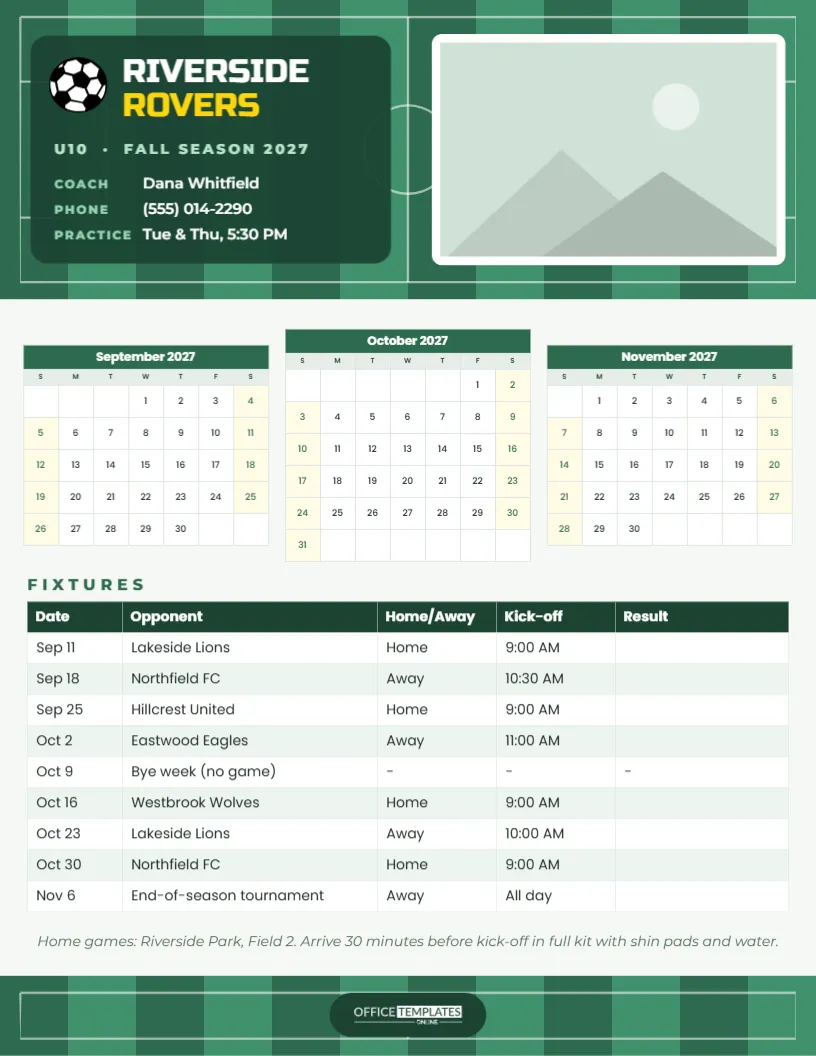
The page is US Letter portrait. The top of the page is a freshly mown soccer field: vertical stripes in two shades of green, with white touchlines, a halfway line, a centre circle and penalty boxes drawn on top. The pitch markings make the page instantly recognisable as a sports schedule, even from across a clubhouse.
2. The Team Identity Is Front and Centre
On the left of the pitch, a dark green panel holds a soccer ball and the team name in Russo One, a bold sporty font: RIVERSIDE in white and ROVERS in bright yellow. Below it, U10 · FALL SEASON 2027, then three short lines for Coach (Dana Whitfield), Phone, and Practice (Tue & Thu, 5:30 PM). Every name is fictional and editable, so type in your own club, age group, and coach.
3. There Is Room for the Team Photo
On the right of the pitch, a white-bordered frame holds the team photo. Click the photo area and choose Replace Image to upload your squad picture; it fills the frame without distorting. Players love seeing themselves on the schedule, and parents are far more likely to keep a page with their child’s face on it. Take the photo at the first practice, so it is ready before the first game.
4. Three Months Sit Side by Side
Below the header, three-month calendars for September, October and November 2027 sit in a row, each with a green title bar, compact weekday initials and Saturdays and Sundays tinted soft yellow. Circle game days in one colour and practices or tournaments in another. Each calendar is the editor’s Calendar object, so open Calendar Options to change the months for a spring season or a different year.
5. The Fixtures Table Holds the Whole Season
The fixtures table lists every game with columns for Date, Opponent, Home/Away, Kick-off, and Result:
| Date | Opponent | Home/Away | Kick-off |
|---|---|---|---|
| Sep 11 | Lakeside Lions | Home | 9:00 AM |
| Sep 18 | Northfield FC | Away | 10:30 AM |
| Sep 25 | Hillcrest United | Home | 9:00 AM |
| Oct 2 | Eastwood Eagles | Away | 11:00 AM |
| Oct 9 | Bye week (no game) | None | None |
| Oct 16 | Westbrook Wolves | Home | 9:00 AM |
| Oct 23 | Lakeside Lions | Away | 10:00 AM |
| Oct 30 | Northfield FC | Home | 9:00 AM |
| Nov 6 | End-of-season tournament | Away | All day |
The Result column is left blank in the template so you can write scores as the season goes on. The table is the editor’s Table object: add rows for extra fixtures, or a column for the field number or meeting time.
6. Parents Know Where to Be
An italic line under the table lists the home ground (Riverside Park, Field 2) and reminds everyone to arrive 30 minutes before kick-off in full kit, with shin pads and water. Edit it with your own venue and team rules. Clear logistics mean fewer late arrivals and fewer forgotten water bottles.
7. It Helps Plan Carpools and Snacks
Many teams run rotas for driving to away games, bringing half-time oranges or washing the kit. Add a column to the fixtures table for Snacks or Driver and write a family name in each row. Once you print and share the schedule, nobody can say they didn’t know it was their turn.
8. It Works for Any Sport
The pitch design suits soccer, but the layout works for any team sport. For basketball, baseball, hockey, netball or rugby, change the team name, swap the soccer ball for a different icon from the editor, update the months and fill in your fixtures. Recolour the green stripes to match your club colours: navy and sky blue, red and white or black and gold.
9. The Footer Echoes the Field
The bottom of the page repeats the mown-pitch stripes and lines in a short band, with the OTO logo in white on a dark green pill in the centre. Top and bottom feel like one design, and the page looks finished when pinned on a noticeboard.
Bonus: Tracking the Season as It Happens
A schedule that only lists dates is useful; one that records the season becomes a keepsake. After each game, write the score in the Result column and circle the date on the calendar in green for a win, yellow for a draw, and red for a loss. Add the player of the match in small letters beside the result. By the end-of-season tournament, the page tells the story of the team’s autumn, and players love comparing it at the season party. Give every family a clean copy at the end, signed by the coach, as a memento.
Coach’s Tips for Sharing the Schedule
Hand out printed copies at the first practice and email a PDF to every family the same day. Pin one on the club noticeboard and post a PNG in the team group chat. If the league changes a fixture, update the table and send a new version straight away with UPDATED in the message, so there is only ever one current schedule.
Printing the Season Calendar
Download the PDF and print on letter paper or card. The green header prints best on a colour printer; for a large club, a print shop can produce copies on heavier paper cheaply. Fonts are Russo One and Poppins, both Google Fonts. Keep a copy in the coach’s kit bag with emergency contacts on the back.
For a whole club with several age groups, duplicate the template once per team, change the age group, coach, and fixtures, and keep the same club colours on every page. Parents with children in two teams then get two matching schedules that are easy to tell apart by the team photo.
One page, one season, and every game in the right place. Go Rovers!