Buyers and sellers remember the agent who follows up well. A thoughtful thank-you after a showing, a tidy market update, a listing proposal that looks as considered as the homes you sell: these are the moments when a Real Estate Agent Letterhead earns its place. This template gives you a branded page you can reuse for every one of them, without hiring a designer or wrestling with a word processor.
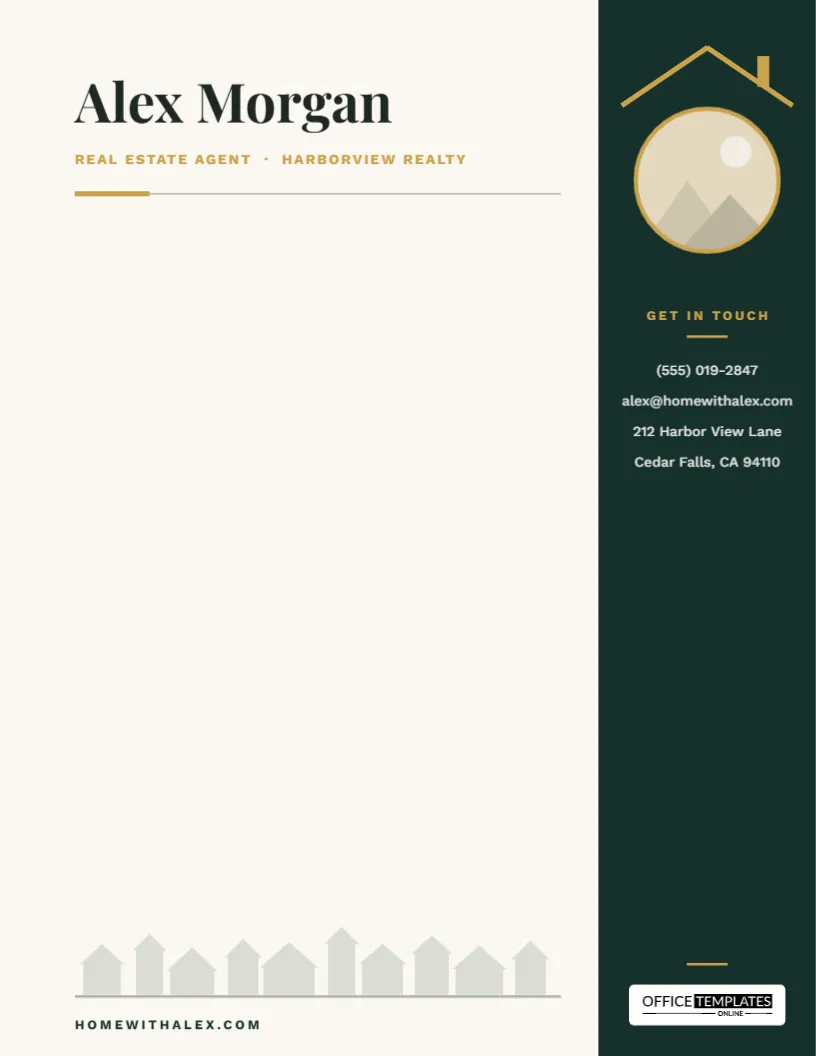
The design is built around a simple idea: your face and your phone number should never be more than a glance away. A deep forest-green sidebar runs down the right-hand edge of the page and keeps both in view, while the rest of the sheet stays open for whatever you need to write.
Why a Branded Letterhead Still Matters When You Sell Homes
Most real estate conversations happen on phones, yet the documents clients keep are usually on paper or in PDFs: offer summaries, comparative market analyses, closing gift notes, referral requests. When those pages carry the same colors, photos, and contact details every time, you start to look like a brand rather than one of the dozens of agents a homeowner has met. That consistency matters in a business built on referrals, because the letter that sits on a kitchen counter for two weeks is doing your marketing for you.
A letterhead also saves time. Instead of rebuilding a header for each document, you open the same file, type the letter, and send it. The look stays identical whether you are writing to a first-time buyer or a developer with twenty units to sell.
A Walk Around the Page
The sidebar
The right edge of the page is a solid forest-green column that runs from top to bottom. At the top, a thin gold roofline, with a small chimney on one slope, sits directly above a round headshot slot. The effect is quiet but clever: your photo sits under a roof, so the page says home before anyone reads your name. Beneath the photo, a small gold Get in touch label introduces four lines in white for your phone number, email, and office address. At the very bottom of the sidebar, the Office Templates Online logo sits on a small white plate.
The header
On the left, your name is set large in Playfair Display, a high-contrast serif that feels established without being stiff. Your role and brokerage follow in spaced gold capitals (Real Estate Agent · Harborview Realty in the sample), and a fine rule with a short gold tab closes the header.
The street at the bottom
Along the foot of the page, ten simple house outlines of different heights stand on a thin baseline, like a street seen from across the road. They are pale enough to stay in the background, and your web address sits just below them.
The writing area
Everything between the header and the street is blank. There is no sample letter to delete, so the page is ready to use the moment you personalize it.
Put Your Photo Under the Roof
- Open the template in the online editor.
- Click the round photo slot in the sidebar and choose Replace Image. Upload a headshot or your brokerage logo; the circle keeps its size and crops your image to fit.
- Click the name Alex Morgan and type your own. Do the same for the gold title line, adding your brokerage or team name.
- Replace the four contact lines in the sidebar with your phone, email, and office address. If you prefer, swap the address for a license number.
- Change the web address under the houses to your own site or a listing page.
- Download the page as a PDF, or as a PNG or JPG if you want an image version.
The page is US Letter (8.5 x 11 in) in portrait orientation, so it matches the paper in any office printer in the United States and Canada.
Letters That Win Listings: What to Write on It
Once the letterhead is set up, it becomes the base for most of the paperwork you send. A few ideas, with an opening line for each:
| Letter | When to send it | Opening line |
|---|---|---|
| Listing proposal cover letter | Before a listing appointment | Thank you for considering me to sell your home. Here is how I would bring it to market. |
| Post-showing thank-you | The day after a showing | It was great walking through homes with you yesterday. |
| Just-sold neighborhood letter | After a closing nearby | Your neighbors on Maple Street just sold, and buyers are still looking in your area. |
| Closing gift note | At or after closing | Congratulations on your new home. It was a privilege to be part of this. |
| Referral request | A few months after closing | If a friend is thinking about buying or selling, I would be honored to help. |
| Price update for sellers | When the market shifts | Here is what has changed in our market since we listed, and what I recommend. |
Small Choices That Make an Agent Look Established
- Use a headshot with a plain background. The circle is small, and a busy background makes faces hard to read.
- Keep the gold. If your brokerage has its own color, recolor the sidebar but leave the gold roofline, so the design keeps its warmth.
- Stay out of the sidebar when you type. Keep your letter in the open area on the left so the contact column stays clear.
- One page, one message. Clients skim. A short letter with a clear next step reads better than a dense page.
- Save a master copy. Keep one personalized, blank version and duplicate it for each new letter.
Printing for Open Houses and Closings
For printed letters, download the PDF and print at actual size or 100% so the sidebar lines up with the edge of the page. Most home and office printers leave a small unprinted margin, so a thin strip of white may show at the very edge; if you want the green to run right to the edge, ask a print shop for full-bleed printing. A bright white 24 lb (90 gsm) paper keeps the green rich and the gold crisp. For email, attach the PDF directly; it keeps the layout exactly as designed on any device.
Questions Agents Ask Before Using It
Can I use my brokerage logo instead of a headshot?
Yes. Click the circle, choose Replace Image, and upload the logo. The roofline still frames it, which works especially well for team or brokerage branding.
Where do I put my license number?
Add it as a fifth line under the address in the sidebar, or replace the address line if your state asks for the license number more than the office address.
Can I change the green?
Yes. Click the sidebar and choose a new color from the toolbar. Darker shades work best because the contact text is white.
Can I remove the houses at the bottom?
Yes. The row of houses is one group, so a single click selects all of them, and you can delete or move it.
Does it work for a team or a brokerage?
It does. Put the team name in the name line and the brokerage in the gold line, then use a team photo or logo in the circle.
Your next client letter can look as polished as your best listing photos. Add your headshot, fill in your details, and download your real estate agent letterhead.