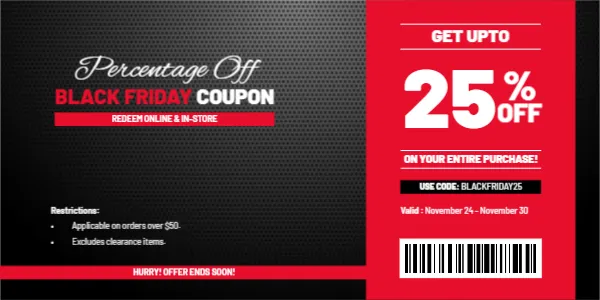
Is It “Up To” or “On Your Entire Purchase”?
This coupon contains a contradiction that is worth settling before you print. The red column says GET UPTO 25% OFF, but the line beneath says ON YOUR ENTIRE PURCHASE! The first suggests a range of discounts. The second suggests a flat percentage. Customers will read it the second way. Choose one meaning and edit the wording: either “GET 25% OFF” or “UP TO 25% OFF SELECTED ITEMS.” It is a two minute fix that avoids many disagreements at the till.
Carbon Black Panel and a Red Column
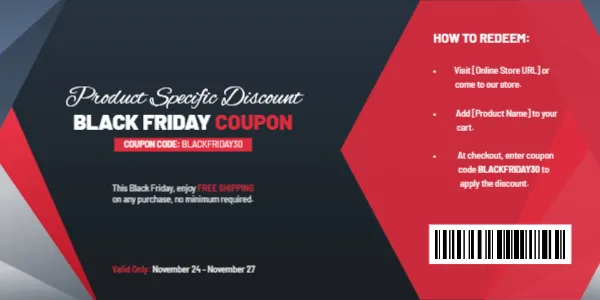
The coupon is 6 x 3 inches in landscape. The left side is a charcoal panel with a carbon fibre texture, carrying Percentage Off in a white script, BLACK FRIDAY COUPON in white and red capitals, and a red ribbon reading REDEEM ONLINE & IN-STORE. A paragraph of restrictions sits below. A red band along the bottom reads HURRY! OFFER ENDS SOON!
On the right, a bright red column with white lines holds GET UPTO, a huge white 25, a percent sign with OFF, ON YOUR ENTIRE PURCHASE!, and a black strip showing USE CODE: BLACKFRIDAY25. The valid dates and a barcode picture finish the column. The fonts are Barlow and Alex Brush.
The Restrictions Are Already on the Card
- Applicable on orders over $50.
- Excludes clearance items.
These are sensible conditions. A minimum order protects you from tiny sales, and excluding clearance stops stacking. Add other restrictions if needed, such as “excludes gift cards” or “one use per customer.” Keep the language short and clear, and make sure the printed type is large enough to read.
Dates for the Percentage Off Offer
The valid dates read November 24 to November 30. Adjust them to your actual sale period, and add the year if you reuse the coupon. The line HURRY! OFFER ENDS SOON! suits a short window. If your sale lasts the whole of November, change it to something less urgent.
Percentage Tiers
| Basket size | Discount |
|---|---|
| Over $50 | 25% off |
| Over $100 | 30% off, if you retype and use a second code |
| Over $200 | 35% off, with a cap |
If you want tiers, create a separate version of the coupon for each level and use different codes, so the till can check the minimum.
Printing the Black and Red Card
The carbon texture and red column need a good quality print. Use 200 to 250 gsm card stock and test one copy. At this size, three coupons fit in a column on a letter sheet. The barcode is a sample picture, so replace it with your own or delete it.
Explaining the Minimum Order
The restriction line says the offer applies on orders over $50. Explain why, in friendly words, near the code: “Spend $50 or more to unlock 25% off.” Customers like to know what they must do. At the till, staff should know whether the minimum is before or after the discount, and whether taxes and shipping count. Agree the rule and print it once, clearly.
Clearance Items and Stacking
Because clearance is excluded, make sure those items are marked with a sticker or a sign. Customers who find out at the till feel disappointed. In an online shop, tag clearance products so the code rejects them automatically. Small details like these make a coupon feel fair rather than tricky.
See also the limited time 50% coupon and the storewide discount coupon. More are in coupons and discount vouchers.