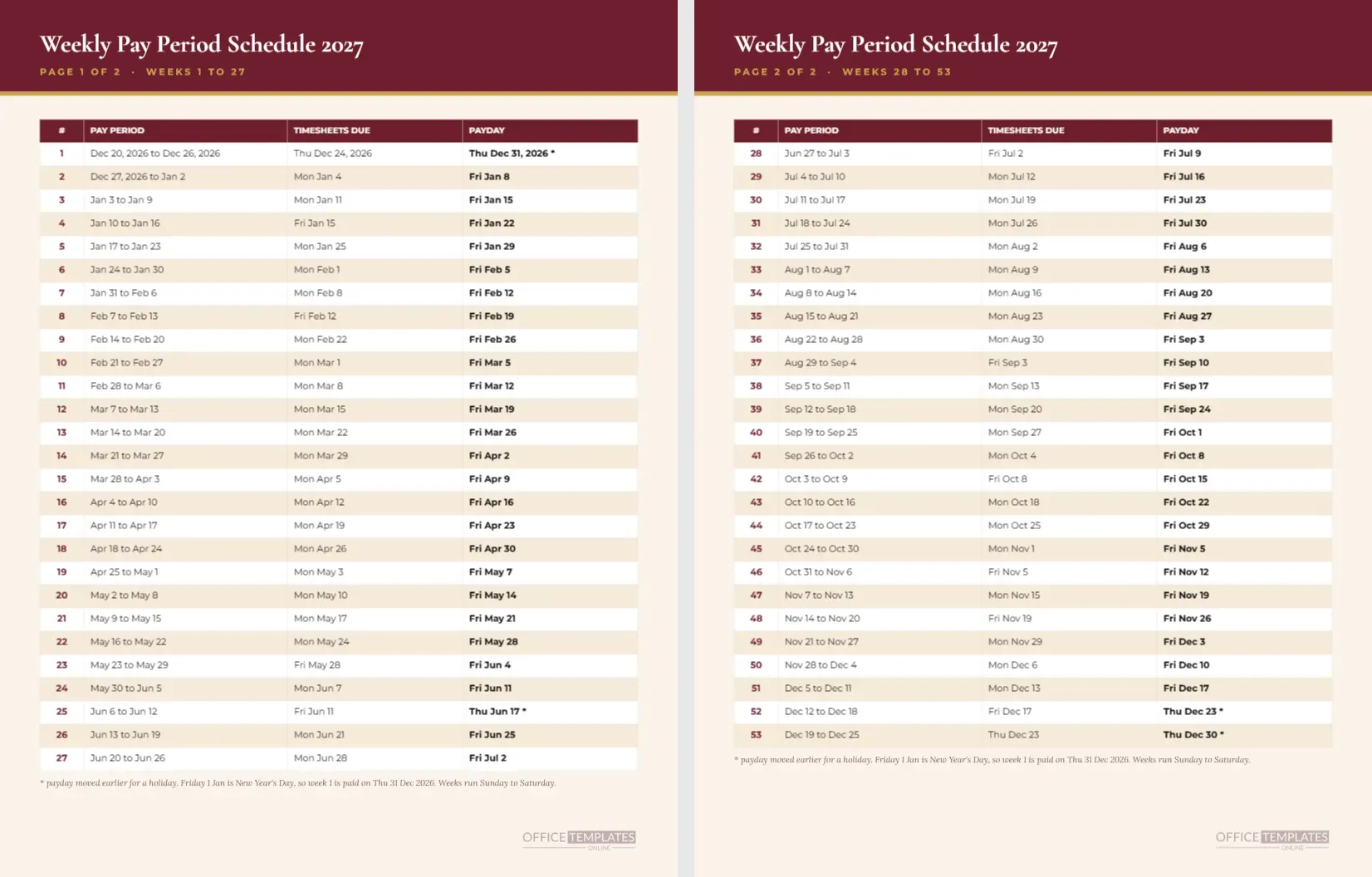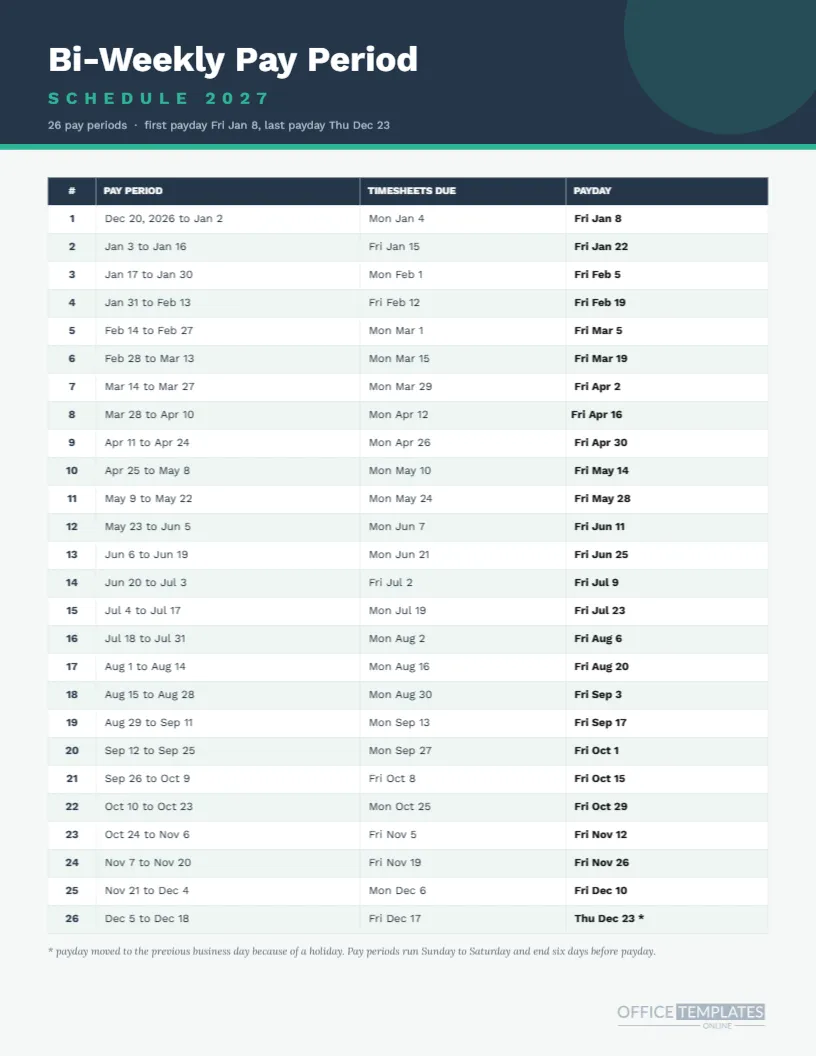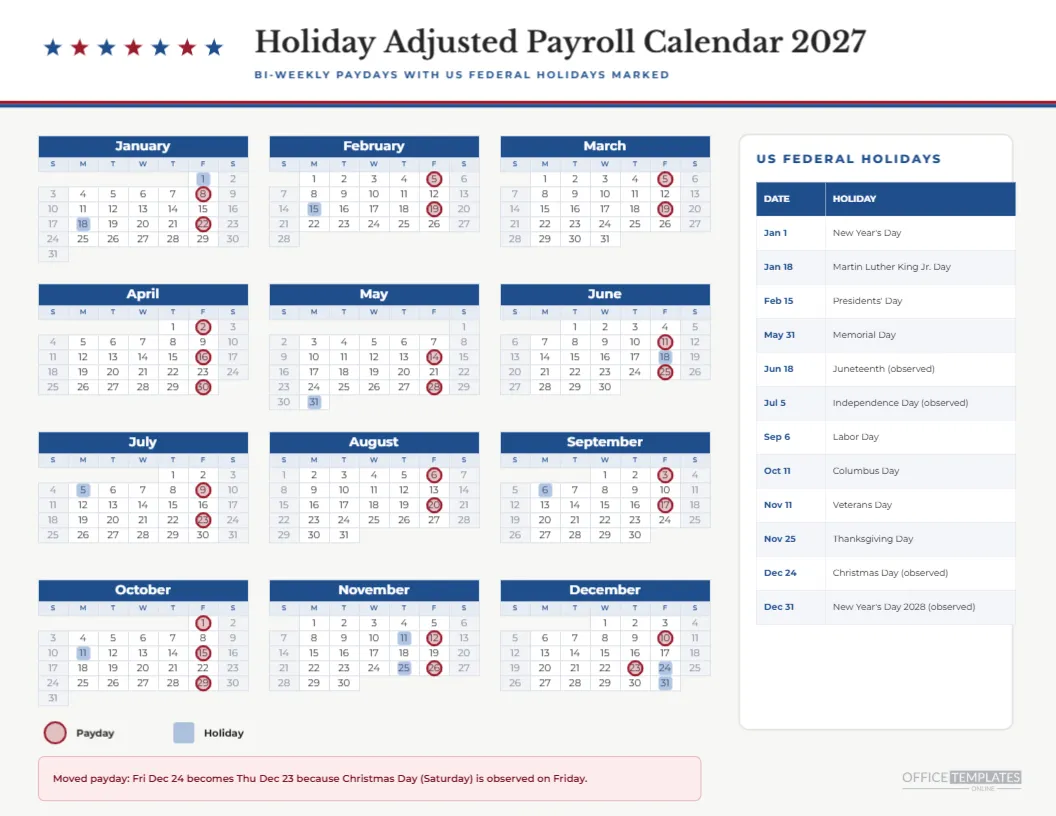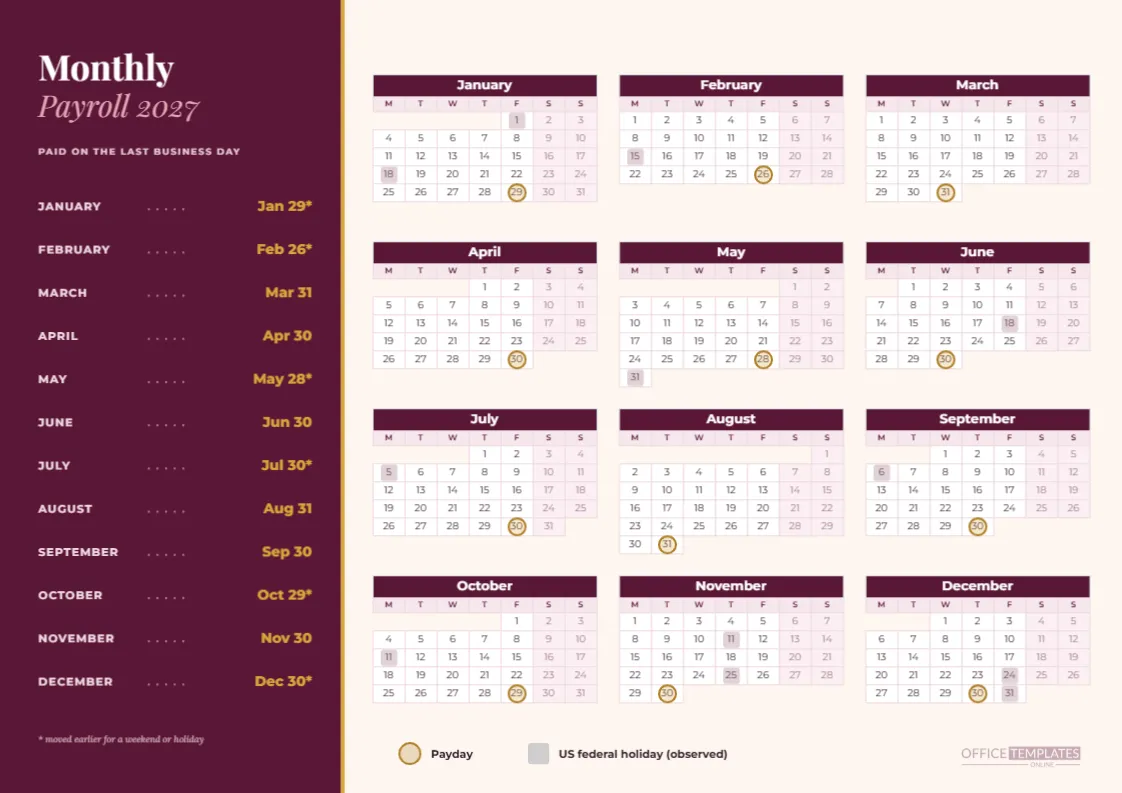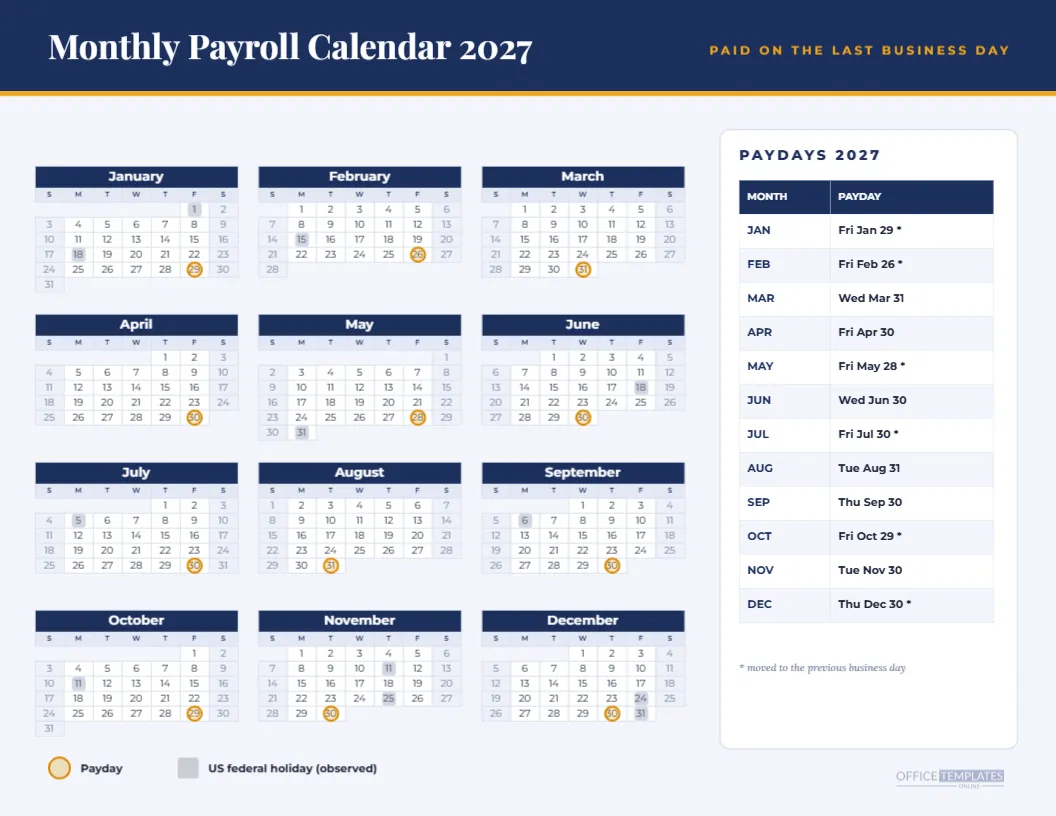
Monthly payroll is the oldest rhythm there is: one payday a month, usually at the end. The trouble is that the end of the month rarely lands on a convenient weekday. This calendar for 2027 settles it by placing every payday on the last business day of the month and listing all twelve in a clean side panel, so there is nothing to work out when the question comes up.
Navy and Amber With a Serif Headline
A navy band across the top carries the title Monthly Payroll Calendar 2027 in Playfair Display, with the line PAID ON THE LAST BUSINESS DAY in amber capitals on the right. The calendar and a white card sit on a pale blue page. The mood is more like an annual report than a spreadsheet, which suits executive offices and accounting firms.
Three Columns and a Payday Panel
Twelve mini months run in three columns on the left, four rows tall. On the right, a white card titled PAYDAYS 2027 holds a two-column table, month and payday, with twelve rows. The table is a real editable Table object, so you can change a date, add a column for cheque numbers, or restyle it without redrawing anything.
The Twelve Dates
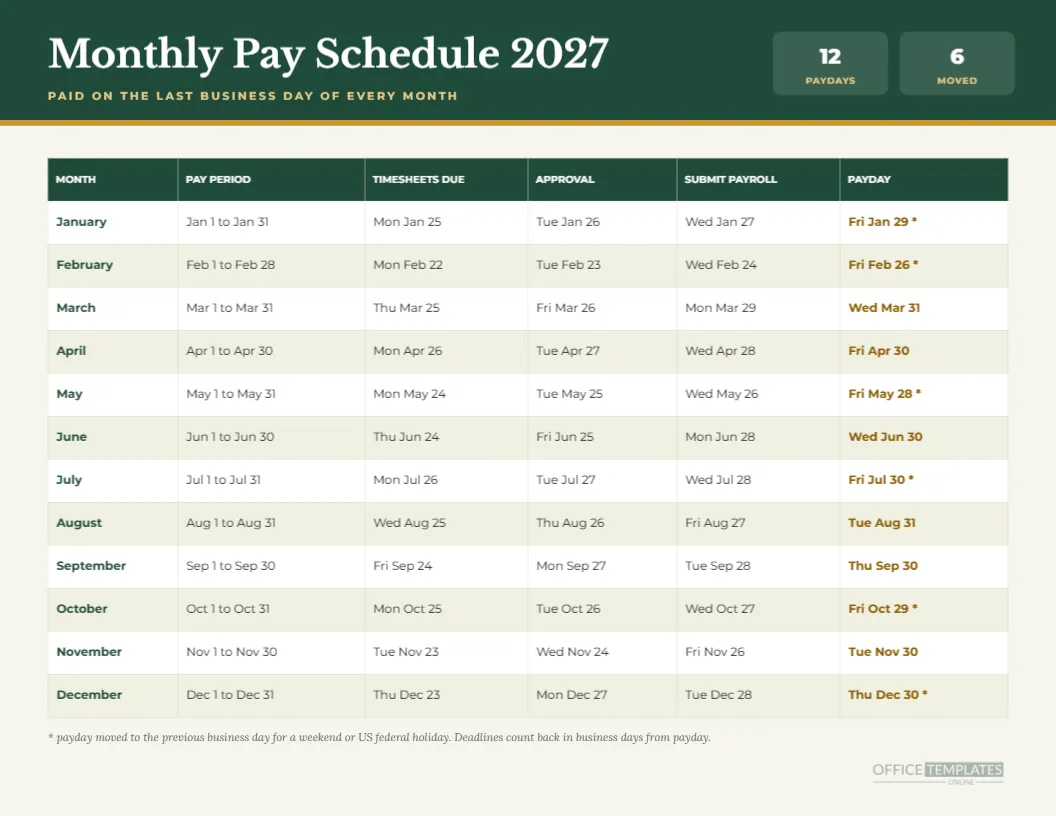
The 2027 monthly paydays are Fri Jan 29, Fri Feb 26, Wed Mar 31, Fri Apr 30, Fri May 28, Wed Jun 30, Fri Jul 30, Tue Aug 31, Thu Sep 30, Fri Oct 29, Tue Nov 30 and Thu Dec 30. Six carry an asterisk, meaning they moved from a weekend or holiday to an earlier business day.
Why Six Months Move
January 31 is a Sunday, February 28 is a Sunday, May 31 is Memorial Day, July 31 is a Saturday, October 31 is a Sunday, and December 31 is the observed New Year’s holiday. Each of those last days is not a working day, so pay shifts back to the previous one. The other six months simply end on a weekday and pay on the last day.
Reading the Rings on the Calendar
An amber ring sits on each payday and a grey square on each holiday. Because there is only one ring per month, you can see at a glance how uneven the gaps are: 28 days between January 29 and February 26, then 33 days to March 31. That unevenness is a quiet reason monthly employees sometimes feel a month is long.
Who Pays Monthly
Monthly pay is common for salaried professionals in many countries, for small family firms with a handful of employees, and for consultants on retainer. In the United States, it is less common than bi-weekly pay, but plenty of nonprofits, schools, and professional offices use it. If you do, this is the single most useful page to give your staff.
Budgeting Around One Large Payday
A monthly payday concentrates cash outflow into one day, so owners should plan funding a few days earlier. The calendar helps by showing which months the payday arrives early. Moving the funding transfer to the day before the ringed date prevents a late bank deposit on a Friday when the previous day is a holiday.
Editing the Calendar and the Panel
Use Calendar Options to change the year or week start, and click the table to edit the dates. If the rings no longer line up after a change, select the group and move it, or ungroup and place each ring individually. The legend at the foot can stay as it is.
Changing to the 25th or the 1st
Some employers pay on a fixed date such as the 25th rather than the last day. For that, edit the table dates, delete the old rings, and draw new ones. The layout, header, and panel do not need to change, which is why the page works as a general monthly payroll sheet and not only a last-day one.
Print and Display Tips
Print on Letter landscape with backgrounds on so the navy band appears. For a notice board, place it in a sheet protector and pin it at eye level. Slide a second copy into the payroll binder. The twelve rows in the panel stay readable at actual size.
Pairing With a Pay Schedule Table
The collection also includes a monthly pay schedule with timesheet, approval, and payroll submit dates, so you can use this page for the year view and that one for the working detail. Both use the same dates, so they will never disagree.
Adding a Company Name
There is room in the navy band for a company name above or beside the title. Keep it short and set it in the same typeface so the band does not look crowded. A logo can be added as an image placed in the top left corner.
How Employees Use It
Employees use a monthly payroll calendar to line up rent, loan instalments, and bills with the month’s single income date. A tenant paid on Thursday, September 30 will see that the first of October rent is due a day after pay, which is useful to know a month in advance.
Limits of the Calendar
The page shows the dates you plan to pay, not the date money reaches an individual bank account, which can lag by a day. It also does not account for state paycheck laws or local holidays. Check requirements for your location, and confirm firm dates with whoever runs your payroll.
Short Questions About the Monthly Page
How many paydays are there? Twelve. How many moved? Six. Is the panel a real table? Yes. Does the calendar start on Sunday? Yes, and you can change it. Is the year editable? Yes, through Calendar Options, though the rings need moving afterwards.
Explaining the Asterisk to Staff
Under the table, a small note says that an asterisk means the payday was moved to the previous business day. Many employees read that line closely the first time they see it. If your company has a different policy, such as paying on the next business day, change the sentence so it says what you actually do, and mention it in your staff handbook.
Using It for Year-End Reviews
Finance teams reviewing the year in December can use the page as a checklist: twelve paydays, twelve payroll runs, twelve sets of records. Tick each month in the margin as the reconciliation is completed. It turns a calendar into a lightweight audit trail that is easy to hand to an accountant.