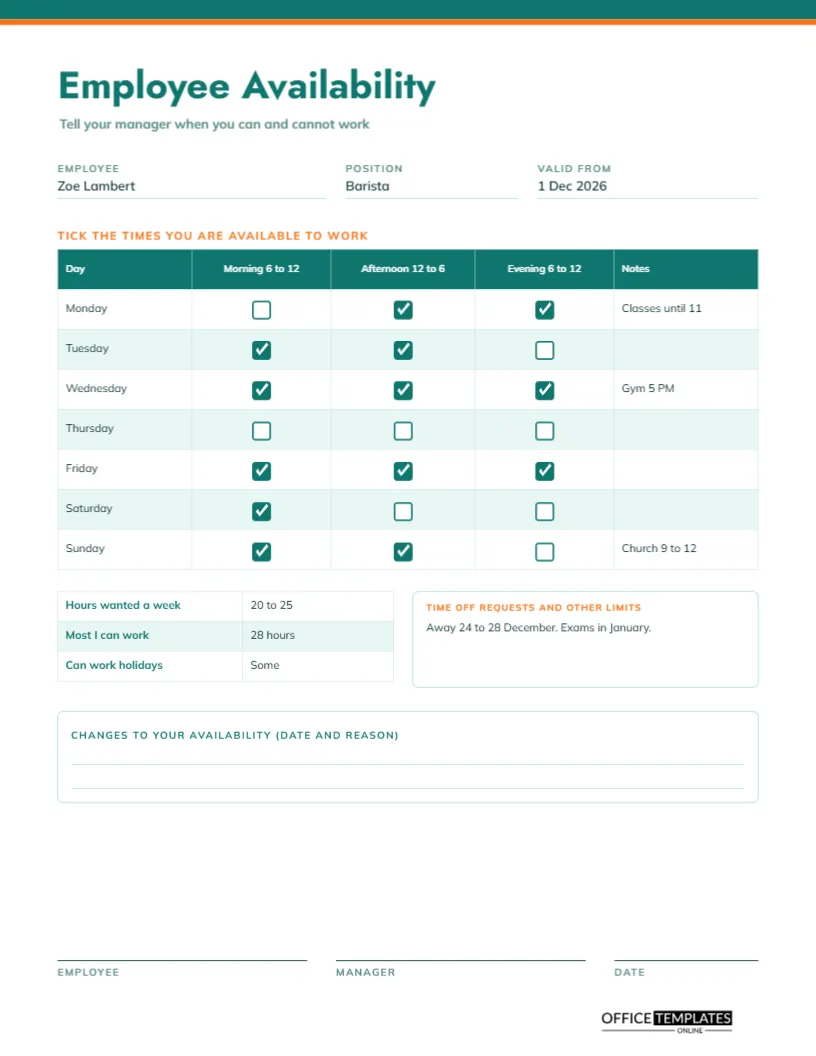
Building a fair schedule starts with knowing when people can work. Asking by text or in passing leads to mix-ups: Priya cannot do Tuesdays, but you forgot; Zoe has classes until eleven, but nobody wrote it down. A one-page form fixes this. Each employee ticks the blocks of time they are available, adds notes, says how many hours they want, and signs. The manager then builds the schedule with the facts in hand.
A Clean Teal Page With an Orange Line
The top edge carries a thin teal bar with a narrower orange line beneath. The title Employee Availability is set in teal Jost, a geometric sans, with the line tell your manager when you can and cannot work below it. Mulish sets the rest of the text. The look is open and friendly, so the form feels like an invitation, not a demand.
Who and From When
Three fields come first: employee, position and valid from. The sample is Zoe Lambert, a barista, valid from 1 December 2026. The valid from date is important because availability changes with school terms, second jobs, and family life. A form without a date can be mistaken for current when it is months old.
The Tick Box Grid
| Day | Morning 6 to 12 | Afternoon 12 to 6 | Evening 6 to 12 | Notes |
|---|---|---|---|---|
| Monday | Ticked | Empty | Ticked | Classes until 11 |
| Tuesday | Ticked | Ticked | Empty | Open |
| Wednesday | Empty | Ticked | Ticked | Gym 5 PM |
| Thursday | Empty | Empty | Empty | Not available |
| Saturday | Ticked | Ticked | Empty | Open |
| Sunday | Empty | Ticked | Ticked | Church 9 to 12 |
The real grid has all seven days and draws a filled teal box for available and an empty box for not available.
Drawn Boxes Instead of Symbols
The tick boxes are small drawn squares, with a white tick on a teal fill for available times. This avoids font problems on different computers. To change a box, select it and change its fill, or copy one from another cell. Printed on paper, employees can also tick the empty squares by hand with a pen.
Hours Wanted and Hours Limits
A small table beneath the grid asks for hours wanted a week, the most you can work, and whether you can work holidays. The sample says 20 to 25 hours, a maximum of 28 and some holidays. Managers use this to match offers to people. A person who wants 20 hours is unlikely to want a forty-hour week, however much you need cover.
Time Off Requests and Other Limits
An orange-headed box is for time off and other limits. The sample reads away 24 to 28 December and exams in January. Collecting such dates early prevents scheduling clashes and last-minute swaps. A reliable habit is to ask staff to update the form at the start of every term or season.
Changes to Your Availability
A lined box at the bottom is for later changes, with the date and reason. Rather than starting a new form each time, an employee can add a line. If the change is large, a fresh form with a new valid-from date is cleaner. Either way, the manager has a written record of what was agreed.
How to Complete the Form
- Write your name, position, and the date it starts.
- Tick every block of time you can work.
- Add notes for classes, other jobs, or commitments.
- Write hours wanted and your maximum.
- List time off requests, sign and hand it in.
Using Availability to Build Fair Schedules
Place the forms side by side and look for gaps. If nobody ticked Sunday evening, you have a problem to solve early. If many people tick the same blocks, you can share them fairly. Keep the forms in a folder so that new schedule builders can see who is available when, without starting from scratch.
Students, Parents and Second Jobs
Many employees are balancing work with study, care, or another job. The form gives them a respectful way to say so. A manager who honours availability gets more reliable staff, fewer last-minute absences and better retention. A form that is ignored teaches employees to stop filling it in.
Legal and Policy Cautions
Availability is a request, not a guarantee. Some places have rules about reasonable notice, minimum shifts, and how availability can be used. Check what applies to you, and agree in advance how often forms can change. The form is a communication tool, not a contract.
Editing the Time Blocks
You can change the block labels to suit your business, for example, overnight, school hours, or lunch rush. The grid is a real Table object with drawn boxes placed over it, so if you change the number of rows, move the boxes too. Duplicate a box and drag it to the right spot.
Signatures and Printing the Availability Form
Employee, manager, and date lines sit at the foot of the US Letter page. Print one copy per employee, or send the PDF and ask for a signed scan.
Collecting Forms From a Large Team
For a team of twenty or more, send the form as a PDF a month before a new schedule period and ask for returns by a set date. Keep a simple checklist of who has replied, and chase gently. A complete set of forms makes a schedule faster to build and stops the last-minute surprises that cause weekend panic.
Keeping Availability Forms Up to Date Through the Year
Staff circumstances change with the seasons. Ask for fresh forms when school terms begin, when a second job starts or ends, and before the holiday period. Mark the old form as replaced and file it. A small routine keeps the information accurate without turning it into an annual chore.
Availability Form Questions
Can I add a column for night work?
Yes. Add a column through Edit Table Data and place the extra boxes by copying existing ones.
How often should staff update it?
At least every term or season, and whenever their situation changes.
Is the ticking automatic?
No. The boxes are shapes you fill in or leave empty.