Is the Black Friday price really the best? Or will Cyber Monday be better? Careful shoppers compare before they buy, especially for big items like TVs, laptops, and appliances. This printable deal tracker gives you a clear table to record prices across stores and days, and to circle the winner.
Deal Tracker Design
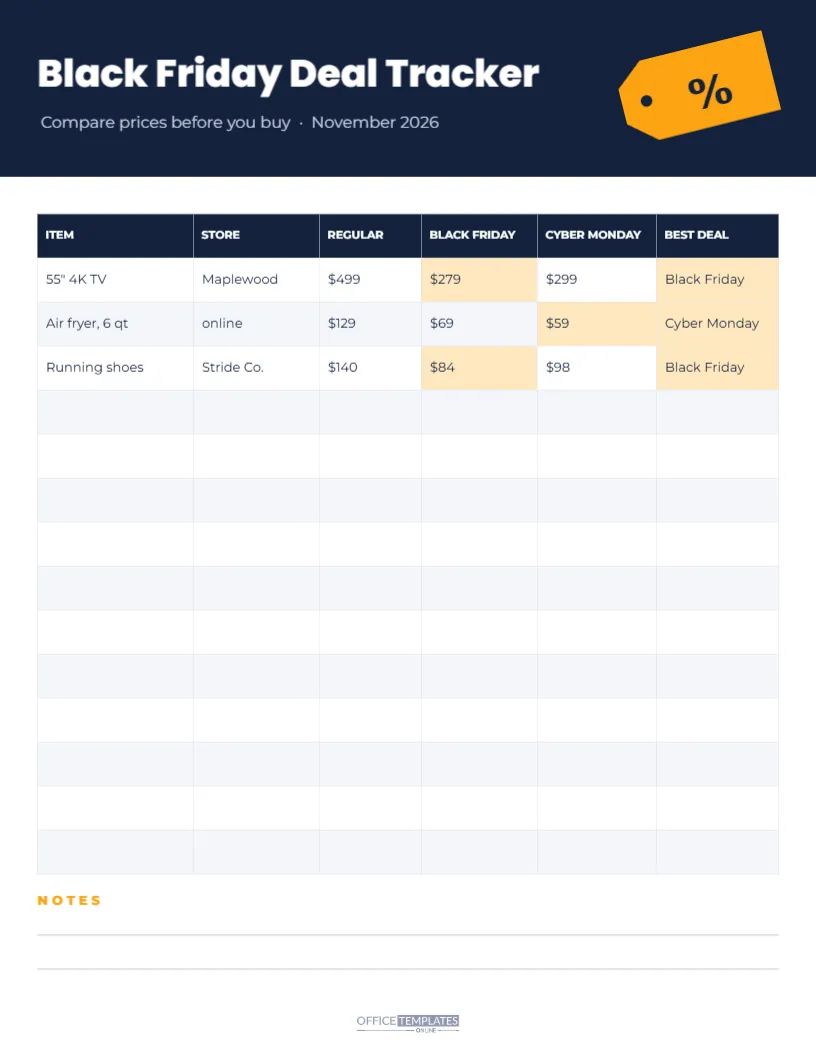
The tracker is US Letter, 8.5 x 11 inches. The top is a deep navy header with Black Friday Deal Tracker in white Poppins ExtraBold and a subtitle, Compare prices before you buy · November 2026. An orange price tag with a percent sign hangs at an angle on the right.
Below, a table has six columns: ITEM, STORE, REGULAR, BLACK FRIDAY, CYBER MONDAY, and BEST DEAL. Three sample rows are filled in, and the best price in each row is shaded light orange along with the BEST DEAL cell. Eleven blank rows follow. At the bottom, a NOTES heading with two lines gives space for reminders, and the logo mark sits at the foot.
Sample Price Comparisons
| Item | Store | Regular | Black Friday | Cyber Monday | Best |
|---|---|---|---|---|---|
| 55″ 4K TV | Maplewood | $499 | $279 | $299 | Black Friday |
| Air fryer, 6 qt | online | $129 | $69 | $59 | Cyber Monday |
| Running shoes | Stride Co. | $140 | $84 | $98 | Black Friday |
These are example figures to show how the table works, not real prices.
How to Track Black Friday Deals
- List the items you plan to buy: Be specific: model, size, and colour.
- Record regular prices early: Note prices a few weeks before Black Friday.
- Check Black Friday prices: Fill in the column as deals are announced.
- Check Cyber Monday prices: Some deals improve, others disappear.
- Mark the best deal: Shade or circle the winning price.
Why Recording Regular Prices Matters
A big percentage off is only meaningful if the starting price is genuine. By noting regular prices in early November, you can see whether a Black Friday deal is truly lower or simply back to a normal price. Your own record is one of the most reliable guides you can have.
Editing the Tracker Table
The table is fully editable. Double-click it, or choose Edit Table Data, to type items and prices before printing. To highlight the best price, change the background colour of that cell. Add rows if you are tracking many items, or delete the samples to start fresh.
Things to Consider Beyond Price
- Shipping costs: a lower price can cost more after delivery fees.
- Return policies: holiday return windows vary by store.
- Warranty: some stores include extended warranties or support.
- Bundles: an included accessory can make a slightly higher price a better deal.
- Stock: the best price is no help if the item is sold out.
Use the notes lines to record these details.
Black Friday Versus Cyber Monday
Black Friday traditionally focuses on in-store deals, while Cyber Monday focuses on online deals, although today most retailers run both online. Some categories may see their best prices on one day, others on the other, and many deals repeat. Tracking both columns lets you decide calmly rather than worrying about missing out.
Using the Tracker With a Shopping List
Pair the tracker with a shopping list and budget planner. The list keeps track of who you are buying for and how much you can spend; the tracker helps you find the best price for the big items on it.
Printing and Using the Tracker
Print the tracker and keep it with your shopping list, or fill it in on screen and save it as a PDF. Some shoppers print a fresh copy for each category, such as electronics, kitchen, and gifts.
Changing the Tracker Colours
Navy and orange are clear and practical. You can change the header and table header to any dark colour and the highlight to any light accent. Keep the table background light so handwriting is easy to read.
Tracking Prices for Your Business
Businesses can use the tracker to monitor competitors’ prices on key products over the weekend. Change the columns to your store and competitors’ stores, and use the notes for strategy ideas.
Keeping Your Records
Keep the completed tracker after the holidays. It shows which items had the best discounts and on which day, which helps you plan next year’s shopping more confidently.
Price Matching Policies
Some stores offer to match a competitor’s lower price, either in-store or online, under certain conditions. If you find a better price elsewhere, your tracker gives you the evidence: the store, the item, and the price. Check each store’s price match rules before relying on them, because many exclude Black Friday doorbusters or limited-time deals.
Price Alerts and Wish Lists
Many online shops let you add items to a wish list and receive alerts when prices drop. Use these alongside your printed tracker: let the alerts tell you when to look, and record the confirmed prices on the page. Combining digital alerts with a written record helps you stay organised without relying on memory.
Deciding When to Buy
If an item you need is at a price you are happy with, it is often sensible to buy it rather than waiting for a slightly better deal that might not come. Popular items can sell out. Use your tracker to set a target price for each item; when a deal reaches your target, buy it and move on.
Sharing the Tracker With Family
If several people in your household are shopping, share one tracker so nobody buys the same item twice or misses a better price someone else found.
Deal Tracker Questions
Can I add more stores?
Add columns in the table editor, or use one row per store for each item.
Can I track prices for weeks?
Rename the columns to dates and use the tracker over several weeks.
Does it work on a phone?
Download it as a PDF or image to view on a phone, though writing is easiest on paper or a tablet.
The best deal is the one you can prove. Track your prices, compare the days, and buy with confidence this Black Friday.