Turn a Quick Story View into a Reason to Shop Your Labor Day Sale
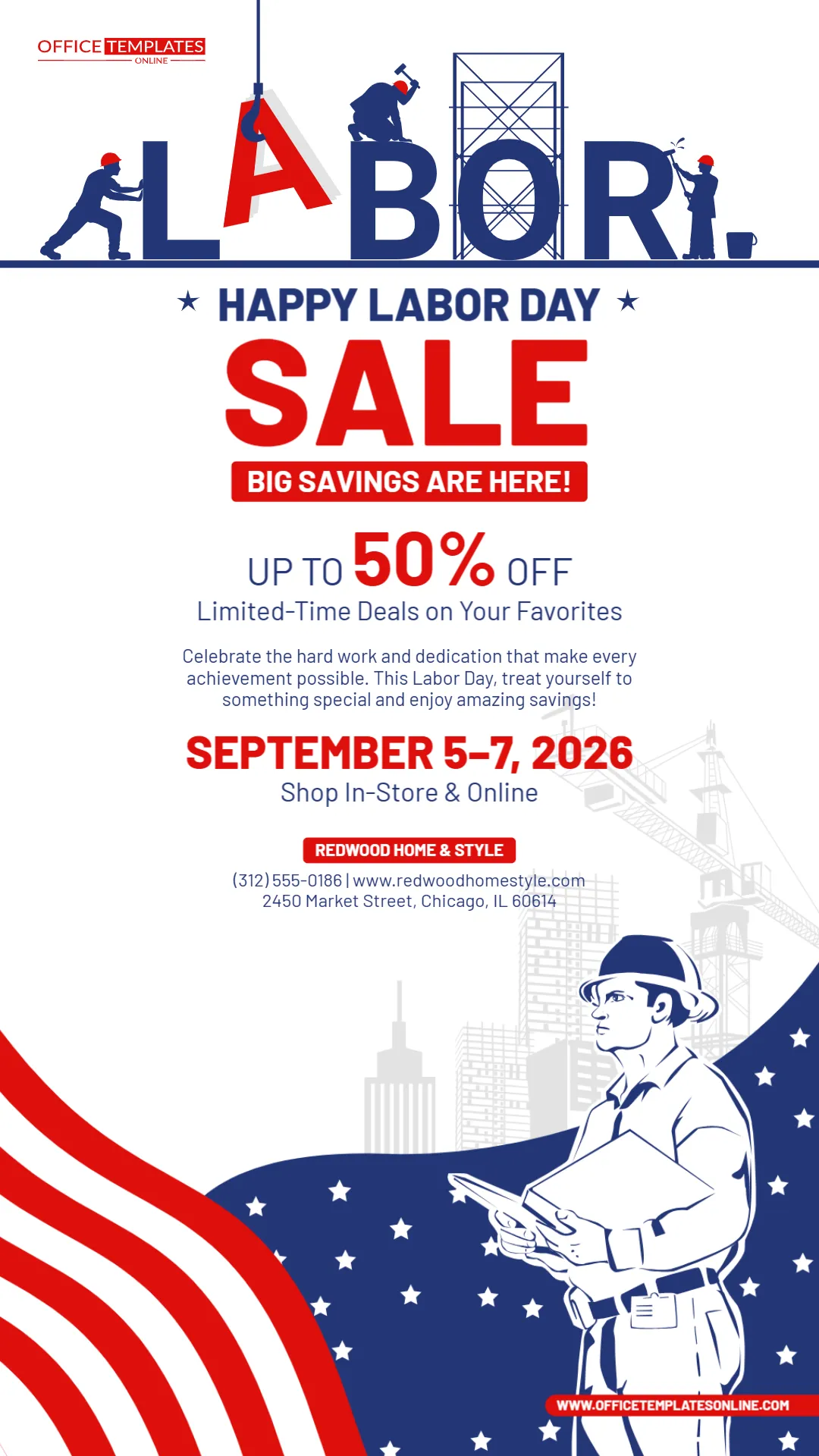
Instagram Stories move quickly, so a promotional design has only a short moment to communicate its message. This Labor Day Sale Instagram Story Template is built around that reality: a tall, attention-focused layout, a huge SALE headline, a prominent up to 50% off offer, clearly displayed sale dates, and patriotic graphics that immediately connect the promotion with Labor Day.
What makes this design especially distinctive is its visual tribute to workers. Across the top, illustrated workers appear to be physically constructing the word “LABOR”—pushing, lifting, building, and working around the oversized letters. A second construction worker appears toward the bottom against a subtle city and crane background. These details give the Story a stronger connection to the meaning of Labor Day while still keeping the main purpose clear: promoting a limited-time sale.
The template can be personalized through the online editor directly in your browser, with no login required. Change the discount, promotional wording, dates, business name, website, contact details, or other editable content to suit your sale.
When your design is ready, download the finished version as a PNG, JPG, or PDF.
Made for the Tall, Mobile-First Instagram Story Format
This is not simply a regular sale flyer squeezed into a social media post.
Its long vertical composition is designed for Story-style viewing, where people normally see content on a phone held upright. The recommended Instagram Story canvas is 1080 × 1920 pixels with a 9:16 aspect ratio, which fills the vertical screen.
That vertical format gives this template room to create a natural viewing sequence:
Labor Day theme ? Sale announcement ? Discount ? Short message ? Sale dates ? Shopping method ? Business information
Instead of making every element compete for attention at the same level, the layout guides the eye downward.
That matters on Stories because important promotional information needs to remain understandable at a glance.
The SALE Headline Is Impossible to Mistake
The central SALE headline is intentionally enormous.
A person who sees this Story for only a moment can still understand that it is promoting a special offer.
Immediately above it appears:
HAPPY LABOR DAY
and immediately below it:
BIG SAVINGS ARE HERE!
Together, these elements answer three important questions very quickly:
What is happening?
A sale.
Why now?
Labor Day.
Why should someone care?
There are special savings available.
This direct approach is useful for a Story because you do not want potential customers to search through decorative elements before discovering the actual promotion.
Make the Discount the Second Big Attention Grabber
The sample offer reads:
UP TO 50% OFF
with 50% displayed much larger than the surrounding text.
That hierarchy is useful because the discount is one of the strongest reasons for a shopper to keep reading.
Replace the sample percentage with your actual promotion.
For example:
UP TO 40% OFF
25% OFF STOREWIDE
SAVE UP TO 60%
BUY ONE, GET ONE 50% OFF
EXTRA 20% OFF SALE ITEMS
SAVE $100 ON SELECT ITEMS
LABOR DAY SPECIAL – 30% OFF
Only advertise a discount that genuinely applies to your sale, and use qualifiers such as “up to,” “selected items,” “with purchase,” or “while supplies last” when they are necessary.
“Limited-Time Deals on Your Favorites” Can Be Customized Too
Directly below the discount, the template currently says:
Limited-Time Deals on Your Favorites
This line gives context to the percentage without adding much visual clutter.
You can adapt it to your product category.
A furniture retailer might use:
Limited-Time Savings on Furniture & Décor
A clothing store could write:
Labor Day Deals on Your Favorite Styles
A home improvement business might use:
Save on Supplies for Your Next Project
An electronics retailer could try:
Big Savings on Select Tech & Accessories
A general retailer might keep it simple:
Limited-Time Labor Day Deals
This small supporting line is a good place to include a relevant product or service keyword without making the headline unnecessarily long.
A Labor Day Sale Design That Actually References Labor
One of the most interesting details in this Story is the treatment of the word LABOR.
The letters are surrounded by workers performing different tasks. One pushes against the “L,” another appears to lower the red “A” into position, another works above a letter, and scaffolding forms part of the composition.
The concept makes the typography itself part of the illustration.
Farther down, another worker holding plans stands in front of a lightly illustrated construction scene with buildings and a crane.
These details help distinguish the template from Labor Day graphics that rely entirely on flags, stars, and discount signs.
The worker imagery is especially suitable for businesses that want their holiday promotion to visually acknowledge work, building, craftsmanship, and dedication while still leading with the sale.
Patriotic Graphics Frame the Promotion
Red, white, and navy blue dominate the design.
The bottom section uses sweeping flag-inspired stripes and a field of white stars. These curved shapes create movement while framing the worker illustration.
Because the center of the Story remains largely white, the promotional text has plenty of breathing room.
That contrast is useful on a mobile screen:
Red emphasizes the sale, discount, dates, and business name.
Navy blue supports secondary text and Labor Day graphics.
White keeps the central promotional information clean and readable.
The result is patriotic without making every inch of the Story visually busy.
Rewrite the Short Promotional Paragraph for Your Business
The sample paragraph talks about celebrating hard work while enjoying Labor Day savings.
You do not have to keep that exact message.
This section can become a short, persuasive introduction to your offer.
For a home store:
Celebrate Labor Day with special savings on furniture, décor, and everyday favorites for your home.
For a fashion retailer:
Refresh your wardrobe for less with limited-time Labor Day savings on selected styles.
For a hardware store:
Tackle your next project for less with Labor Day deals on selected tools, supplies, and equipment.
For an online retailer:
Shop our Labor Day event from anywhere and save on selected customer favorites for a limited time.
Keep the paragraph brief. The discount and dates should remain more visually important than the supporting copy.
Show Exactly How Long the Sale Runs
The template currently displays:
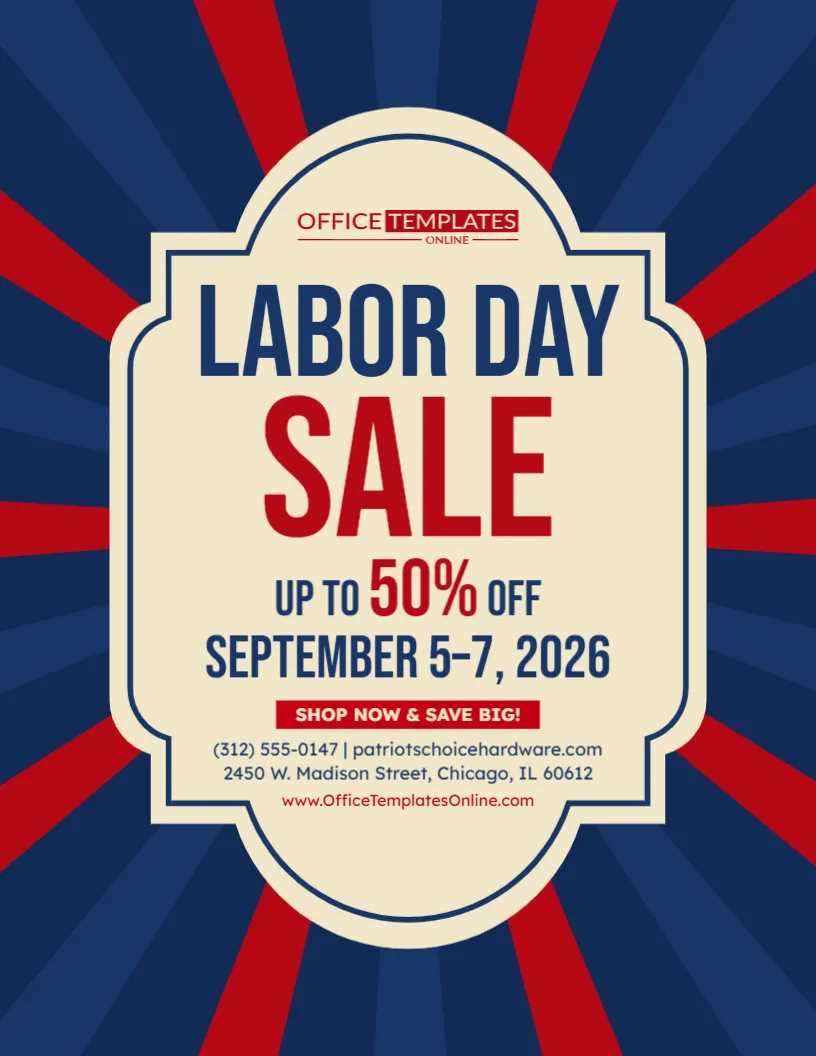
SEPTEMBER 5–7, 2026
in large red lettering.
This is valuable information because a limited-time promotion becomes much easier to understand when shoppers can immediately see when it begins and ends.
You can customize the date treatment according to your campaign:
SEPTEMBER 5–7
LABOR DAY WEEKEND ONLY
SEPTEMBER 4–7, 2026
ENDS SEPTEMBER 7
ONE DAY ONLY • SEPTEMBER 7
FRIDAY–MONDAY
For a particularly short promotion, you might make the urgency stronger:
ENDS TONIGHT
FINAL DAY
LAST CHANCE – SEPTEMBER 7
Use urgency only when it accurately reflects the promotion.
Make “Shop In-Store & Online” Match the Way You Sell
The sample design says:
Shop In-Store & Online
This is useful because customers immediately know they have two ways to take advantage of the promotion.
However, you should change it if your business operates differently.
For an online-only store:
SHOP ONLINE
For a physical retailer:
VISIT US IN-STORE
For multiple locations:
SHOP AT PARTICIPATING LOCATIONS
For an appointment-based business:
BOOK YOUR LABOR DAY SPECIAL
For a service business:
CALL TODAY TO CLAIM THIS OFFER
For local pickup:
ORDER ONLINE • PICK UP IN-STORE
Small details like this make the template relevant to many different kinds of businesses rather than only traditional retail stores.
Add Your Real Business Name Where the Sample Brand Appears
Near the bottom of the promotional content is a red business-name label.
The sample reads:
REDWOOD HOME & STYLE
Replace this with your own store, company, brand, or service name.
Keeping the business name close to the contact details helps viewers connect the offer with the company running it.
You can also customize the information underneath it with details such as:
Phone number
Website
Street address
Store location
For an Instagram Story, however, avoid turning this area into a complete business directory.
Include the information someone actually needs to take the next step.
Make the Website Easy to Read on a Phone
A website appears underneath the business contact information in the sample design.
If you plan to use a URL in your customized version, keep it short and readable.
For example:
is easier to understand quickly than a long page address containing folders, tracking codes, and campaign parameters.
You can direct customers to a dedicated sale page after they reach your website rather than displaying an unnecessarily long URL inside the graphic.
Customize Everything Online Without Logging In
You can personalize this Labor Day Sale Instagram Story Template directly through the browser-based online editor.
There is no login required to start editing.
Depending on your promotion, you can replace or adjust:
- Sale headline
- Discount percentage
- Supporting promotional text
- Sale dates
- Shopping instructions
- Business name
- Phone number
- Website
- Store address
- Other editable text and design elements
This is particularly useful when you need a social media promotion quickly and do not want to start with an empty vertical canvas.
Open the design, replace the sample information, review the result, and prepare it for your campaign.
Use It for More Than a General Retail Sale
Although the sample content represents a home-and-style business, the structure is flexible.
You can adapt this Story for:
Furniture stores
Home décor retailers
Clothing boutiques
Shoe stores
Electronics retailers
Hardware stores
Home improvement businesses
Auto-related businesses
Department stores
Beauty businesses
Local shops
Online stores
Service businesses
Seasonal promotions
The most important changes are usually the discount, supporting sentence, dates, business information, and call to action.
A Furniture Store Version Could Read Like This
HAPPY LABOR DAY
FURNITURE SALE
UP TO 50% OFF
Selected Furniture & Home Décor
SEPTEMBER 5–7
SHOP IN-STORE & ONLINE
This preserves the overall structure while making the product category obvious.
A Fashion Store Can Give It a Completely Different Voice
For fashion retail, you might change the promotional copy to:
LABOR DAY STYLE SALE
SAVE UP TO 40%
Selected Clothing, Shoes & Accessories
ENDS SEPTEMBER 7
SHOP THE SALE
The worker illustrations and patriotic theme remain relevant to Labor Day while the copy makes the campaign specific to fashion.
A Hardware or Home Improvement Business Is an Especially Natural Fit
The construction imagery makes this Story particularly suitable for hardware, tools, building supplies, and home improvement promotions.
You might use:
LABOR DAY PROJECT SALE
SAVE UP TO 50%
TOOLS • HARDWARE • HOME IMPROVEMENT
SEPTEMBER 5–7
SHOP NOW
In this case, the workers, scaffolding, crane, and hard-work theme visually support the products being promoted.
Use a Strong Call to Action
The sample uses “Shop In-Store & Online,” but you can make the call to action more direct when appropriate.
Try:
SHOP THE SALE
SHOP NOW
SAVE THIS WEEKEND
VISIT US TODAY
GET THE DEAL
SHOP LABOR DAY SAVINGS
ORDER ONLINE
VISIT OUR STORE
DON’T MISS THESE DEALS
For a Story, shorter calls to action are usually easier to process quickly.
If you add Instagram’s own interactive link or CTA features when publishing, keep the surrounding design uncluttered so the action remains easy to notice.
Remember That Instagram Adds Its Own Interface Over a Story
When preparing a Story, it is useful to remember that Instagram places interface elements over parts of the screen.
Current Story guidance recommends keeping essential text and logos away from the extreme top and bottom portions of a 1080 × 1920 design because profile information, reply controls, and other interface elements can overlap those areas.
When customizing this template, avoid moving your most important information—especially the discount, dates, business name, or call to action—too close to the outer edges.
Keeping the key message in the central viewing area can help it remain readable after the Story is published.
Keep the Copy Shorter Than You Would on a Printed Flyer
A printed promotional flyer may be viewed for several minutes.
An Instagram Story may receive only a few seconds of attention.
That changes how you should write.
Instead of:
“We are pleased to announce that in celebration of Labor Day, customers can take advantage of a wide variety of discounts across many of our most popular products…”
use:
LABOR DAY SAVINGS ARE HERE
UP TO 50% OFF SELECTED FAVORITES
The second version communicates the offer much faster.
Use the available space for information that directly helps the customer understand or act on the promotion.
Put the Most Important Information in the Right Order
For this template, a useful information hierarchy is:
1. Labor Day Sale
2. Discount
3. What the discount applies to
4. Sale dates
5. How to shop
6. Business name
7. Contact or website
A customer should not need to reach the bottom before discovering the offer.
The design already follows this hierarchy, so try to preserve it when replacing the sample text.
Avoid Filling the Story with Fine Print
Discount campaigns sometimes require conditions.
If your offer has exclusions, make sure they are communicated appropriately, but avoid shrinking a large block of terms until it becomes unreadable on a phone.
For example, the main graphic might say:
UP TO 50% OFF SELECTED ITEMS
rather than simply:
50% OFF
if the discount does not apply to everything.
The goal is to make the main offer clear and accurate.
Detailed terms can be provided where customers can realistically read them, such as on the linked sale page.
Create Several Story Versions from the Same Campaign
This template can also serve as the visual foundation for a short sequence of Labor Day promotional Stories.
For example, you might create:
Story 1:
LABOR DAY SALE – UP TO 50% OFF
Story 2:
Highlight a specific product category.
Story 3:
ENDS SEPTEMBER 7 – SHOP NOW
This approach lets you keep each Story focused rather than squeezing every product, discount, and condition into a single image.
You can also create countdown versions:
3 DAYS LEFT
TOMORROW ONLY
FINAL DAY
LAST CHANCE
The same visual identity can make the campaign feel connected from beginning to end.
Use the Design for an Early Sale Announcement
You do not have to wait until Labor Day weekend to use the template.
Before the promotion starts, change the message to:
LABOR DAY SALE STARTS SOON
or:
LABOR DAY SAVINGS ARE COMING
Then include the dates.
Once the sale begins, switch to:
LABOR DAY SALE IS ON
Near the end:
LAST CHANCE TO SAVE
This lets one design style support several stages of the same campaign.
Don’t Forget Mobile Readability
A design can look large on a desktop editor but much smaller when viewed on a phone.
Before publishing, check that:
The discount is easy to read.
The dates stand out.
The supporting paragraph is not too small.
The business name is recognizable.
The website or contact information remains legible.
Important content is not pushed against the top or bottom edges.
The standard 9:16 Story format is intended to fill a vertical phone display, so mobile readability should be the priority when making changes.
Download the Completed Story as PNG, JPG, or PDF
Once your promotion is customized, you can download the completed template in PNG, JPG, or PDF format.
For posting a static Instagram Story, PNG or JPG will generally be the most directly useful image formats.
PDF can be useful when you also want a document version of the customized design for other purposes.
Having multiple download choices means you can personalize the design once and choose the output that suits your intended use.
The Design Can Work Beyond Instagram Stories Too
Although this template is created specifically as a Labor Day Sale Instagram Story, the finished artwork can also be useful as part of a broader digital campaign when the format suits the destination.
You might use the same messaging and visual style for:
- Social media promotions
- Mobile sale announcements
- Digital campaign graphics
- Short-term promotional reminders
- Online store announcements
- Labor Day campaign materials
For Instagram Stories specifically, the vertical 9:16 format is the key advantage because it is designed to occupy the full upright screen.
Run a Five-Second Test Before Publishing
Before downloading the final version, look at the Story for only about five seconds.
Then look away.
What do you remember?
Ideally, you should immediately recall:
Labor Day Sale
Up to 50% Off
September 5–7
and perhaps the business name.
If you remember a long paragraph but cannot remember the discount, the hierarchy needs adjustment.
If you notice the artwork but miss the dates, make the dates stronger.
If the business name disappears into the lower details, give it more visibility.
This quick test is useful because it approximates the fast viewing behavior the design is intended for.
Check Every Promotional Detail Before You Post
Before publishing the customized Story, verify:
Discount: Is the percentage or dollar amount correct?
Scope: Does the discount apply to everything or only selected products?
Dates: Are the start and end dates accurate?
Shopping method: Can customers shop online, in-store, or both?
Business name: Has the sample brand been replaced?
Website: Does the URL belong to your business?
Phone number: Is it correct and necessary?
Address: Is the store location accurate?
Readability: Can the important information be understood on a phone?
Placeholders: Have all sample details been removed?
One incorrect date or discount can undermine an otherwise strong promotion, so this final review is worth doing.
Give Your Labor Day Promotion a Story Built for Quick Attention
This Labor Day Sale Instagram Story Template combines a direct sales message with a visual style that recognizes the holiday itself.
The workers constructing the LABOR lettering give the design its own identity. The oversized SALE headline makes the commercial purpose instantly clear. The large discount area provides room for your strongest offer, while the sale dates, shopping method, business name, website, and contact information are organized into a natural vertical flow.
Use it to promote a retail sale, furniture event, home improvement promotion, fashion discount, hardware sale, online shopping event, local store offer, or other Labor Day special.
Open the template in the online editor and customize it directly in your browser without logging in. Replace the sample discount, dates, business information, and promotional message with your own details. Keep the most important content easy to read on a mobile screen and review the offer carefully before publishing.
When the design is finished, download your customized Labor Day Sale Instagram Story as PNG, JPG, or PDF and use it to put your Labor Day offer in front of customers in a bold, mobile-friendly format.