Pack the Picnic Basket and Bring Everyone Together This Labor Day
Labor Day is a natural time to slow down, head outdoors, enjoy good food, and spend the day with people who matter. This Labor Day Picnic Flyer Template captures that relaxed feeling with a warm, family-centered design made for inviting people to an outdoor holiday gathering.
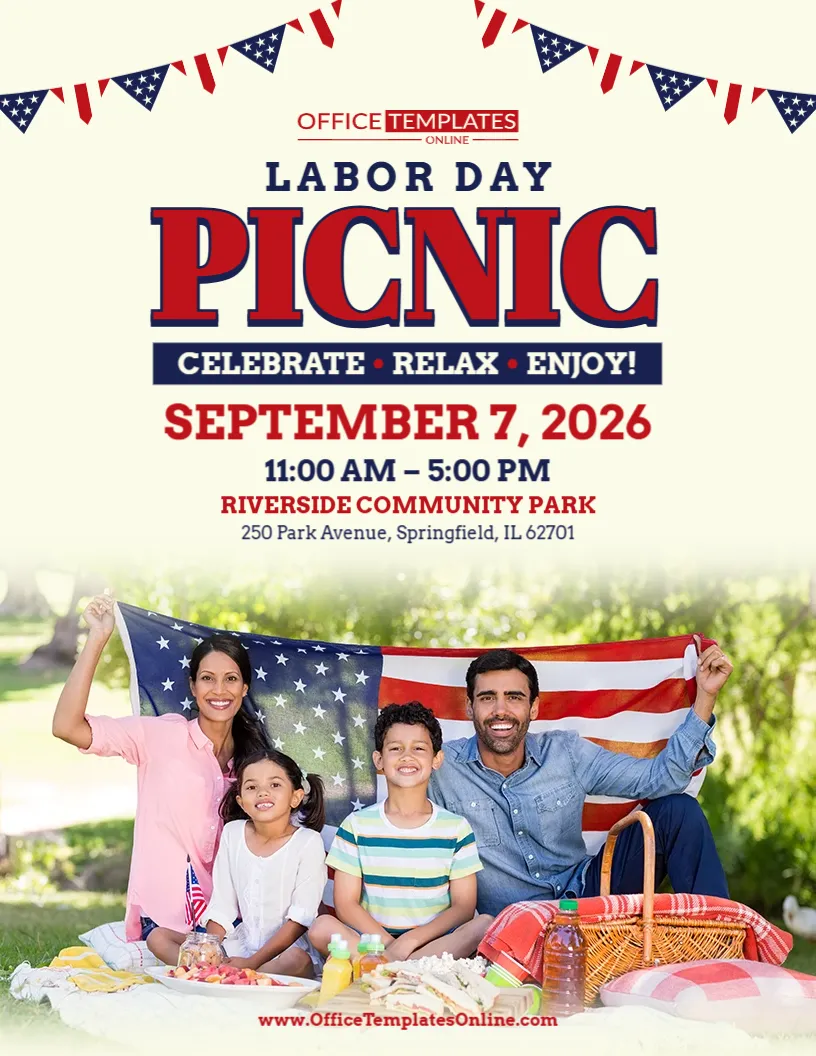
Unlike a flyer built around a sale, concert, or formal community program, this design immediately feels like a picnic invitation. The lower half features a cheerful family enjoying time outdoors with an American flag, picnic food, drinks, a basket, and a blanket. Above the photograph, the large “Labor Day Picnic” headline makes the purpose of the event unmistakable.
The practical information is kept together in the center of the page, with dedicated space for the date, time, venue name, and address. Patriotic bunting across the top completes the Labor Day look without making the design feel too formal.
You can personalize this template in the online browser-based editor with no login required. Replace the sample information with your own picnic details, make the design suitable for your family, company, church, neighborhood, or community gathering, and download the completed flyer as a PDF, PNG, or JPG.
This Flyer Feels Like an Invitation to Relax
The words directly beneath the main headline say:
CELEBRATE • RELAX • ENJOY!
Those three words summarize the personality of this template remarkably well.
There is no pressure-driven wording and no complicated event message. The design simply invites people to come together and enjoy the holiday.
That tone works particularly well for a picnic because outdoor gatherings are usually casual and social. Community-event guidance also recommends using welcoming language rather than sales-style urgency when the purpose of a flyer is participation and connection.
You can keep the original phrase or replace it with something that better matches your gathering, such as:
EAT • PLAY • CELEBRATE!
FOOD • FAMILY • FUN!
RELAX • CONNECT • CELEBRATE!
PICNIC • PLAY • ENJOY!
GOOD FOOD • GREAT COMPANY • LABOR DAY FUN!
BRING THE FAMILY & ENJOY THE DAY!
A short phrase works especially well here because it keeps the upper section clean and easy to scan.
The Family Picnic Photo Does Much of the Talking
One of the strongest features of this particular flyer is its large photograph.
Instead of trying to describe the atmosphere with several paragraphs, the image shows people relaxing outdoors together with picnic food and an American flag.
That instantly communicates ideas such as:
family
outdoor fun
food
togetherness
relaxation
Labor Day
Picnic-flyer guidance recommends outdoor scenery, picnic food, baskets, blankets, and family gathering imagery because viewers can understand the nature of the event before reading all the details.
That makes this design particularly suitable for an event where the atmosphere is just as important as the schedule.
A Softer Patriotic Style
This template still uses recognizable Labor Day colors, but it handles them differently from many bold red-and-blue event flyers.
The background is a soft, warm off-white rather than bright white.
Red and navy blue are reserved mainly for the typography and patriotic decorations.
Across the top, triangular bunting uses stars and stripes to frame the design. The American flag in the picnic photograph provides another strong patriotic element in the lower half.
Because these elements are spread across the page rather than concentrated in one large graphic, the design maintains a relaxed outdoor feeling.
The result is a flyer that says Labor Day without losing the friendly character of a family picnic.
Change the Picnic Title to Match Your Group
The large “Labor Day Picnic” headline is broad enough for many uses.
However, adding a group or organization name can make the invitation feel much more personal.
You could turn it into:
Annual Labor Day Picnic
Family Labor Day Picnic
Community Labor Day Picnic
Company Labor Day Picnic
Employee Labor Day Picnic
Neighborhood Labor Day Picnic
Church Labor Day Picnic
Labor Day Family Picnic
Labor Day Picnic in the Park
Labor Day Community Picnic & Cookout
You could also include a local name:
Riverside Labor Day Picnic
Oakwood Neighborhood Labor Day Picnic
ABC Company Labor Day Picnic
Grace Community Church Labor Day Picnic
Picnic flyer templates are commonly adapted for family gatherings, company events, churches, and community organizations, with the event name and practical details changed for the intended audience.
Make the Date Easy to Spot
The sample design places September 7, 2026 in large red lettering directly underneath the picnic slogan.
That gives the date a clear visual priority.
Replace it with the exact date of your gathering.
Depending on your event, you might write:
SEPTEMBER 7, 2026
MONDAY, SEPTEMBER 7
SATURDAY, SEPTEMBER 5
LABOR DAY • SEPTEMBER 7
SEPTEMBER 6–7
For an annual company, church, or community picnic, including the year can also help prevent confusion when the flyer is shared digitally or remains posted after the event.
Picnic-flyer guidance recommends making the date and location prominent with clear typography and contrast so people can quickly decide whether they are available to attend.
Give Guests a Clear Start and Finish Time
Immediately below the date, the sample template shows:
11:00 AM – 5:00 PM
This works well for an outdoor picnic because guests immediately know that the gathering is planned as a daytime event.
Change the schedule to whatever fits your plans:
10:00 AM – 3:00 PM
12:00 PM – 6:00 PM
Picnic Starts at 11 AM
Lunch Served at 12:30 PM
11 AM – Sunset
If the event has a specific meal time, it may be useful to mention that too.
For example:
PICNIC: 11 AM – 5 PM • LUNCH SERVED AT NOON
This prevents someone from arriving late and missing the meal.
Tell Everyone Exactly Which Park to Visit
The sample location is:
Riverside Community Park
followed by a complete street address.
For a picnic, this information deserves special attention because parks can be large, have several entrances, or contain multiple picnic areas.
Replace the sample information with your actual venue, such as:
Memorial Park
Lakeside Picnic Area
Riverside Community Park – Pavilion B
Central Park – North Picnic Shelter
Company Recreation Grounds
Oakwood Neighborhood Park
If your park has numbered shelters or reserved picnic areas, include that information.
For example:
LOCATION: Memorial Park, Pavilion #3
or:
LOCATION: Riverside Park, North Picnic Area
Picnic planning guidance recommends including the park or venue address along with practical location information so attendees can plan their visit easily.
Customize It Online Without Creating an Account
You do not need to start with a blank page or install professional graphic design software.
This Labor Day Picnic Flyer Template can be customized directly through the online browser-based editor, and no login is required to begin editing.
Simply open the template and replace the sample content with information about your picnic.
Depending on your event, you can personalize details such as:
- Picnic name
- Host or organization name
- Event date
- Start and end time
- Park or venue
- Street address
- Picnic slogan
- Activity information
- Food details
- RSVP instructions
- What guests should bring
- Contact information
- Other editable text and design elements
The existing layout gives you a ready-made visual structure while leaving the event information open for personalization.
Turn It into a Family Picnic Invitation
The photograph makes this template an especially natural choice for a family gathering.
Instead of a general event title, you could use:
The Johnson Family Labor Day Picnic
or:
Annual Smith Family Labor Day Picnic
Then add a warm invitation such as:
Pack your picnic spirit and join the family for an afternoon of food, games, laughter, and time together!
If relatives are traveling from different places, consider adding practical details such as:
Bring a Lawn Chair
Please Bring a Side Dish
Lunch Served at Noon
RSVP by August 30
Games Begin at 1 PM
Family Photo at 3 PM
Family-event guidance recommends including the exact location, parking or arrival details when useful, what attendees should bring, and an RSVP method when the host needs a headcount.
Make It Work for a Company Picnic
This design can also become a friendly Labor Day company picnic flyer.
Change the headline to:
ABC COMPANY LABOR DAY PICNIC
and add wording such as:
Celebrating Our Team with Food, Fun & Family Time!
A company picnic may include:
BBQ lunch
Team games
Raffles
Prizes
Music
Kids’ activities
Employee recognition
Sports
Family entertainment
Company picnic invitations generally benefit from clearly stating the date, location, activities, and any participation instructions employees need.
If employees can bring spouses, partners, children, or other guests, say so clearly.
For example:
Employees & Families Welcome
or:
Bring the Family and Join Us!
Create a Church or Fellowship Picnic Flyer
Churches and faith-based organizations can easily adapt the same layout for a Labor Day fellowship gathering.
For example:
GRACE COMMUNITY CHURCH LABOR DAY PICNIC
The supporting line might say:
Food • Fellowship • Family • Fun
Then provide the date, time, park location, and any potluck instructions.
You could add:
Bring a Dish to Share
Everyone Welcome
Games for All Ages
Church Provides the Main Course
Please Bring a Side or Dessert
Outdoor Fellowship Following Sunday Service
Picnic flyer resources commonly recommend including the church name, food or potluck arrangements, planned activities, and gathering details when adapting a flyer for a faith-based picnic.
A Community Picnic Needs an Inclusive Message
If the picnic is open to an entire neighborhood or community, make that obvious.
You might use:
Everyone Welcome!
Bring Your Family & Friends
Join Your Neighbors for a Labor Day Picnic
A Community Celebration for All Ages
Come Eat, Play & Celebrate Together
The supporting message can also mention the main attractions:
Join neighbors and friends for an afternoon of food, outdoor games, music, and Labor Day fun for the whole family.
Community-focused event flyers generally work best when the language emphasizes welcome and participation rather than commercial urgency.
Tell People What’s on the Picnic Menu
Food is a major part of most picnics.
If your menu is one of the attractions, mention it.
You could add:
BBQ Lunch Provided
Burgers & Hot Dogs
Picnic Lunch Included
Food Trucks Available
BBQ • Drinks • Desserts
Bring Your Own Picnic Lunch
Potluck Picnic
If food will be sold rather than provided free, make that clear.
If guests need to bring their own food, say so before they arrive.
Picnic flyer guidance specifically recommends including food arrangements because attendees often need to know whether meals are provided, sold, shared potluck-style, or brought individually.
Hosting a Potluck? Give Simple Instructions
A picnic becomes much easier to organize when everyone understands what they are expected to contribute.
If your Labor Day picnic is potluck-style, you might add:
Bring Your Favorite Side Dish
Please Bring a Dish to Share
Families: Bring One Side or Dessert
Main Course Provided – Bring a Side
Bring Your Favorite Picnic Food
If you need specific contributions, you can be more precise:
Last Names A–M: Bring a Side
Last Names N–Z: Bring a Dessert
Keep these instructions short enough that they do not dominate the flyer.
Give Families a Preview of the Activities
If the event offers more than food, tell people.
Family-friendly picnic activities might include:
- Sack races
- Cornhole
- Tug-of-war
- Frisbee
- Volleyball
- Face painting
- Playground activities
- Kids’ games
- Raffles
- Music
- Family competitions
- Crafts
- Water games
- Picnic contests
Picnic flyer guidance recommends highlighting activities, games, food, and family-friendly entertainment because these details help potential guests understand what they can expect from the event.
You can present these in a compact line:
FOOD • GAMES • MUSIC • FAMILY FUN
or:
PICNIC • CORNHOLE • KIDS’ GAMES • PRIZES
That may work better visually than adding another paragraph.
Should Guests Bring Anything?
Outdoor events often require a little more preparation than indoor gatherings.
Depending on your picnic, attendees may need:
Lawn chairs
Picnic blankets
Sunscreen
Water
A side dish
Outdoor games
Coolers
Sports equipment
If there is something guests genuinely need, include a simple reminder:
BRING YOUR LAWN CHAIRS & PICNIC BLANKETS
or:
DON’T FORGET A CHAIR AND SUNSCREEN!
For family and community picnics, practical details such as what to bring, parking, food arrangements, and RSVP information can make the event easier for guests to plan.
Add an RSVP When Food Planning Depends on It
Not every picnic requires registration.
A public community picnic may simply invite everyone to attend.
A company picnic, family gathering, church event, or catered picnic may need an accurate headcount.
If so, add something like:
RSVP by August 28
Please RSVP: (555) 123-4567
RSVP Required for Lunch
Register by September 1
Let Us Know You’re Coming!
If you need dietary information, you might also ask guests to provide it during registration rather than trying to fit every instruction on the flyer.
Picnic-flyer guidance recommends providing a clear RSVP method and contact person when attendance numbers affect event planning.
Think About the Weather Before You Publish
A picnic depends on the weather more than many other types of Labor Day events.
If you already have a rain plan, consider including it.
For example:
RAIN OR SHINE
RAIN LOCATION: COMMUNITY CENTER
RAIN DATE: SEPTEMBER 8
CHECK OUR WEBSITE FOR WEATHER UPDATES
For a larger community event, practical guidance recommends communicating weather contingency plans and other participation logistics when they may affect attendance.
You do not need to make weather information visually prominent unless it is especially important, but giving guests a plan can prevent confusion if conditions change.
Parking Information Can Be Surprisingly Helpful
A large park may have several parking lots.
A neighborhood picnic may have limited street parking.
A company recreation area may require visitors to enter through a particular gate.
If parking could be confusing, add a short note such as:
Free Parking Available
Use the North Park Entrance
Parking at Community Center Lot
Overflow Parking Available Across the Street
For larger community gatherings, event guidance recommends including parking and accessibility information when these details help attendees participate successfully.
Keep the Design Relaxed When Adding More Information
The existing template has a strong visual balance.
The headline occupies the upper area.
The date, time, and venue sit together in the middle.
The photograph fills much of the lower portion.
Try to preserve that simplicity when customizing it.
Instead of adding:
“We invite everyone from our community to attend our annual Labor Day picnic where there will be numerous exciting activities including games, delicious food, entertainment and opportunities to spend time with neighbors…”
you could write:
Join us for food, games, family fun, and a relaxing Labor Day afternoon in the park!
The shorter version communicates the idea much faster.
Flyer-design guidance generally recommends maintaining a clear information hierarchy and avoiding unnecessary text so the essential details remain easy to find.
Let the Photo Create the Emotion and the Text Provide the Facts
Because this template already contains a large lifestyle image, you do not need the wording to do all the emotional work.
Let the photograph communicate:
outdoors
family
happiness
food
relaxation
Then let your text answer:
What is the event?
When is it?
Where is it?
Who is invited?
What should people bring?
Do they need to RSVP?
That division of roles can keep the flyer both attractive and useful.
Download the Finished Picnic Flyer in Three Formats
After you have replaced the sample information and reviewed your changes, you can download the customized design as a PDF, PNG, or JPG.
Choose PDF when you want a convenient format for printing or document sharing.
Choose PNG when you need a clear digital image.
Choose JPG when you want a widely compatible image file for everyday online use.
Having all three options makes it easier to prepare the same personalized Labor Day picnic design for different types of distribution.
Use It in Print or Share It Digitally
A picnic invitation can reach people in many different ways.
Depending on your audience, your finished flyer can be used for:
- Printed invitations
- Workplace bulletin boards
- Community notice boards
- Church announcements
- Neighborhood communications
- Employee communications
- Family event messages
- Email invitations
- Organization websites
- Digital event announcements
Picnic flyer guidance recommends designing event materials so they remain useful for both printed and digital distribution, with the essential information staying easy to read in either format.
For larger picnics, giving families enough advance notice can also help with scheduling and RSVPs. One picnic-event guide recommends distributing flyers roughly two to three weeks before the gathering, with more advance notice for larger company or community events.
Before You Head to the Park, Check the Flyer Once More
A beautiful picnic flyer is not very helpful if it sends everyone to the wrong park.
Before downloading your final version, check each important detail carefully.
Picnic name: Does it clearly identify the event?
Date: Is the day and date correct?
Time: Have you included both start and end times when needed?
Venue: Is the park or picnic area named correctly?
Address: Is the street address accurate?
Food: Do guests know whether food is provided, sold, potluck-style, or bring-your-own?
What to bring: Have you mentioned anything essential?
RSVP: If you need a headcount, are the instructions clear?
Weather: Is a rain plan necessary?
Sample details: Have you removed every placeholder that does not belong to your event?
Then look at the flyer without reading every word.
Can you spot the event name, date, time, and location within a few seconds?
If you can, your guests probably can too.
Make Labor Day Feel Like a Day Off
This Labor Day Picnic Flyer Template is designed for the more relaxed side of the holiday—a day spent outdoors with food on the blanket, family and friends nearby, and time to simply enjoy being together.
Its large picnic photograph gives the design warmth. The patriotic bunting and American flag establish the Labor Day theme. The spacious upper section keeps the picnic name, date, time, venue, and address easy to find.
Use it for a family picnic, company outing, employee gathering, church picnic, neighborhood event, community picnic, park celebration, or Labor Day cookout.
Open the template in the browser-based editor and customize it online without logging in. Replace the sample date and location, add your food and activity details, tell guests what to bring when necessary, and include an RSVP if your planning requires one.
When everything looks right, download your personalized Labor Day Picnic Flyer in PDF, PNG, or JPG format and get ready for a Labor Day filled with food, fresh air, and good company.