Serve Up Your Labor Day Special with a Flyer Designed to Bring Diners In
Labor Day gives restaurants a timely reason to offer customers something special—whether that means a dine-in discount, holiday menu, family meal deal, BBQ special, or limited-time dining promotion. This Labor Day Restaurant Special Flyer Template gives you a ready-made design for putting that offer in front of customers clearly and professionally.
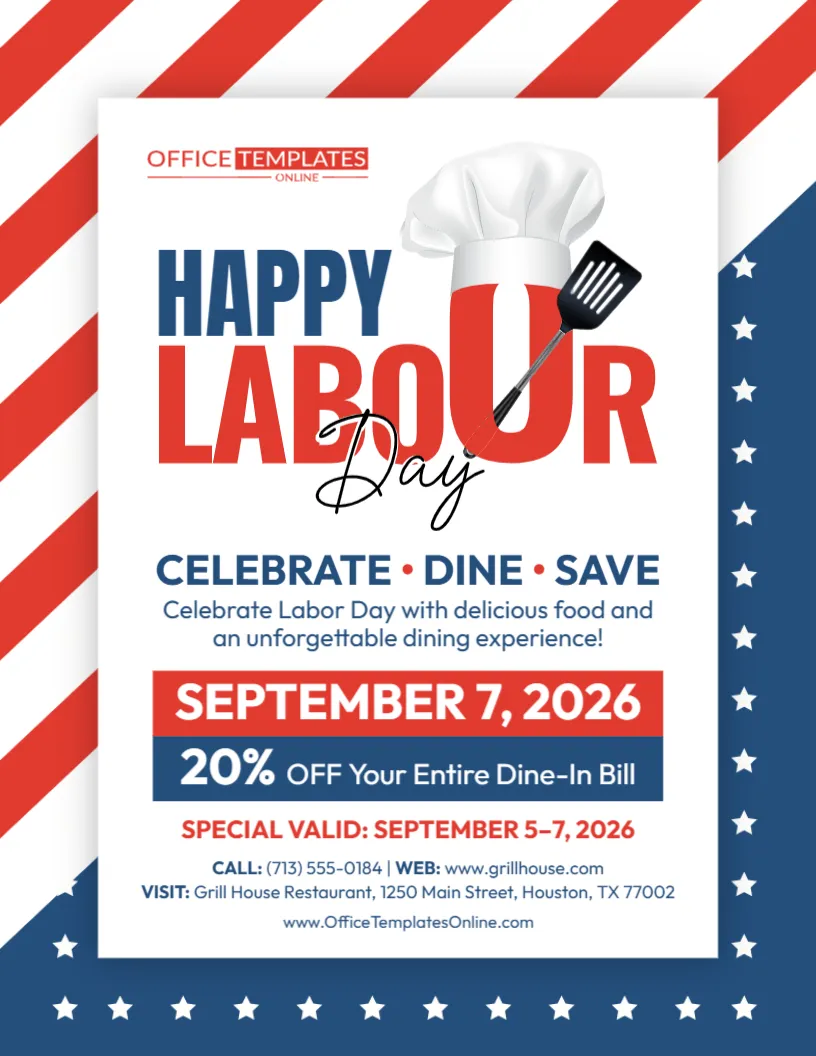
Unlike a general retail sale flyer, this design immediately speaks the language of food and dining. A chef’s hat and spatula are incorporated into the large Labor Day headline, while the message “Celebrate • Dine • Save” quickly establishes the purpose of the promotion. Red, white, and blue graphics surround the flyer, giving it a strong American holiday theme without making the restaurant information difficult to read.
The sample version promotes 20% off the entire dine-in bill, along with a September 7 event date and a September 5–7 validity period. These details are examples that you can replace with the actual offer and dates from your restaurant.
You can personalize the template using the online editor directly in your browser, with no login required. Once you have added your restaurant information and finalized the promotion, download your completed flyer as a PDF, PNG, or JPG.
Start with the Offer Your Diners Care About Most
Restaurant flyers work best when they have one clear promotional focus rather than trying to squeeze an entire menu onto one page. Restaurant marketing guidance similarly recommends making the main offer, restaurant information, and next action easy to identify.
This template follows that approach.
The sample offer is:
20% OFF Your Entire Dine-In Bill
It sits inside a large blue promotional area, directly below the event date. That makes the discount one of the first practical details customers see after identifying the flyer as a Labor Day restaurant promotion.
You are not limited to a 20% dine-in discount. Replace it with whatever special your restaurant is actually running.
For example:
- 15% Off Your Dine-In Bill
- Labor Day Family Meal Special
- Buy One Entrée, Get One 50% Off
- Labor Day BBQ Dinner Special
- Kids Eat Free with Qualifying Entrée
- Special Labor Day Lunch Menu
- Holiday Weekend Dinner Deal
- Labor Day Takeout Special
- Family Feast for a Special Price
- Complimentary Dessert with Qualifying Meal
The best choice depends on your restaurant, menu, service style, and business goals.
A Restaurant Flyer That Doesn’t Look Like a Retail Advertisement
This template has its own food-service personality.
The chef’s hat immediately introduces a culinary element, while the spatula reinforces the restaurant connection. Instead of filling the design with shopping bags, price tags, or generic retail graphics, these illustrations help customers recognize that the promotion is about dining.
At the same time, the background uses bold red stripes, a navy border, and white stars to establish a patriotic Labor Day setting.
The central white panel keeps the important information clean and readable.
That gives the design three visual layers:
Labor Day through the patriotic colors and stars.
Restaurant dining through the chef and cooking imagery.
Special offer through the large discount and date sections.
This makes the flyer useful for restaurants that want their holiday promotion to feel festive while keeping the dining offer easy to understand.
“Celebrate • Dine • Save” Sets the Tone in Three Words
The supporting headline in this design is short:
Celebrate • Dine • Save
Those three words summarize the basic idea behind the promotion without adding unnecessary text.
You can keep this phrase or change it to something that better matches your restaurant’s personality.
A casual restaurant might use:
Eat • Relax • Celebrate
A family restaurant could try:
Gather • Dine • Enjoy
A BBQ restaurant might prefer:
Grill • Feast • Celebrate
For a discount-focused campaign:
Dine More • Save More
Or simply:
Labor Day Dining Made Delicious
Short supporting phrases work particularly well here because the main Labor Day headline and promotional discount already do most of the communication.
Make the Template Fit Your Type of Restaurant
A useful feature of this design is that it is not tied to one particular cuisine.
The chef-inspired graphics and general dining language allow it to be adapted for many food businesses, including:
- Family restaurants
- Casual dining restaurants
- BBQ restaurants
- Grills
- Diners
- Cafés
- Pizzerias
- Burger restaurants
- Seafood restaurants
- Steakhouses
- Mexican restaurants
- Italian restaurants
- Buffet restaurants
- Local independent restaurants
- Fast-casual businesses
- Takeout restaurants
Labor Day restaurant promotions can also extend beyond traditional dine-in discounts. Industry marketing resources suggest options such as family bundles, limited-time menus, takeout packages, and group-friendly offers depending on the restaurant’s service model.
That means you can keep the design but completely change the promotional concept.
Dine-In Special? Make That Clear
The sample flyer specifically states that the 20% discount applies to the entire dine-in bill.
That small detail matters.
If your offer is only available to customers eating at the restaurant, keep “dine-in” prominent. Do not leave customers wondering whether the discount also applies to takeout, delivery, catering, or online orders.
Likewise, if your promotion applies to a different ordering method, change the language accordingly.
For example:
20% Off Dine-In Orders
15% Off Takeout Orders
Labor Day Family Meals – Pickup Only
Special Available for Dine-In & Takeout
Online Orders Only
Labor Day Catering Special
Clear eligibility information can prevent confusion when customers try to redeem the promotion.
Or Turn It into a Labor Day Menu Special
A percentage discount is only one way to use the template.
Restaurants can also use Labor Day promotions to feature a special dish, meal package, or limited-time menu. Restaurant marketing guidance for the holiday recommends making special menus and family packages clear and easy to understand when they are part of the offer.
Instead of advertising “20% Off,” you might use the promotional area for:
Labor Day BBQ Platter – $29.99
Family Feast – Serves 4
Burger + Fries + Drink Special
Labor Day Brunch Special
Holiday Weekend Dinner for Two
Family BBQ Takeout Package
If you use a package offer, make sure customers can easily understand what is included.
For example, if a family meal feeds four people and includes two entrées, sides, and drinks, those details may be worth mentioning in concise wording.
Edit the Restaurant Flyer Right in Your Browser
You do not have to create this promotion using complex graphic design software.
The template works with an online browser-based editor, allowing you to personalize the existing design without starting from an empty page.
There is also no login or account registration required to begin customizing the template.
Open the design and replace the sample content with the information from your restaurant.
Depending on your promotion, you can customize details such as:
- Labor Day restaurant headline
- Main dining offer
- Discount percentage
- Special menu wording
- Promotion date
- Offer validity period
- Restaurant name
- Phone number
- Website
- Restaurant address
- Call-to-action text
- Supporting promotional message
- Other editable text and design elements
The ready-made layout handles the visual structure while you concentrate on getting the actual restaurant offer right.
Two Date Areas Give You More Flexibility
An interesting feature of this template is that it includes both a large main date and a separate special validity period.
The sample design displays:
September 7, 2026
and underneath the offer:
Special Valid: September 5–7, 2026
This gives you several ways to present your promotion.
Perhaps your restaurant is holding its main Labor Day celebration on September 7, while the discount is available throughout the weekend.
Or perhaps your special runs for several days and you want to highlight the holiday itself as the main event.
If you only need one date range, you can simplify the wording.
For example:
Labor Day Weekend • September 5–7
or:
Special Available September 5–7
or:
Labor Day Only • September 7
Restaurant promotion guidance recommends using specific dates for holiday offers rather than relying only on vague “limited time” language. Clear validity periods make it easier for customers to know exactly when they can redeem the deal.
Add a Dining Message That Sounds Like Your Restaurant
The sample supporting copy says:
“Celebrate Labor Day with delicious food and an unforgettable dining experience!”
You can replace this with a message that better reflects your cuisine, atmosphere, or offer.
A family restaurant might say:
Bring the Family Together for a Delicious Labor Day Meal
A BBQ restaurant could use:
Celebrate Labor Day with BBQ Favorites and Holiday Savings
A casual restaurant might prefer:
Good Food, Great Company, and Labor Day Savings
A local restaurant could write:
Spend Labor Day with Great Food Right Here in the Neighborhood
For a takeout promotion:
Let Us Handle the Food for Your Labor Day Celebration
This is a useful place to communicate personality. Keep it brief enough that the discount and dates remain visually stronger.
Family Meals Can Be a Natural Fit for Labor Day
If your restaurant serves groups or families, you do not have to limit the promotion to a percentage discount.
Family meal bundles are one option frequently recommended for Labor Day restaurant campaigns because the holiday weekend often involves group gatherings and shared meals.
You could adapt this flyer to advertise:
Labor Day Family Feast
Dinner for Four Special
Family BBQ Bundle
Pizza & Wings Family Deal
Take-Home Labor Day Meal Package
Holiday Weekend Sharing Platter
If you choose this route, use the discount area for the package price or main value statement.
For example:
FAMILY FEAST $49.99
can be much clearer than trying to list several unrelated percentage discounts.
Takeout and Catering Promotions Work Here Too
Not every customer wants to dine at a restaurant during a holiday gathering.
Some may be hosting friends or family at home and simply want someone else to prepare the food.
Restaurant Labor Day marketing guidance specifically identifies takeout and catering as useful promotional opportunities, particularly for group celebrations.
This template could therefore become a:
Labor Day Catering Special Flyer
Labor Day Takeout Deal Flyer
Labor Day Family Meal Flyer
Labor Day BBQ Pickup Flyer
For these versions, replace the dine-in wording with clear ordering instructions.
If advance ordering is required, say so.
If a catering package feeds a specific number of people, include that information.
If customers must order before a certain deadline, make the cutoff easy to see.
Give Diners an Obvious Next Step
After someone sees the offer, what should they do?
The answer depends on how your restaurant handles customers.
For a dine-in special:
Visit Us This Labor Day
For reservations:
Reserve Your Table Today
For takeout:
Order Your Labor Day Meal
For online ordering:
Order Online & Save
For catering:
Pre-Order Your Labor Day Feast
For a general promotion:
Celebrate Labor Day with Us
Restaurant flyer guidance recommends keeping the next action clear, whether that means calling, reserving, ordering online, or visiting the restaurant.
You do not need several competing calls to action. Pick the one that best matches the promotion.
Make Your Phone, Website, and Location Useful
The bottom of the flyer includes dedicated space for the restaurant’s phone number, website, and physical address.
These details may look secondary compared with the discount, but they are essential once a customer decides to act.
Replace all sample contact information before publishing your design.
If reservations are taken by phone, make the number accurate.
If customers should order online, double-check the website address.
If the goal is to increase dine-in traffic, confirm that the restaurant address is complete and easy to understand.
Restaurant flyer guidance consistently identifies the business name, offer, location, and contact information as core information that customers need.
Be Specific About What the Discount Covers
The phrase “20% Off Your Entire Dine-In Bill” sounds simple, but restaurant offers may have conditions.
Before using similar wording, consider whether the discount includes:
- All menu items
- Alcoholic beverages
- Specials
- Desserts
- Group orders
- Taxes
- Gratuity
- Other existing promotions
You do not need to turn the main flyer into a wall of fine print, but the promotional claim itself should be accurate.
If necessary, use clearer wording such as:
20% Off Eligible Dine-In Food Purchases
or:
20% Off Selected Menu Items
or:
20% Off Dine-In Orders – Restrictions Apply
A restaurant promotion should make the value attractive without leaving diners with a misleading impression of what they will receive.
Keep the Flyer Focused Instead of Printing the Whole Menu
A restaurant flyer and a restaurant menu serve different purposes.
This flyer works best as an invitation to the promotion rather than a complete list of everything your kitchen serves.
Keep the strongest offer prominent.
Then provide the date, restaurant information, and one clear next step.
Restaurant flyer guidance recommends building the design around one primary offer and avoiding excessive information that makes the promotion harder to understand quickly.
If customers need your full menu, direct them to your website or provide it separately.
That keeps this Labor Day design visually clean and allows the special itself to remain memorable.
Download the Final Design in the Format You Need
Once your restaurant details and promotional offer are in place, you can download the finished flyer in PDF, PNG, or JPG format.
PDF is a convenient option when preparing a flyer for printing or sharing as a document.
PNG works well when you want a high-quality image for digital promotion.
JPG is a widely supported image format that is useful for general online sharing.
You can choose the format according to how you intend to promote your Labor Day special.
Use Your Flyer Before Customers Make Their Holiday Plans
A restaurant promotion is more useful when customers see it before they have decided where or what they will eat.
Restaurant marketing resources suggest beginning Labor Day promotion ahead of the holiday, particularly for offers involving group meals, reservations, takeout, or advance ordering. Some guidance recommends announcing specials roughly 10 to 14 days before Labor Day and then increasing reminders as the holiday approaches.
Depending on your business, you could use your customized flyer as part of:
- In-restaurant displays
- Takeout-order inserts
- Local printed promotion
- Website announcements
- Customer email campaigns
- Digital promotional posts
- Reservation reminders
- Holiday special announcements
If you promote the same offer through several channels, keep the dates, discount, and redemption conditions consistent.
Before the Flyer Leaves the Kitchen: Check the Details
Give the finished design one last inspection before downloading or publishing it.
Check the offer.
Is it really 20% off, or should the sample amount be changed?
Check where it applies.
Is it dine-in only, or are takeout and online orders included?
Check the dates.
Make sure both the main event date and validity period are correct.
Check the restaurant information.
Verify the phone number, website, and address.
Check the wording.
Remove any sample restaurant details that do not belong to your business.
Check the visual priority.
Someone should be able to quickly identify that this is a Labor Day restaurant special, see the main offer, and understand when it is available.
Clear offers, specific dates, and easy-to-find ordering or reservation information are recurring recommendations in restaurant holiday promotion guidance.
Put Your Labor Day Special on the Menu—and Your Promotion on Display
Whether you are planning a dine-in discount, family meal package, holiday menu, BBQ special, takeout offer, or another restaurant promotion, this Labor Day Restaurant Special Flyer Template gives you a flexible starting point.
The chef-inspired graphics make the food connection obvious. The patriotic border establishes the holiday theme. The central layout gives your date and dining offer plenty of attention, while the lower section provides room for the information customers need to find or contact your restaurant.
Instead of designing all of this from scratch, open the template in the browser-based editor and customize it online without logging in. Replace the sample 20% offer with your real special, enter the correct dates, add your restaurant details, and adjust the editable wording to suit your campaign.
Once everything looks right, download your personalized Labor Day Restaurant Special Flyer as a PDF, PNG, or JPG and get your holiday dining promotion ready to serve.