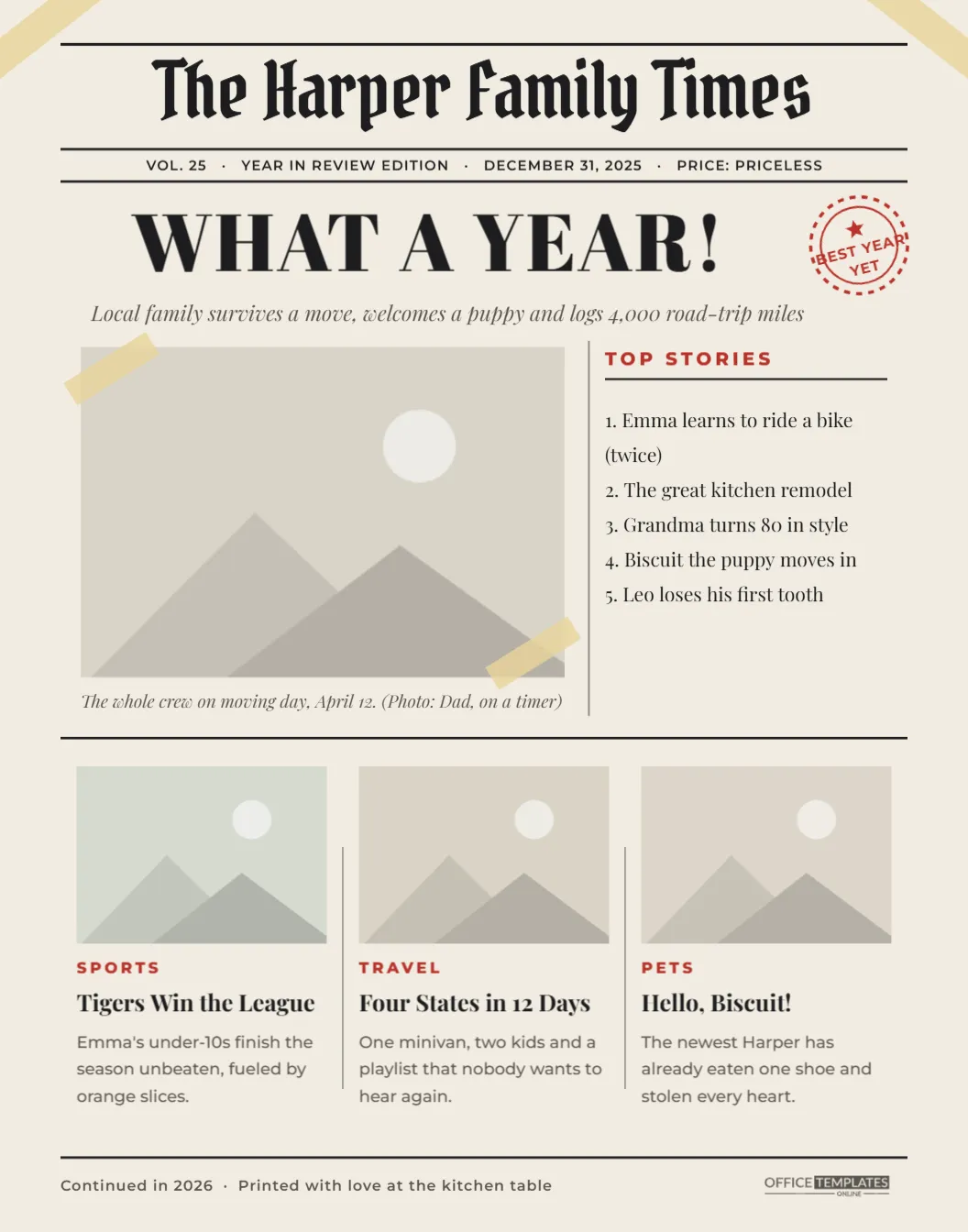
Extra, extra! Your family had a big year, and it deserves a front page. This Year in Review Scrapbook Poster is designed as a vintage-style newspaper, complete with a blackletter masthead, a banner headline, a lead photo, a Top Stories column, and three short news items with pictures. Taped to the wall with a couple of strips of masking tape, it looks like a clipping you saved from the printing press.
Stop the Presses: How the Front Page Is Laid Out
The page is a warm newsprint cream. At the top, The Harper Family Times is set in Pirata One, a blackletter typeface that gives it the look of a real masthead, framed by thin black rules. Beneath it, a dateline strip reads Vol.25 · Year in Review Edition · December 31, 2025 · Price: Priceless. Then comes the banner headline, WHAT A YEAR!, in heavy Abril Fatface, with a red circular stamp reading Best Year Yet beside it and a sub-headline in italics.
The top half of the page is split into two columns: a large lead photo with tape at its corners and an italic photo caption on the left, and a numbered Top Stories list in a narrower column on the right, separated by a fine column rule. Below a full-width rule, three smaller stories sit side by side, each with a photo, a red section label (Sports, Travel, Pets in the sample), a bold headline and a two-line blurb. A footer line, Continued in 2026 · Printed with love at the kitchen table, closes the page with the Office Templates Online mark.
Writing Headlines Like a Real Editor
The fun of a family newspaper is in the writing. Real headlines follow a few habits worth borrowing:
- Use the present tense. Emma Learns to Ride a Bike feels like news; Emma learned to ride a bike feels like a diary.
- Lead with the action. Four States in 12 Days beats Our summer vacation.
- Exaggerate a little. Local Toddler Refuses All Vegetables for Third Straight Month is funnier than it has any right to be.
- Keep it short. Five or six words fit the story columns best.
For the blurbs, answer the classic reporter’s questions in one or two sentences: who, what, when, where and why. Emma’s under-10s finished the season unbeaten on Saturday, fueled mostly by orange slices. Covers four of the five and still sounds like you.
A Sample Lead Story to Borrow
The lead photo caption is the closest thing on the page to a full article, so it helps to see one written out. Here is a caption in newspaper style that you could adapt for your own lead picture:
MOVING DAY: The Harper household relocated across town on April 12 in a single rented truck, three borrowed dollies and an estimated 140 boxes, 30 of them labeled misc. No injuries were reported, although one lamp remains missing. Officials, also known as Mom, say unpacking is basically done.
Notice the formula: a label in capitals, the key fact with a date, a few specific numbers, and a small joke at the end. On the poster, the caption line under the lead photo is short, so use one or two sentences there, and keep longer versions like this for an emailed copy or a holiday letter.
Story Ideas for Your Front Page
- New arrivals: a baby, a puppy, a kitten, a new sibling-in-law.
- Big moves: a new house, a new city, a new school.
- Milestones: first steps, first words, first job, a graduation, a retirement.
- Sports and hobbies: a season, a recital, a race, a finished quilt.
- Travel: road trips, reunions, a first flight.
- Home improvement: the kitchen remodel that took twice as long as promised.
- Weather and disasters, family-sized: the great basement flood, the week the power went out.
- Opinion page: each family member’s best moment of the year in one line.
Laying Out Your Edition
- Change the masthead to your family name. Keep Times, or try Gazette, Chronicle, or Daily.
- Update the dateline with your year and edition name.
- Rewrite the banner headline and sub-headline.
- Click the lead photo and each of the three story photos, choose Replace Image, and upload your pictures. The frames keep their size.
- Edit the photo caption, the five Top Stories, and the three news items.
- Download the page as a PDF, PNG, or JPG.
The page holds four photos: one large lead image and three smaller story pictures. Landscape photos fit these frames best.
Printing and Sharing the Edition
The poster is 11 x 14 inches, portrait. Printed on a matte or uncoated paper, it looks convincingly like newsprint; a glossy photo paper makes the photos pop but loses some of the newspaper feel. Print at 100% scale, frame it in a standard 11 x 14 frame, or simply pin it to the fridge with the two strips of tape shown in the design.
It also makes a brilliant alternative to a long holiday letter. Print smaller copies on letter paper to tuck into holiday cards, or email the PDF to far-flung relatives who want the whole story. Some families make a new edition every December and keep them in a folder, building a family archive one front page at a time.
From the Letters Desk
Can I add more stories?
The page is full at four photos and eight short stories. For a bigger year, make a second page with the same masthead and call it Section B.
Can I change the red accent color?
Yes. Click the section labels, the Top Stories heading, or the stamp and choose a new color.
Can I use it for a club, team, or class instead of a family?
Absolutely. A team’s season in review or a class’s year makes an ideal front page.
Which fonts are used?
Pirata One for the masthead, Abril Fatface for the headline, Playfair Display for stories, and Montserrat for labels, all Google Fonts.
Every family has a year’s worth of reporting. Give yours the front page it deserves: write the headlines, add your photos, and publish your very own year in review.