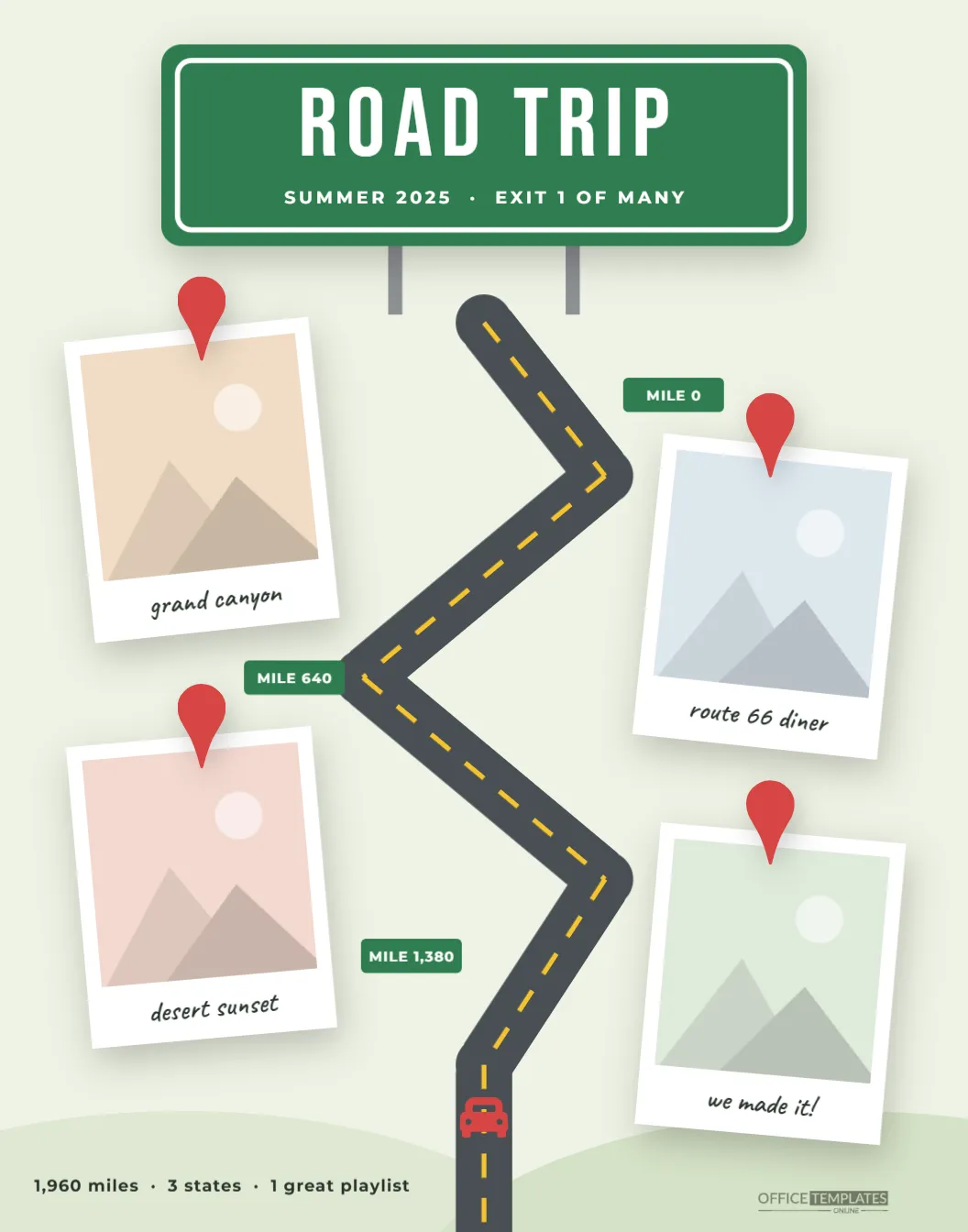
A great road trip isn’t about the destination; it’s the diner nobody planned, the view that made you pull over, and the song everybody sang at the top of their lungs somewhere in the desert. This Road Trip Scrapbook Poster follows the journey itself. A green highway sign announces the trip, a winding two-lane road with a yellow center line zigzags down the page, and four photos are pinned beside it like stops on a map, each marked with a red location pin.
The Road From the Sign to the Last Stop
At the top of the poster, a classic green highway sign with a white border reads ROAD TRIP in tall Bebas Neue capitals, with Summer 2025 · Exit 1 of Many underneath, standing on two gray posts. From the foot of the sign, a dark asphalt road with a dashed yellow center line winds down the page in a series of switchbacks, heading off the bottom edge as if the trip hasn’t really ended.
A little red car sets off at the top of the road. Small green mile markers read Mile 0, Mile 640, and Mile 1,380 along the way. Four Polaroid photos sit on alternating sides of the road, each topped with a red map pin, with captions like Grand Canyon, Route 66 diner, desert sunset, and we made it!. Soft green hills rise along the bottom, where a line of trip stats reads 1,960 miles · 3 states · 1 great playlist, next to the Office Templates Online mark.
The Stats Worth Putting on Your Poster
The trip stats line at the bottom is a small detail that people love. Some numbers to dig up after you get home:
| Stat | Where to find it |
|---|---|
| Miles driven | Your odometer, or the route in your maps app |
| States, provinces, or countries | Count the Welcome to signs in your photos |
| Days on the road | First and last dates in your camera roll |
| Tanks of gas | Your card statement, if you dare |
| Hours of music | Your playlist’s total length |
| Snacks eaten | An honest estimate is fine |
Pick your best three and keep them short, so they fit on one line.
Mile Markers and Map Pins
The three green mile markers are there to be edited. Use real mileage from your trip (mile 0 at home, then the distance to each stop) or turn them into labels: Day 1, Day 4, Day 9, or the names of the roads you drove, such as I-40 or Hwy 1. The red map pins at the top of each photo are images you can recolor or remove. Moving a photo? Move its pin with it by selecting both at once.
Building Your Route, Stop by Stop
- Open the poster and change the highway sign text to your trip name and year.
- Click the first photo, choose Replace Image, and upload your picture; the frame keeps its size, and your photo is cropped to fit.
- Replace the other three photos in the order you visited them, from top to bottom.
- Update the captions, the mile markers, and the trip stats line.
- Download the poster as a PDF for printing, or as a PNG or JPG.
The road, the center line, and the car are ordinary shapes and an image, so you can recolor the car to match your own or nudge the road if you add another stop.
Choosing the Four Stops
Four photos means four chapters, so think of the trip as a story with a beginning, two middles, and an end. The first stop is the moment the trip felt real: the car packed, the first Welcome to sign, the first scenic pull-off. The two middle stops are the highlights, usually one big landmark and one small surprise, like the roadside diner or the motel pool. The last stop is the finish: the destination, the ocean at the end of the road, or the family collapsed on the couch back home. Captions work best as place names or tiny quotes from the trip (are we there yet?), and a photo with the car in it somewhere ties everything back to the road.
Beyond the Summer Road Trip
The layout suits any journey that happens on wheels: a cross-country move, a college tour, a motorcycle ride, a camper-van summer, a trip to see every baseball stadium, or a road trip to visit grandparents. Change the highway sign to fit (Moving West, The College Tour, Grandma or Bust) and the rest of the poster follows along.
Printing a Poster for the Garage or Den
The poster is 11 x 14 inches in portrait orientation, a standard frame size widely available in stores. Print the PDF at 100% scale at a photo lab or print shop on matte photo paper or a heavy matte poster stock; the matte finish keeps the road and the green sign looking crisp and bold. A simple black or natural wood frame suits the highway theme. The road continues past the bottom edge by design, so borderless printing gives the best effect.
Quick Answers for the Road
Can I add a fifth stop?
There’s room beside the lower bend. Duplicate one of the photos and its map pin, then move them into place.
Can I change the sign to blue or brown?
Yes. Blue suits an interstate feel and brown a national-park trip; click the sign and pick a new color.
Will landscape photos fit?
The frames are portrait-shaped, so landscape photos are cropped at the sides. Center the main subject for the best result.
Is it a good gift?
It makes a great present for a travel buddy, a new driver, or anyone who just finished a big trip. Add the date and a line like thanks for driving to the stats line.
Every road trip leaves a map in your memory. Put yours on paper: add your four favorite stops, fill in the mile markers, and keep the adventure hanging where you’ll see it every time you grab the car keys.