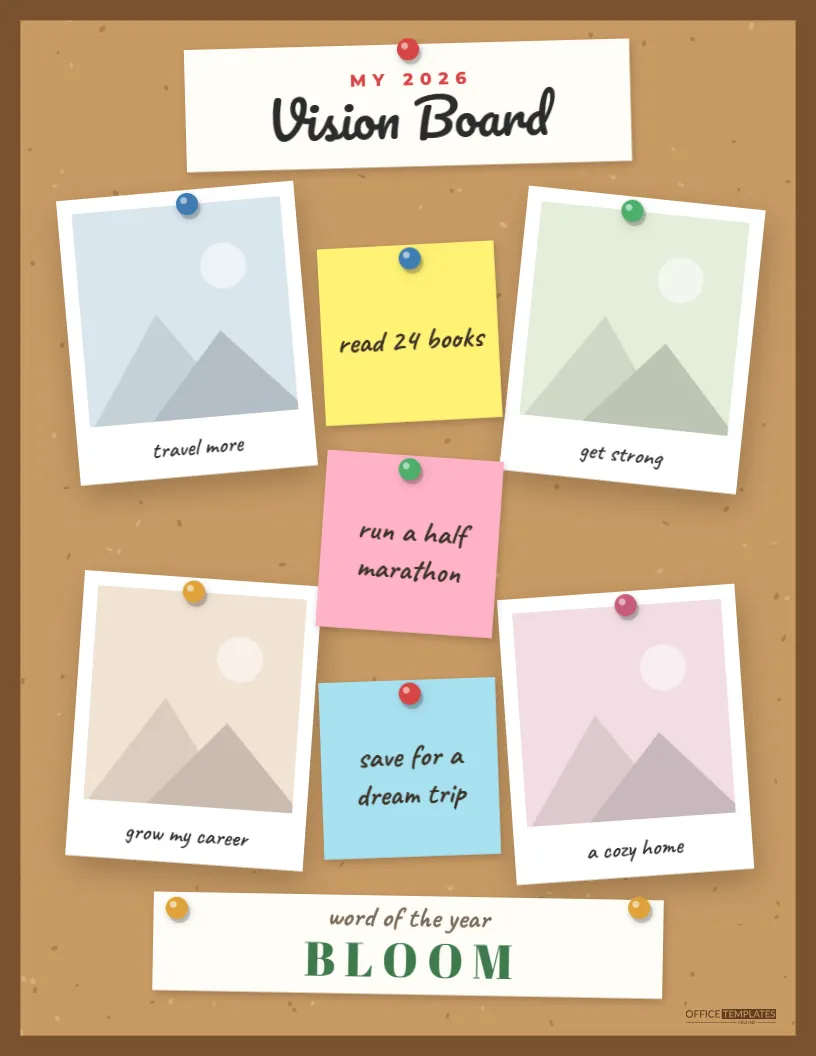
New year, new goals, and a real chance to keep them this time. This scrapbook vision board template gives your goals a place to live where you’ll actually see them every day. It’s designed as a cork board in a wooden frame, with four push-pinned photos for different areas of your life, three bright sticky notes holding specific goals, and a card at the bottom with your word of the year. Print it, pin it above your desk, and let it quietly remind you what you’re working toward.
What’s Pinned to the Board
The background is warm cork, flecked with tiny darker and lighter specks, surrounded by a solid wooden frame. At the top, a white card pinned with a red push pin reads MY 2026 in small red capitals above Vision Board in a bold script.
Four Polaroid photos are pinned to the corners of the board, each with a push pin in a different color and a handwritten goal as its caption: travel more, get strong, grow my career, and a cozy home in the sample. Down the middle, three square sticky notes, yellow, pink, and blue, are pinned one above another, each with a specific goal written in marker: read 24 books, run a half marathon, and save for a dream trip. At the bottom, a wide white card held by two gold pins carries the word of the year in handwriting and BLOOM in large green capitals. The Office Templates Online mark sits in the lower corner of the cork.
How to Build Your Vision Board in One Evening
- Look back first (15 minutes). Write down what went well last year, what didn’t, and what you wish you’d done more of.
- Choose four life areas (10 minutes). Common ones are health, career, relationships, home, money, travel, learning, and creativity. Pick the four that matter most right now; they become your four photo captions.
- Find a photo for each area (20 minutes). Use your own photos or images that capture how you want that area to feel, like a mountain trail for health or a sunlit kitchen for home.
- Write three specific goals (15 minutes). These go on the sticky notes. Make them concrete enough that you’ll know when you’ve done them.
- Choose one word (5 minutes). A single word that sums up the year you want: bloom, calm, brave, focus, joy, grow.
- Fill in the template and print it.
Goal Wording That Works
The sticky notes work best with goals you can actually finish. Compare a vague goal with a specific one:
| Vague | Specific |
|---|---|
| Read more | Read 24 books (two a month) |
| Get fit | Run a half marathon in October |
| Save money | Save $5,000 for a dream trip |
| Be more creative | Finish one painting a month |
| Travel | Visit two new national parks |
| Learn something | Complete a beginner Spanish course |
Keep the notes short, since the sticky note format fits about four to six words in large handwriting, and save the details for a planner or journal.
Choosing Photos That Motivate
The four photos do the emotional work on a vision board, so pick images that make you feel something rather than ones that just illustrate a topic. For health, that might be a photo of you on a hike you loved, not a stock image of a gym. For career, a photo of a workspace you’d like to have, or the kind of project you want to be known for. Your own photos are often the most powerful, because they remind you that the life you want is partly already yours.
Personalizing the Board
- Change “MY 2026” to your year, and Vision Board to a title of your own if you like, such as Dream Big.
- Click each of the four photos and choose Replace Image to add your pictures; the polaroid frames keep their size.
- Rewrite the four photo captions for your chosen life areas.
- Click each sticky note’s text and replace it with your specific goals.
- Change “BLOOM” to your word of the year.
- Export the board as a PDF for printing, or as a PNG or JPG to use as a phone or desktop wallpaper.
Making It Stick Beyond January
Most vision boards fail not because the goals were wrong but because the board ended up in a drawer. A few habits help. Hang it where you’ll see it daily, near your desk, by the bathroom mirror, or inside a closet door. Set a monthly reminder to look at it properly and ask, What’s one step I can take this month? Tick off sticky-note goals as you finish them, and don’t be afraid to change a goal halfway through the year; a vision board is a guide, not a contract. Many people also save the image version as their phone lock screen, which is the most-viewed “wall” most of us have.
Printing Your Board at Letter Size
The vision board is US Letter size, 8.5 x 11 inches, in portrait orientation, so it prints on any home or office printer without adjustment. Print at 100% scale; a matte photo paper or heavy card stock makes the photos crisper and the board sturdier if you pin it to a real cork board. The wooden frame runs to the edges of the page, so a thin white margin is normal on most printers. It also fits an 8.5 x 11 document frame or a clipboard.
Vision Board Questions
Can I use it for a group or a class?
Yes. Teachers and coaches often print one per person as a goal-setting activity at the start of a year or season.
Can I add more goals?
Copy a sticky note and paste it in an empty spot, or write extra goals on the back of the printed board.
Does it have to be for a new year?
Not at all. Make one for a birthday, a new job, a move, a school year, or any fresh start.
Can I change the cork color?
The cork background is one group; ungroup it to adjust the base color, or pick a white board look instead.
Goals are easier to reach when you can see them. Pin up your photos, write your sticky notes, choose your word, and give this year a board worth looking at.