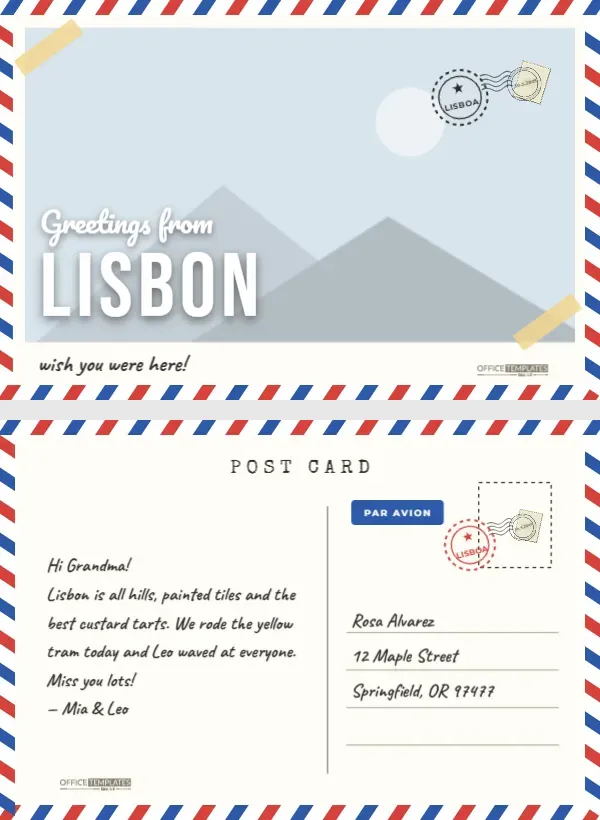
There is something about a postcard that a text message can’t match. It arrives in a mailbox weeks later, covered in stamps, with a picture of somewhere far away and a few scribbled lines that took ten minutes to write. This Travel Postcard Scrapbook template lets you make your own, using your photo instead of a generic tourist shot. The front has a retro Greetings from headline over your picture, the back is laid out like a real postcard, and both sides are wrapped in a red-white-and-blue airmail border.
Two Sides, Just Like the Real Thing
The front
Your photo fills most of the front, framed by the classic diagonal stripes of an airmail envelope. In the lower left, Greetings from is written in a bold retro script, with the destination, LISBON in the sample, set large in white Bebas Neue capitals. A postage stamp sits in the top-right corner with a round postmark stamped half over it, two strips of yellow tape hold the photo at opposite corners, and a small paper strip under the picture reads wish you were here! Beside the Office Templates Online mark.
The back
The back is a proper postcard layout. POST CARD is typed across the top, and a thin line divides the card in two. On the left, there is a handwritten-style message; on the right, a dashed stamp box with a stamp and postmark, a blue Par Avion airmail label, and four ruled address lines with a sample address in the same handwriting. The airmail border runs around this side too.
Can You Actually Mail It? USPS Postcard Basics
Yes, and that’s half the fun. In the United States, a card qualifies for the postcard rate when it is rectangular, at least 3.5 x 5 inches and no larger than 4.25 x 6 inches, and between 0.007 and 0.016 inches thick. At 6 x 4 inches, this template fits within those limits, as long as you print it on postcard-weight card stock. A few practical tips:
- The stamp on the design is decorative. Add a real postcard stamp in the stamp box before mailing.
- Print on a sturdy card stock, around 100 to 110 lb cover, so it survives the mail.
- Write or type the address clearly on the ruled lines, and keep the bottom edge of the address side free of decoration.
- Postal rates and rules change, so check your local post office’s current guidance, especially for international mail.
Writing a Postcard in Five Lines
Postcards reward brevity. The message area holds about five short lines, so pick one moment and tell it well. A formula that works: a greeting, one specific detail, a small feeling, and a sign-off. Hi Grandma! Lisbon is all hills and painted tiles. We rode the yellow tram today, and Leo waved at everyone. Miss you lots! Mia & Leo. That’s it. The more specific the detail, the better the postcard: not the food is great, but we had custard tarts for breakfast three days in a row.
What Makes a Good Postcard Photo
The best postcard photos are simple and bold, because the Greetings from lettering sits over the lower-left part of the picture. Look for an image with open space there, such as sky, water, a plain wall, or a street, so the white letters stay readable. Iconic views work beautifully: a skyline, a famous bridge, a colorful street. But so do personal ones, like your family at a viewpoint or a table at your favorite café. Avoid very busy scenes with lots of small details; they compete with the headline at postcard size. And if your photo is dark, the white lettering will stand out even more.
Making Your Postcard
- Open the template and click the large photo on the front. Choose Replace Image and upload your picture; the frame keeps its size, and your image is cropped to fit.
- Change LISBON to your destination; short names look best at this size.
- Edit the little wish you were here! line if you like.
- On the back, replace the sample message and the address with your own.
- Rename the postmarks by clicking their labels.
- Download both sides as a PDF for double-sided printing, or as images to send digitally.
Printing Both Sides of a 6×4 Card
The postcard is 6 x 4 inches, landscape, with two pages: the front and the back. Print them double-sided on 6 x 4 card stock at 100% scale, choosing flip on short edge so both sides read the right way up. If your printer can’t handle small cards, place several copies on a letter-size sheet at a print shop and trim them down. Matte card takes handwriting and ink stamps well; glossy card makes the photo pop but can smudge pen. A 4 x 6 inch size also slots neatly into standard photo albums and 4 x 6 frames.
Beyond the Mailbox
You don’t have to mail it to enjoy it. A stack of these makes a charming travel journal: print one for each day of a trip and write the back as a diary entry. They also work as thank-you cards for hosts you stayed with, as a save-the-date for a destination wedding, or as a souvenir to tuck into a scrapbook album next to ticket stubs and maps.
Postcard Questions
Can I use a vertical photo?
The front photo is landscape, so vertical photos will be cropped top and bottom. A horizontal shot fits best.
Can I change the airmail colors?
The border is one group; click Ungroup to recolor the stripes, for example, red and green for a holiday postcard.
Can I send it by email?
Yes. Download the front as a JPG and send it as a digital postcard.
Is there room for a longer message?
Make the message text a little smaller, or print the back blank and write it by hand.
Somewhere out there, someone would love to find your postcard in their mailbox. Add your photo, write five good lines, add a real stamp, and send a little piece of your trip home.