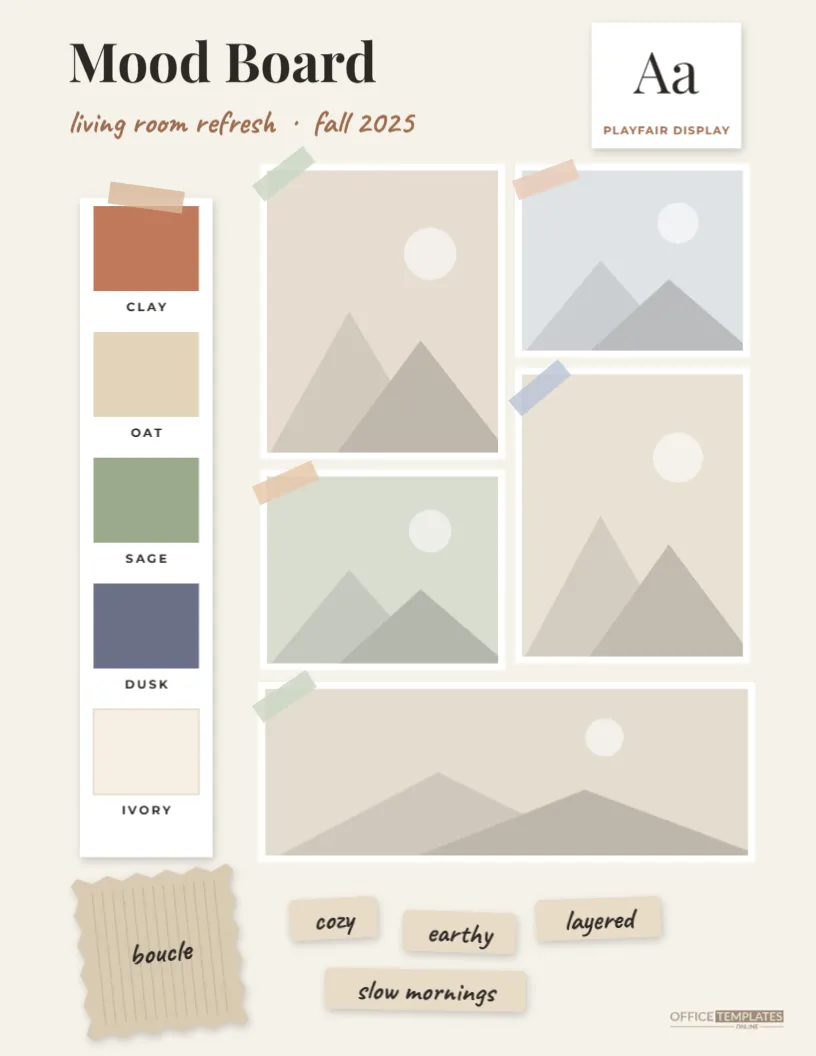
Before a room is painted, a wedding is styled, or a brand is designed, there is almost always a mood board: a single page that pulls photos, colors, textures, and words together until the idea clicks. This Scrapbook Mood Board Template gives you that page, laid out the way designers do it. There’s a grid of taped-down photos, a strip of paint chips, a fabric swatch with pinked edges, a type sample, and a handful of keyword tags, all on a calm off-white background that lets your images lead.
Anatomy of the Board
At the top left, Mood Board is set in a confident serif, Playfair Display, with a handwritten subtitle in warm rust: living room refresh · fall 2025 in the sample. Beside it, a small white card shows a large Aa specimen with the font’s name underneath, a detail borrowed from real design presentations.
Down the left side, a tall white card holds five paint chips, clay, oat, sage, dusk, and ivory, each labeled in small capitals and topped with a strip of tape. The main area is a grid of five photos in different sizes, two tall, two short, and one wide across the bottom, each with a thin white border and a piece of washi tape at the corner in a soft color. In the bottom-left corner sits a fabric swatch with zigzag pinked edges and fine woven lines, labeled boucle. Four keyword tags on kraft labels, cozy, earthy, layered, and slow mornings, are scattered along the bottom, next to the Office Templates Online mark.
What a Mood Board Is Actually For
A mood board isn’t decoration; it’s a decision-making tool. Seeing images side by side shows you instantly whether they belong together. A photo you loved on its own may clash with everything else, and a color you weren’t sure about might tie the whole page together. Mood boards are also the fastest way to explain an idea to someone else, whether that’s a partner, a contractor, a photographer, or a client. Instead of describing warm but not too rustic, you can point at the page.
Building a Palette From a Single Photo
The five paint chips are the heart of the board, and the easiest way to choose them is to pull them from your favorite photo:
- Pick the image that best captures the feeling you want.
- Find one light color (walls, sky, linen), one or two mid-tones (wood, plants, stone), one dark anchor (a shadow, a dark sofa, a door), and one accent (a cushion, a flower, a lamp).
- Open the photo in any free color-picker tool and note each color’s hex code.
- Click each paint chip and enter the codes.
- Rename the chips with evocative names; wet sand says far more than beige.
If you’re working toward real paint, look up the nearest match in a paint brand’s color library and write its name on the chip label. Always check physical paint samples before buying, since printed and on-screen colors are only a guide.
Beyond the Living Room
The template’s sample is a room makeover, but the same layout suits almost any creative plan:
- Weddings and events: venue, flowers, dress, table setting, invitations, with your wedding palette as the chips.
- Brand identity: product photos, a logo sketch, brand colors, and the chosen typeface in the Aa card.
- Photo shoots: locations, outfits, lighting references and poses.
- Fashion and wardrobe: a seasonal capsule wardrobe with fabric swatches.
- Gardens: planting ideas, materials and a palette of blooms.
- Art and design projects: references and color studies for a painting or illustration.
Editing the Board Down
The hardest part of making a mood board is leaving things out. Start by collecting far more images than you need, twenty or thirty, then narrow them down to five. Remove anything that looks great alone but doesn’t match the others, anything that repeats another image, and anything you chose because you felt you should. The five survivors should look like they belong in the same room, the same wedding, or the same brand. If you can’t decide between two, keep the one with the more interesting texture or light; mood boards live on atmosphere.
Assembling Yours
- Change the title and subtitle to describe your project.
- Click each of the five photos and choose Replace Image; the frames hold their shape and your pictures are cropped to fill them.
- Recolor and rename the five paint chips.
- Edit the Aa card to show your chosen font, and rename the fabric swatch.
- Rewrite the four keyword tags. Words that describe a feeling, like airy or grounded, work better than names of objects.
- Send it to your printer as a PDF, or share it as a PNG or JPG with whoever you’re planning with.
Printing and Presenting
The mood board is US Letter, 8.5 x 11 inches, portrait. Print it at 100% scale on a smooth matte paper, which shows photos clearly without glare and lets you add handwritten notes. For client presentations, a heavier bright-white stock gives a crisp, professional finish. Because the design sits within comfortable margins, it prints cleanly on home printers without needing borderless printing, and it slides neatly into a project binder or a clear sleeve.
Questions From Planners
Can I use a photo grid with different sizes?
The frames can be resized and moved freely; keep a little white space between them so the board stays calm.
Can I add more paint chips?
Copy a chip and its label and paste them below the others, or shorten the photos to make space.
How is this different from a vision board?
A vision board focuses on personal goals; a mood board focuses on the look and feel of a specific project.
Can I delete the fabric swatch?
Yes, it’s a single group; delete it or replace its label with a material like oak or linen.
Every good project starts with a clear picture of how it should feel. Gather your photos, pull your palette, and let this mood board turn your ideas into a plan.