A Green Wave and a Ladder of Books
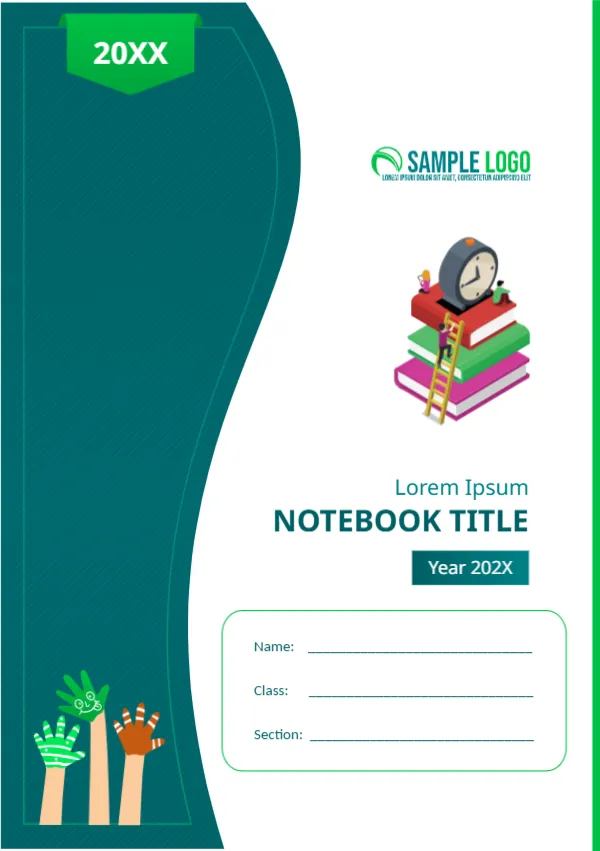
A tall wave of deep green runs down the left side of this A5 cover with a green ribbon at the top, and a small illustration of books and a clock sits at the right. It suits a school notebook, a planner or a branded set.
Curved Green Panel and Illustration
The page is A5, 148 x 210 mm, portrait. A thin green line runs along the right edge. Painted hands in green and orange sit at the lower left. The name box has Name, Class and Section lines.
Title, Year and Name Box
Lorem Ipsum sits above NOTEBOOK TITLE in dark green, with a Year 202X box. A rounded outline holds the name fields. Replace the year, the title and the school logo.
Customising the Notebook
- Set the school year.
- Change the subject.
- Add a logo.
- Keep the name lines.
- Print on 170 gsm.
A5 Size Notes
A5 is half of A4, about 148 by 210 millimetres. It fits a bag easily and is common for school notebooks.
Green for Calm Study
Green suits learning and is easy on the eyes.
Printing the A5 Notebook Cover
Print two per A4 sheet, and cut. Use 170 gsm.
Step by Step Editing of the A5 Notebook Green Design
- On the a5 notebook green design, click the main headline and type your own words, keeping a similar length.
- Retype every name, date and contact line on the a5 notebook green design, checking each against a trusted source.
- Search the a5 notebook green design for the words Lorem and Company so that no placeholder remains.
- Click any logo or photo on the a5 notebook green design, choose Replace Image and resize the new picture to fit.
- Zoom the a5 notebook green design to full size and read each line aloud before you save it.
- Keep a clean master of the a5 notebook green design without private details, so later versions start tidy.
Planning a Notebook Series
Print the same cover with a different subject for each notebook, and use the colour bar on the side to code subjects. Pupils then find the right book at a glance.
Choosing Paper Inside
Pair the cover with 70 or 80 gsm ruled paper. Thicker paper reduces ink show through when pupils use fountain pens or gel pens.
Adding a Timetable to the Back
Use the back cover or the inside page for a weekly timetable. Pupils open the notebook at the start of each lesson, and a printed timetable keeps them organised.
Adding a Subject Tab and Spine Label
Add a small label with the subject and the pupil’s name to the spine or the corner. It saves minutes every day, especially when ten notebooks sit in one pile on a desk.
Reusing the Layout for Planners
The same green wave works on a planner, a diary or a journal. Change the title and the year, keep the ribbon and the books, and your stationery range will share one look.
You may also like the A4 notebook cover. For comparison, open the school notebook A5 cover. Consider the A6 notebook cover. Find more designs next to the a5 notebook green design in cover pages.