Tile One: The Header Blocks
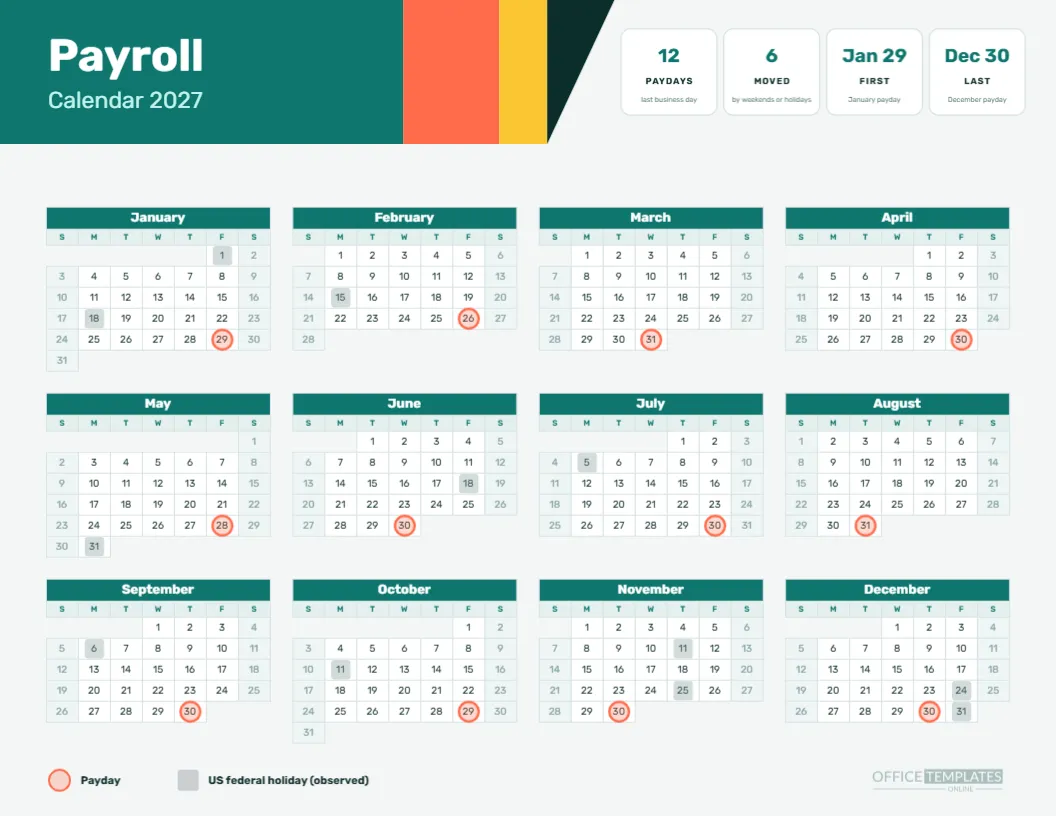
The top left of the page is a large teal block with the word Payroll in white Rubik Bold and Calendar 2027 in pale mint beneath. Beside it, a coral stripe and a yellow stripe lead into a dark triangle that points toward the tiles. The geometry is simple, and it gives the page the look of a modern product page.
Tile Two: Twelve Paydays
The first of four white tiles reads 12 PAYDAYS, with the caption last business day. It states the schedule in one glance. Monthly pay is simple, and the tile expresses that simplicity. If your own schedule is different, retype the figure and the caption.
Tile Three: Six Moved
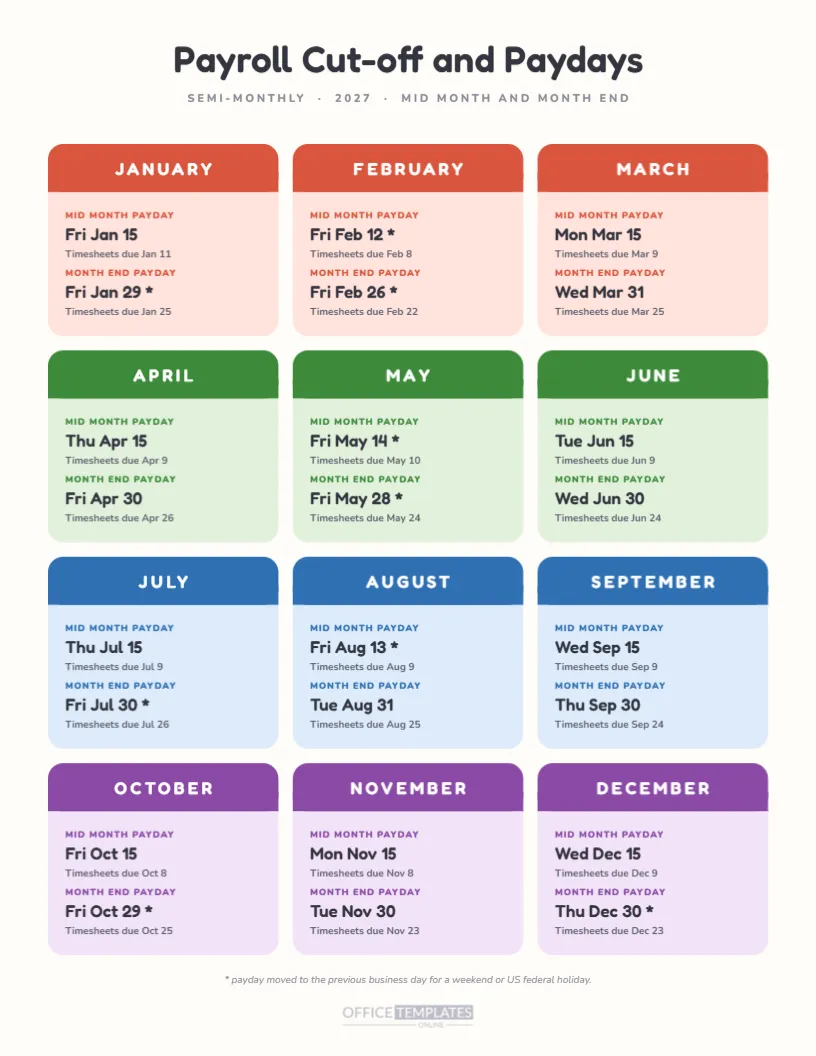
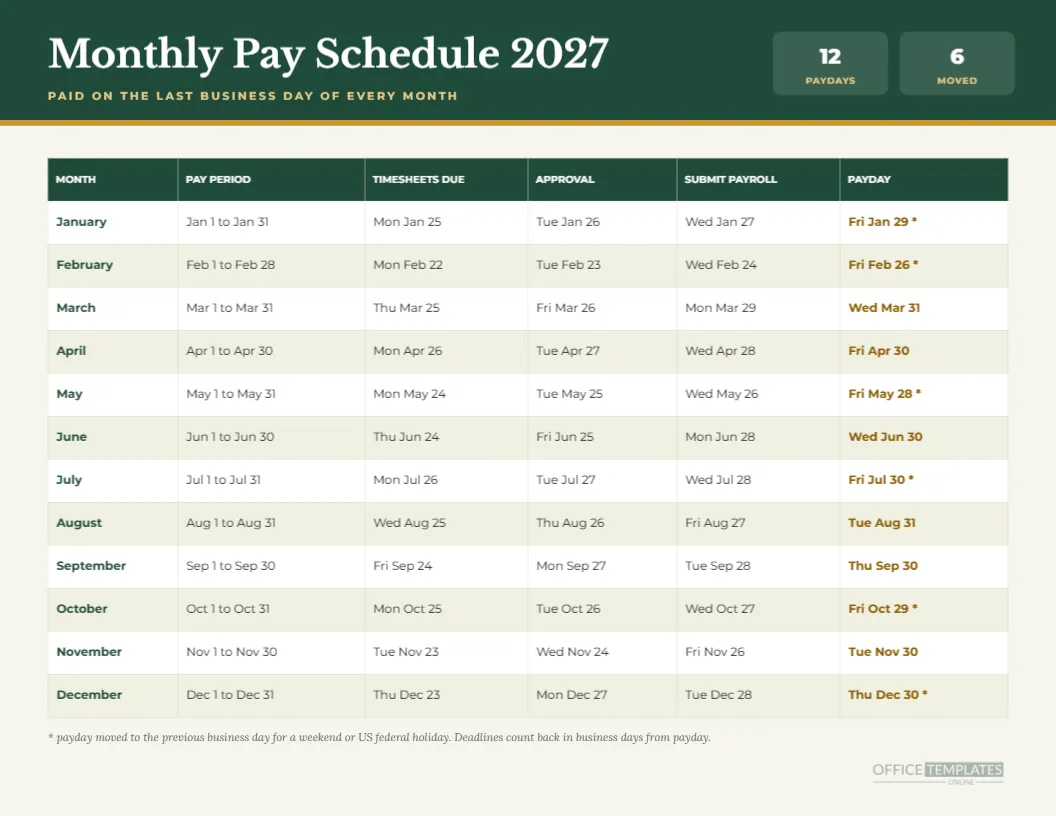
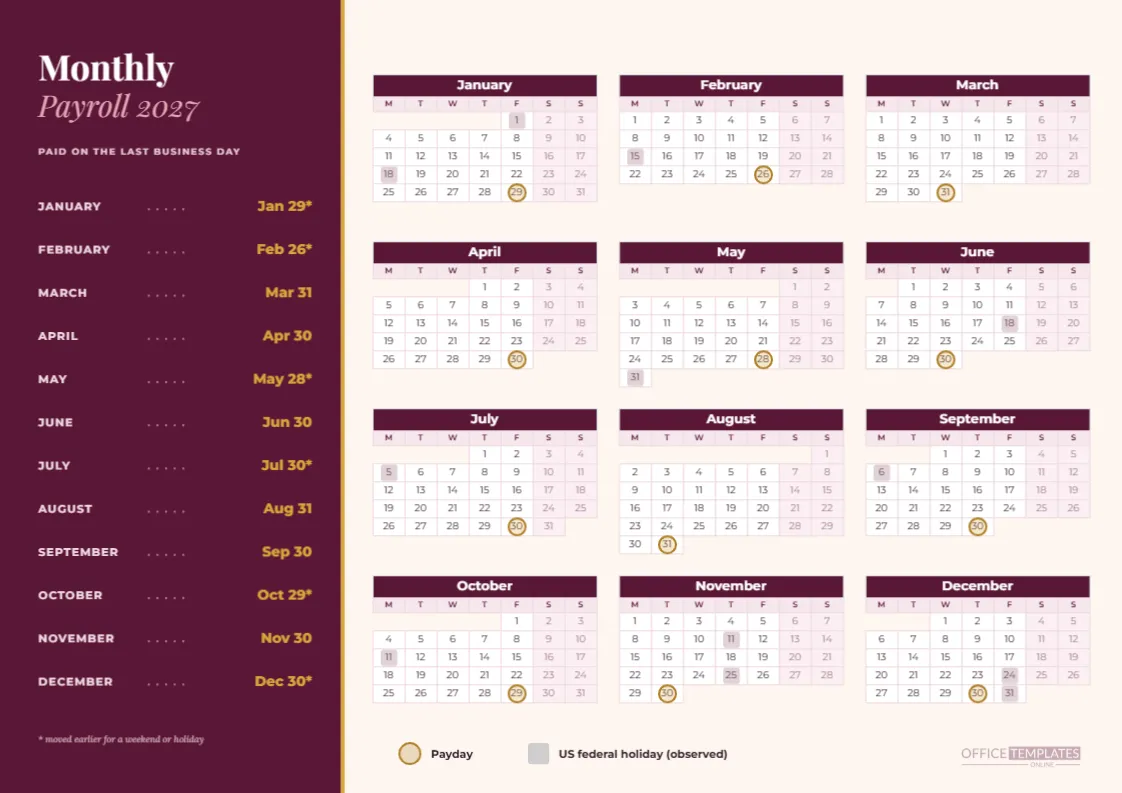
The second tile reads 6, MOVED, with the caption by weekends or holidays. Six of the twelve paydays move earlier than the calendar month end: January 29, February 26, May 28, July 30, October 29 and December 30. That is half the year, which is worth stating plainly because many people assume month-end pay always means the last calendar day.
Tile Four: First and Last
The last two tiles read Jan 29 FIRST, with the caption January payday, and Dec 30 LAST, with the caption December payday. They frame the year, and they remind staff that neither the first nor the last payday falls on the 31st. A manager can read all four tiles in the time it takes to say them.
The Four Column Year
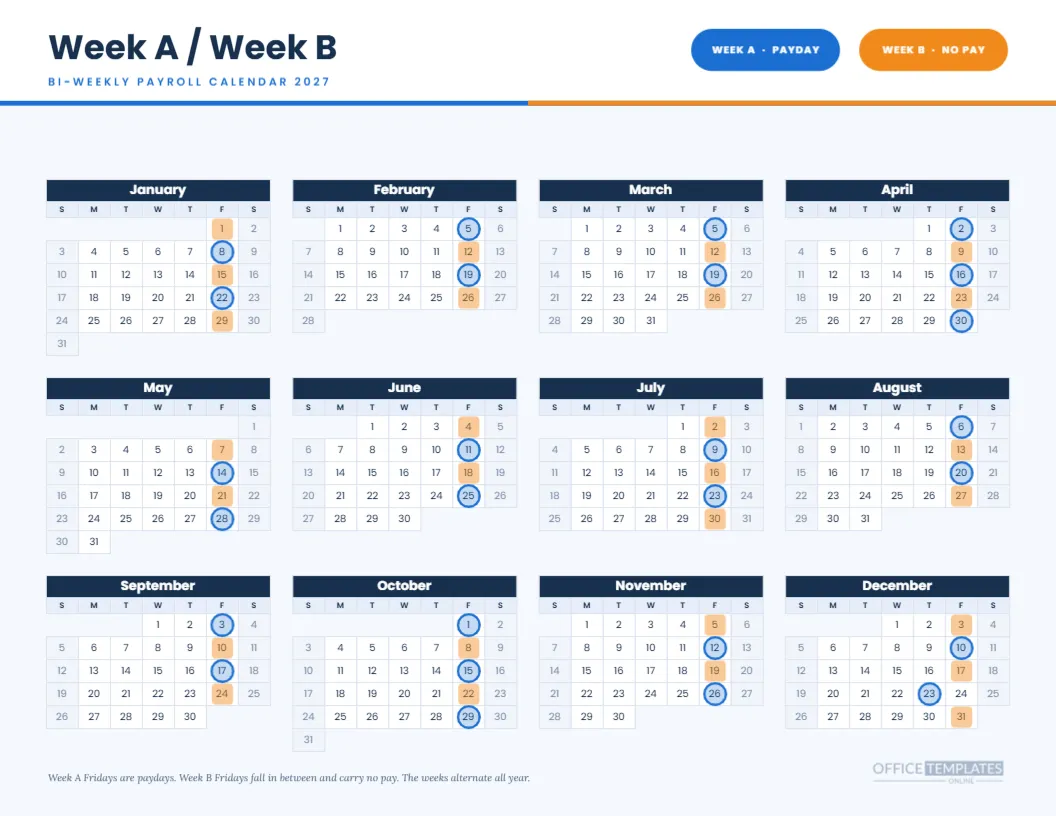
Below the header, twelve months sit in four columns and three rows. Month headers are teal with white text, the day name row is a pale teal, and weekends are slightly deeper. All numbers use Rubik, which has a slightly rounded, contemporary feel. Coral rings with a coral tint mark the monthly paydays.
Coral Rings and Grey Squares
Each payday carries a coral ring, and each observed holiday carries a grey square. With only twelve rings on the page, the markers are rare, so each is easy to find. The legend at the foot repeats them in the same Rubik type, and the logo sits at the bottom right.
Last Business Day Pay: The Rule
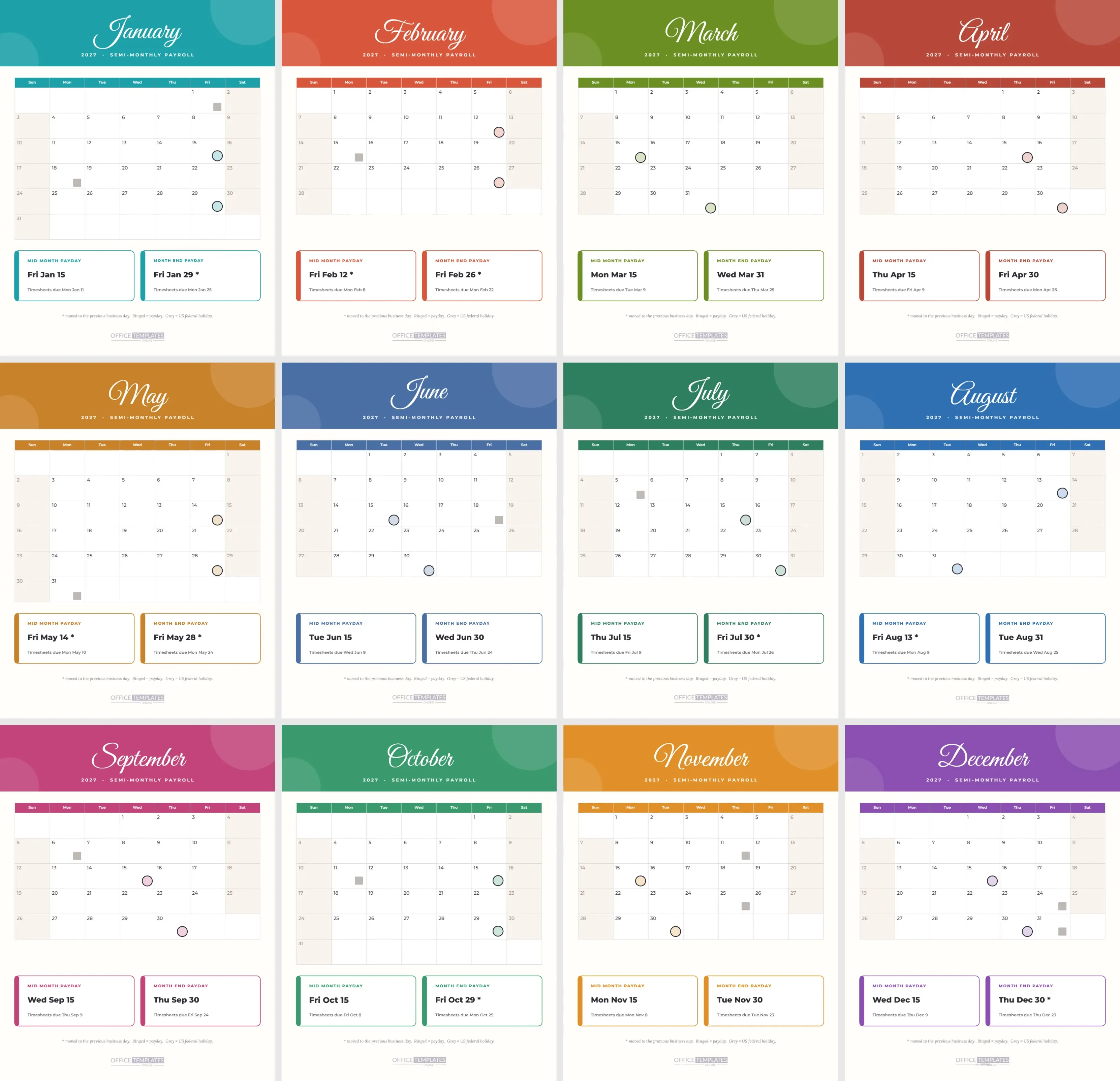
When pay is on the last business day, the date is the last weekday of the month that is not an observed US federal holiday. March 31 is a Wednesday, April 30 is a Friday, June 30 is a Wednesday, August 31 is a Tuesday, September 30 is a Thursday, and November 30 is a Tuesday, so six months keep their last calendar day.
Spacing Between Paydays
The gaps between paydays vary from 28 to 33 days. January 29 to February 26 is 28 days. February 26 to March 31 is 33 days. Employees on a monthly salary may notice that some months feel longer, and a calendar with all twelve rings helps explain it.
Who It Suits
Agencies, startups, design studios, software firms, and any team that prefers a contemporary look. The tile structure is also useful for anyone who wants to add their own statistics, such as headcount or the next payday, without redesigning the page.
Customising the Tiles
Each tile is a white rounded rectangle with a figure, a label, and a caption. Change the text, recolour the figure, add a fifth tile by copying one and spacing them evenly. If you reduce to three tiles, centre the group in the header area so the balance holds.
Customising the Header Blocks
The teal, coral, yellow and dark shapes are plain rectangles and a triangle. Change them to match your brand, or move the stripes to the right to extend the header. Keep the white title on a dark enough block so it stays easy to read, and check the combination in greyscale.
Editing the Year Calendar
The grid is the editor’s Calendar object. In Calendar Options, you can set the year, week start, and colours. The coral rings and grey squares are separate grouped shapes laid over the grid. After any change, move the group so the rings sit over the right cells, and update the tiles.
Printing the Teal Blocks
Print landscape on Letter at actual size with background graphics on so the blocks print. The colour areas are moderate, so an ordinary inkjet copes well. For a wall version, a print shop can enlarge it to tabloid and the vector shapes will stay sharp.
Sharing It on Screen
The layout translates well to a screen, so download an image and drop it into a chat or a slide. The tiles read like a dashboard at small sizes, and the year grid is legible at about half the page width. For a slide, crop to the header and tiles and keep the year for the handout.
Pairing With the Monthly Schedule
The monthly pay schedule and the monthly pages with checklists in this collection use the same twelve dates. Use this page as the cover and those as the working sheets. A reader who moves between them will see the same Friday, Wednesday, and Thursday dates.
Caveats
The page follows one rule and a US federal holiday list. It does not know your provider’s cut-off times, your local holidays, or your contract. Verify the dates before sharing them as firm, and change the holiday squares if you work outside the United States.
The Teal Page in Short
Teal and coral blocks. Four tiles. Twelve paydays, six moved. Four-column year. Letter landscape. Every part editable.
Adding a Fifth Tile for the Next Payday
A tile that says NEXT PAYDAY and a date is a lovely finishing touch, and it is easy to keep current. Retype it at the start of each month and keep the page on screen or on a notice board. The rest of the page does not change, so it takes seconds, and staff get into the habit of looking at the tile.
Reading the Tiles in a Meeting
The four tiles work as a short agenda for a payroll review. Twelve paydays, six moved, the first on the 29th and the last on the 30th: a team can confirm each point in a minute and then talk about the exceptions. Anything that makes a recurring meeting shorter is worth keeping.
Choosing Colours for a Brand Match
If your brand uses blue and orange instead of teal and coral, change the header block, the month headers, and the ring colour together. Keep the yellow stripe as a neutral accent or swap it for a brand tint. After the change, check that white type on the main block meets a comfortable contrast.
Using the Page for Contractors and Retainers
Studios that pay freelancers monthly can share the page with them. A contractor who sees that payment lands on the last business day, with six exceptions, plans cash flow more confidently. Add a short line under the title saying invoices are due by the 20th, or whichever rule applies, and the page becomes a small agreement.