Landlords and property managers fill most vacancies online, yet a good sign in the window or on the lawn still brings in a surprising number of renters: people who already walk the neighbourhood, want to live on that block, and would never have found your listing otherwise. This For Rent Sign Template is designed to be noticed from the sidewalk and to answer the first questions renters ask before they pick up the phone: how big, how much, when, and how to apply.
The Building-Facade Design
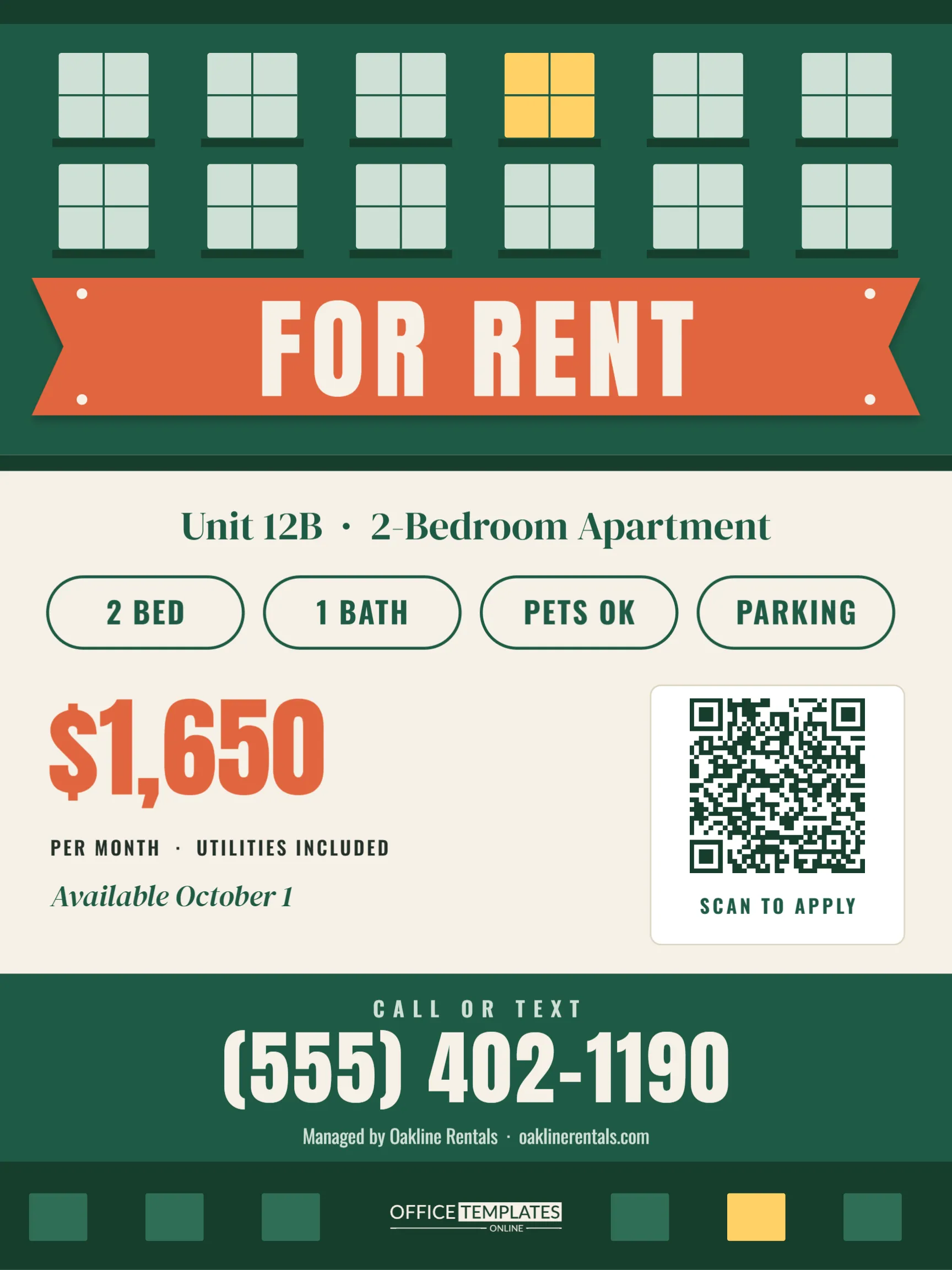
The poster is 18 x 24 inches in portrait, a size that fits most ground-floor windows and poster frames. The top third is drawn as the face of an apartment building in deep green: a darker cornice, two rows of six mint-green windows with white muntins and dark sills, and one window glowing warm yellow, as if someone just switched on the light in the empty unit. A wide terracotta banner with notched ends hangs across the building, with small grommets at the corners, and FOR RENT is written across it in large cream Anton capitals.
Below a dark sidewalk strip, the lower part of the poster sits on warm cream. A DM Serif Display line names the unit (Unit 12B · 2-Bedroom Apartment). Four outlined pills list the essentials: 2 BED, 1 BATH, PETS OK, and PARKING. The rent, $1,650, is printed large in terracotta, with PER MONTH · UTILITIES INCLUDED and Available October 1 below it. On the right, a white card holds a QR code with the caption SCAN TO APPLY. A green contact band reads CALL OR TEXT above a huge phone number and the management company’s name. The footer repeats a strip of little windows, one of them lit, around our logo.
Rental Sign Checklist
- Unit number or type (studio, 1-bed, 2-bed, house)
- Monthly rent and what it includes
- Move-in date
- Three or four features renters filter by: bedrooms, bathrooms, pets, parking, laundry
- One clear way to apply and one clear phone number
Anything beyond that, such as lease length, deposit and screening criteria, is better placed on the application page behind the QR code, where you have room to explain it properly.
Entering Your Unit Details
Click each text line to type your own information. The feature pills are simple outlined shapes with text inside them; retype them as W/D IN UNIT, BALCONY, GYM, or NO SMOKING as needed, or delete one and space the rest evenly. The rent is a single text box so that it can say $1,650 or From $1,450.
Select the QR code to open its options. Choose URL/Website and paste your application or listing link; if you prefer calls, choose Phone Number instead. The lit window and every other window are part of one group, so the building moves and recolours as a single piece.
Fair Housing Wording
In the United States, rental advertising, signs included, must follow fair housing rules. Describe the property, not the person you hope will rent it. Phrases such as 2 bedrooms, near the bus line, and no smoking describe the home and the rules. Avoid wording that suggests a preference for or against any group of people, such as perfect for a young couple or adults only, unless your property qualifies for a specific legal exemption. When in doubt, keep the sign to facts about the unit.
Weather-Ready Printing
For a window, download the PDF and print it at 18 x 24 inches on poster paper, then tape it facing out; the design is legible through glass. For a lawn, order a corrugated plastic sign in the same size with an H-stake. If you manage several units, keep the same design and simply update the unit line and rent for each vacancy. A US Letter print, scaled to fit, is handy for building lobbies and community notice boards.
Changing Colours for Your Brand
Green and terracotta feel warm and residential, but you can switch the building to navy, charcoal, or brick red and keep the banner as your accent. Keep strong contrast between the banner and its text, and between the contact band and the phone number, since those are the parts people read from farthest away.
Keeping the Sign Current
An out-of-date rental sign costs you calls. If the move-in date passes and the unit is still empty, change Available October 1 to Available Now, which often prompts renters who assumed they had missed it. When the rent changes, reprint rather than covering the price with a sticker, because a patched number looks untrustworthy from the sidewalk. Once the unit is leased, take the sign down the same day; people who call about a unit that is already gone rarely call back about the next one.
If you manage a building with regular turnover, keep a copy of the design with a blank unit line. You can then fill in the details for each new vacancy in a couple of minutes, and every sign your tenants and neighbours see looks consistent, which quietly builds your reputation as an organised landlord.
Answering Renters’ First Questions
Most calls from a sign start with the same few questions, and having answers ready makes you sound professional. Know the exact lease length you offer, the security deposit, whether utilities are included and which ones, the pet policy with any size limits or fees, the parking arrangement, and how laundry works. If you require a minimum income or a credit check, say so on the application page linked from the QR code, so applicants know what to expect before they apply.
Frequently Asked by Landlords
Does it work for a house instead of an apartment?
Yes. Change the unit line to 3-Bedroom House and the pills to features like YARD or GARAGE. The building graphic still reads as home.
Can I show two available units?
Change the unit line to 2 Units Available and the rent to From $1,450, then list details behind the QR code.
Where should the QR code point?
Your online application, a listings page with photos, or a scheduling form for viewings.
Fill the Vacancy Faster
Put the rent, date, and features on the sign, link the QR code to your application, and hang it where neighbours will see it. A clear, good-looking rental sign signals a well-run building before anyone even calls.