Curbside pickup has become part of everyday life for restaurants, pharmacies, grocery stores, libraries, and retailers. It only works smoothly, though, when customers know exactly where to park and what to do next. A clearly numbered pickup spot, with a phone number for arrivals, saves your staff from wandering the car park looking for the right customer and saves your customer from calling the main line and waiting on hold. This Curbside Pickup Sign Template does exactly that in a friendly, modern teal design.
Reading the Sign from the Driver’s Seat
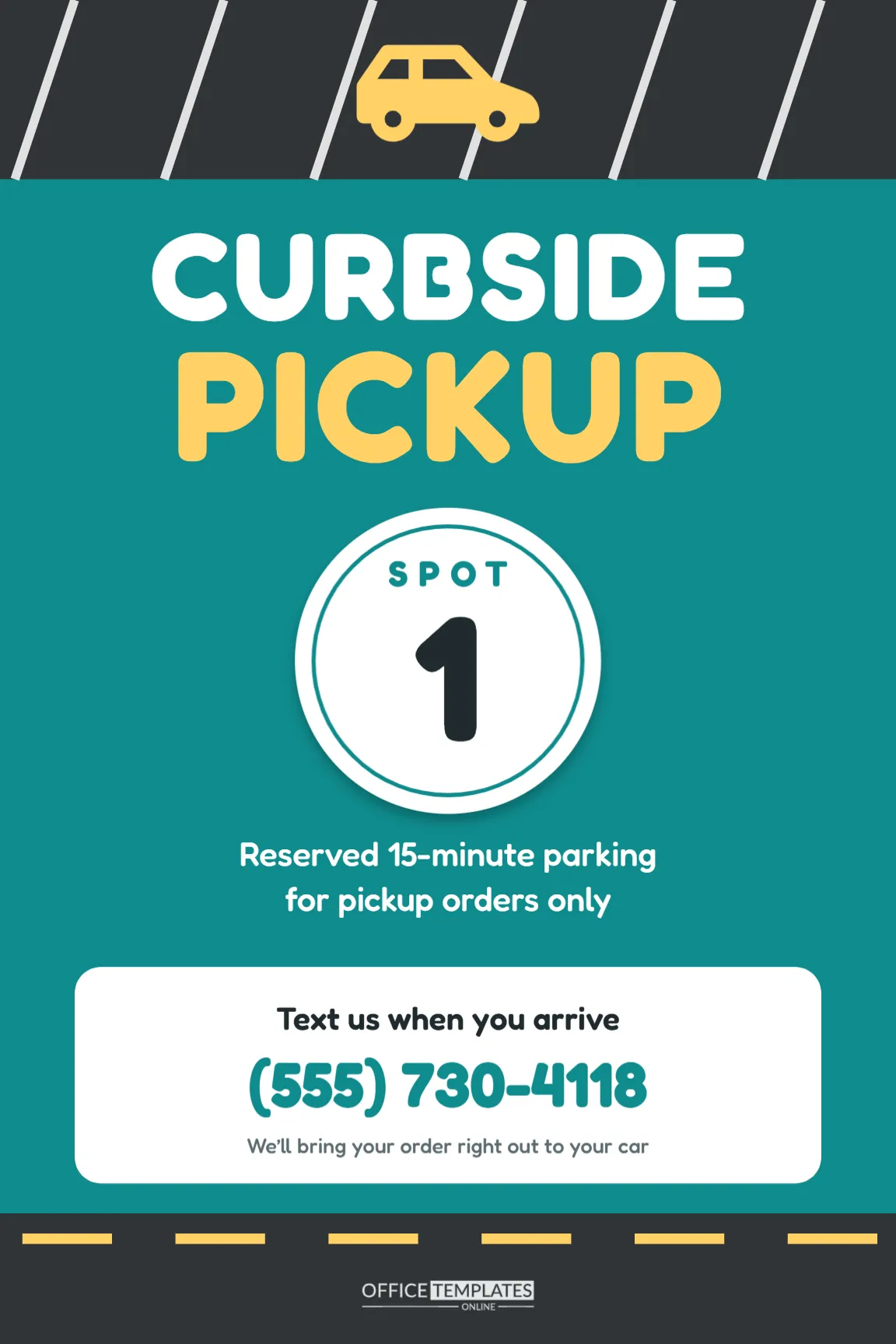
The sign is 12 x 18 inches in portrait, the standard size for parking signs, so it fits common sign posts and wall brackets. It is organised from top to bottom in the order a driver needs the information.
- Parking-lot header: a dark asphalt band with slanted white parking-stall lines and a yellow car, which says parking before a word is read.
- Headline: CURBSIDE in white and PICKUP in yellow, in Fredoka, a rounded and friendly typeface.
- Spot number: a big white disc with a teal inner ring, the word SPOT, and a huge number 1, so customers can tell staff exactly where they are.
- Rule: Reserved 15-minute parking for pickup orders only.
- Action card: a white rounded card that says Text us when you arrive, with a large teal phone number and We’ll bring your order right out to your car.
- Footer: another asphalt band with a dashed yellow lane line, echoing the header, and our logo in pale grey.
Setting Up a Pickup Area That Works
- Choose spots close to the door, but out of the main traffic lane, so staff can walk out safely.
- Number every spot. Make one sign per spot by changing the number: 1, 2, 3, and so on.
- Decide how customers check in. A text number is simplest; an app or phone call also works. Put that method on the card.
- Tell customers in advance. Mention the spot numbers in your order confirmation message: Park in any curbside spot and text us the number.
- Train the team to look for the spot number in each arrival message and to bring the order out promptly.
Editing Your Signs
Click the large number to change it for each spot. The disc stays centred, so any one- or two-digit number fits. Click the phone number to add yours, and edit the rule line if your limit is different, for example, 10-minute parking or Reserved for mobile orders. If customers check in through an app instead of by text, change the card heading to Check in on our app when you arrive. The car in the header is an editable vector: recolour it from its colour swatches to match your brand, or change the teal background and the yellow accents to your own colours.
Variations for Other Businesses
| Business | Headline | Card instruction |
|---|---|---|
| Restaurant | CURBSIDE PICKUP | Text us your spot number |
| Pharmacy | PRESCRIPTION PICKUP | Call the pharmacy when parked |
| Grocery store | ONLINE ORDER PICKUP | Check in on the app |
| Library | HOLDS PICKUP | Call the front desk |
| Garden centre | LOADING ZONE | Pop your trunk, we’ll load it |
Printing and Installation
Download the PDF. For permanent spots, order 12 x 18 inch aluminium signs from a local sign shop; they can be mounted on posts in front of each space or on the building wall facing the spots. Corrugated plastic with a stake is a quick and inexpensive option for a temporary pickup area, such as during a holiday rush. Mount the signs high enough to be seen over the bonnet of a parked car, and make sure the phone number is readable from the driver’s seat. A US Letter print, scaled to fit, makes a matching sign for the front door that tells walk-in customers where pickup happens.
Keeping Pickup Spots Free
A pickup spot is only useful if it is empty when a pickup customer arrives. The 15-minute rule on the sign helps, but staff can reinforce it politely. If other drivers regularly use the spots, add a second line such as: Other vehicles may be asked to move. For persistent problems, you can pair this sign with a tow-away sign, following your local rules for private-property towing.
What Customers Experience
Think about the pickup from the customer’s side. They place an order online, get a confirmation, drive over, and then face the most stressful part: finding where to go. A tall, numbered sign they can spot from the car park entrance removes that stress. They pull into spot 3, send a quick text saying Spot 3, order for Maria, and a few minutes later someone walks out with their bag. No phone queue, no walking in with children in the back seat, no circling the lot. That smooth experience is what brings customers back to order again, and the sign is a surprisingly large part of it.
It also helps your team. When every arrival message includes a spot number, staff can carry several orders out at once, go straight to the right car, and hand over the order with a quick name check. On a busy Friday evening, those saved minutes add up to shorter waits for everyone.
Curbside Sign Questions
Can I show several spot numbers on one sign?
You can write SPOTS 1 – 4 in the disc for a single sign at the entrance of a pickup row, but individual signs make it easier for staff to find each car.
Will it work at night?
The white disc and card are highly visible under car-park lighting. For extra visibility, ask the print shop for a reflective finish.
Can I add a QR code for ordering?
Yes. Add a QR code from the editor’s code tool in the space under the rule line and link it to your online ordering page.
Smooth Handoffs, Happy Customers
Number your spots, add your phone number, and put the signs where drivers can see them. A well-marked pickup area turns curbside service from a guessing game into a fast, friendly handoff.