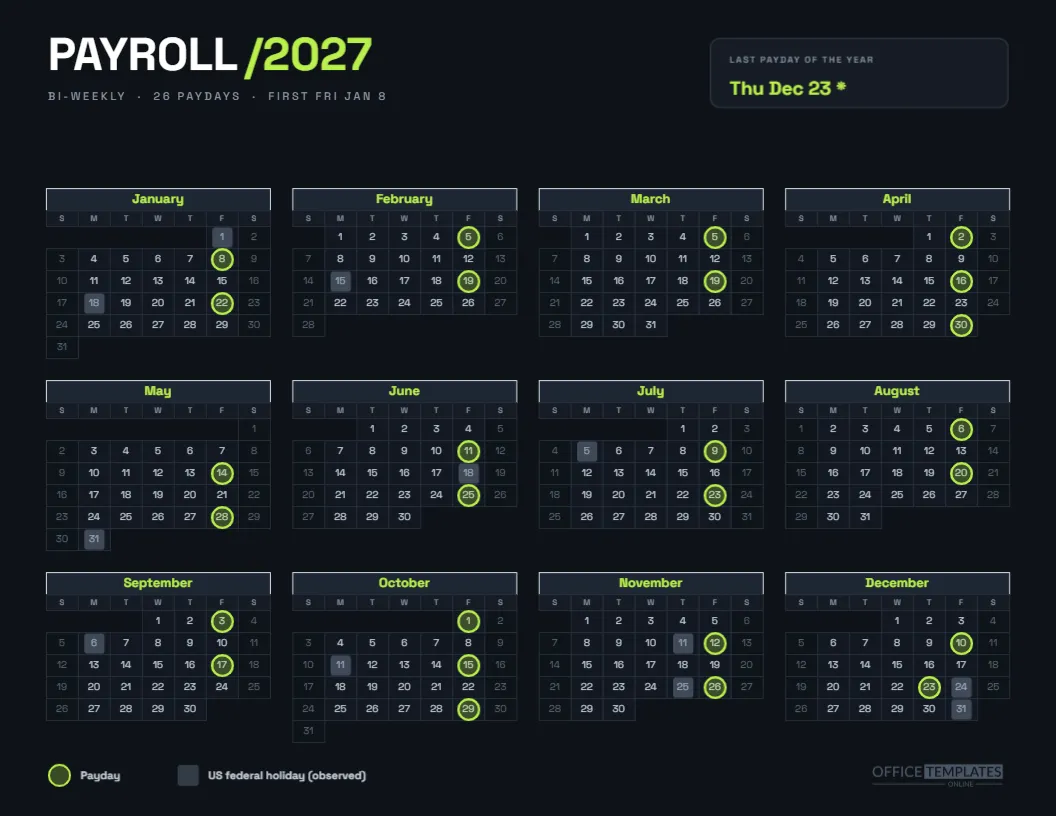
Staring at a white screen all day makes a dark page feel like a relief. This dark mode payroll calendar for 2027 inverts the usual look: near-black page, light numerals, neon lime rings. It shows the 26 bi-weekly paydays, and a small card at the top right calls out the last payday of the year. It is aimed at teams that live in dark-themed software and want a calendar that matches.
Spec Sheet for the Dark Page
| Property | Value |
|---|---|
| Size | US Letter landscape |
| Page colour | Near-black blue, #0e1218 |
| Accent | Neon lime for headings and paydays |
| Typeface | Space Grotesk throughout |
| Calendar | Full Year object, four columns, dark cell fills |
| Schedule | Bi-weekly from Fri Jan 8, 26 paydays |
The Headline
PAYROLL in white capitals is followed by /2027 in lime, set in Space Grotesk Bold. A line underneath, in small grey capitals, reads BI-WEEKLY, 26 PAYDAYS, FIRST FRI JAN 8. The tone is that of a software dashboard rather than a printed form, and the header is deliberately short so the calendar has room.
The Last Payday Card
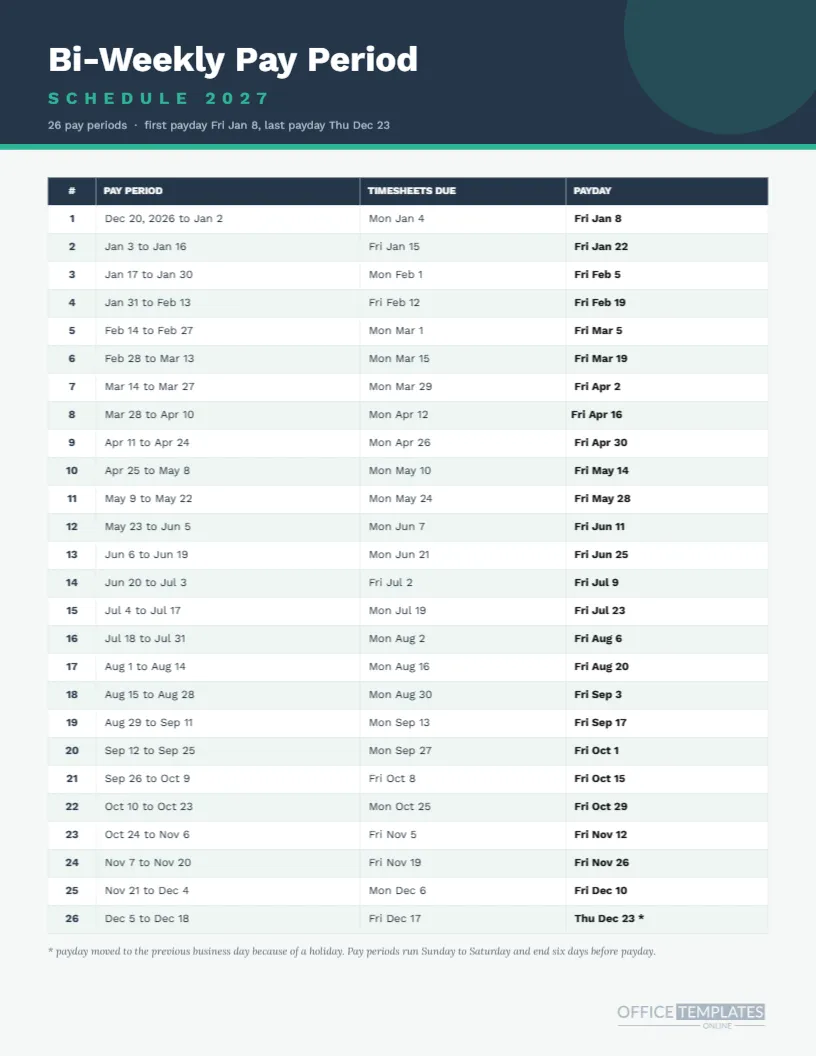
At the top right, a rounded dark card with a subtle outline carries a tiny label, LAST PAYDAY OF THE YEAR, and a lime date: Thu Dec 23 with an asterisk. It is the single piece of extra information on the page, and it answers a question that comes up every December. The asterisk means the date moved because of Christmas observed on Friday.
Dark Cells, Light Numbers
Each month sits in dark slate cells with thin charcoal borders. Day numbers are pale grey, weekends are slightly darker, and out-of-month cells are left blank. Month names in lime sit in a slightly lighter slate header. The contrast is gentle on the eyes but legible, since the lightest numerals are still near white.
Lime Rings and Slate Squares
Paydays carry a neon lime ring with a faint lime fill. Holidays carry a slate blue grey square with moderate opacity. On a dark page, the lime pops, so the paydays read first. The legend at the foot uses the same markers in pale grey type to explain them.
Twenty Six Paydays in Lime
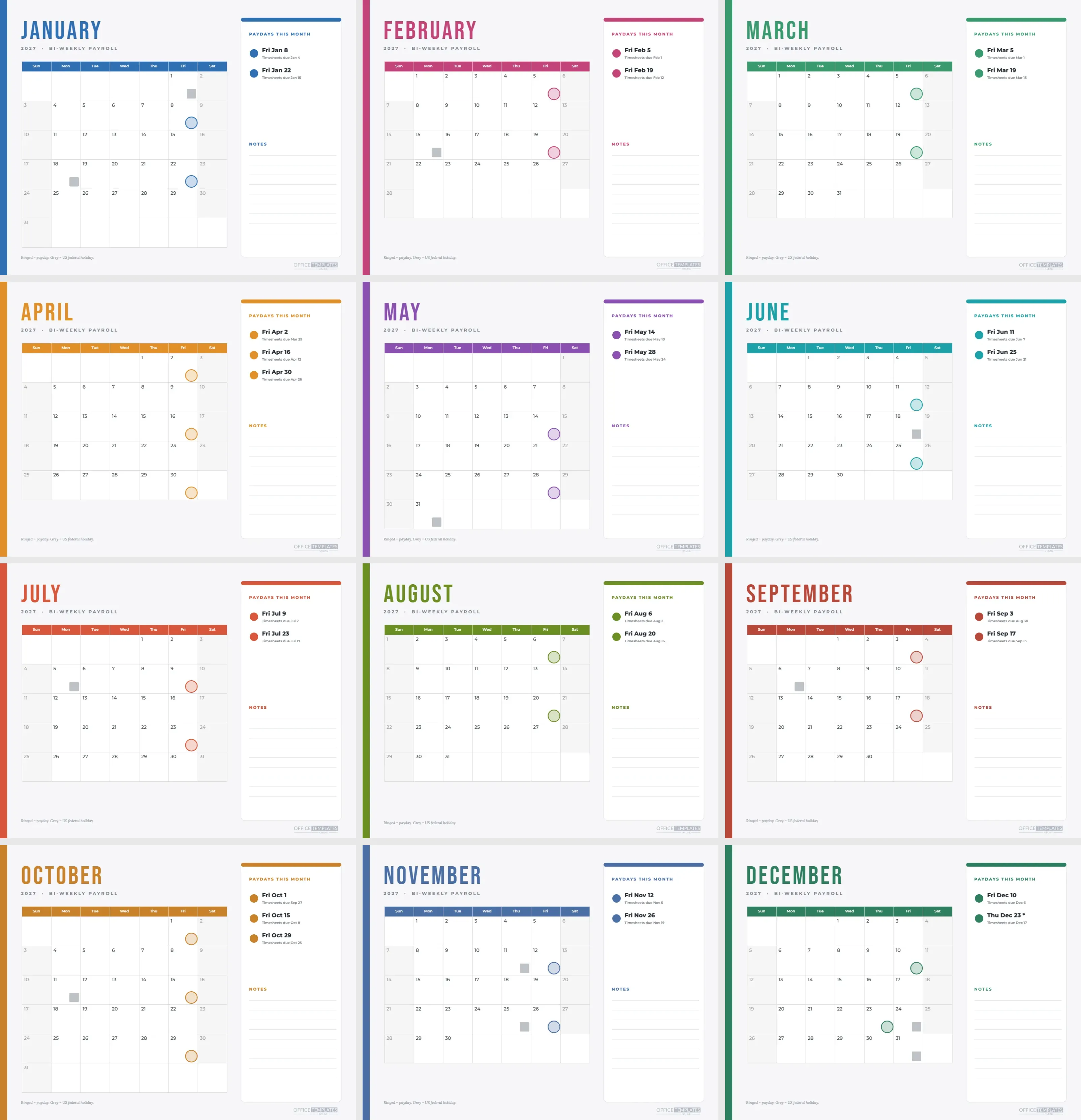
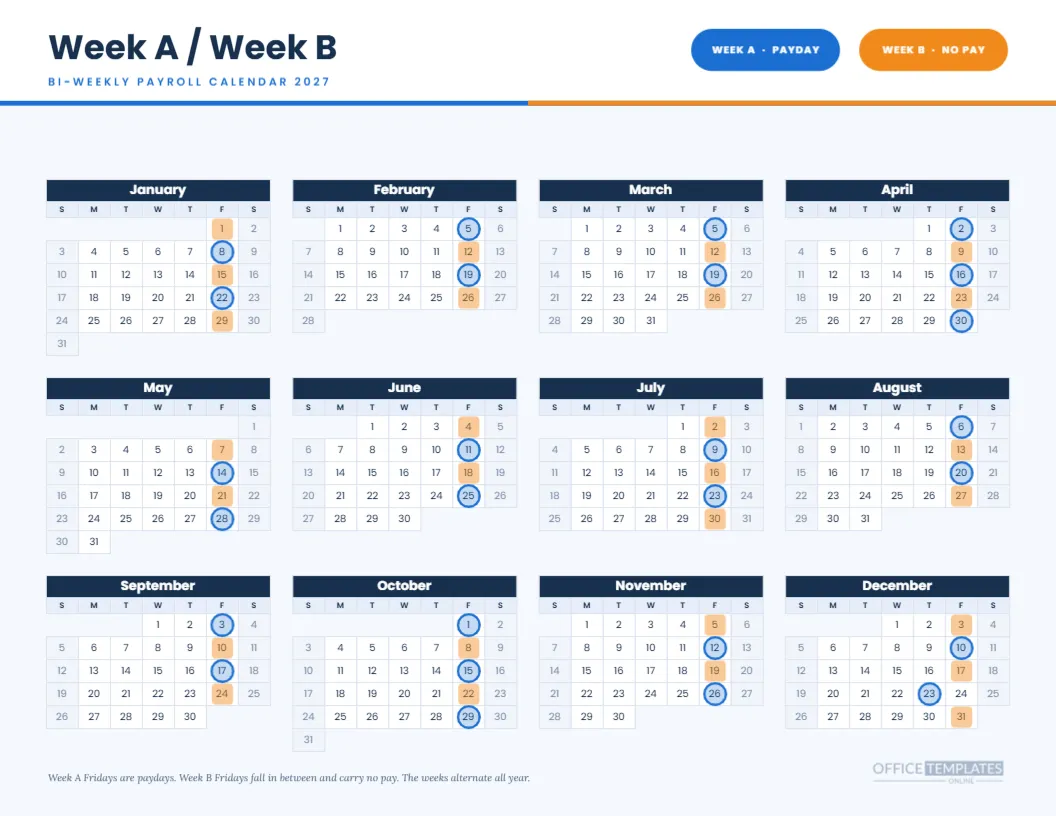
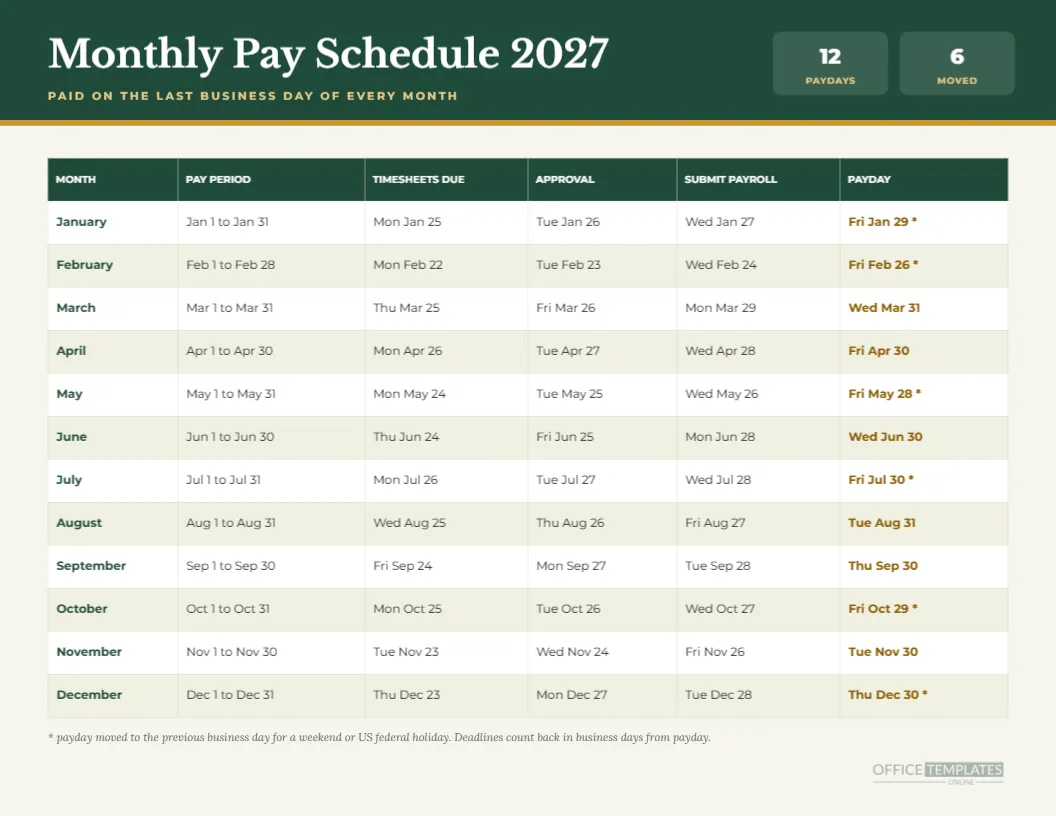
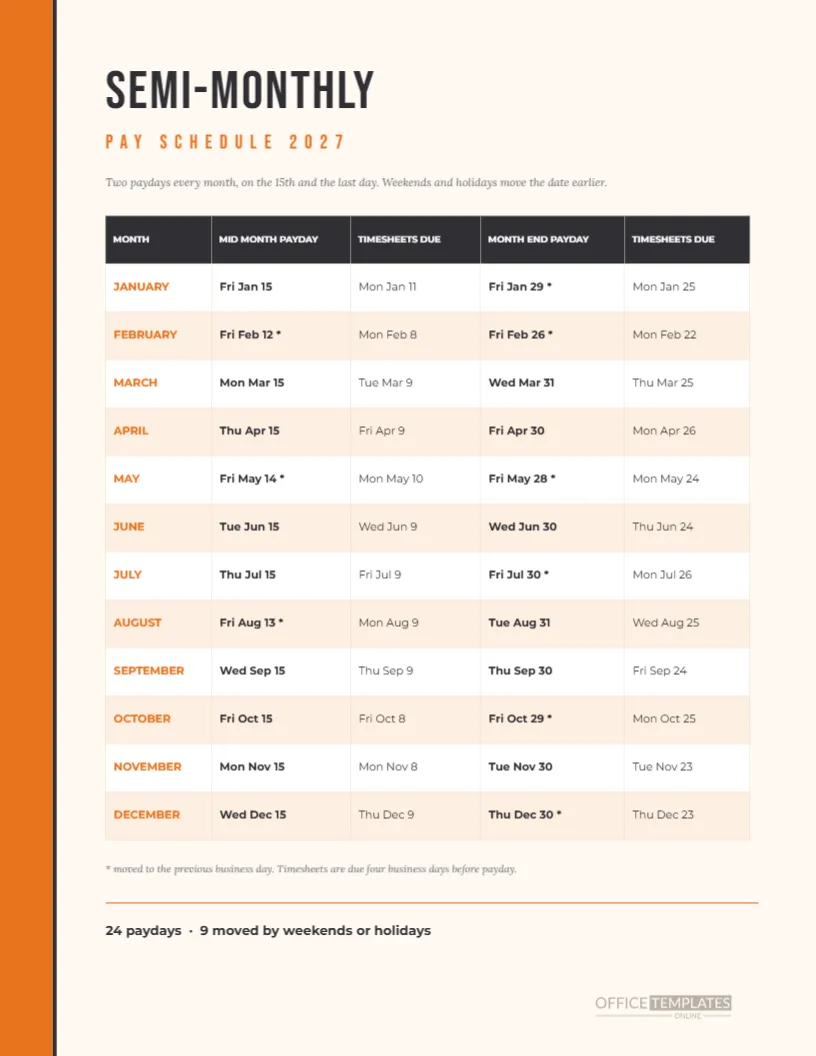
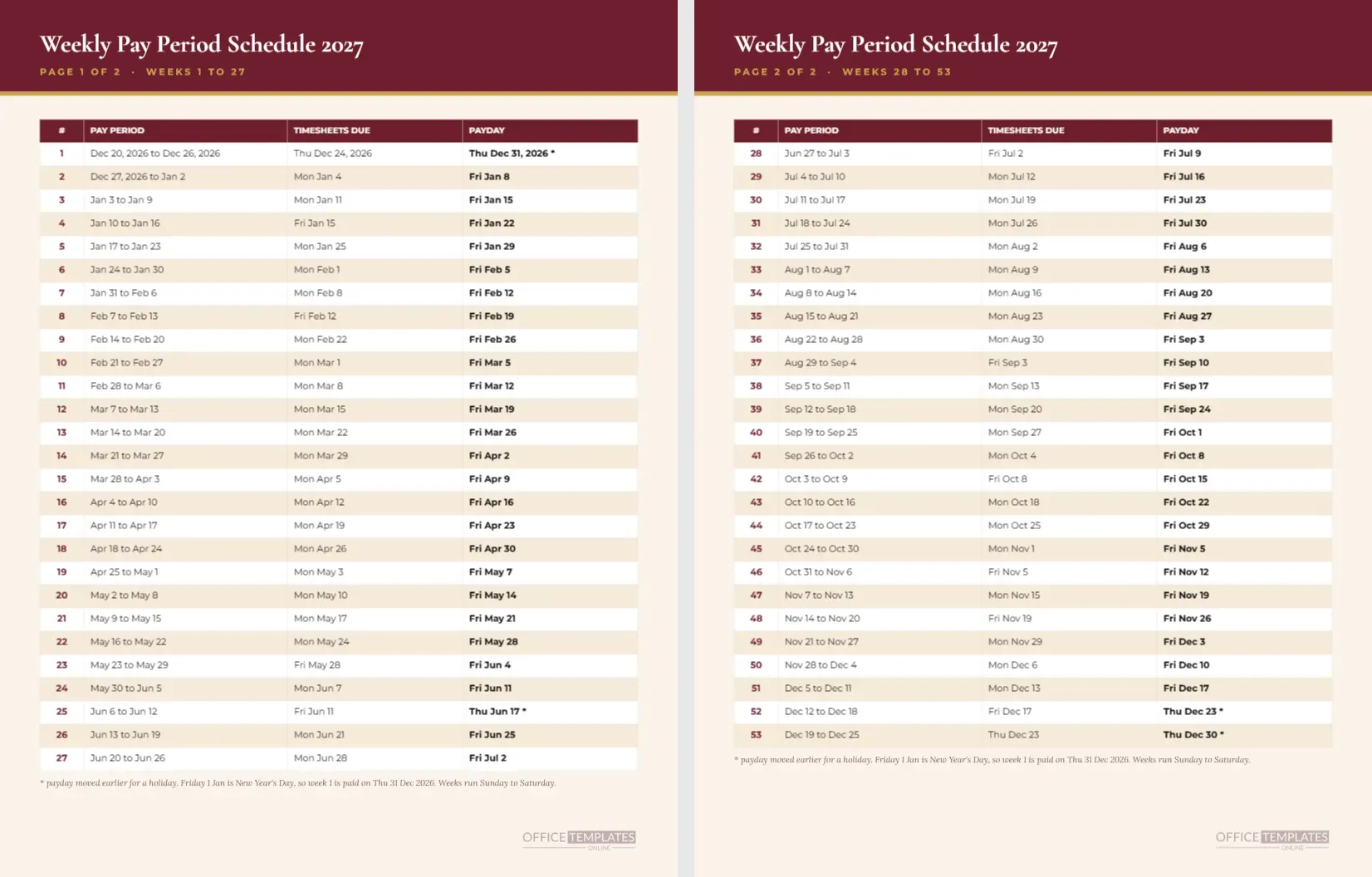
The lime rings sit on Jan 8, Jan 22, Feb 5, Feb 19, Mar 5, Mar 19, Apr 2, Apr 16, Apr 30, May 14, May 28, Jun 11, Jun 25, Jul 9, Jul 23, Aug 6, Aug 20, Sep 3, Sep 17, Oct 1, Oct 15, Oct 29, Nov 12, Nov 26, Dec 10 and Dec 23. All but the last fall on Fridays, and the final one is a Thursday.
Who Wants a Dark Calendar
Software teams, support desks, studios, gaming companies, and night shift operations tend to work in dark interfaces. A dark payroll page feels at home on a second monitor, as a wallpaper, or in a Slack channel pinned post. It is also an unconventional page for a conventional topic, which makes people look twice.
Using It as a Screen Image
Download the page as an image and set it as a desktop wallpaper or share it in a chat channel. Because the type is large and the contrast is high, the dates stay readable at a reduced size. For a tidy desktop, crop to the calendar, or use the full page and let the card sit in a corner.
Printing a Dark Page
Dark pages use a lot of toner and can show scuffs. If you print, choose a laser printer or a print shop, matte paper, and actual size. Consider a light version for desks and reserve the dark one for screens. A trial print will show whether the slate cells hold their detail on your printer.
Changing the Accent
Lime is bold, but it may not match your brand. Select the headline accent, the month names, the card date, and the rings, and change the fill to your colour. Electric blue, magenta, and amber all work on a near-black page. Keep the saturation high, since muted colours disappear against dark.
Editing the Dark Slate Calendar
The grid is the editor’s Calendar object. Open Calendar Options to change the year, week start, or the colours of the dark cells. The rings are separate grouped shapes laid over the cells. After a change, drag the group, or ungroup and nudge single rings. Zoom in to centre them accurately on the date numbers.
Editing the Header Card
The card is a rounded rectangle with two lines of text. Retype the label or the date, or replace it with another fact such as the next payday. The text box widths are sized to the existing wording, so after a long edit, check that nothing wraps unexpectedly.
A Light Companion Page
The collection contains lighter bi-weekly pages with the same 26 dates, so a team can print a light version for the desk and keep the dark one on screens. Having both means staff see the same schedule in whatever form suits their setting, and the dates never conflict.
Accessibility Notes
High contrast pairs such as near-white on near-black are readable for many people, though some readers find bright text on dark backgrounds tiring in long passages. For a calendar, which is short and glanceable, it works well. The shape-based markers do not rely on colour alone.
Pairing With the Processing Deadlines
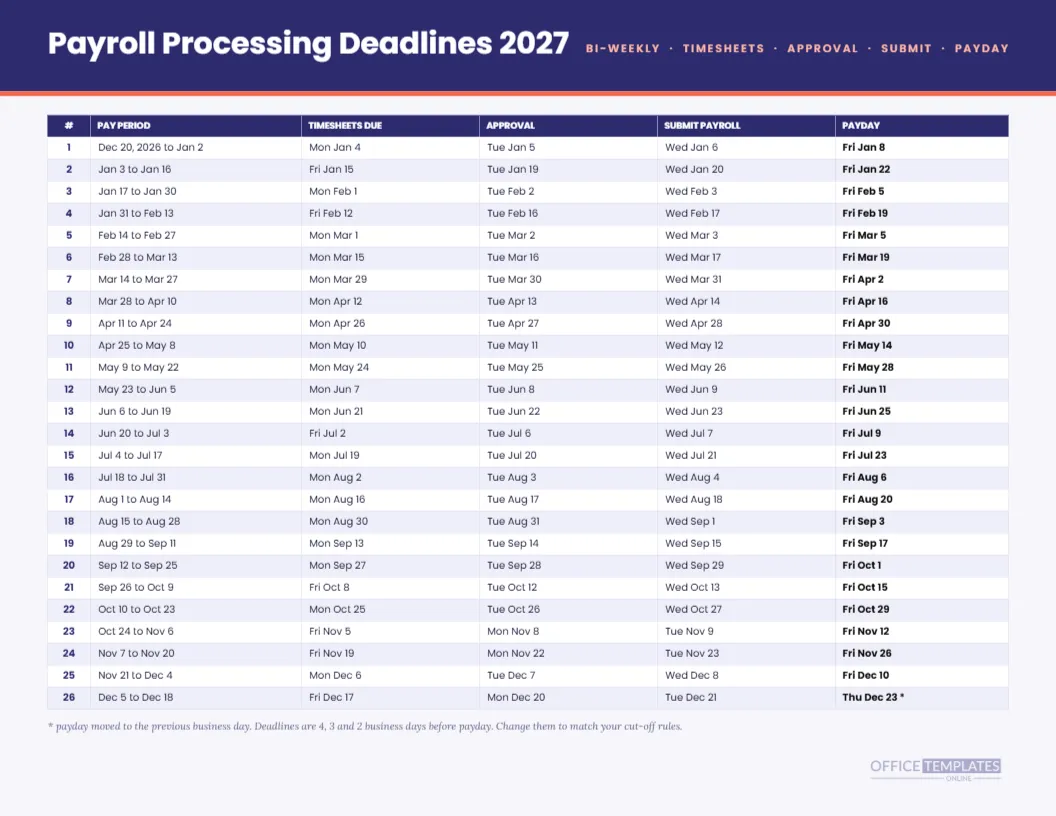
For the dates that come before payday, use the payroll processing deadlines sheet in this collection. It lists timesheet, approval, and submit dates for each of the 26 runs. Together with this page, it covers both the what and the when of the cycle.
Honest Limits for Dark Mode
This page shows planned pay dates under one rule and a US federal holiday list. It does not read from your payroll system, and it will not update if a date changes. Treat it as a reference image, and confirm any date with your provider before sharing it as firm.
The Dark Page in One Breath
Near-black page, lime rings, Space Grotesk. Twenty-six paydays. One moved. A last payday card. Landscape Letter. Fully editable.