Most people do not read full minutes. They read the subject line of the email that arrives after the meeting and, if it helps them, they read a few lines more. A summary page respects that reality. It says in two sentences what happened, lists what was decided, names who will do what by when, and shows the key dates on a line. This template is made for that purpose, and it is designed to be sent as a PDF or pasted into an email.
A Sunrise Across the Top
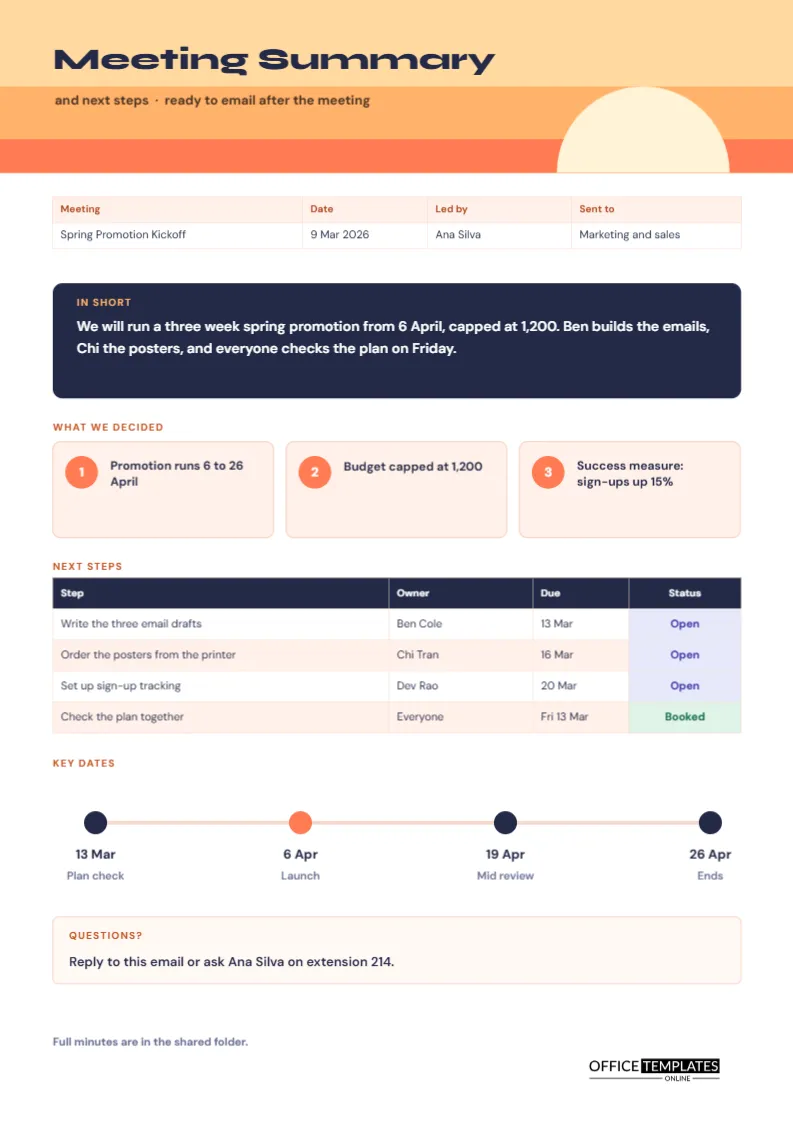
The header is three horizontal bands in pale gold, apricot, and coral, with a cream half circle rising from the lower right like a sun. The title Meeting Summary is set in Syne, a wide, modern typeface, in navy. A line beneath reads Next steps, ready to email after the meeting. A sunrise suggests a fresh start, which suits a page about what happens next.
The In Short Box
A navy rounded panel holds a label, In short, and a short paragraph in white. The sample says that the team will run a three-week spring promotion from 6 April, capped at 1,200, that Ben builds the emails and Chi the posters, and that everyone checks the plan on Friday. This box is the part most readers will read, so write it as if it were the only part. Keep it under forty words.
What Belongs in the In Short Box
| Question | Sample answer |
|---|---|
| What are we doing? | A three-week spring promotion |
| By when? | From 6 April |
| What are the limits? | Budget capped at 1,200 |
| Who is doing what? | Ben on emails and Chi on posters |
| What happens next? | A plan check on Friday |
Three Decision Cards
Below the summary, three cards with numbered coral circles list the decisions: the promotion runs from 6 to 26 April, the budget is capped at 1,200, and the success measure is a rise of fifteen percent in sign-ups. Keep each decision to a short line. Three is a good number, and if you have more than five, consider the longer minutes.
The Next Steps Table
A navy-headed table lists each step, its owner, a due date, and a status. The sample has four steps: write email drafts, order posters, set up sign-up tracking, and check the plan together. Status labels are coloured: Open in lavender and Booked in green. A reader who sees their name in the owner column knows exactly what is expected of them.
Writing Next Steps Recipients Will Act On
- Begin with a verb: write, order, set up, check.
- Name the thing, not just the topic.
- Give each step one owner and one date.
- Use full dates if the recipients are in different time zones.
- Do not list more steps than people can remember.
The Key Dates Line
A thin line with four circles shows key dates: plan check on 13 March, launch on 6 April, mid review on 19 April, and the end on 26 April. The launch circle is coral and the others navy. Dates on a line are easier to absorb than dates in a paragraph, and they work well on a phone screen.
Questions and Who to Ask
A cream box at the foot names a person and a way to ask questions, such as replying to the email or calling an extension. Recipients are more likely to respond to a summary if they know whom to contact. Add a link to the full minutes in the footer, as the sample does, for those who want detail.
Sending the Summary Within an Hour
Timing matters more than polish. A summary sent within an hour of the meeting is read, and one sent three days later is skimmed. Fill in the page while you are still in the room, or immediately afterwards, and send it as a PDF with a subject line such as Summary and next steps: spring promotion kickoff.
Using the Page Alongside Full Minutes
The summary and the minutes serve different readers. Use the summary for people who need only the outcome, and the minutes for those who need the detail or the record. Link them: the summary mentions where the minutes are kept.
Editing the Sunrise and Boxes
The header bands and the sun are simple shapes you can recolour. The boxes and cards are editable. The next steps table is a real Table object with Edit Table Data and Add Row, and the status cells carry words and fills.
Printing and Posting the Summary
A4 portrait. Most people will read it on screen, so download a PDF from the editor. If you print, the coral and apricot bands print in colour or as soft greys.
Tailoring the Summary to Different Readers
Different readers want different things. A director wants the decision and the cost. A team member wants their own steps. A client wants to know what happens next and when. You can keep one page and highlight the rows that matter to each group in your covering note, or produce a short version for each. The page is quick enough to adapt, and tailoring raises the chance that people act on it.
Writing a Subject Line That Gets the Summary Read
The subject line decides whether the summary is opened. Include the meeting name, the word summary, and the main outcome, for example, Summary: spring promotion approved, three actions due 13 March. Avoid vague lines such as notes from today. A clear subject also helps people find the message later when they need to check a date.
Following Up When Steps Are Missed
If a step is overdue, a short note to the owner is often enough: just checking on the poster order due on the 16th, can I help? Ask without blame, and offer help. Update the status cell on the page and send a revised version to the group. The summary then stays a living record of progress.
Summary Questions
Can I paste the text into an email?
Yes. Copy the key lines, or attach the page as a PDF so formatting stays the same.
Is it a replacement for minutes?
No. It is a short companion. Keep the full record where one is required.